
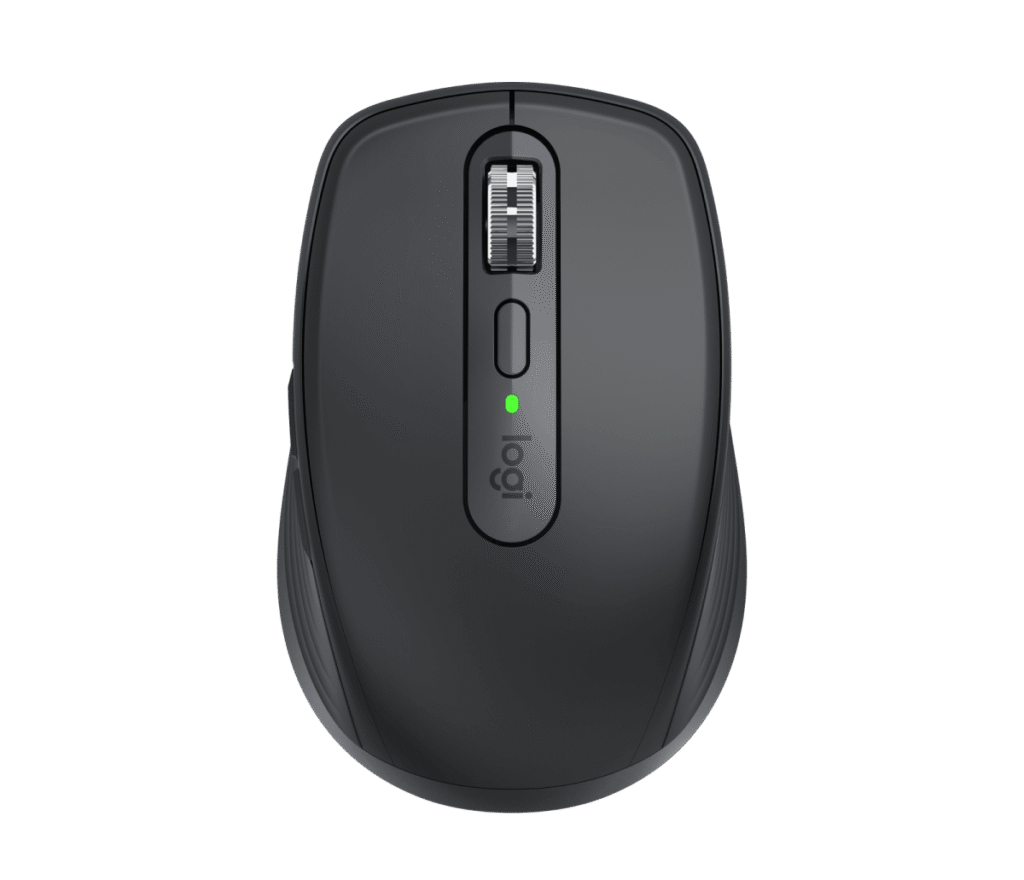
Logitech MX Anywhere 3S: Specs, Price, Pros & Cons
Small enough for a laptop sleeve and still dense in the hand, the MX Anywhere 3S is Logitech's compact office mouse. It carries most of what the big MX Master does into a shape that fits the front pocket of a bag.
Next to featherweight gaming mice it feels solid, with a 500 mAh rechargeable cell and six buttons. It charges over USB-C, and quick charging covers the morning it turns up flat in the bag. The wheel is the part the MX name promises. It runs ratcheted under a gentle turn and spins free when flicked, switching by itself, and it also handles horizontal scrolling. Logitech's software remaps the buttons per program and moves the mouse between three paired computers.
This 3S revision brought two changes over the older Anywhere. The switches are quiet, which suits a library or a train, and the sensor gained resolution and tracks on glass. Its ceiling is still modest next to gaming mice, whose figures no office mouse needs. The trade-offs are the ones a travel shape imposes. Its body is short, so large hands end up holding it in a claw grip, and Bluetooth is the only radio in the box, with Logitech's receiver sold separately. A laptop with Bluetooth pairs straight away, and an older desktop may need the extra dongle.
The mouse suits someone who works from a laptop in several places and wants the MX scroll wheel wherever they go. Its quiet clicks suit a shared table as well. Gaming is outside its brief, and a person who never moves from one desk will be more comfortable with the bigger Master.
Category strengths
Where the Logitech MX Anywhere 3S beats the median
- Much longer battery life ?1,680 h vs 150 h (median)
- Has horizontal scrolling ?
- Has free-spin scroll wheel ?
Where the Logitech MX Anywhere 3S trails the median
- A much lower max sensitivity ?8,000 DPI vs 25,600 DPI (median)
- Fewer connection options ?
- A heavier build ?99 g vs 89 g (median)
How this VS Score was computed
Score 54: each known spec is measured against the median of all mice (81 products), then weighted; 50 means level with that median. In classes of six or more, a value beyond the class’s 10th–90th percentile range counts as that limit, so one extreme product cannot set the scale. 49% of the scoreable weight could be used; unknown values, features not applicable to this class and proxies (battery capacity where a rated life exists) add or remove nothing.
| Specification | This product | Cohort median | Score weight | Points moved |
|---|---|---|---|---|
| Battery life | 1,680 | 150 | 0.8 | +40.0 |
| Max sensitivity | 8,000 | 25,600 | 1 | −34.0 |
| Connection | 1 | 2 | 0.8 | −20.0 |
| USB-C charging | Yes | 67% of the class have it | 0.3 | +15.0 |
| Quick charge | Yes | 55% of the class have it | 0.3 | +15.0 |
| Horizontal scrolling | Yes | 45% of the class have it | 0.2 | +10.0 |
| Free-spin scroll wheel | Yes | 34% of the class have it | 0.2 | +10.0 |
| RGB lighting | No | 46% of the class have it | 0.2 | −9.6 |
| Weight | 99 | 89 | 1 | −5.0 |
| Buttons | 6 | 6 | 0.6 | +0.0 |
Not scored: Max tracking speed (unknown: not scored); Max acceleration (unknown: not scored); Polling rate (unknown: not scored); Adjustable lift-off distance (unknown: not scored); Grip styles (unknown: not scored); Click latency (unknown: not scored); Switch lifespan (unknown: not scored); Debounce adjustment (unknown: not scored); Wireless polling rate (unknown: not scored); Battery capacity (capacity is a proxy; the rated battery life is scored instead); Wireless charging (not applicable: only 14% of this class have it); Onboard memory (unknown: not scored); Software customization (standard for the class (97% have it)); Adjustable weights (not applicable: only 2% of this class have it).
Editor’s note
The MX Anywhere 3S is the travel half of Logitech's MX family, and its brief has not changed in a decade: a mouse small enough to vanish into a laptop sleeve that gives up as little as possible to the full-size MX Master on the way in. This S revision quietly fixed the two things worth fixing: the sensor now tracks at up to 8,000 DPI on effectively any surface including glass, and the main clicks were re-engineered to be quiet, a real courtesy in libraries, planes and meetings.
The signature hardware remains the MagSpeed wheel: ratcheted for precision until a flick spins it free through a thousand lines a second, shifting between modes automatically. It is the feature MX owners cannot go back from. Six programmable buttons, Logi Options+ profiles that follow you between apps, and multi-device switching across three machines complete the workflow story. Battery life is rated at seventy days, topped up over USB-C, and a one-minute charge buys three hours, which in practice means the battery is never a problem.
The limitations start with size. At 100.5 millimeters it is small, and large hands will claw uncomfortably through long sessions: this is a travel shape, not an all-day throne. There is no receiver in the box. The 3S connects over Bluetooth, with Logitech's Bolt dongle sold separately, the same quiet unbundling Logitech's K980 keyboard pulls. And Logitech publishes no polling rate, which tells you correctly that this is not a gaming mouse.
With frequent discounts on its list price, the buying logic is simple: if the mouse lives in a bag, this is the default answer. On a single desk, the full-size MX Master is more comfortable for the same money.
Specifications
Quality bars show where each figure sits between the lowest and highest of the 81 mice this VS Score is measured against.
Sensor & tracking
Design & handling
Switches & latency
Connectivity
Battery
Features
Sources and verification
Where the specifications come from
- Official product pagelogitech.com
- Independent testingrtings.com
Verification
- First published
- Specifications last checked
- Sheet completeness
- 21 of 34 specifications verified; the rest show as Unknown and are never estimated or scored
- Page type
- Product specification page — Compiled from the manufacturer’s published specifications and the cited sources; this is not a hands-on test.
- Basis
- Research-based: specifications and editorial text were compiled from the documents listed here and the manufacturer’s published data. We have not tested this unit ourselves; where independent measurements are mentioned they belong to the linked publication.
Where to buy
Prices and availability may change. Check the retailer before buying. We may earn a commission on purchases.
Price history
Mice with similar specs to the Logitech MX Anywhere 3S
Ratings & reviews
No reviews yet. Be the first to share your experience.
The bottom line
The Logitech MX Anywhere 3S earns a VS Score of 54, above the median of the 81 mice it is measured against (a score of 50 is level with that median).
- Who it’s for
- Laptop-bag workflows: the small MX with 8K any-surface tracking, quiet clicks, the MagSpeed wheel and 70-day battery. It is the default travel mouse.
- Who should look elsewhere
- Large hands over long sessions, gamers (no published polling rate), and anyone expecting a receiver (Bluetooth only in the box, Bolt sold separately).
- The trade-off that matters
- You accept the compact claw-grip shape and dongle unbundling for MX-class features that fit in a sleeve pocket.
- The main alternative
- Logitech's full-size MX Master line is the same money and far more comfortable if the mouse never leaves the desk.
The VS Score is calculated from the weighted specifications above, each measured against the median of comparable mice — a shortlisting guide, not a substitute for your own priorities. See how we score.





