HP Tilt Ergonomic Mouse 725M BH0Z5AA: Specs, Pros & Cons
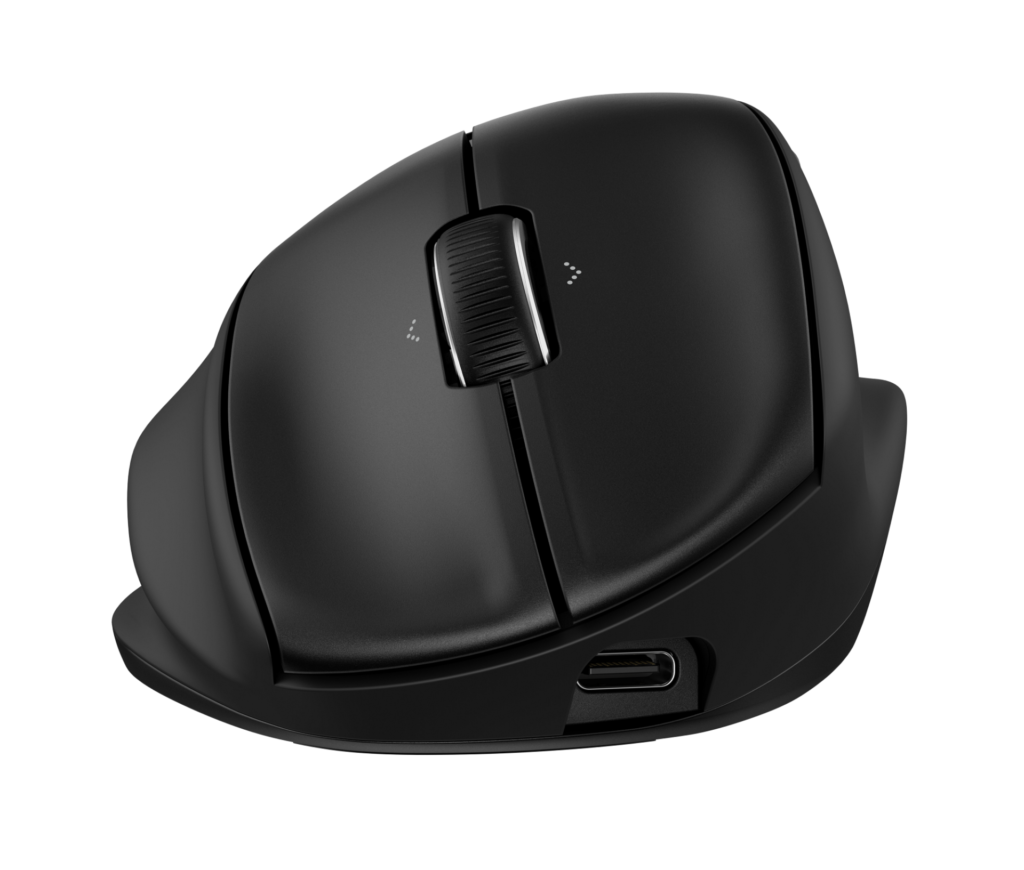
The 725M is HP's attempt to solve a problem that vertical mice create while fixing another. A fully vertical mouse takes the strain off the wrist by turning the hand ninety degrees, and then asks you to relearn every click. The 725M tilts the hand twenty-one degrees instead, which is enough, HP argues, to relax the forearm without abandoning the grip everybody already has.
It is a right-handed, palm-grip office mouse with seven buttons, six of them programmable through HP's software, and a tilt wheel that scrolls sideways as well as up and down. The sensor is a plain optical unit rated at 1200 dpi by default and adjustable to 6000, which is far more than a single screen needs and exactly what a multi-monitor desk wants. It tracks on most surfaces.
Connectivity is the dual arrangement that has become standard on business mice: a 2.4 GHz USB dongle and Bluetooth, with quick switching between them. The unusual part is the power source. In place of a lithium battery, HP fitted a supercapacitor that charges from empty in about three minutes over USB-C. That means no battery to age and no overnight charging, at the cost of needing a top-up more often than a mouse that runs for months.
At 120 grams and 117 by 80 by 56 millimeters it is a full-sized mouse with a distinct tall profile, and HP's Comfort Silicone finish gives it a soft grip.
The buyer it suits is an office worker with early wrist discomfort who is not ready for a true vertical mouse, and who works at a desk where a three-minute charge is no hardship. It is a poor fit for left-handers, for gaming, and for anyone who wants a mouse that goes weeks between charges.
Category strengths
Where the HP Tilt Ergonomic Mouse 725M BH0Z5AA beats the median
- Has horizontal scrolling ?
- More buttons ?7 vs 6 (median)
Where the HP Tilt Ergonomic Mouse 725M BH0Z5AA trails the median
- A much lower max sensitivity ?6,000 DPI vs 25,600 DPI (median)
- A heavier build ?120 g vs 89 g (median)
- Fewer supported grip styles ?
How this VS Score was computed
Score 45: each known spec is measured against the median of all mice (83 products), then weighted; 50 means level with that median. In classes of six or more, a value beyond the class’s 10th–90th percentile range counts as that limit, so one extreme product cannot set the scale. 44% of the scoreable weight could be used; unknown values, features not applicable to this class and proxies (battery capacity where a rated life exists) add or remove nothing.
| Specification | This product | Cohort median | Score weight | Points moved |
|---|---|---|---|---|
| Max sensitivity | 6,000 | 25,600 | 1 | −38.0 |
| USB-C charging | Yes | 68% of the class have it | 0.3 | +15.0 |
| Quick charge | Yes | 55% of the class have it | 0.3 | +15.0 |
| Weight | 120 | 89 | 1 | −13.0 |
| Grip styles | 1 | 2 | 0.4 | −10.0 |
| Horizontal scrolling | Yes | 46% of the class have it | 0.2 | +10.0 |
| RGB lighting | No | 48% of the class have it | 0.2 | −9.6 |
| Buttons | 7 | 6 | 0.6 | +4.8 |
| Connection | 2 | 2 | 0.8 | +0.0 |
Not scored: Max tracking speed (unknown: not scored); Max acceleration (unknown: not scored); Polling rate (unknown: not scored); Adjustable lift-off distance (unknown: not scored); Free-spin scroll wheel (unknown: not scored); Click latency (unknown: not scored); Switch lifespan (unknown: not scored); Debounce adjustment (unknown: not scored); Wireless polling rate (unknown: not scored); Battery life (unknown: not scored); Battery capacity (unknown: not scored); Wireless charging (not applicable: only 18% of this class have it); Onboard memory (unknown: not scored); Software customization (standard for the class (98% have it)); Adjustable weights (not applicable: only 2% of this class have it).
Editor’s note
What I find most interesting about the 725M is the supercapacitor, and I am split on it. HP's pitch is that three minutes on a USB-C cable gets you back to work, and that there is no battery to wear out over a three-year corporate refresh cycle. That is a real advantage for a fleet buyer. For an individual, the flip side is that HP does not publish how long a charge lasts, and a capacitor is not a battery: expect to plug it in regularly.
The twenty-one-degree tilt is the sensible middle path. I would recommend it to someone who has tried a vertical mouse and hated the learning curve, or who suspects they would. It changes the wrist angle enough to notice without changing where the buttons are. Someone with real RSI who has already adapted to a vertical mouse will find it a half-measure.
The tilt wheel with horizontal scroll and six programmable buttons make this a more capable office tool than its shape suggests, and 6000 dpi is plenty for driving two large monitors. Bluetooth plus a dongle is the right combination for a laptop that moves between desks.
The part that would make me hesitate is how little HP says. No polling rate, no sensor model, no switch rating, no runtime figure. That is normal for a business peripheral and it makes the mouse hard to compare on paper against consumer rivals that publish everything.
I would buy it for an office desk, for someone who wants comfort without relearning a mouse, and especially through a business channel where HP's warranty and fleet consistency matter. I would look at Logitech's ergonomic range for a home buyer who wants published battery life and a mouse that goes months between charges.
Specifications
Quality bars show where each figure sits between the lowest and highest of the 83 mice this VS Score is measured against.
Sensor & tracking
Design & handling
Switches & latency
Connectivity
Battery
Features
Sources and verification
Where the specifications come from
- Official product pagehp.com
- Retailer listing (cross-check)amazon.com
Verification
- First published
- Specifications last checked
- Sheet completeness
- 20 of 34 specifications verified; the rest show as Unknown and are never estimated or scored
- Page type
- Product specification page — Compiled from the manufacturer’s published specifications and the cited sources; this is not a hands-on test.
- Basis
- Research-based: specifications and editorial text were compiled from the documents listed here and the manufacturer’s published data. We have not tested this unit ourselves; where independent measurements are mentioned they belong to the linked publication.
Mice with similar specs to the HP Tilt Ergonomic Mouse 725M BH0Z5AA
Ratings & reviews
No reviews yet. Be the first to share your experience.
The bottom line
The HP Tilt Ergonomic Mouse 725M BH0Z5AA earns a VS Score of 45, below the median of the 83 mice it is measured against (a score of 50 is level with that median).
- Who it’s for
- An office worker with early wrist strain who wants a gentler angle than a vertical mouse, works at a desk where a three-minute USB-C top-up is easy, and values dual wireless and a horizontal-scroll wheel for multi-monitor work.
- Who should look elsewhere
- Left-handers, gamers, and anyone who wants a mouse that runs for weeks on a charge. HP publishes no runtime figure, and a supercapacitor is built for quick top-ups.
- The trade-off that matters
- You give up a long-life battery for a capacitor that charges in three minutes and never wears out. That is a fleet manager's trade, and it only suits an individual whose mouse lives next to a USB-C cable.
- The main alternative
- Logitech Lift: a true vertical ergonomic mouse with a published multi-month battery life and a left-handed version, for buyers who are ready for the full angle or need to go longer between charges.
The VS Score is calculated from the weighted specifications above, each measured against the median of comparable mice — a shortlisting guide, not a substitute for your own priorities. See how we score.