
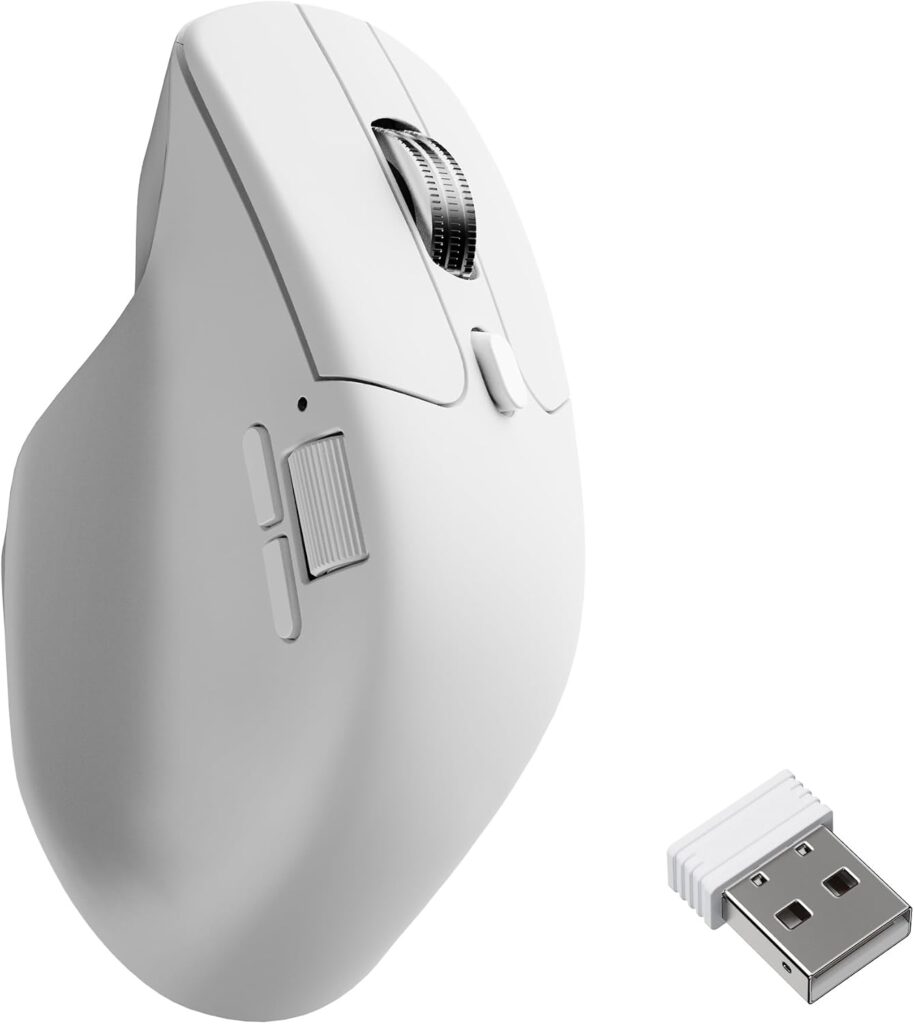
Keychron M6: Specs, Features, Pros & Cons
Keychron built its name on mechanical keyboards for people who care about how their desk works, and the M6 is what happens when that company designs a mouse: the hardware underneath is competitive gaming kit, but the thinking on top is aimed at someone who spends the working day in documents and only plays in the evening.
That is a more unusual combination than it sounds. The gaming market and the productivity market have largely diverged (one optimizes for weight and polling, the other for comfort and connectivity), and most mice pick a side. This one takes a modern high-end sensor and a right-handed shape from the gaming column, then adds the features office mice have and gaming mice tend to drop.
The most important of those is sideways scrolling. Wide spreadsheets, video timelines and long lines of code are miserable without it, and it is rare on anything sold as a gaming mouse. Tri-mode connectivity is the other one: a cable, a low-latency dongle and Bluetooth, which means one mouse can serve a work laptop and a desktop without unplugging anything.
There is no lighting. On a mouse at this level that reads as a decision, and it fits the intended desk.
The shape is the thing to check before buying. It is right-handed and sits in the middle of the weight range (neither a lightweight nor a brick), which suits most people and nobody exactly. If you have strong preferences about mouse weight, this is a compromise rather than an answer, and it is meant to be.
Category strengths
Where the Keychron M6 beats the median
- More connection options ?
- Has horizontal scrolling ?
- A lighter build ?78 g vs 89 g (median)
- A slightly higher max sensitivity ?26,000 DPI vs 25,600 DPI (median)
Where the Keychron M6 trails the median
- Much shorter battery life ?80 h vs 150 h (median)
How this VS Score was computed
Score 56: each known spec is measured against the median of all mice (81 products), then weighted; 50 means level with that median. In classes of six or more, a value beyond the class’s 10th–90th percentile range counts as that limit, so one extreme product cannot set the scale. 63% of the scoreable weight could be used; unknown values, features not applicable to this class and proxies (battery capacity where a rated life exists) add or remove nothing.
| Specification | This product | Cohort median | Score weight | Points moved |
|---|---|---|---|---|
| Connection | 3 | 2 | 0.8 | +20.0 |
| Battery life | 80 | 150 | 0.8 | −18.4 |
| Adjustable lift-off distance | Yes | 61% of the class have it | 0.3 | +15.0 |
| USB-C charging | Yes | 67% of the class have it | 0.3 | +15.0 |
| Horizontal scrolling | Yes | 45% of the class have it | 0.2 | +10.0 |
| RGB lighting | No | 46% of the class have it | 0.2 | −9.6 |
| Weight | 78 | 89 | 1 | +7.0 |
| Max sensitivity | 26,000 | 25,600 | 1 | +1.0 |
| Max tracking speed | 650 | 650 | 0.8 | +0.0 |
| Polling rate | 1,000 | 1,000 | 0.8 | +0.0 |
| Switch lifespan | 80 | 80 | 0.2 | +0.0 |
| Wireless polling rate | 1,000 | 1,000 | 0.5 | +0.0 |
Not scored: Max acceleration (unknown: not scored); Buttons (unknown: not scored); Grip styles (unknown: not scored); Free-spin scroll wheel (unknown: not scored); Click latency (unknown: not scored); Debounce adjustment (unknown: not scored); Battery capacity (capacity is a proxy; the rated battery life is scored instead); Quick charge (unknown: not scored); Wireless charging (not applicable: only 14% of this class have it); Onboard memory (standard for the class (86% have it)); Software customization (standard for the class (97% have it)); Adjustable weights (not applicable: only 2% of this class have it).
Editor’s note
Keychron now sells the M6 in 18 versions, and this is the original one: a plastic scroll wheel Keychron calls the Standard Wheel, the PixArt PAW3395 at 1,000 Hz and clicky Huano switches. Retail listings and most reviews just say "M6", so check the SKU (M6-A1 in black, M6-A3 in white) before trusting any figure printed next to the name.
Keychron's variant table gives this version up to 80 hours of battery. Listings that quote 120 hours are describing the 4K and 8K versions at 1,000 Hz, and the 180-hour figure belongs to the Premium Wheel model measured at its lowest polling rate.
Its clicky switches are rated at 80 million clicks, against 20 million for the silent switches on the quiet versions. A quieter click costs three quarters of the rated margin, and on a mouse that also plays games every evening I would keep the loud one.
Sideways scrolling comes from a second wheel under the thumb, the same arrangement Logitech uses on its MX Master line. That thumb wheel moves through wide spreadsheets and video timelines without holding a modifier key.
Setup runs through Keychron Launcher, a web app that opens only in Chrome, Edge or Opera and sees the mouse only over the cable or the receiver. A Mac user who lives in Safari needs a second browser for the first session. After that the settings sit in the mouse's onboard profiles, so a locked-down work laptop needs nothing installed.
One thing no 1,000 Hz M6 does is track on glass. Keychron lists that only for the 8K version.
Specifications
Quality bars show where each figure sits between the lowest and highest of the 81 mice this VS Score is measured against.
Sensor & tracking
Design & handling
Switches & latency
Connectivity
Battery
Features
Sources and verification
Where the specifications come from
- Official product pagekeychron.com
- Independent testingrtings.com
Verification
- First published
- Specifications last checked
- Sheet completeness
- 25 of 34 specifications verified; the rest show as Unknown and are never estimated or scored
- Page type
- Product specification page — Compiled from the manufacturer’s published specifications and the cited sources; this is not a hands-on test.
- Basis
- Research-based: specifications and editorial text were compiled from the documents listed here and the manufacturer’s published data. We have not tested this unit ourselves; where independent measurements are mentioned they belong to the linked publication.
Where to buy
Prices and availability may change. Check the retailer before buying. We may earn a commission on purchases.
Mice with similar specs to the Keychron M6

Ratings & reviews
No reviews yet. Be the first to share your experience.
The bottom line
The Keychron M6 earns a VS Score of 56, above the median of the 81 mice it is measured against (a score of 50 is level with that median).
- Who it’s for
- One mouse for a work laptop by day and a gaming PC in the evening, used by someone who lives in wide spreadsheets or video timelines.
- Who should look elsewhere
- Competitive players after a very light shell, and left-handers, since the shape is right-handed.
- The trade-off that matters
- It sits in the middle on weight. That is comfortable for most people and ideal for few, so anyone with firm views on mouse mass will want something more extreme.
- The main alternative
- Keychron M6 8K: faster polling and a newer sensor for a high-refresh monitor
The VS Score is calculated from the weighted specifications above, each measured against the median of comparable mice — a shortlisting guide, not a substitute for your own priorities. See how we score.




