
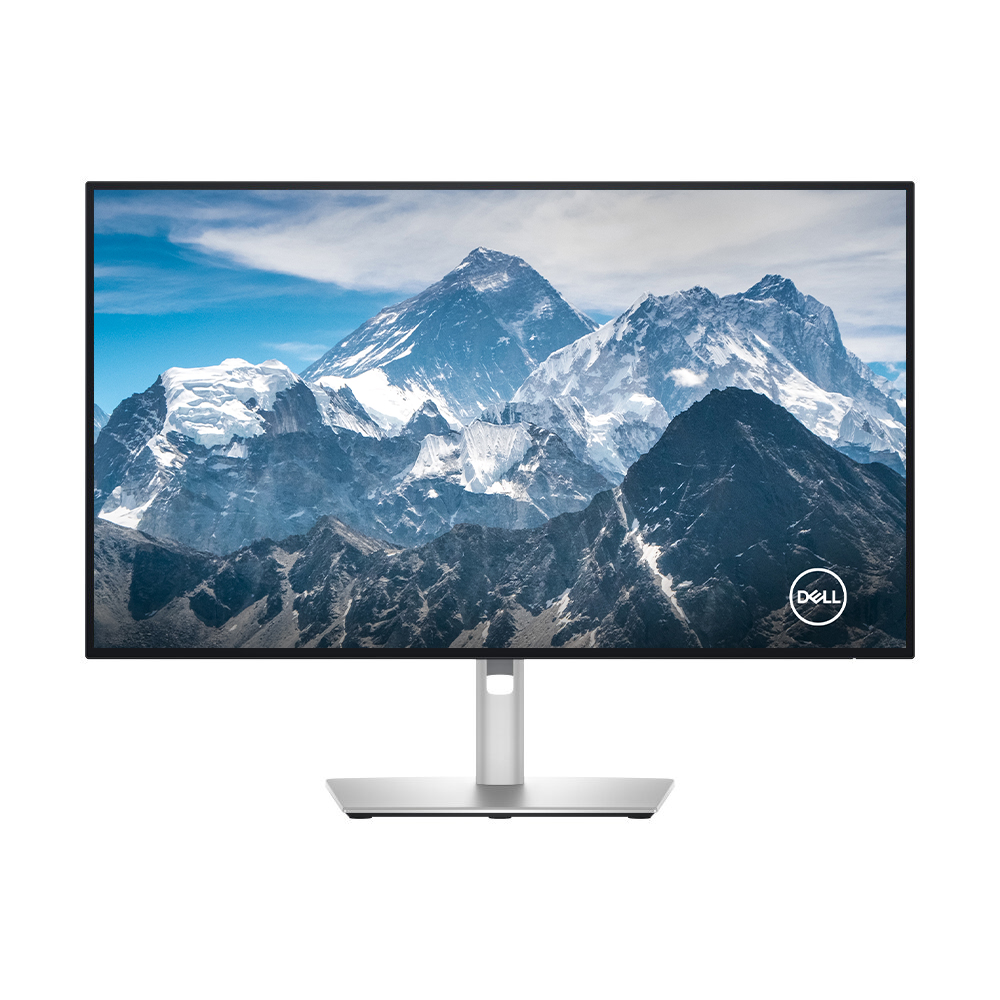
Dell U2725QE: Specs, Features, Pros & Cons
Plug a laptop into this monitor in the morning and one cable carries the picture, the charge, the wired network and the keyboard and mouse. Dell builds its UltraSharp models with an E at the end of the name around that docking job, and the U2725QE is the 4K member of the family at the screen size most offices buy.
It follows the U2723QE, a common sight on office desks, and keeps its recipe with two changes that matter day to day. The refresh rate went up, so scrolling a long page and dragging windows look smoother. And the charging port got stronger, so a big laptop with a hungry processor can leave its power brick in the bag.
The people who get the most from it read and write for a living. Letters look close to print at desk distance, the matte finish keeps ceiling lights and windows from turning into reflections, and the stand raises and lowers the screen as well as tilting it. Hybrid workers have an extra reason, because a work laptop and a home desktop can share one keyboard and mouse, with the monitor handing them to whichever machine is on screen.
Photo work is in range too. The color gamut is wide enough for pictures headed to the web or a print lab, and the blacks are darker than office panels usually manage, which helps in a dim room.
Fast games are the part it leaves out. The panel smears quick motion, and Dell sells it as an office screen with no gaming claims attached. Anyone who plays shooters most evenings should put a gaming monitor on the list instead.
Category strengths
Where the Dell U2725QE beats the median
- Has ethernet ?
- Higher peak brightness ?600 nits vs 500 nits (median)
- A higher contrast ratio ?3000:1 vs 2500:1 (median)
- Has KVM switch ?
- Faster USB-C charging ?140 W vs 118 W (median)
- A slightly higher refresh rate ?120 Hz vs 110 Hz (median)
How this VS Score was computed
Score 60: each known spec is measured against the median of IPS office monitors, 27 to 31 inches (8 products), then weighted; 50 means level with that median. In classes of six or more, a value beyond the class’s 10th–90th percentile range counts as that limit, so one extreme product cannot set the scale. 66% of the scoreable weight could be used; unknown values, features not applicable to this class and proxies (battery capacity where a rated life exists) add or remove nothing.
| Specification | This product | Cohort median | Score weight | Points moved |
|---|---|---|---|---|
| USB-C | Yes | 75% of the class have it | 0.5 | +25.0 |
| USB hub | Yes | 75% of the class have it | 0.3 | +15.0 |
| Swivel | Yes | 75% of the class have it | 0.2 | +10.0 |
| Pivot | Yes | 75% of the class have it | 0.2 | +10.0 |
| KVM switch | Yes | 50% of the class have it | 0.2 | +10.0 |
| Ethernet | Yes | 38% of the class have it | 0.2 | +10.0 |
| Built-in speakers | No | 38% of the class have it | 0.2 | −9.6 |
| HDR | DisplayHDR 600 | DisplayHDR 400 | 0.5 | +8.5 |
| Peak brightness | 600 | 500 | 0.8 | +8.0 |
| Contrast ratio | 3,000 | 2,500 | 0.6 | +6.0 |
| Variable refresh rate | Yes | 75% of the class have it | 0.1 | +5.0 |
| Refresh rate | 120 | 110 | 0.6 | +3.0 |
| USB-C power delivery | 140 | 118 | 0.3 | +2.7 |
| Screen size | 27 | 27 | 1.2 | +0.0 |
| Resolution | 4K | 4K | 1.2 | +0.0 |
| Panel type | IPS | IPS | 0.8 | +0.0 |
| Color depth | 10 | 10 | 0.3 | +0.0 |
| Response time | 5 | 5 | 0.24 | +0.0 |
| DCI-P3 coverage | 99 | 99 | 0.6 | +0.0 |
| Pixel density | 163 | 163 | 0.5 | +0.0 |
| HDMI ports | 1 | 1 | 0.4 | +0.0 |
| DisplayPort inputs | 1 | 1 | 0.4 | +0.0 |
Not scored: Local dimming (unknown: not scored); Local dimming zones (unknown: not scored); Adaptive sync (unknown: not scored); Motion blur reduction (unknown: not scored); Input lag (unknown: not scored); Height adjustment (standard for the class (88% have it)); Tilt (standard for the class (100% have it)); Headphone output (unknown: not scored); Webcam (not applicable: only 13% of this class have it); Microphone (unknown: not scored); Picture-by-picture (standard for the class (86% have it)).
Editor’s note
The U2725QE is not a gaming monitor and is built for anyone who mainly works, so it is worth reading on its own terms.
The panel is IPS Black, Dell's higher-contrast IPS variant, and it reaches 3,000:1 where ordinary IPS manages 1,000:1. In a dim room that turns a gray black into a dark one, and the panel adds near-complete DCI-P3 coverage, 10-bit color, 600 nits and DisplayHDR 600 certification. At 27 inches and 4K it is 163 ppi, so text is sharp. The matte coating suits an office with overhead lighting.
The connectivity is the reason to buy it. USB-C carries 140 W, which is enough to charge a large laptop as well as a thin one, alongside Ethernet, a USB hub and a KVM switch. One cable to a laptop replaces power, network, display and peripherals. The KVM then shares that keyboard and mouse with a desktop.
Refresh runs at 120 Hz, which is unusually high for a productivity monitor and makes everyday window-dragging noticeably smoother. Dell does list variable refresh over HDMI 2.1 and Windows dynamic refresh over DisplayPort, but there is no FreeSync or G-Sync certification and the 5 ms response is slow next to gaming panels, so games are a side benefit here.
I would pick it for a laptop that docks every morning. Someone who plays fast games most evenings is paying for a dock they will not use.
Specifications
Quality bars show where each figure sits between the lowest and highest of the 8 IPS office monitors, 27 to 31 inches this VS Score is measured against.
Picture
Gaming
Ergonomics & design
Connectivity
Features
Sources and verification
Where the specifications come from
- Datasheet or manualdell.com
- Independent testingrtings.com
Verification
- First published
- Specifications last checked
- Sheet completeness
- 34 of 42 specifications verified; the rest show as Unknown and are never estimated or scored
- Page type
- Product specification page — Compiled from the manufacturer’s published specifications and the cited sources; this is not a hands-on test.
- Basis
- Research-based: specifications and editorial text were compiled from the documents listed here and the manufacturer’s published data. We have not tested this unit ourselves; where independent measurements are mentioned they belong to the linked publication.
Monitors with similar specs to the Dell U2725QE

Ratings & reviews
No reviews yet. Be the first to share your experience.
The bottom line
The Dell U2725QE earns a VS Score of 60, above the median of the 8 IPS office monitors, 27 to 31 inches it is measured against (a score of 50 is level with that median).
- Who it’s for
- A laptop worker who docks every day and wants charging, Ethernet, video and peripherals on one cable, with sharp text and darker blacks than ordinary IPS.
- Who should look elsewhere
- Gamers beyond the occasional evening. Variable refresh works but carries no FreeSync or G-Sync certification, and the response is slow for fast motion.
- The trade-off that matters
- Everything goes into the dock and the text, so games get a smooth refresh on a panel that blurs fast motion.
- The main alternative
- Dell S2725QC: a simpler Dell with the same resolution, USB-C charging and FreeSync, for a lighter laptop and casual gaming.
The VS Score is calculated from the weighted specifications above, each measured against the median of comparable IPS office monitors, 27 to 31 inches — a shortlisting guide, not a substitute for your own priorities. See how we score.





