Samsung ViewFinity S6 S61F: Specs, Features, Pros & Cons
This is the sort of monitor that gets bought for a desk rather than chosen for one, and it makes a reasonable case for itself. The pixel density is sharp enough that you stop noticing pixels without needing display scaling, which is the main reason to step up from 1080p at this size.
The rest of the numbers describe an ordinary, competent office panel. There is no HDR certification and the contrast is typical IPS, so blacks will look grey in a dark room.
Category strengths
Where the Samsung ViewFinity S6 S61F beats the average
- Has height adjustment ?
- Has pivot adjustment ?
- More HDMI ports ?2 vs 1.74 (avg)
- Has swivel adjustment ?
- Has headphone output ?
Where the Samsung ViewFinity S6 S61F trails the average
- A much slower response time ?5 ms vs 1.3 ms (avg)
- A much lower refresh rate ?100 Hz vs 208.82 Hz (avg)
- A much lower contrast ratio ?1,000 :1 vs 423,802.48 :1 (avg)
- No variable refresh rate ?
- Much lower peak brightness ?300 nits vs 697.38 nits (avg)
- No USB hub ?
- No USB-C ?
- A slightly smaller screen ?27" (68.58 cm) vs 29.13" (73.99 cm) (avg)
- A lower pixel density ?109 ppi vs 125.84 ppi (avg)
- No KVM switch ?
Editor’s note
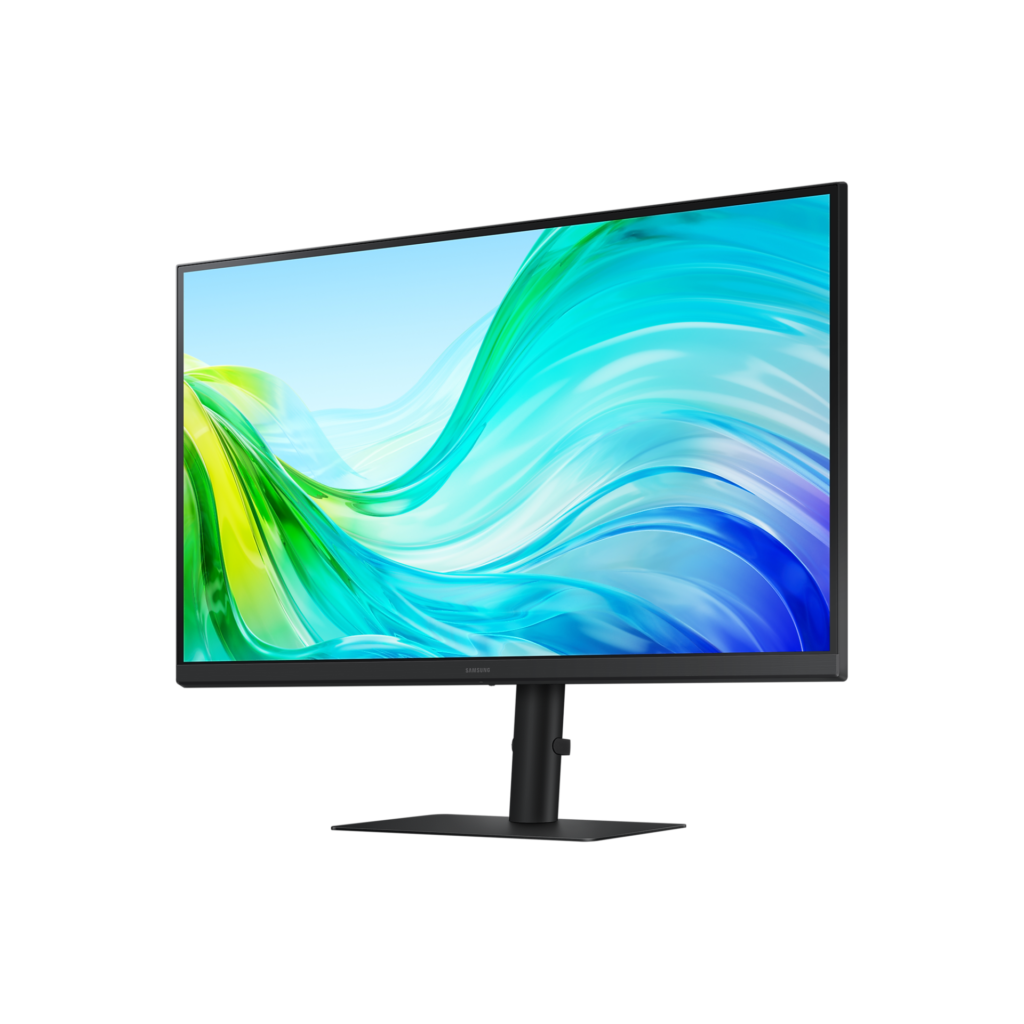
This is the sort of monitor that gets bought for a desk rather than chosen for one, and at around 230 dollars it makes a reasonable case for itself. The panel is a 27-inch IPS at 2560×1440, which lands at 109 pixels per inch – sharp enough that you stop noticing pixels without needing display scaling, which is the main reason to step up from 1080p at this size.
Samsung quotes 99 percent sRGB coverage, 300 nits and a 1000:1 contrast ratio, and those numbers describe an ordinary, competent office panel. There is no HDR certification and the contrast is typical IPS, so blacks will look grey in a dark room. The matte coating is the right call for an office and the wrong one if you want images to pop.
The stand is the quiet highlight. Height adjustment of 135 mm, tilt, 45 degrees of swivel each way, and a full 90 degree pivot, plus a 100×100 VESA pattern. Plenty of monitors at this price give you tilt and nothing else, and if you have ever tried to read a long document on a landscape screen you will appreciate the pivot.
The omissions are where I would push back. There is no adaptive sync at all – Samsung's own spec sheet lists FreeSync as No – so the 100 Hz refresh rate is a smoothness bonus for scrolling and not a gaming feature. There are no speakers. There is no USB-C, so a laptop needs a separate power cable and a separate video cable. You get two HDMI 2.0 inputs, one DisplayPort 1.2 and a headphone jack, and that is the whole list.
If any of those three gaps matters, the Dell S2725DS is the same size, resolution and refresh rate with 5 W speakers built in.
Specifications
Quality bars are generated automatically against 90 other monitors.
Picture
Larger screens are more immersive; measured diagonally.
The total pixel count; higher is sharper.
The panel technology; OLED offers the best contrast.
The more specific panel or backlight technology (e.g. QD-OLED, WOLED or Mini-LED VA).
The native or supported bit depth used to reproduce colour gradients.
The display surface treatment and its balance of glare control and image clarity.
Higher refresh rates are smoother for gaming and scrolling.
Grey-to-grey response; lower reduces motion blur.
Higher brightness makes HDR highlights pop.
The ratio between the brightest and darkest output.
Wider colour gamut for more vivid, accurate colour.
Full sRGB coverage keeps everyday content and photos colour-accurate.
The certified HDR tier.
Pixels per inch; higher looks sharper.
Dims parts of the backlight independently to improve contrast.
More independently controlled zones can improve HDR precision.
Gaming
Variable-refresh technology for tear-free motion.
Syncs the refresh rate to the GPU.
Backlight strobing for clearer motion.
The delay between an input and the image changing; lower is better.
The minimum-to-maximum refresh range over which variable refresh rate operates.
Ergonomics & design
The width-to-height ratio (e.g. 16:9, 21:9).
The curve radius (e.g. 1000R); blank for a flat panel.
Raise and lower the panel.
Angle the panel up and down.
Rotate the panel left and right.
Rotate to portrait orientation.
The VESA wall / arm mount pattern (e.g. 100 x 100 mm).
Connectivity
More HDMI inputs connect more devices.
The highest HDMI standard supported by the monitor.
DisplayPort inputs, preferred for high refresh rates.
The highest DisplayPort standard supported by the monitor.
A USB-C input, often with power delivery for laptops.
Charges a connected laptop over USB-C.
Built-in USB ports for peripherals.
Integrated speakers.
A 3.5 mm audio output for headphones or external speakers.
Control two computers with one keyboard and mouse.
Features
A built-in camera for video calls.
A built-in microphone for calls.
A wired network port for USB-C docking.
Shows inputs from two computers side by side.
Specs last verified August 24, 202632 of 42 specs verified (76%)Unverified specs show as Unknown — never estimated, never scored
Monitors with similar specs to the Samsung ViewFinity S6 S61F
Ratings & reviews
No reviews yet. Be the first to share your experience.
The bottom line
The Samsung ViewFinity S6 S61F earns a VS Score of 27, trailing most of the 91 monitors we compare here, at least on the spec sheet.
- Who it’s for
- Desk workers who want QHD sharpness and an adjustable stand that actually pivots, and who will connect it to a machine that has HDMI or DisplayPort to spare.
- Who should look elsewhere
- Laptop users who wanted one cable. There is no USB-C, so you are back to a power brick plus a video cable plus a separate dock if you need ports.
- The trade-off that matters
- You get an unusually good stand at this price and give up adaptive sync entirely, which makes the 100 Hz useful for scrolling but not for gaming.
- The main alternative
- The Dell S2725DS matches the 27-inch QHD 100 Hz IPS spec and adds 5 W built-in speakers, which is the difference if you don't already have desk audio.
The VS Score is calculated from the weighted specifications above, measured against every other monitors we track — a shortlisting guide, not a substitute for your own priorities. See how we score.