
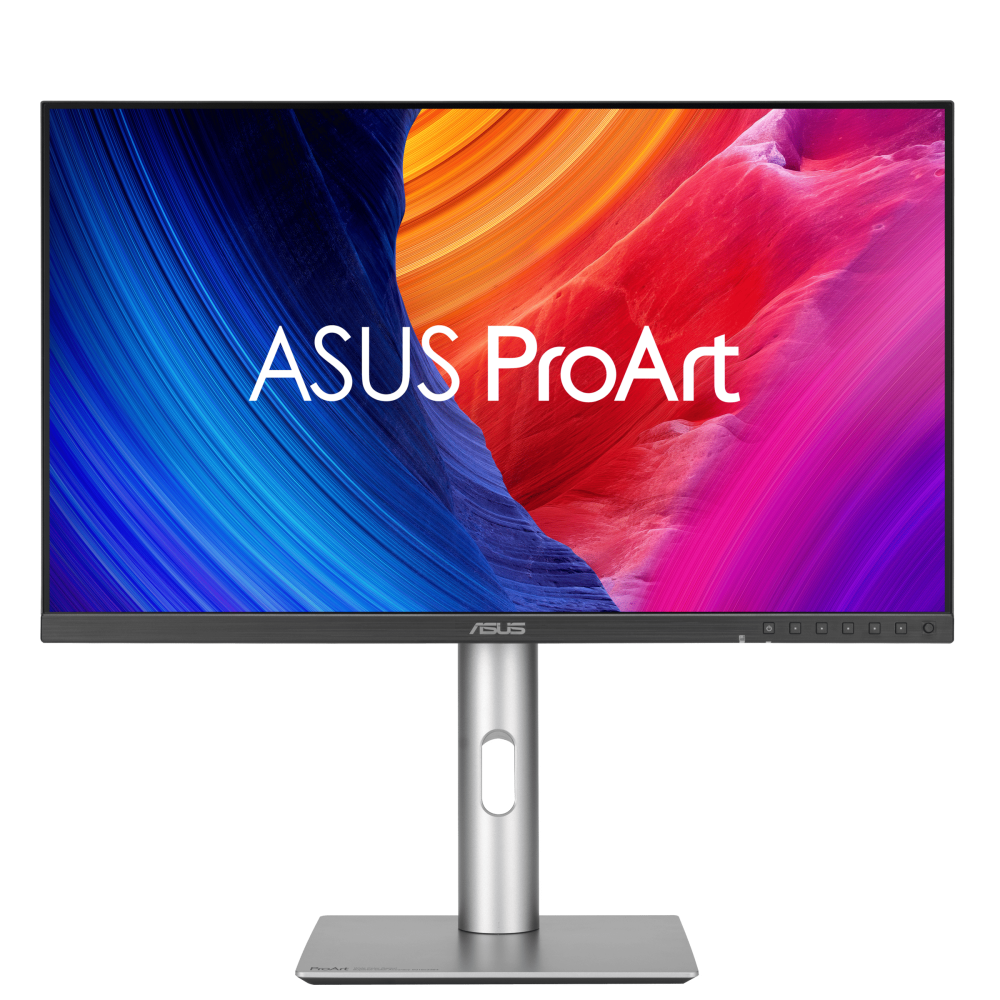
ASUS ProArt Display 6K PA32QCV: Specs, Features, Pros & Cons
6K is more than a larger 4K. The resolution exists because of the way operating systems scale interfaces: at this pixel count a screen of this size renders a scaled desktop cleanly instead of approximating it, which is why the format took hold among people editing photographs and video rather than among people watching them.
That is the entire reason to consider this display, and it is also the test of whether you should. If your work means reading type all day, retouching fine detail, or judging an image on its own terms, the density changes the experience in a way that no panel of this size at a lower resolution can. For other work, you are paying a great deal for pixels you will never resolve.
ASUS has built the rest of the monitor around the same buyer. There is a calibration pedigree, an ambient light sensor, and a docking arrangement that assumes a laptop arrives in the morning and leaves at night, with no tower living under the desk.
The compromise is stated in the specification and deserves emphasis, because it is the thing people regret: this panel is built for accuracy, not for motion. Anyone arriving from a high-refresh gaming display will notice how cursor movement and scrolling feel on the first day, and no setting will change it.
It is also large and heavy enough to assume a deep desk and a serious arm if you dislike its stand.
Buy it as a working instrument for image work. If it also has to be the screen you unwind in front of, buy something else for that and keep this one for the day job.
Category strengths
Where the ASUS ProArt Display 6K PA32QCV beats the median
- Has built-in speakers ?
- A bigger screen ?31.5" (80.01 cm) vs 27" (68.58 cm) (median)
- A higher pixel density ?218 ppi vs 163 ppi (median)
- Higher peak brightness ?600 nits vs 500 nits (median)
- Has KVM switch ?
Where the ASUS ProArt Display 6K PA32QCV trails the median
- A much lower refresh rate ?60 Hz vs 110 Hz (median)
- A lower contrast ratio ?1500:1 vs 2500:1 (median)
- Slower USB-C charging ?96 W vs 118 W (median)
- Slightly narrower DCI-P3 colour coverage ?98 % vs 99 % (median)
How this VS Score was computed
Score 62: each known spec is measured against the median of IPS office monitors, 27 to 31 inches (8 products), then weighted; 50 means level with that median. In classes of six or more, a value beyond the class’s 10th–90th percentile range counts as that limit, so one extreme product cannot set the scale. 68% of the scoreable weight could be used; unknown values, features not applicable to this class and proxies (battery capacity where a rated life exists) add or remove nothing.
| Specification | This product | Cohort median | Score weight | Points moved |
|---|---|---|---|---|
| Resolution | 8K | 4K | 1.2 | +39.6 |
| USB-C | Yes | 75% of the class have it | 0.5 | +25.0 |
| USB hub | Yes | 75% of the class have it | 0.3 | +15.0 |
| Refresh rate | 60 | 110 | 0.6 | −13.8 |
| Contrast ratio | 1,500 | 2,500 | 0.6 | −12.0 |
| Swivel | Yes | 75% of the class have it | 0.2 | +10.0 |
| Pivot | Yes | 75% of the class have it | 0.2 | +10.0 |
| Built-in speakers | Yes | 38% of the class have it | 0.2 | +10.0 |
| Headphone output | Yes | 57% of the class have it | 0.2 | +10.0 |
| KVM switch | Yes | 50% of the class have it | 0.2 | +10.0 |
| Ethernet | No | 38% of the class have it | 0.2 | −9.6 |
| Screen size | 31.5 | 27 | 1.2 | +9.6 |
| HDR | DisplayHDR 600 | DisplayHDR 400 | 0.5 | +8.5 |
| Pixel density | 218 | 163 | 0.5 | +8.5 |
| Peak brightness | 600 | 500 | 0.8 | +8.0 |
| Variable refresh rate | Yes | 75% of the class have it | 0.1 | +5.0 |
| USB-C power delivery | 96 | 118 | 0.3 | −2.7 |
| DCI-P3 coverage | 98 | 99 | 0.6 | −0.6 |
| Panel type | IPS | IPS | 0.8 | +0.0 |
| Color depth | 10 | 10 | 0.3 | +0.0 |
| Response time | 5 | 5 | 0.24 | +0.0 |
| HDMI ports | 1 | 1 | 0.4 | +0.0 |
| DisplayPort inputs | 1 | 1 | 0.4 | +0.0 |
Not scored: Local dimming (unknown: not scored); Local dimming zones (unknown: not scored); Adaptive sync (unknown: not scored); Motion blur reduction (not scored for this class of product); Input lag (unknown: not scored); Height adjustment (standard for the class (88% have it)); Tilt (standard for the class (100% have it)); Webcam (not applicable: only 13% of this class have it); Microphone (not applicable: only 14% of this class have it); Picture-by-picture (standard for the class (86% have it)).
Editor’s note
The PA32QCV is a working display, and the number that defines it is 218 pixels per inch. Spreading 6016 by 3384 across 31.5 inches produces a screen with no visible pixel structure at any normal desk distance. It is the same class of density as a laptop Retina panel, on a monitor big enough to hold two documents side by side.
That matters most for anyone who works with type or fine detail all day. Text rendering stops being a compromise, and image work is judged on the image rather than on the grid it sits on.
The color credentials are the other half. 98% DCI-P3 and 100% sRGB, a 10-bit panel, a factory calibration report in the box, Calman verification and a stated Delta E under 2. There is also an ambient light sensor and a hardware KVM switch.
The connectivity is the quiet luxury: two Thunderbolt 4 ports with 96 W of power delivery and daisy-chain support. That is enough to run and charge most laptops down one cable, and to chain a second display off the first. Very few monitors at any price do this properly.
The compromise is refresh rate. This is a 60 Hz panel with a 5 ms response. If you have grown used to a 120 Hz desktop, moving here will feel slower in everyday scrolling, and it is not a gaming display in any sense. Contrast is a typical IPS 1,500:1 too, so the DisplayHDR 600 badge is about brightness, and black level stays ordinary.
Buy it for photo, video and design work where resolution and color accuracy decide the purchase. Skip it if you also want it to game.
Specifications
Quality bars show where each figure sits between the lowest and highest of the 8 IPS office monitors, 27 to 31 inches this VS Score is measured against.
Picture
Gaming
Ergonomics & design
Connectivity
Features
Sources and verification
Where the specifications come from
- Official product pageasus.com
- Independent testingrtings.com
Verification
- First published
- Specifications last checked
- Sheet completeness
- 35 of 42 specifications verified; the rest show as Unknown and are never estimated or scored
- Page type
- Product specification page — Compiled from the manufacturer’s published specifications and the cited sources; this is not a hands-on test.
- Basis
- Research-based: specifications and editorial text were compiled from the documents listed here and the manufacturer’s published data. We have not tested this unit ourselves; where independent measurements are mentioned they belong to the linked publication.
Monitors with similar specs to the ASUS ProArt Display 6K PA32QCV

Ratings & reviews
No reviews yet. Be the first to share your experience.
The bottom line
The ASUS ProArt Display 6K PA32QCV earns a VS Score of 62, above the median of the 8 IPS office monitors, 27 to 31 inches it is measured against (a score of 50 is level with that median).
- Who it’s for
- A photographer, retoucher or designer who spends the day on type and fine detail and wants a laptop to charge and connect on one cable.
- Who should look elsewhere
- Anyone who games, or has grown used to a fast desktop. The refresh rate is low and scrolling shows it.
- The trade-off that matters
- Resolution and color accuracy win over motion, so everyday scrolling and cursor movement feel slower than on a high-refresh screen.
- The main alternative
- Apple Studio Display XDR: similar density with a faster refresh and local dimming, for a Mac-based studio that wants HDR punch.
The VS Score is calculated from the weighted specifications above, each measured against the median of comparable IPS office monitors, 27 to 31 inches — a shortlisting guide, not a substitute for your own priorities. See how we score.





