
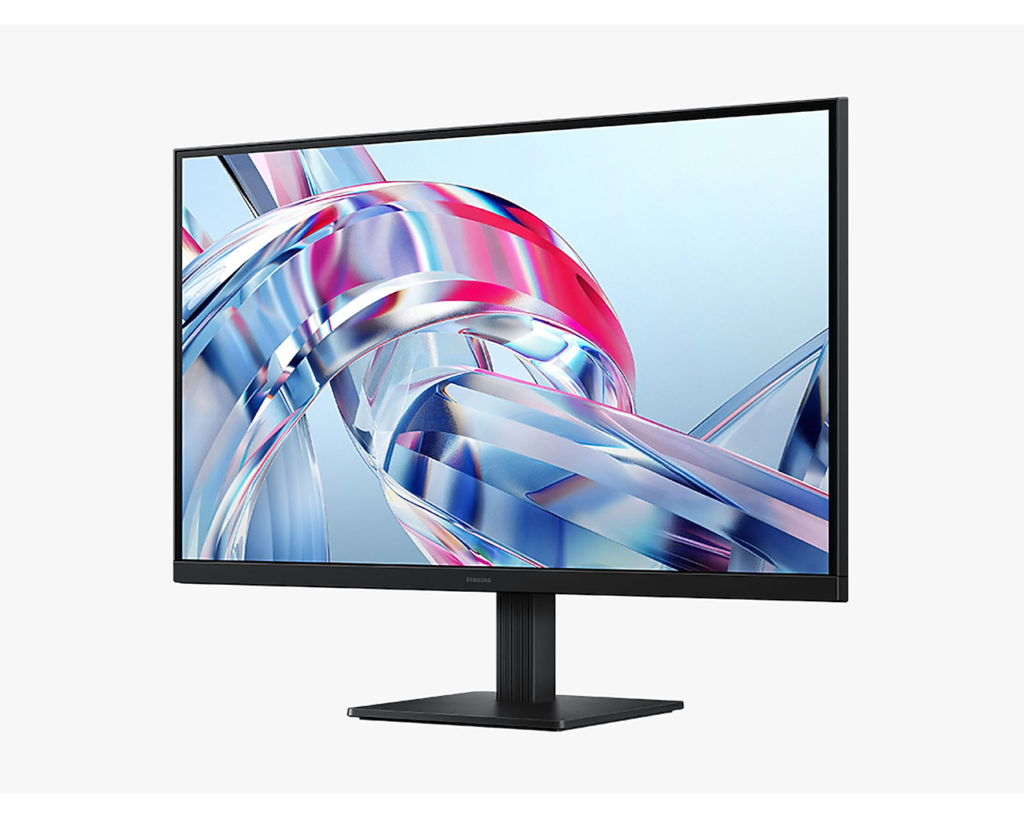
Samsung ViewFinity S7 S70H 27-inch: Specs, Pros & Cons
Buying this much resolution at this diagonal is a decision about scaling. Run the desktop at native size and everything is beautifully sharp and too small to read comfortably. Scale it up, as almost everyone does, and you hand some of that resolution back in exchange for legibility. What you keep is text with smooth, solid edges instead of the faint staircase a coarser panel gives you, and that is the entire argument for this monitor.
The rest of the specification follows from a decision Samsung clearly made early: spend the budget on the panel and on nothing else. The stand tilts and that is the extent of it, so height comes from a monitor arm or a stack of books. There is no USB of any kind, which means a laptop needs a separate video cable and its own charger. There are no speakers either.
The panel technology here keeps viewing angles honest across a wide screen, so the corners of a document do not shift in tone as you lean back, and color stays consistent enough for ordinary layout work even though this was never built as a color-critical display.
Two limitations are worth carrying into the decision. The first is that this is a productivity monitor with no gaming pretensions at all, and its specification carries no gaming badges. The second is that Samsung sells the same model name in two sizes with different panel technologies inside them, so a review of one is not a review of the other. Check the diagonal on anything you read before you trust it.
Category strengths
Where the Samsung ViewFinity S7 S70H 27-inch beats the median
- A higher contrast ratio ?3000:1 vs 2500:1 (median)
Where the Samsung ViewFinity S7 S70H 27-inch trails the median
- No USB-C ?
- No height adjustment ?
- Lower peak brightness ?300 nits vs 500 nits (median)
- No USB hub ?
- A much lower refresh rate ?60 Hz vs 110 Hz (median)
- No swivel adjustment ?
- No pivot adjustment ?
- No variable refresh rate ?
- No KVM switch ?
How this VS Score was computed
Score 36: each known spec is measured against the median of IPS office monitors, 27 to 31 inches (8 products), then weighted; 50 means level with that median. In classes of six or more, a value beyond the class’s 10th–90th percentile range counts as that limit, so one extreme product cannot set the scale. 68% of the scoreable weight could be used; unknown values, features not applicable to this class and proxies (battery capacity where a rated life exists) add or remove nothing.
| Specification | This product | Cohort median | Score weight | Points moved |
|---|---|---|---|---|
| USB-C | No | 75% of the class have it | 0.5 | −24.0 |
| Height adjustment | No | 88% of the class have it | 0.4 | −19.2 |
| Peak brightness | 300 | 500 | 0.8 | −16.0 |
| USB hub | No | 75% of the class have it | 0.3 | −14.4 |
| Refresh rate | 60 | 110 | 0.6 | −13.8 |
| Local dimming | No — held to half its range (fewer than six products in this class list it) | 33% of the class have it | 0.4 | −10.0 |
| Headphone output | Yes | 57% of the class have it | 0.2 | +10.0 |
| Swivel | No | 75% of the class have it | 0.2 | −9.6 |
| Pivot | No | 75% of the class have it | 0.2 | −9.6 |
| Built-in speakers | No | 38% of the class have it | 0.2 | −9.6 |
| KVM switch | No | 50% of the class have it | 0.2 | −9.6 |
| Ethernet | No | 38% of the class have it | 0.2 | −9.6 |
| HDR | HDR10 | DisplayHDR 400 | 0.5 | −8.5 |
| Contrast ratio | 3,000 | 2,500 | 0.6 | +6.0 |
| Variable refresh rate | No | 75% of the class have it | 0.1 | −4.8 |
| Screen size | 27 | 27 | 1.2 | +0.0 |
| Resolution | 4K | 4K | 1.2 | +0.0 |
| Panel type | IPS | IPS | 0.8 | +0.0 |
| Color depth | 10 | 10 | 0.3 | +0.0 |
| Response time | 5 | 5 | 0.24 | +0.0 |
| Pixel density | 163 | 163 | 0.5 | +0.0 |
| Adaptive sync | None | None | 0.12 | +0.0 |
| HDMI ports | 1 | 1 | 0.4 | +0.0 |
| DisplayPort inputs | 1 | 1 | 0.4 | +0.0 |
Not scored: DCI-P3 coverage (unknown: not scored); Local dimming zones (unknown: not scored); Motion blur reduction (unknown: not scored); Input lag (unknown: not scored); Tilt (standard for the class (100% have it)); USB-C power delivery (unknown: not scored); Webcam (not applicable: only 13% of this class have it); Microphone (not applicable: only 14% of this class have it); Picture-by-picture (standard for the class (86% have it)).
Editor’s note
The ViewFinity S7 27-inch is a 4K monitor for people who read and write for a living. At 163 ppi, text on this panel is print-like, and Samsung backs it with the things that matter for eight-hour days: 99% sRGB, a TUV-certified eye-care mode, flicker-free dimming, and, unusually at this price, both picture-in-picture and picture-by-picture for juggling two inputs on one screen.
One detail matters to anyone choosing a size: the 27-inch S70H is an IPS panel while the 32-inch S70H is VA. Samsung's own spec tables confirm both. They are materially different products: the 27 has IPS viewing angles and sharper density, and the 32 trades that for VA contrast on a coarser pitch. This page covers the 27-inch, and for text work it is the one I would pick.
What the street price does not buy is equally clear. This is a 60 Hz, 5 ms panel with no adaptive sync of any kind (Samsung's table has no FreeSync row, where its gaming models always do), so it is the wrong purchase for anyone who games more than casually. The stand is Samsung's 'Simple' type: tilt only. Connectivity is one HDMI 2.0 plus one DisplayPort 1.2, with no USB-C, no USB hub, and no speakers. Brightness is 300 nits with decode-only HDR10.
One curiosity: Samsung quotes 3000:1 contrast for this IPS panel, an unusual claim, but it is what the maker's table states.
Against Dell's S2725QC, the missing USB-C is this monitor's clearest gap. If your laptop docks over one cable, look there. For a desktop and a stack of documents, this is excellent value.
Specifications
Quality bars show where each figure sits between the lowest and highest of the 8 IPS office monitors, 27 to 31 inches this VS Score is measured against.
Picture
Gaming
Ergonomics & design
Connectivity
Features
Sources and verification
Where the specifications come from
- Official product pagesamsung.com
- Retailer listing (cross-check)amazon.com
Verification
- First published
- Specifications last checked
- Sheet completeness
- 36 of 42 specifications verified; the rest show as Unknown and are never estimated or scored
- Page type
- Product specification page — Compiled from the manufacturer’s published specifications and the cited sources; this is not a hands-on test.
- Basis
- Research-based: specifications and editorial text were compiled from the documents listed here and the manufacturer’s published data. We have not tested this unit ourselves; where independent measurements are mentioned they belong to the linked publication.
Where to buy
Prices and availability may change. Check the retailer before buying. We may earn a commission on purchases.
Price history
Monitors with similar specs to the Samsung ViewFinity S7 S70H 27-inch

Ratings & reviews
No reviews yet. Be the first to share your experience.
The bottom line
The Samsung ViewFinity S7 S70H 27-inch earns a VS Score of 36, below the median of the 8 IPS office monitors, 27 to 31 inches it is measured against (a score of 50 is level with that median).
- Who it’s for
- Writers, coders and document workers on a desktop machine, who spend the day in text and want it to look like print rather than like pixels.
- Who should look elsewhere
- Gamers, because there is no variable refresh of any kind, and laptop owners, because there is no USB connectivity to dock through.
- The trade-off that matters
- Print-like sharpness for the money, bought by giving up every modern convenience port. Note too that the two sizes sold under this name use different panel technologies inside.
- The main alternative
- Dell S2725QC adds USB-C power delivery to the same productivity brief, and is the better pick for anyone docking a laptop.
The VS Score is calculated from the weighted specifications above, each measured against the median of comparable IPS office monitors, 27 to 31 inches — a shortlisting guide, not a substitute for your own priorities. See how we score.





