
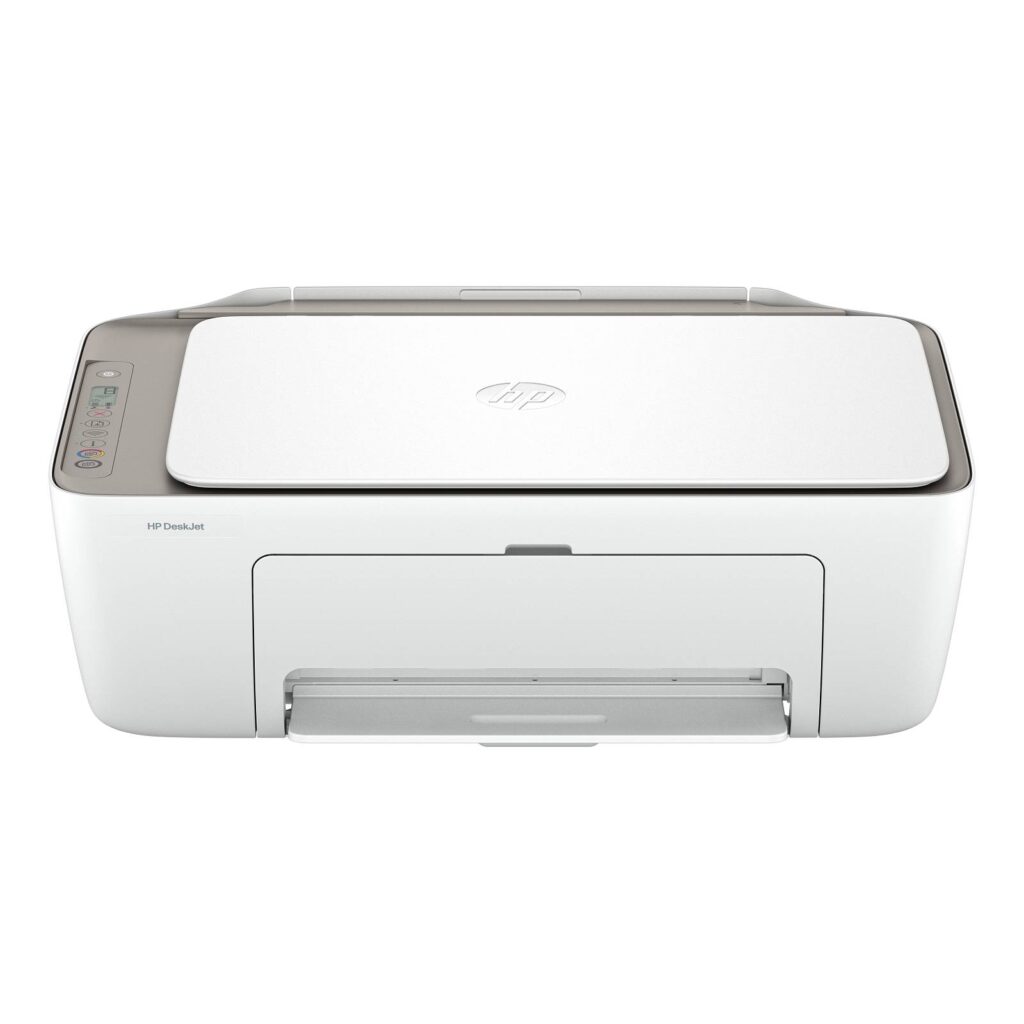
HP DeskJet 2923: Specs, Features, Pros & Cons
Under a hundred dollars buys a chassis, not a printing system. That is the honest frame for anything at the bottom of the inkjet market, and it explains far more about this machine than any line on its specification. The hardware is priced to be bought on impulse. The money is made afterwards, over years, in small increments.
Every design choice follows from that. The input tray holds sixty sheets, which is less a cost saving than a statement about expected volume: a printer meant to be fed a handful of pages at a time. There is no display, only a row of illuminated icons, because a screen would cost more than the margin on the hardware. Automatic two-sided printing, a document feeder and a wired network port are all absent, and their absence is what keeps the number on the box low.
The part deserving real attention is the ink arrangement. HP's subscription bills by the page, meters an allowance each month, and ships cartridges that stay tied to an active plan and are never owned outright. Bundled trial months look like a discount and function as an onboarding step. Separately, the printer is built to reject cartridges that lack the manufacturer's own circuitry, and firmware updates are used to keep enforcing that, so the usual escape route of buying cheaper ink elsewhere is closed by design.
None of which makes it a bad object. It does mean the purchase should be judged on the consumable arrangement you are signing up to more than on the sticker, and that a household printing more than a few pages a week is quietly agreeing to a running cost it has never been shown a figure for.
Category strengths
Where the HP DeskJet 2923 beats the median
- A much lighter build ?3.4 kg vs 7.98 kg (median)
Where the HP DeskJet 2923 trails the median
- A much lower print speed (black) ?7.5 ppm vs 16 ppm (median)
- No automatic duplex printing ?
- No automatic document feeder ?
- A much lower input tray capacity ?60 sheets vs 150 sheets (median)
- No ethernet ?
- A lower print speed (color) ?5.5 ppm vs 9 ppm (median)
- No Wi-Fi Direct ?
- A much lower monthly duty cycle ?1,000 pages vs 10,000 pages (median)
- A much lower output tray capacity ?25 sheets vs 67.5 sheets (median)
How this VS Score was computed
Score 18: each known spec is measured against the median of all printers (65 products), then weighted; 50 means level with that median. In classes of six or more, a value beyond the class’s 10th–90th percentile range counts as that limit, so one extreme product cannot set the scale. 65% of the scoreable weight could be used; unknown values, features not applicable to this class and proxies (battery capacity where a rated life exists) add or remove nothing.
| Specification | This product | Cohort median | Score weight | Points moved |
|---|---|---|---|---|
| Automatic duplex printing | No | 73% of the class have it | 1 | −48.0 |
| Automatic document feeder | No | 55% of the class have it | 1 | −48.0 |
| Print speed (black) | 7.5 — capped at the class’s lower range (8.8) | 16 | 2 | −44.0 |
| Input tray capacity | 60 | 150 | 1 | −30.0 |
| Supertank / refillable ink | No | 30% of the class have it | 0.5 | −24.0 |
| Duplex scanning | No | 23% of the class have it | 0.5 | −24.0 |
| Ethernet | No | 54% of the class have it | 0.5 | −24.0 |
| Touchscreen display | No | 45% of the class have it | 0.5 | −24.0 |
| Print speed (color) | 5.5 | 9 | 1 | −19.0 |
| Weight | 3.4 — capped at the class’s lower range (4) | 7.98 | 0.3 | +15.0 |
| Wi-Fi Direct | No | 90% of the class have it | 0.3 | −14.4 |
| Monthly duty cycle | 1,000 | 10,000 | 0.3 | −13.5 |
| Fax | No | 35% of the class have it | 0.2 | −9.6 |
| Output tray capacity | 25 | 67.5 | 0.3 | −9.3 |
| Print resolution | 4,800 | 4,800 | 0.5 | +0.0 |
Not scored: Color printing (standard for the class (88% have it)); All-in-one (standard for the class (85% have it)); ADF capacity (unknown: not scored); Wi-Fi (standard for the class (97% have it)); USB (standard for the class (100% have it)); Apple AirPrint (standard for the class (97% have it)); Mobile app printing (standard for the class (100% have it)).
Editor’s note
The DeskJet 2923 needs one paragraph of context before anything else: it is the regionally-numbered twin of the US DeskJet 2955. HP publishes identical specifications for both (same 7.5 ppm black speed, same HP 68 cartridges, same chassis) and even documents the 2923's media handling by pointing at the 2955's datasheet. The difference that matters is price. The 2955 sells for less in US retail, and this 2923 listing is import-priced well above it. Unless the 2923 is what your local shop stocks, the 2955 is the same machine for less.
Judged as hardware, it is HP's most basic all-in-one, and the basics are what you get. Print, scan and copy work over dual-band Wi-Fi through HP's mobile app. There is no automatic duplex, no document feeder, no fax, no Ethernet, and the control panel is a strip of icons with no screen.
The real cost lives in the cartridges. HP rates the 68 Black at about 160 pages and the Tri-Color at 120, which works out to roughly 13 to 17 cents per black page at street cartridge prices. That is among the most expensive printing you can buy. HP's own datasheet also states that the printer is designed to reject cartridges without HP circuitry, and that firmware updates will keep doing so. Third-party ink is not a realistic escape hatch here.
HP's answer is the Instant Ink subscription, and this bundle includes six months of it. For light printing, a few pages a week, that arrangement can be fine.
Buyers rate it 3.4 stars across 261 reviews. I would either buy the 2955 instead, or step up to a tank printer and stop thinking about ink altogether.
Specifications
Quality bars show where each figure sits between the lowest and highest of the 65 printers this VS Score is measured against.
Printing
Scanning & copying
Paper handling
Connectivity
Design
Sources and verification
Where the specifications come from
- Official product pagesupport.hp.com
- Retailer listing (cross-check)amazon.com
Verification
- First published
- Specifications last checked
- Sheet completeness
- 23 of 24 specifications verified; the rest show as Unknown and are never estimated or scored
- Page type
- Product specification page — Compiled from the manufacturer’s published specifications and the cited sources; this is not a hands-on test.
- Basis
- Research-based: specifications and editorial text were compiled from the documents listed here and the manufacturer’s published data. We have not tested this unit ourselves; where independent measurements are mentioned they belong to the linked publication.
Printers with similar specs to the HP DeskJet 2923
Ratings & reviews
No reviews yet. Be the first to share your experience.
The bottom line
The HP DeskJet 2923 earns a VS Score of 18, below the median of the 65 printers it is measured against (a score of 50 is level with that median).
- Who it’s for
- Only buyers whose local retailer stocks this regional numbering at a lower price than its US-market twin, because the hardware is the same entry all-in-one either way.
- Who should look elsewhere
- Anyone shopping the import-priced listing: it costs more than an identical machine sold under another model number. And anyone printing weekly, given how little ground one cartridge covers.
- The trade-off that matters
- You pay a regional-numbering premium for hardware sold cheaper under another model number, which is the rare case where the product's biggest flaw is its own sibling.
- The main alternative
- HP DeskJet 2955 is the same printer with US retail presence at around sixty dollars, and the listing this one should be compared against before anything else.
The VS Score is calculated from the weighted specifications above, each measured against the median of comparable printers — a shortlisting guide, not a substitute for your own priorities. See how we score.





