ASUS ROG Falchion Ace 75 HE: Specs, Features, Pros & Cons
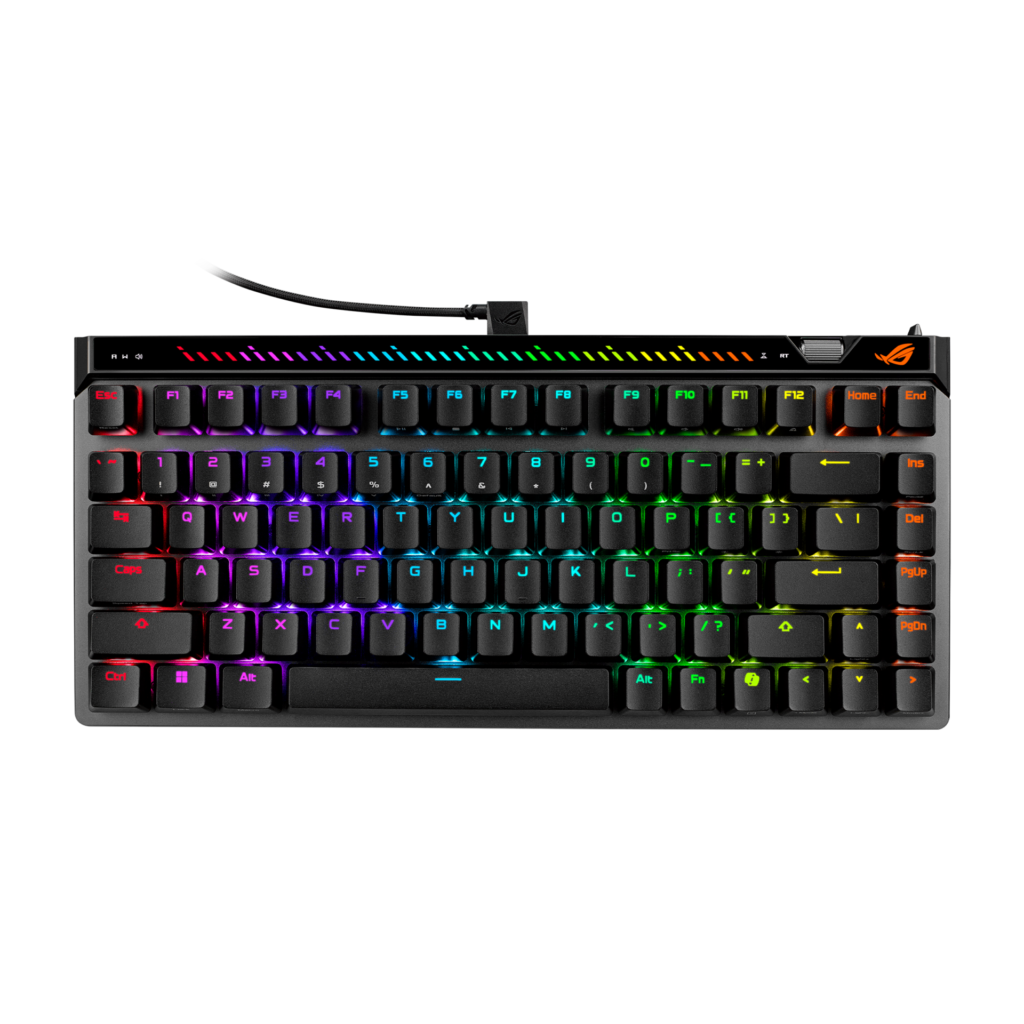
The Falchion Ace 75 HE is ASUS's wired Hall-effect board, and its distinguishing feature is not the switches but the controls around them. A pressable Multiwheel on the side scrolls the actuation point in 0.01 mm steps and switches between adjusting actuation and Rapid Trigger sensitivity. A physical toggle turns Rapid Trigger on and off, a touch panel handles volume, media and lighting, and an RGB light bar above the function row shows what each adjustment is doing. Almost every rival makes you open software to change these.
The switches are ROG HFX V2 and V2X magnets on ASUS's new Hall-effect socket platform, read by a new ROG sensor. The V2X that ships on this variant travels 3.5 mm with 30 gf of initial force and 45 gf at the bottom, and actuation is settable anywhere from 0.1 mm down to the full travel. Rapid Trigger is enabled on WASD by default and reconfigurable, and Speed Tap (ASUS's SOCD handling, where the last of two opposed keys wins) ships off and is armed with a key combination.
Polling is 8,000 Hz over the single USB-C connection. There is no wireless mode and no battery. This is a wired keyboard by design.
The layout is 75 percent at 320 by 145 mm, with six onboard profiles, on-the-fly macro recording, three tilt angles and a six-layer dampening stack of PORON and silicone. Configuration runs through Gear Link in a browser, so there is no Armoury Crate install to sit in the background.
Two things ASUS does not tell you. Its spec tab is seven rows long, so weight, key count, plate, case and mount material are all unpublished. And the hot-swap is real but restricted: ROG puts the magnet on the side of the stem, so third-party center-magnet switches will not fit.
Category strengths
Where the ASUS ROG Falchion Ace 75 HE beats the median
- A much higher polling rate ?8,000 Hz vs 1,000 Hz (median)
- Has rapid trigger ?
- Has adjustable actuation ?
- A lighter actuation force ?30 g vs 45 g (median)
Where the ASUS ROG Falchion Ace 75 HE trails the median
- Fewer connection options ?
How this VS Score was computed
Score 76: each known spec is measured against the median of all keyboards (101 products), then weighted; 50 means level with that median. In classes of six or more, a value beyond the class’s 10th–90th percentile range counts as that limit, so one extreme product cannot set the scale. 53% of the scoreable weight could be used; unknown values, features not applicable to this class and proxies (battery capacity where a rated life exists) add or remove nothing.
| Specification | This product | Cohort median | Score weight | Points moved |
|---|---|---|---|---|
| Polling rate | 8,000 | 1,000 | 0.7 | +35.0 |
| Switch technology | Hall effect | Mechanical | 1 | +33.0 |
| Hot-swappable | Yes | 61% of the class have it | 0.6 | +30.0 |
| Connection | 1 | 3 | 0.8 | −26.4 |
| Rapid trigger | Yes | 25% of the class have it | 0.5 | +25.0 |
| Adjustable actuation | Yes | 24% of the class have it | 0.4 | +20.0 |
| Sound dampening | Yes | 76% of the class have it | 0.3 | +15.0 |
| Rotary knob | Yes | 54% of the class have it | 0.2 | +10.0 |
| Actuation force | 30 — capped at the class’s lower range (40) | 45 | 0.4 | +2.4 |
| Keycap material | PBT | PBT | 0.4 | +0.0 |
| Backlight | RGB | RGB | 0.3 | +0.0 |
Not scored: N-key rollover (unknown: not scored); Analog input (unknown: not scored); Wired latency (unknown: not scored); Wireless latency (unknown: not scored); Front height (unknown: not scored); Bluetooth devices (unknown: not scored); Battery life (unknown: not scored); Battery capacity (unknown: not scored); USB passthrough (unknown: not scored); Programmable keys (standard for the class (99% have it)); Media controls (standard for the class (98% have it)); Onboard profiles (standard for the class (89% have it)); Configuration software (standard for the class (95% have it)).
Editor’s note
This is the Hall-effect board for someone who wants to tune it without opening an app. The Multiwheel and the Rapid Trigger toggle sound like gimmicks until you have spent an evening moving an actuation point in software, restarting a game to test it, and going back again. Doing that on the board itself, in fine steps, with a light bar showing where you are, is better.
Start conservative with the actuation point, as with any magnetic board. At the shallowest setting a resting finger triggers keys, and the mistakes cost more than the milliseconds gain. Work down from the middle of the range until typing stays clean.
Speed Tap is worth understanding before you enable it. SOCD handling is banned or restricted in some competitive titles, and ASUS ships it off for exactly that reason. Check your game's rules before assuming it is allowed.
The hot-swap deserves its asterisk. The sockets are there, but ROG's side-magnet stem design means the usual third-party magnetic switches do not fit, so your options are ASUS's own V2 and V2X until other makers ship compatible ones. Treat it as future-proofing rather than an open platform.
What you give up is wireless (this is wired only, a coherent choice for a board sold on its polling rate) and information. ASUS publishes a seven-row spec sheet, so if you want to know what the plate is made of or what the board weighs before buying, that is not published. Keycaps also vary by SKU: the V2X variants ship PBT and the black V2 ships ABS.
Specifications
Quality bars show where each figure sits between the lowest and highest of the 101 keyboards this VS Score is measured against.
Switches & typing
Performance
Layout & size
Connectivity
Build & sound
Features
Sources and verification
Where the specifications come from
- Official product pagerog.asus.com
- Retailer listing (cross-check)amazon.com
Verification
- First published
- Specifications last checked
- Sheet completeness
- 20 of 34 specifications verified; the rest show as Unknown and are never estimated or scored
- Page type
- Product specification page — Compiled from the manufacturer’s published specifications and the cited sources; this is not a hands-on test.
- Basis
- Research-based: specifications and editorial text were compiled from the documents listed here and the manufacturer’s published data. We have not tested this unit ourselves; where independent measurements are mentioned they belong to the linked publication.
Keyboards with similar specs to the ASUS ROG Falchion Ace 75 HE


Ratings & reviews
No reviews yet. Be the first to share your experience.
The bottom line
The ASUS ROG Falchion Ace 75 HE earns a VS Score of 76, above the median of the 101 keyboards it is measured against (a score of 50 is level with that median).
- Who it’s for
- Players who want magnetic-switch tuning they can do on the keyboard itself (actuation in fine steps, a Rapid Trigger toggle and a light bar showing the setting) in a wired 75% layout.
- Who should look elsewhere
- Anyone who needs wireless, or who wants an open hot-swap platform: ROG's side-magnet stems exclude the standard third-party magnetic switches.
- The trade-off that matters
- The best on-board controls of any Hall-effect board here, against a wired-only design and a seven-row spec sheet that leaves weight, materials and key count unpublished.
- The main alternative
- Wooting 80HE: if analog axis output and a fully documented spec sheet matter more than on-board dials, in a TKL layout.
The VS Score is calculated from the weighted specifications above, each measured against the median of comparable keyboards — a shortlisting guide, not a substitute for your own priorities. See how we score.