
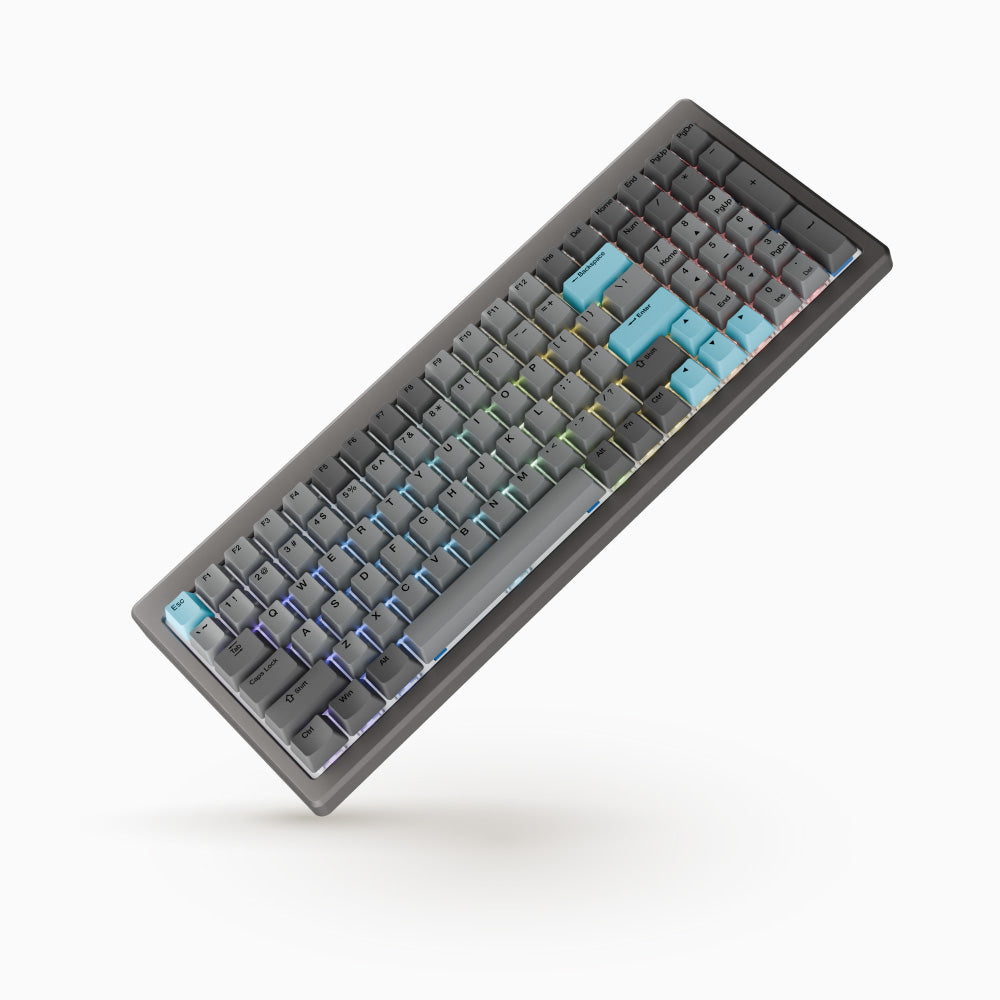
Ducky Cushion 98: Specs, Price, Pros & Cons
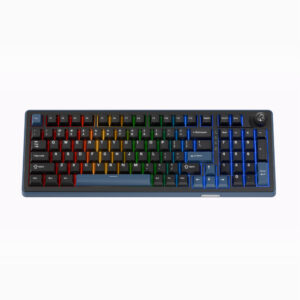
The Cushion 98 is the keyboard Ducky built to be quiet, and the two things that make it so are both new. The Nest Mount is Ducky's replacement for a gasket: a dedicated cushioning layer under the plate that absorbs and spreads keystroke force across the whole board, and the aluminum top case opens tool-free with a quick latch so you can swap between the two included cushioning layers of different softness. Ducky's Shush switches, in silent linear or silent tactile form, sit in hot-swap sockets on an aluminum plate, under Cherry-profile double-shot PBT keycaps.
The layout is what Ducky calls 100 keys in an 80 percent footprint, a 96-percent-class board with a full numpad in 386 x 147 mm, 41.7 mm tall, at 1,216 g. Connection is tri-mode: USB-C wired at Ducky's stated 1,000 Hz report rate, 2.4 GHz through the included dongle, and Bluetooth with up to four paired hosts selected from the Fn row. Rollover is NKRO wired and 6KRO wireless. The advertised 2 kHz figure is the internal matrix scan rate, not the polling rate, and the sheet records the polling figure. The 4,200 mAh battery is rated for up to 63 hours with the RGB off.
Configuration runs through DuckyHub in a Chromium browser or through VIA, with three onboard profiles, Fn-layer media keys and three typing angles from the feet. There is no rotary knob, no USB passthrough and no magnetic sensing, so adjustable actuation, rapid trigger and analog input are all absent by design.
What Ducky does not publish is an actuation force or any latency figure, and its own store shows no price, so those rows are empty. The authorized US retailer prices every color and switch combination the same. The Amazon listing's Silent Green switch is not a name Ducky uses on its own pages. Colors are Nickel and Silver. It is the full-layout board for an office or a shared room where sound is the constraint and a numpad is not negotiable.
Category strengths
Where the Ducky Cushion 98 trails the median
- Much shorter battery life ?63 h vs 313.5 h (median)
- No rotary knob ?
How this VS Score was computed
Score 45: each known spec is measured against the median of all keyboards (101 products), then weighted; 50 means level with that median. In classes of six or more, a value beyond the class’s 10th–90th percentile range counts as that limit, so one extreme product cannot set the scale. 58% of the scoreable weight could be used; unknown values, features not applicable to this class and proxies (battery capacity where a rated life exists) add or remove nothing.
| Specification | This product | Cohort median | Score weight | Points moved |
|---|---|---|---|---|
| Hot-swappable | Yes | 61% of the class have it | 0.6 | +30.0 |
| Rapid trigger | No | 25% of the class have it | 0.5 | −24.0 |
| Battery life | 63 — capped at the class’s lower range (100) | 313.5 | 0.6 | −20.4 |
| Adjustable actuation | No | 24% of the class have it | 0.4 | −19.2 |
| Sound dampening | Yes | 76% of the class have it | 0.3 | +15.0 |
| Rotary knob | No | 54% of the class have it | 0.2 | −9.6 |
| Switch technology | Mechanical | Mechanical | 1 | +0.0 |
| Polling rate | 1,000 | 1,000 | 0.7 | +0.0 |
| Connection | 3 | 3 | 0.8 | +0.0 |
| Bluetooth devices | 4 — capped at the class’s upper range (3) | 3 | 0.3 | +0.0 |
| Keycap material | PBT | PBT | 0.4 | +0.0 |
| Backlight | RGB | RGB | 0.3 | +0.0 |
Not scored: Actuation force (unknown: not scored); N-key rollover (standard for the class (84% have it)); Analog input (not applicable: only 14% of this class have it); Wired latency (unknown: not scored); Wireless latency (unknown: not scored); Front height (unknown: not scored); Battery capacity (capacity is a proxy; the rated battery life is scored instead); USB passthrough (not applicable: only 4% of this class have it); Programmable keys (standard for the class (99% have it)); Media controls (standard for the class (98% have it)); Onboard profiles (standard for the class (89% have it)); Configuration software (standard for the class (95% have it)).
Editor’s note
I would recommend the Cushion 98 to someone who types in a shared office or next to a sleeping household and refuses to give up a numpad or a mechanical feel. Silent switches on a cushioned mount inside an aluminum case is the most thorough approach to quiet I have seen at this price, and the tool-free top case means the softness can be tuned without a screwdriver.
In use, the mount is what you notice: keystrokes feel even across the board, with none of the hollow sound at the edges that cheaper gasket boards have. Try both cushioning layers in the first week. The softer one is quieter and the firmer one is crisper, and preference splits people.
The wireless side needs plain words. The dongle and Bluetooth are convenient, four Bluetooth hosts is generous, but rollover drops to 6KRO off the cable and polling is the same stated rate in every mode. This is a typing keyboard that games adequately, and the figure on the box is a scan rate, not a report rate. Anyone buying it for competitive play has misread the listing.
Battery is a decision too: the rated figure is with the RGB off, and with lighting on a board this size the cable comes out weekly. Keep the dongle in the desktop and Bluetooth for the laptop.
The gaps are Ducky's: no actuation force, no latency, no price on its own store, and a switch name on Amazon that Ducky does not use. Against the Keychron K2 HE, this trades magnetic sensing for silence and a numpad. Against the Logitech MX Keys S it is heavier, louder and far more customizable. Buy it for quiet mechanical typing with a numpad, and a magnetic board if rapid trigger is the point.
Specifications
Quality bars show where each figure sits between the lowest and highest of the 101 keyboards this VS Score is measured against.
Switches & typing
Performance
Layout & size
Connectivity
Build & sound
Features
Sources and verification
Where the specifications come from
- Official product pageducky.global
- Retailer listing (cross-check)amazon.com
Verification
- First published
- Specifications last checked
- Sheet completeness
- 30 of 34 specifications verified; the rest show as Unknown and are never estimated or scored
- Page type
- Product specification page — Compiled from the manufacturer’s published specifications and the cited sources; this is not a hands-on test.
- Basis
- Research-based: specifications and editorial text were compiled from the documents listed here and the manufacturer’s published data. We have not tested this unit ourselves; where independent measurements are mentioned they belong to the linked publication.
Where to buy
Prices and availability may change. Check the retailer before buying. We may earn a commission on purchases.
Price history
Keyboards with similar specs to the Ducky Cushion 98
Ratings & reviews
No reviews yet. Be the first to share your experience.
The bottom line
The Ducky Cushion 98 earns a VS Score of 45, below the median of the 101 keyboards it is measured against (a score of 50 is level with that median).
- Who it’s for
- Typists in shared rooms who want a quiet mechanical board with a numpad: silent switches, cushioned mount, aluminum case and tri-mode wireless, all tunable without tools.
- Who should look elsewhere
- Competitive gamers (standard polling, 6KRO wireless and no magnetic sensing) or anyone who needs a published actuation force or latency before buying.
- The trade-off that matters
- The most thorough approach to quiet at this price, against a spec sheet Ducky left half-empty and a battery that needs the lights off to reach its figure.
- The main alternative
- Keychron K2 HE: if magnetic switches with rapid trigger matter more than silence and a numpad, in a 75% layout at a similar price.
The VS Score is calculated from the weighted specifications above, each measured against the median of comparable keyboards — a shortlisting guide, not a substitute for your own priorities. See how we score.




