Apple Magic Keyboard with Touch ID and Numeric Keypad Specs
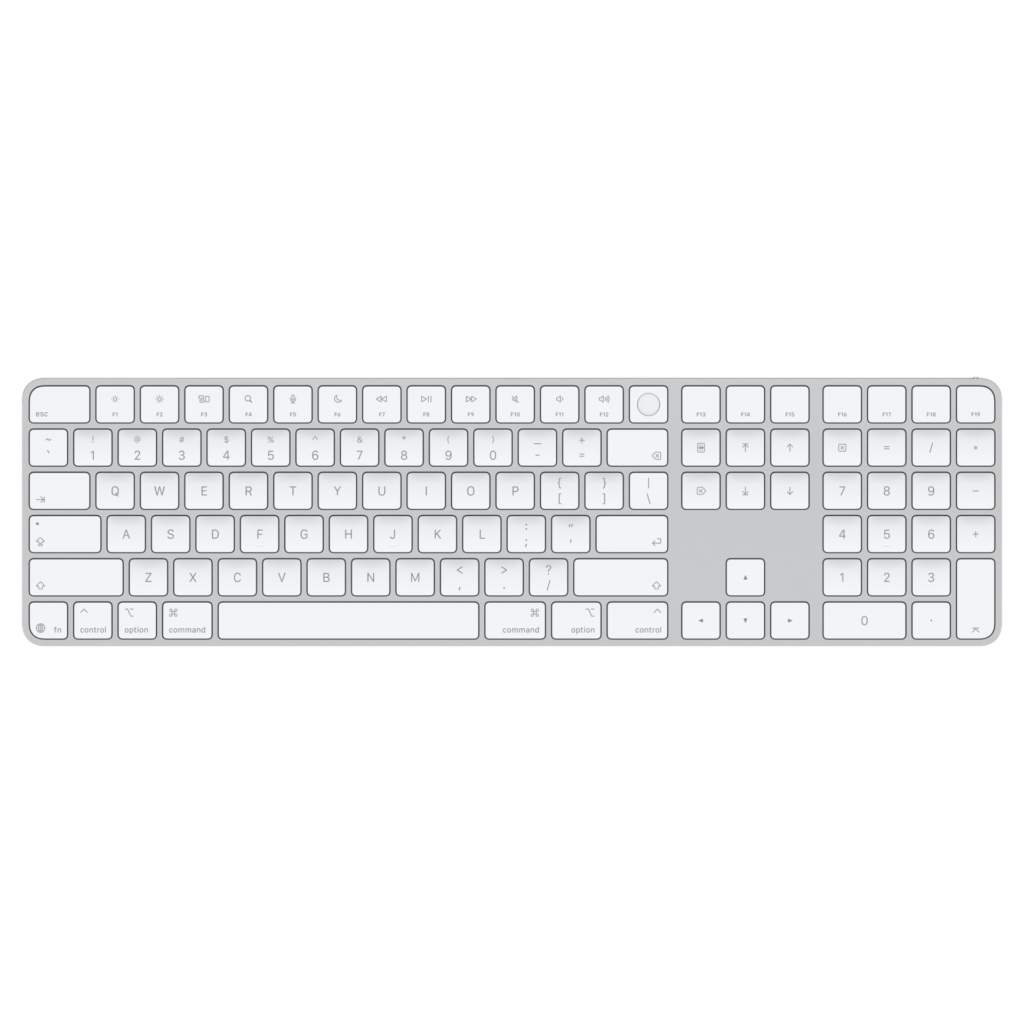
On a Mac mini or a Mac Studio, this keyboard is the only way to get Touch ID. The round key in the top right corner is a fingerprint sensor, and it unlocks the Mac, fills in saved passwords and approves Apple Pay the way the sensor on a MacBook does. No third-party keyboard can offer the same, because the sensor has to pair with the Secure Enclave inside the Mac.
That pairing sets the first limit. Touch ID works only with Macs built on Apple silicon. An Intel iMac, an iPad or an iPhone will take the keyboard for typing and leave the fingerprint part out.
This is the extended version, with a numeric keypad, a block of document navigation keys and function keys that run up to F19. The 2024 revision charges and pairs over USB-C instead of Lightning. It is a wide board, so the mouse sits further out to the right than it would beside Apple's compact model, and the keypad has to earn that space in spreadsheets or accounting work.
Apple publishes very little about how it types. The spec sheet gives the size, the weight, Bluetooth, a USB-C port and multimedia keys, and says a charge lasts about a month or more. It says nothing about key travel, the switch design, backlighting or switching between computers.
It suits a desktop Mac owner who enters numbers all day and would rather touch a key than type a password again. Someone who shares one keyboard between a Mac and a Windows laptop pays for a sensor that works on only one of them.
Category strengths
Where the Apple Magic Keyboard with Touch ID and Numeric Keypad (USB-C) beats the median
- A much lower front height ?4.1 mm vs 20.2 mm (median)
Where the Apple Magic Keyboard with Touch ID and Numeric Keypad (USB-C) trails the median
- Fewer connection options ?
How this VS Score was computed
Score 34: each known spec is measured against the median of all keyboards (101 products), then weighted; 50 means level with that median. In classes of six or more, a value beyond the class’s 10th–90th percentile range counts as that limit, so one extreme product cannot set the scale. 9% of the scoreable weight could be used; unknown values, features not applicable to this class and proxies (battery capacity where a rated life exists) add or remove nothing.
| Specification | This product | Cohort median | Score weight | Points moved |
|---|---|---|---|---|
| Connection | 1 | 3 | 0.8 | −26.4 |
| Front height | 4.1 — capped at the class’s lower range (7) | 20.2 | 0.2 | +10.0 |
Not scored: Switch technology (unknown: not scored); Actuation force (unknown: not scored); Hot-swappable (unknown: not scored); N-key rollover (unknown: not scored); Adjustable actuation (unknown: not scored); Analog input (unknown: not scored); Polling rate (unknown: not scored); Wired latency (unknown: not scored); Wireless latency (unknown: not scored); Rapid trigger (unknown: not scored); Bluetooth devices (unknown: not scored); Battery life (unknown: not scored); Battery capacity (unknown: not scored); USB passthrough (unknown: not scored); Keycap material (unknown: not scored); Sound dampening (unknown: not scored); Backlight (unknown: not scored); Programmable keys (unknown: not scored); Media controls (standard for the class (97% have it)); Rotary knob (unknown: not scored); Onboard profiles (unknown: not scored); Configuration software (unknown: not scored).
Editor’s note
I would buy this keyboard for the sensor and for nothing else. As a typing tool it is ordinary as far as anyone can tell from Apple's own material, and it costs about what a well-made mechanical board does. The fingerprint key is what no rival can copy.
Apple's security guide explains why. The keyboard stores no fingerprints and does no matching itself: it passes the reading to the Secure Enclave in the Mac, which also means a finger enrolled on a MacBook's built-in sensor works on the keyboard, and the other way round. A household with a MacBook and a Mac mini on the same account does not have to enrol twice.
The pairing asks for proof that you are sitting at the computer. Before enrolling a new fingerprint, macOS may ask you to press the Mac's power button twice. On the current Mac mini that button sits underneath the case, which is a small annoyance the first time and a non-issue afterwards.
The black-key version costs more for the same hardware. Unless the color matches the rest of the desk, the white one is the better buy.
The missing pieces are the ones office keyboards now take for granted. Logitech's MX Keys S lights its keys, remembers several computers and switches between them from a key, and costs less. For a desk that has only a Mac on it, those extras are easy to give up.
The USB-C revision needs macOS 15.1 or later, so check the system version on an older Mac before ordering.
Specifications
Quality bars show where each figure sits between the lowest and highest of the 101 keyboards this VS Score is measured against.
Switches & typing
Performance
Layout & size
Connectivity
Build & sound
Features
Sources and verification
Where the specifications come from
- Official product pagesupport.apple.com
- Datasheet or manualsupport.apple.com
- Support and firmware documentationsupport.apple.com
- Independent testingrtings.com
Verification
- First published
- Specifications last checked
- Sheet completeness
- 7 of 34 specifications verified; the rest show as Unknown and are never estimated or scored
- Page type
- Product specification page — Compiled from the manufacturer’s published specifications and the cited sources; this is not a hands-on test.
- Basis
- Research-based: specifications and editorial text were compiled from the documents listed here and the manufacturer’s published data. We have not tested this unit ourselves; where independent measurements are mentioned they belong to the linked publication.
Where to buy
Prices and availability may change. Check the retailer before buying. We may earn a commission on purchases.
Price history
Keyboards with similar specs to the Apple Magic Keyboard with Touch ID and Numeric Keypad (USB-C)
Ratings & reviews
No reviews yet. Be the first to share your experience.
The bottom line
The Apple Magic Keyboard with Touch ID and Numeric Keypad (USB-C) earns a VS Score of 34 on the 9% of specifications we could compare like for like — an indication, not a ranking.
- Who it’s for
- Owners of a Mac mini, Mac Studio or Mac Pro with Apple silicon who want fingerprint unlock and a numeric keypad on the same board.
- Who should look elsewhere
- Anyone on an Intel Mac or on Windows, and anyone who wants lit keys or a quick way to move between several computers.
- The trade-off that matters
- You pay for a sensor that works with one kind of computer, and get a keyboard whose typing feel Apple does not describe in any published detail.
- The main alternative
- Logitech MX Keys S: backlit keys and switching between devices, for a desk that serves a Mac and a PC, at the cost of Touch ID.
The VS Score is calculated from the weighted specifications above, each measured against the median of comparable keyboards — a shortlisting guide, not a substitute for your own priorities. See how we score.