
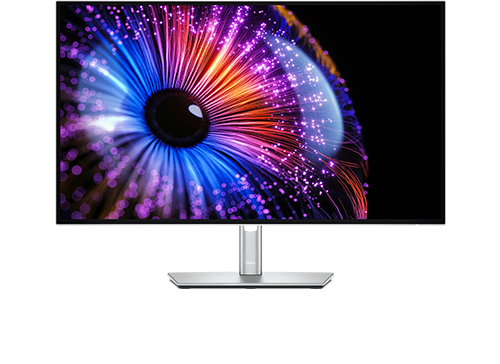
Dell UltraSharp U2726DER: Specs, Price, Pros & Cons
Dell does not sell this monitor on its own website. The U2726DER is the retail-channel version of the UltraSharp 27 Thunderbolt Hub Monitor, sold through Amazon and other stores, and its sheet is the QHD IPS Black panel with a Thunderbolt 4 hub that dell.com offers as the U2724DE. The idea is the same in both cases: one cable back to a laptop carries the picture, the data, the charging and a wired network connection, and the monitor takes the place of a dock.
What separates it from an ordinary office display is the panel technology and the amount of plumbing behind it. IPS Black is Dell's name for LG's higher-contrast IPS variant, which keeps the wide viewing angles of IPS while roughly doubling the depth of black over a conventional panel. Behind the screen sit a Thunderbolt upstream port, a second Thunderbolt port for daisy-chaining, a DisplayPort output, a bank of USB-A sockets, a pop-out pair of quick-access ports on the underside, wired Ethernet, and a switch that hands the keyboard and mouse to whichever computer is on screen. An ambient light sensor adjusts brightness and color temperature on its own.
This is a monitor for someone who works from a laptop at a fixed desk, particularly on a Mac, who wants QHD scaling at 27 inches rather than the sharper, smaller-text alternative. It is not a media or gaming display. There is no HDR certification, the backlight is edge-lit with no local dimming, there are no speakers, and the audio jack is a line-out for external speakers, with no headphone socket.
Priced below Dell's sharper hub model, the U2726DER makes sense only if the hub will be used. A desktop owner with a graphics card and a wired network gains almost nothing from the extra cost, while a laptop owner gets to retire a dock, a charger and a cable tangle in one purchase.
Category strengths
Where the Dell UltraSharp U2726DER beats the median
- Has ethernet ?
- Has KVM switch ?
- A slightly higher refresh rate ?120 Hz vs 110 Hz (median)
Where the Dell UltraSharp U2726DER trails the median
- Lower peak brightness ?350 nits vs 500 nits (median)
- No headphone output ?
- A lower pixel density ?109 ppi vs 163 ppi (median)
- A lower contrast ratio ?2000:1 vs 2500:1 (median)
- Slower USB-C charging ?90 W vs 118 W (median)
- Slightly narrower DCI-P3 colour coverage ?98 % vs 99 % (median)
How this VS Score was computed
Score 52: each known spec is measured against the median of IPS office monitors, 27 to 31 inches (8 products), then weighted; 50 means level with that median. In classes of six or more, a value beyond the class’s 10th–90th percentile range counts as that limit, so one extreme product cannot set the scale. 64% of the scoreable weight could be used; unknown values, features not applicable to this class and proxies (battery capacity where a rated life exists) add or remove nothing.
| Specification | This product | Cohort median | Score weight | Points moved |
|---|---|---|---|---|
| USB-C | Yes | 75% of the class have it | 0.5 | +25.0 |
| Resolution | 1440p | 4K | 1.2 | −20.4 |
| USB hub | Yes | 75% of the class have it | 0.3 | +15.0 |
| Peak brightness | 350 | 500 | 0.8 | −12.0 |
| Swivel | Yes | 75% of the class have it | 0.2 | +10.0 |
| Pivot | Yes | 75% of the class have it | 0.2 | +10.0 |
| KVM switch | Yes | 50% of the class have it | 0.2 | +10.0 |
| Ethernet | Yes | 38% of the class have it | 0.2 | +10.0 |
| Built-in speakers | No | 38% of the class have it | 0.2 | −9.6 |
| Headphone output | No | 57% of the class have it | 0.2 | −9.6 |
| Pixel density | 109 | 163 | 0.5 | −8.5 |
| Contrast ratio | 2,000 | 2,500 | 0.6 | −6.0 |
| Variable refresh rate | Yes | 75% of the class have it | 0.1 | +5.0 |
| Refresh rate | 120 | 110 | 0.6 | +3.0 |
| USB-C power delivery | 90 — capped at the class’s lower range (96) | 118 | 0.3 | −2.7 |
| DCI-P3 coverage | 98 | 99 | 0.6 | −0.6 |
| Screen size | 27 | 27 | 1.2 | +0.0 |
| Panel type | IPS | IPS | 0.8 | +0.0 |
| Color depth | 10 | 10 | 0.3 | +0.0 |
| Response time | 5 | 5 | 0.24 | +0.0 |
| HDMI ports | 1 | 1 | 0.4 | +0.0 |
| DisplayPort inputs | 1 | 1 | 0.4 | +0.0 |
Not scored: HDR (unknown: not scored); Local dimming (unknown: not scored); Local dimming zones (unknown: not scored); Adaptive sync (unknown: not scored); Motion blur reduction (unknown: not scored); Input lag (unknown: not scored); Height adjustment (standard for the class (88% have it)); Tilt (standard for the class (100% have it)); Webcam (not applicable: only 13% of this class have it); Microphone (not applicable: only 14% of this class have it); Picture-by-picture (standard for the class (86% have it)).
Editor’s note
The hub is what you are paying for, so start there. Thunderbolt 4 upstream with up to 90 W of charging covers every ultraportable and most 14-inch workstation laptops, though a 16-inch machine with a discrete GPU may still ask for its own brick under load. The 2.5 GbE jack is a real upgrade over the gigabit ports on older Dell hubs if your office network supports it, and the keyboard-and-mouse switching means a work laptop and a personal desktop can share one set of peripherals without a separate box. Daisy-chaining a second display from the Thunderbolt output is the feature I would use most.
On the picture, be realistic. IPS Black is noticeably better than ordinary IPS in a dim room and still nowhere near OLED or a good VA for black depth. Brightness is office-grade, and this is a very good SDR productivity screen, nothing more ambitious. The refresh rate helps scrolling and cursor motion feel smooth, but it does not make this a gaming monitor.
The part that would make me hesitate is the audio jack. Dell labels it a line-out and says it is not meant for headphones, which is an odd omission on a monitor built to replace a dock. Factor in a USB or Bluetooth headset if you plug in at your desk.
Value depends on how you shop. Dell's own site carries a near-identical model under a different name, and it is worth checking which of the two is cheaper on the day you buy. If you would never connect a laptop, a plain QHD IPS monitor and a cheap USB hub do the same job for far less.
Specifications
Quality bars show where each figure sits between the lowest and highest of the 8 IPS office monitors, 27 to 31 inches this VS Score is measured against.
Picture
Gaming
Ergonomics & design
Connectivity
Features
Sources and verification
Where the specifications come from
- Official product pagedell.com
- Retailer listing (cross-check)amazon.com
Verification
- First published
- Specifications last checked
- Sheet completeness
- 35 of 42 specifications verified; the rest show as Unknown and are never estimated or scored
- Page type
- Product specification page — Compiled from the manufacturer’s published specifications and the cited sources; this is not a hands-on test.
- Basis
- Research-based: specifications and editorial text were compiled from the documents listed here and the manufacturer’s published data. We have not tested this unit ourselves; where independent measurements are mentioned they belong to the linked publication.
Where to buy
Prices and availability may change. Check the retailer before buying. We may earn a commission on purchases.
Price history
Monitors with similar specs to the Dell UltraSharp U2726DER

Ratings & reviews
No reviews yet. Be the first to share your experience.
The bottom line
The Dell UltraSharp U2726DER earns a VS Score of 52, above the median of the 8 IPS office monitors, 27 to 31 inches it is measured against (a score of 50 is level with that median).
- Who it’s for
- Someone who works from a laptop at a fixed desk and wants one Thunderbolt cable to replace the dock, the charger and the network adapter.
- Who should look elsewhere
- Desktop owners, gamers and anyone hoping for HDR: the hub is wasted without a laptop, there is no adaptive-sync or HDR certification, and the backlight is edge-lit.
- The trade-off that matters
- You pay for plumbing rather than picture. Against a plain QHD IPS monitor the extra money buys Thunderbolt, Ethernet and KVM, so the value only exists if you plug a laptop in daily.
- The main alternative
- Dell U2725QE: the same hub design with a 4K panel, for buyers who want sharper text and are willing to pay more.
The VS Score is calculated from the weighted specifications above, each measured against the median of comparable IPS office monitors, 27 to 31 inches — a shortlisting guide, not a substitute for your own priorities. See how we score.





