
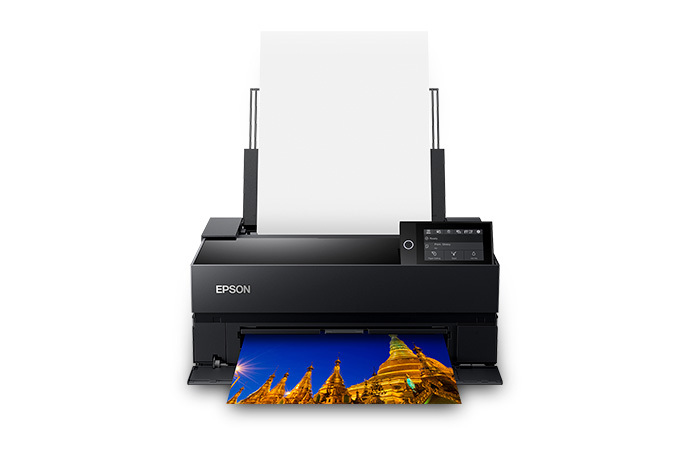
Epson SureColor P700: Specs, Features, Pros & Cons
Strip the photography out and the P700 looks like a badly specified printer. There is no scanner, no copier, no document feeder, no fax, and the paper capacity is smaller than on machines costing a fraction as much. Judged as an office device it fails on every axis, which is the clearest available signal that it was never built to be one.
It belongs to a shrinking category: desktop printers sold to people for whom the print is the end product rather than a by-product of some other task. That market used to be crowded and is now down to a handful of models from two manufacturers, which affects the buying decision in ways a spec sheet cannot show. Fewer rivals means fewer paper profiles circulating, fewer third-party ink options, and a support tail that depends entirely on the maker staying interested in the segment.
The features worth caring about are all about what the paper does. A printer aimed at fine art work has to move thick, stiff sheets without bending them, hold a color position across a long run, and let you watch the sheet as it feeds. Almost everything else on the specification (the wireless, the mobile app, the network port) is the same commodity hardware Epson fits to its office machines, and none of it should influence the choice.
The gate here is not the purchase. It is the standing commitment that follows: a set of individual cartridges that all have to be in stock at once, a maintenance box that is a consumable in its own right, and ink consumed by nozzle maintenance whether you print or not. A printer of this type is cheap to own if it runs every week and quietly expensive if it sits between projects, so the honest question to ask before buying is how often you will use it.
Category strengths
Where the Epson SureColor P700 beats the median
- Has touchscreen display ?
- A higher print resolution ?5,760 dpi vs 4,800 dpi (median)
Where the Epson SureColor P700 trails the median
- No all-in-one ?
- No automatic document feeder ?
- A much heavier build ?13.6 kg vs 7.98 kg (median)
- A lower input tray capacity ?120 sheets vs 150 sheets (median)
How this VS Score was computed
Score 31: each known spec is measured against the median of all printers (65 products), then weighted; 50 means level with that median. In classes of six or more, a value beyond the class’s 10th–90th percentile range counts as that limit, so one extreme product cannot set the scale. 39% of the scoreable weight could be used; unknown values, features not applicable to this class and proxies (battery capacity where a rated life exists) add or remove nothing.
| Specification | This product | Cohort median | Score weight | Points moved |
|---|---|---|---|---|
| All-in-one | No | 85% of the class have it | 1 | −48.0 |
| Automatic document feeder | No | 55% of the class have it | 1 | −48.0 |
| Ethernet | Yes | 54% of the class have it | 0.5 | +25.0 |
| Touchscreen display | Yes | 45% of the class have it | 0.5 | +25.0 |
| Supertank / refillable ink | No | 30% of the class have it | 0.5 | −24.0 |
| Duplex scanning | No | 23% of the class have it | 0.5 | −24.0 |
| Input tray capacity | 120 | 150 | 1 | −10.0 |
| Fax | No | 35% of the class have it | 0.2 | −9.6 |
| Weight | 13.6 | 7.98 | 0.3 | −6.3 |
| Print resolution | 5,760 | 4,800 | 0.5 | +5.0 |
Not scored: Color printing (standard for the class (88% have it)); Print speed (black) (unknown: not scored); Print speed (color) (unknown: not scored); Automatic duplex printing (unknown: not scored); Monthly duty cycle (unknown: not scored); ADF capacity (unknown: not scored); Output tray capacity (unknown: not scored); Wi-Fi (standard for the class (97% have it)); Wi-Fi Direct (standard for the class (90% have it)); USB (standard for the class (100% have it)); Apple AirPrint (standard for the class (97% have it)); Mobile app printing (standard for the class (100% have it)).
Editor’s note
The P700 is a specialist tool and it does not pretend otherwise. Ten UltraChrome PRO10 pigment inks feed a 10-channel MicroPiezo head, and crucially both Photo Black and Matte Black have their own nozzles. Older photo printers made you swap between the two and flushed ink every time you changed paper type. Not having to think about that is worth more in daily use than any number on the spec sheet.
Speed is the honest limitation. Epson quotes 1 minute 29 seconds for a letter-size print and 2 minutes 23 seconds for 13×19, and it does not publish an ISO ppm figure because nobody buys this to print documents. Feed it a stack of paper and you will be waiting.
The media handling is where the money goes. It takes sheets up to 1.5 mm thick through a front feeder, so heavy art papers go through flat instead of being bent around a roller, and roll support is standard here rather than optional as it is on the P900. Maximum print length is 129 inches, which is the panoramic feature people use. There is a 4.3 inch touchscreen, Ethernet alongside Wi-Fi, and an interior light so you can see what the paper is doing.
What I would think hard about is running cost. The cartridges hold 25 ml each across ten colors, and there is a maintenance box to replace on top of that. Print rarely and you will lose ink to nozzle checks and cleaning cycles. A printer like this rewards regular use and punishes neglect.
It suits a photographer selling or exhibiting prints. It is the wrong purchase for someone who wants nice holiday photos a few times a year. Canon's imagePROGRAF PRO-310 is the direct rival, with nine inks plus a Chroma Optimizer that lifts gloss uniformity, and it is worth comparing on the papers you print.
Specifications
Quality bars show where each figure sits between the lowest and highest of the 65 printers this VS Score is measured against.
Printing
Scanning & copying
Paper handling
Connectivity
Design
Sources and verification
Where the specifications come from
- Official product pageepson.com
- Independent testingrtings.com
Verification
- First published
- Specifications last checked
- Sheet completeness
- 18 of 24 specifications verified; the rest show as Unknown and are never estimated or scored
- Page type
- Product specification page — Compiled from the manufacturer’s published specifications and the cited sources; this is not a hands-on test.
- Basis
- Research-based: specifications and editorial text were compiled from the documents listed here and the manufacturer’s published data. We have not tested this unit ourselves; where independent measurements are mentioned they belong to the linked publication.
Printers with similar specs to the Epson SureColor P700

Ratings & reviews
No reviews yet. Be the first to share your experience.
The bottom line
The Epson SureColor P700 earns a VS Score of 31 on the 39% of specifications we could compare like for like — an indication, not a ranking.
- Who it’s for
- Photographers who print regularly and sell, exhibit or frame the results, particularly on heavy matte and fine art papers that need the flat front feed path.
- Who should look elsewhere
- Occasional printers. Leave it idle for weeks and cleaning cycles will quietly drink the cartridges before you print anything worth keeping.
- The trade-off that matters
- Dedicated Photo Black and Matte Black nozzles remove the single most annoying thing about pigment photo printers, and you pay for it in speed and in a full rack of cartridges to keep stocked.
- The main alternative
- Canon's imagePROGRAF PRO-310 is the obvious cross-shop, with a Chroma Optimizer that evens out gloss differential on glossy stock. It is worth comparing on the specific papers you print.
The VS Score is calculated from the weighted specifications above, each measured against the median of comparable printers — a shortlisting guide, not a substitute for your own priorities. See how we score.




