
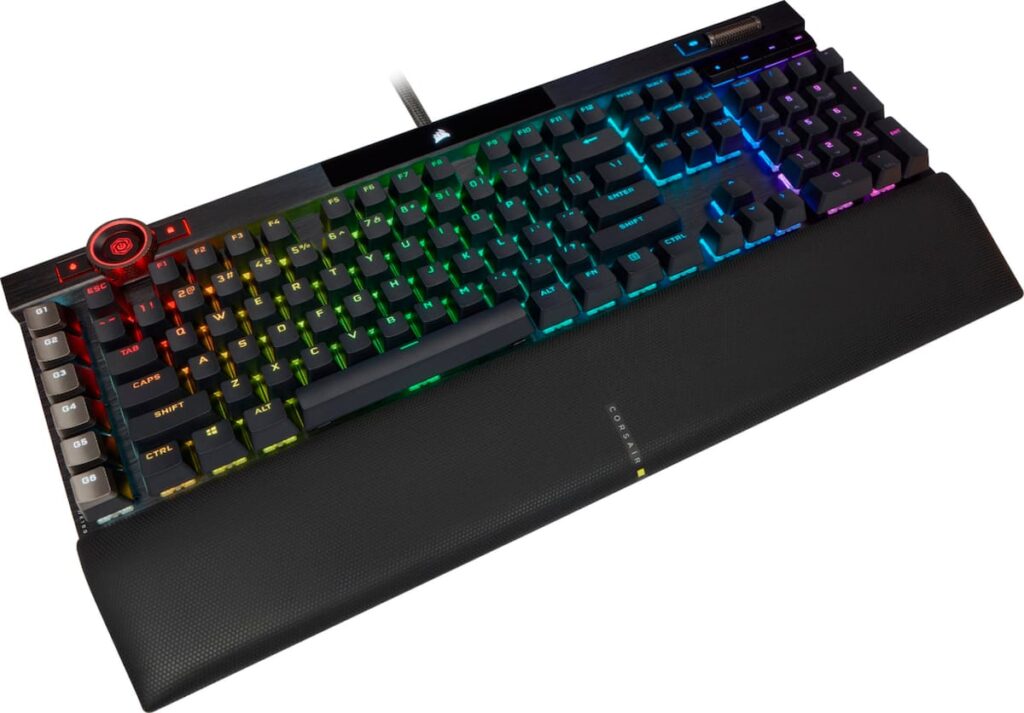
Corsair K100 RGB: Specs, Price, Pros & Cons
Six dedicated macro keys, a machined control wheel, a lighting strip and a USB passthrough port all sit on one wired, full-size Corsair board, the K100 RGB, and few keyboards carry that much hardware around the keys any more.
It sits at the top of Corsair's wired range, above plainer full-size models such as the K70 CORE, and its aluminum top plate and doubleshot PBT keycaps are the parts meant to justify the step up. Polling runs at several times the rate most boards use, and the passthrough port takes a wireless dongle or a headset lead without reaching behind the computer. Media keys and full N-key rollover complete a list that leaves little out.
One product name covers two switch builds. This one uses the Cherry MX Speed Silver, a linear switch with a very short actuation distance tuned for fast repeated presses. Corsair also sold the board with its own OPX optical switches, and the two type very differently, so match the switch on any listing before buying. Two limits come with it. The switches are soldered, so the build you choose stays for the life of the keyboard, and the cable is the only connection, with no receiver and no Bluetooth.
The buyer it was made for plays far more than they write, has a wide desk with room for a wrist rest, and already runs Corsair's iCUE software for a mouse or headset. Anyone who spends the day in documents will find the light switches pick up stray keystrokes, and anyone short of desk width will find the frame wider than the space they have.
Category strengths
Where the Corsair K100 RGB beats the median
- A much higher polling rate ?8,000 Hz vs 1,000 Hz (median)
- Has USB passthrough ?
Where the Corsair K100 RGB trails the median
- No hot-swappable switches ?
- Fewer connection options ?
How this VS Score was computed
Score 42: each known spec is measured against the median of all keyboards (101 products), then weighted; 50 means level with that median. In classes of six or more, a value beyond the class’s 10th–90th percentile range counts as that limit, so one extreme product cannot set the scale. 52% of the scoreable weight could be used; unknown values, features not applicable to this class and proxies (battery capacity where a rated life exists) add or remove nothing.
| Specification | This product | Cohort median | Score weight | Points moved |
|---|---|---|---|---|
| Polling rate | 8,000 | 1,000 | 0.7 | +35.0 |
| Hot-swappable | No | 61% of the class have it | 0.6 | −28.8 |
| Connection | 1 | 3 | 0.8 | −26.4 |
| Rapid trigger | No | 25% of the class have it | 0.5 | −24.0 |
| Adjustable actuation | No | 24% of the class have it | 0.4 | −19.2 |
| USB passthrough | Yes | 4% of the class have it | 0.2 | +10.0 |
| Rotary knob | Yes | 53% of the class have it | 0.2 | +10.0 |
| Switch technology | Mechanical | Mechanical | 1 | +0.0 |
| Actuation force | 45 | 45 | 0.4 | +0.0 |
| Keycap material | PBT | PBT | 0.4 | +0.0 |
| Backlight | RGB | RGB | 0.3 | +0.0 |
Not scored: N-key rollover (standard for the class (85% have it)); Analog input (not applicable: only 14% of this class have it); Wired latency (unknown: not scored); Wireless latency (unknown: not scored); Front height (unknown: not scored); Bluetooth devices (unknown: not scored); Battery life (unknown: not scored); Battery capacity (unknown: not scored); Sound dampening (unknown: not scored); Programmable keys (standard for the class (99% have it)); Media controls (standard for the class (97% have it)); Onboard profiles (standard for the class (89% have it)); Configuration software (standard for the class (95% have it)).
Editor’s note
The K100 RGB is Corsair's flagship, and it behaves like one, for better and for worse. The aluminum top plate, the 44-zone lighting strip and the machined control wheel give it real presence on a desk, but it is also 470 mm wide before you attach the wrist rest, and the full assembly comes in close to 1.3 kg. Measure your desk before you order.
Two different switch options share this product name. This page covers the Cherry MX Speed Silver build, which actuates at 1.2 mm under 45 g of force. That is superb for twitch shooters and awkward for long typing sessions, because resting a finger slightly too heavily produces stray characters until you adapt to it. If you type far more than you play, the OPX optical version or a slower Cherry switch is the better purchase.
What justifies the price is the hardware around the switches. Six dedicated macro keys, a programmable control wheel, 8 MB of onboard storage for roughly 200 profiles and a USB 2.0 passthrough port are all uncommon, and the passthrough is handy for a wireless dongle or a headset cable. The doubleshot PBT keycaps should outlast the rest of the board.
The drawbacks are real. There is no hot-swap socket, so the switches you pick are the switches you keep for the life of the keyboard. iCUE is a heavy piece of software to leave running. The 8,000 Hz polling rate is a headline figure that costs CPU cycles for a benefit almost nobody can feel.
Buy it if you want a maximalist full-size board with macro keys and passthrough and you already run other Corsair hardware. Skip it if you want a quiet office keyboard, a compact layout, or the freedom to change switches later.
Specifications
Quality bars show where each figure sits between the lowest and highest of the 101 keyboards this VS Score is measured against.
Switches & typing
Performance
Layout & size
Connectivity
Build & sound
Features
Sources and verification
Where the specifications come from
- Official product pagecorsair.com
- Independent testingrtings.com
Verification
- First published
- Specifications last checked
- Sheet completeness
- 24 of 34 specifications verified; the rest show as Unknown and are never estimated or scored
- Page type
- Product specification page — Compiled from the manufacturer’s published specifications and the cited sources; this is not a hands-on test.
- Basis
- Research-based: specifications and editorial text were compiled from the documents listed here and the manufacturer’s published data. We have not tested this unit ourselves; where independent measurements are mentioned they belong to the linked publication.
Where to buy
Prices and availability may change. Check the retailer before buying. We may earn a commission on purchases.
Price history
Keyboards with similar specs to the Corsair K100 RGB


Ratings & reviews
No reviews yet. Be the first to share your experience.
The bottom line
The Corsair K100 RGB earns a VS Score of 42, below the median of the 101 keyboards it is measured against (a score of 50 is level with that median).
- Who it’s for
- A player with a wide desk and other Corsair gear who wants macro keys, a control wheel and a passthrough port on one full-size board.
- Who should look elsewhere
- Writers and owners of small desks should look elsewhere. Resting fingers produce stray characters on these switches, and you cannot change them later.
- The trade-off that matters
- The hair-trigger switches are the deciding compromise: quick in shooters, error-prone in long emails, and fixed for the life of the keyboard.
- The main alternative
- Corsair K70 CORE: Corsair's stripped-back full-size board with a knob and media keys, for someone who wants the layout without the macro bank and bulk.
The VS Score is calculated from the weighted specifications above, each measured against the median of comparable keyboards — a shortlisting guide, not a substitute for your own priorities. See how we score.




