
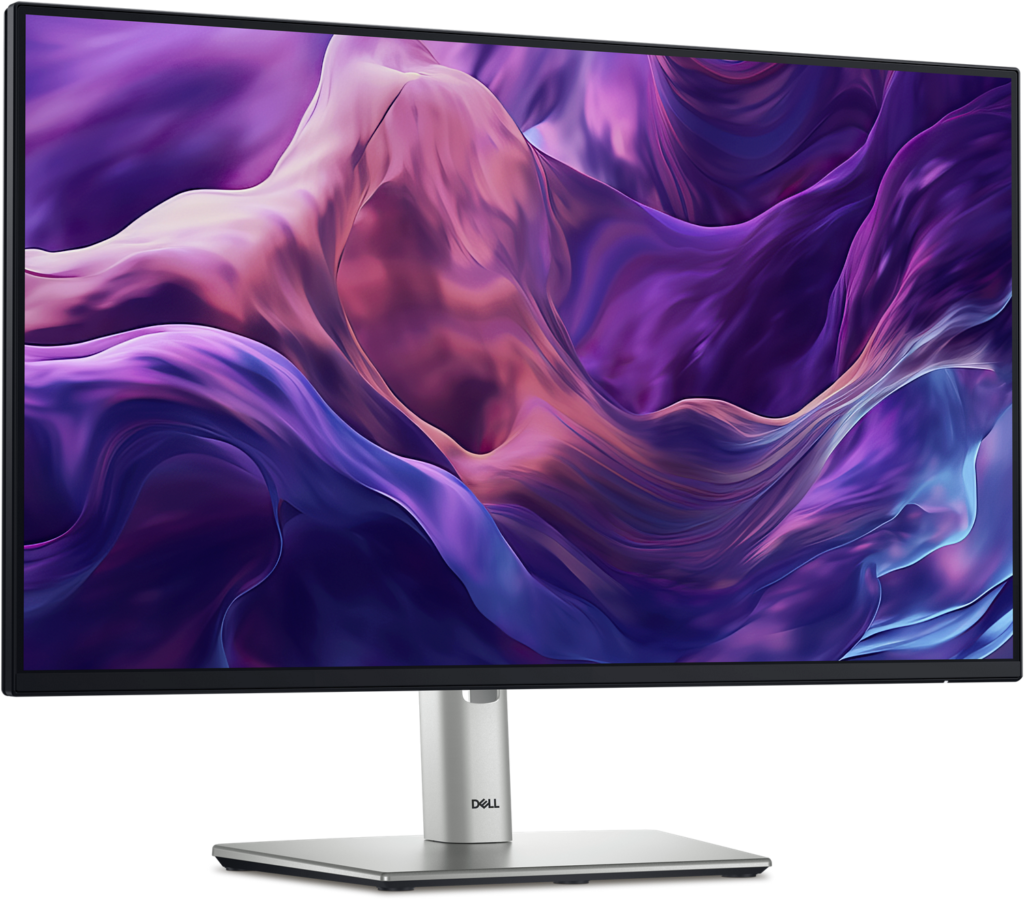
Dell P2425H: Specs, Price, Pros & Cons
Monitors like this one are rarely chosen by the person who ends up using them. They are bought in tens by whoever equips the desks, and the criteria are boring in a way that turns out to matter: does it adjust to fit a person, will spare parts still exist in four years, can it be plugged into whatever the estate happens to contain, and does it sit neatly beside an identical unit.
Seen that way the Dell makes sense. The panel is ordinary by design, an office screen for documents, mail and video calls in a room with the lights on, and the money has gone into the parts that survive contact with real desks. The stand moves through the full range including rotation into portrait, which is useful for reading code or long documents and is missing from most screens sold at this level.
The higher refresh rate is a modern touch more than a feature. It makes dragging windows feel smoother and will go unnoticed by anyone who was not looking for it.
The trap is the USB-C port. It is there for peripherals and a trickle of power, not for video and not for charging a laptop, which is the opposite of what the label leads people to assume. Anyone hoping to retire a dock should read the USB-C specification twice.
The input selection also reaches further back than most, since alongside the modern connections there is a legacy analog port, which is either irrelevant to you or the exact reason this model was chosen.
Right for a fleet, an office refresh or a second screen. Wrong for anyone who wanted one cable to a laptop.
Category strengths
Where the Dell P2425H trails the median
- No USB-C ?
- Lower peak brightness ?250 nits vs 375 nits (median)
- No headphone output ?
- No KVM switch ?
- No picture-by-picture ?
- A lower pixel density ?92 ppi vs 140 ppi (median)
- A lower contrast ratio ?1500:1 vs 2000:1 (median)
- A smaller screen ?24" (60.96 cm) vs 27" (68.58 cm) (median)
- A lower refresh rate ?100 Hz vs 120 Hz (median)
- A lower color depth ?8 bit vs 10 bit (median)
How this VS Score was computed
Score 31: each known spec is measured against the median of IPS office monitors (14 products), then weighted; 50 means level with that median. In classes of six or more, a value beyond the class’s 10th–90th percentile range counts as that limit, so one extreme product cannot set the scale. 61% of the scoreable weight could be used; unknown values, features not applicable to this class and proxies (battery capacity where a rated life exists) add or remove nothing.
| Specification | This product | Cohort median | Score weight | Points moved |
|---|---|---|---|---|
| Resolution | 1080p | 4K | 1.2 | −30.0 |
| USB-C | No | 64% of the class have it | 0.5 | −24.0 |
| Local dimming | No | 25% of the class have it | 0.4 | −19.2 |
| HDR | None | DisplayHDR 400 | 0.5 | −16.5 |
| Built-in speakers | No | 33% of the class have it | 0.2 | −9.6 |
| Headphone output | No | 56% of the class have it | 0.2 | −9.6 |
| KVM switch | No | 58% of the class have it | 0.2 | −9.6 |
| Ethernet | No | 42% of the class have it | 0.2 | −9.6 |
| Picture-by-picture | No | 82% of the class have it | 0.2 | −9.6 |
| Pixel density | 92 — capped at the class’s lower range (93) | 140 | 0.5 | −8.5 |
| Peak brightness | 250 — capped at the class’s lower range (300) | 375 | 0.8 | −8.0 |
| Screen size | 24 | 27 | 1.2 | −7.2 |
| Contrast ratio | 1,500 | 2,000 | 0.6 | −7.2 |
| Refresh rate | 100 | 120 | 0.6 | −4.8 |
| Color depth | 8 | 10 | 0.3 | −3.0 |
| Panel type | IPS | IPS | 0.8 | +0.0 |
| Response time | 5 | 5 | 0.24 | +0.0 |
| HDMI ports | 1 | 1 | 0.4 | +0.0 |
| DisplayPort inputs | 1 | 1 | 0.4 | +0.0 |
Not scored: DCI-P3 coverage (unknown: not scored); Local dimming zones (unknown: not scored); Adaptive sync (unknown: not scored); Variable refresh rate (unknown: not scored); Motion blur reduction (not scored for this class of product); Input lag (too few comparable peers (1, need 3)); Height adjustment (standard for the class (93% have it)); Tilt (standard for the class (100% have it)); Swivel (standard for the class (86% have it)); Pivot (standard for the class (83% have it)); USB-C power delivery (unknown: not scored); USB hub (standard for the class (86% have it)); Webcam (not applicable: only 10% of this class have it); Microphone (not applicable: only 11% of this class have it).
Editor’s note
The Dell P2425H is an office monitor first and last. You get a 23.8-inch 1920×1080 IPS panel running at 100 Hz, 99% sRGB coverage, a 1500:1 contrast ratio and 250 nits of brightness. Those are ordinary numbers, and they are meant to be: this is a screen for spreadsheets, email and video calls in a lit office.
Where it earns its keep is the hardware around the panel. The stand adjusts for height, tilt, swivel and pivot, so it can be set properly for your posture or rotated into portrait for long documents and code. There is a built-in USB hub with three downstream Type-A ports plus a Type-C, and the three-sided thin bezel makes it tidy in a multi-monitor row. The faster refresh is a small but real upgrade over the 60 Hz screens that still dominate this class.
The compromises are worth knowing before you buy. The USB-C port carries data and 15 W of power only. It is not a video input and it will not charge a laptop, so single-cable docking is off the table. Video inputs are one HDMI 1.4, one DisplayPort 1.2 and a legacy VGA, which is dated even for an office panel. There are no speakers and no HDR, and 1080p across 23.8 inches works out to about 92 pixels per inch, so text is readable without being crisp.
Buy it if you are outfitting a desk or an office fleet and value ergonomics, sRGB accuracy and a USB hub over pixel density. Look elsewhere if you want single-cable USB-C docking, a sharper 1440p image, or anything approaching a gaming or media display.
Specifications
Quality bars show where each figure sits between the lowest and highest of the 14 IPS office monitors this VS Score is measured against.
Picture
Gaming
Ergonomics & design
Connectivity
Features
Sources and verification
Where the specifications come from
- Datasheet or manualdell.com
- Independent testingrtings.com
Verification
- First published
- Specifications last checked
- Sheet completeness
- 35 of 42 specifications verified; the rest show as Unknown and are never estimated or scored
- Page type
- Product specification page — Compiled from the manufacturer’s published specifications and the cited sources; this is not a hands-on test.
- Basis
- Research-based: specifications and editorial text were compiled from the documents listed here and the manufacturer’s published data. We have not tested this unit ourselves; where independent measurements are mentioned they belong to the linked publication.
Where to buy
Prices and availability may change. Check the retailer before buying. We may earn a commission on purchases.
Price history
Monitors with similar specs to the Dell P2425H


Ratings & reviews
No reviews yet. Be the first to share your experience.
The bottom line
The Dell P2425H earns a VS Score of 31, below the median of the 14 IPS office monitors it is measured against (a score of 50 is level with that median).
- Who it’s for
- An IT buyer fitting out an office, or anyone adding a second screen, who values a stand that turns to portrait and a USB hub over sharpness.
- Who should look elsewhere
- Look elsewhere if you hoped to retire a laptop dock. The USB-C port carries data and a little power, never video.
- The trade-off that matters
- Everything went into the stand and the ports, so the panel is plain, with modest brightness and soft-edged text at this pixel density.
- The main alternative
- Dell P2423D: Dell's office screen of the same size at a sharper resolution, for people who read more than they scroll, at a lower refresh rate.
The VS Score is calculated from the weighted specifications above, each measured against the median of comparable IPS office monitors — a shortlisting guide, not a substitute for your own priorities. See how we score.




