
Epson EcoTank ET-3950: Specs, Price, Pros & Cons
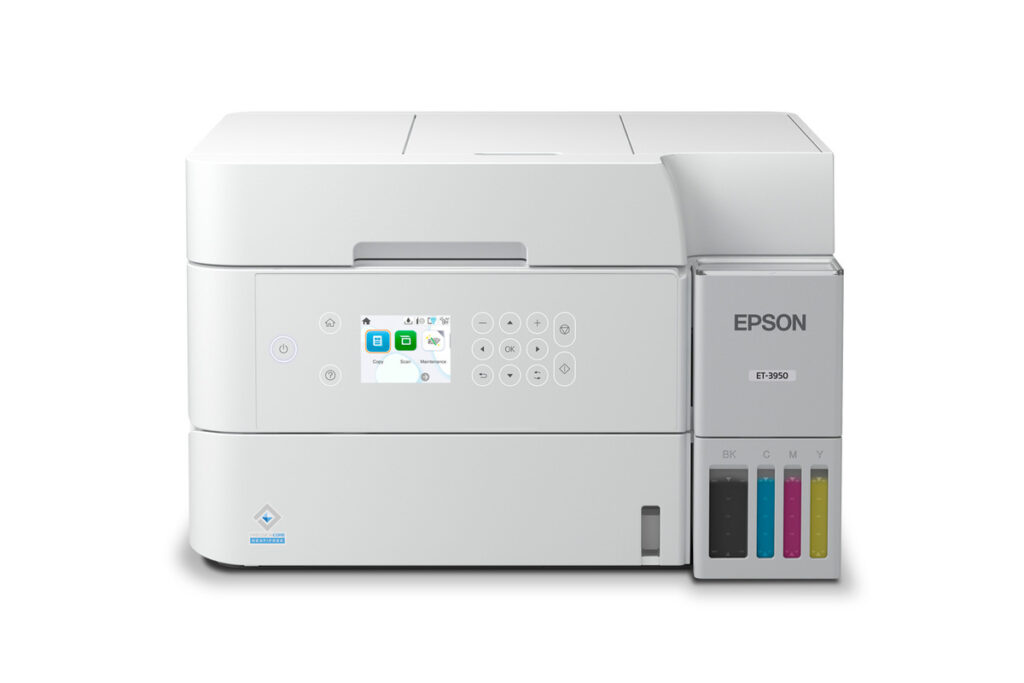
A paper cassette at the front, a document feeder on the lid and a network socket at the back mark the ET-3950 as the EcoTank meant for a home office. The bottles and tanks work like those on every other EcoTank. The paper handling around them is built for a desk that prints every working day, where loading a rear slot a few sheets at a time would soon wear thin.
Epson places it one rung below a fax-equipped sibling that uses the same body. Everything that saves time on paperwork is here. The feeder copies and scans a stack without anyone standing over it, pages print on both sides automatically, and the printer joins the network over Ethernet or Wi-Fi, with AirPrint for Macs and iPhones. The spec sheet gives a maximum resolution of 4,800 dpi, and black text prints briskly.
It fits someone who works from home and prints contracts, invoices and drafts in a steady flow, the kind of volume at which turning pages over by hand and topping up a small tray soon gets old. A household with a student writing long essays would get the same use from it, with the cassette holding enough paper for a term paper and its drafts.
The savings came from the controls and the phone line. Its display is small and button-driven, with no touchscreen, and there is no fax at all. The output tray is the one part that looks undersized, small next to the cassette that feeds it, so a long job wants someone nearby to lift the finished pages away. Epson's own papers are also unclear about whether the feeder reads both sides of a page, so treat two-sided scanning as unconfirmed.
Category strengths
Where the Epson EcoTank ET-3950 beats the median
- A much higher input tray capacity ?250 sheets vs 150 sheets (median)
- Has supertank / refillable ink ?
- A higher print speed (black) ?18 ppm vs 16 ppm (median)
- A slightly lighter build ?7.2 kg vs 7.98 kg (median)
Where the Epson EcoTank ET-3950 trails the median
- A much lower output tray capacity ?30 sheets vs 67.5 sheets (median)
- A lower ADF capacity ?30 sheets vs 35 sheets (median)
How this VS Score was computed
Score 66: each known spec is measured against the median of all printers (65 products), then weighted; 50 means level with that median. In classes of six or more, a value beyond the class’s 10th–90th percentile range counts as that limit, so one extreme product cannot set the scale. 63% of the scoreable weight could be used; unknown values, features not applicable to this class and proxies (battery capacity where a rated life exists) add or remove nothing.
| Specification | This product | Cohort median | Score weight | Points moved |
|---|---|---|---|---|
| Automatic duplex printing | Yes | 73% of the class have it | 1 | +50.0 |
| Automatic document feeder | Yes | 55% of the class have it | 1 | +50.0 |
| Input tray capacity | 250 | 150 | 1 | +33.0 |
| Supertank / refillable ink | Yes | 30% of the class have it | 0.5 | +25.0 |
| Ethernet | Yes | 54% of the class have it | 0.5 | +25.0 |
| Touchscreen display | No | 45% of the class have it | 0.5 | −24.0 |
| Print speed (black) | 18 | 16 | 2 | +12.0 |
| Fax | No | 35% of the class have it | 0.2 | −9.6 |
| Output tray capacity | 30 | 67.5 | 0.3 | −8.4 |
| ADF capacity | 30 | 35 | 0.5 | −3.5 |
| Weight | 7.2 | 7.98 | 0.3 | +1.5 |
| Print speed (color) | 9 | 9 | 1 | +0.0 |
| Print resolution | 4,800 | 4,800 | 0.5 | +0.0 |
| Monthly duty cycle | 10,000 | 10,000 | 0.3 | +0.0 |
Not scored: Color printing (standard for the class (88% have it)); All-in-one (standard for the class (85% have it)); Duplex scanning (unknown: not scored); Wi-Fi (standard for the class (97% have it)); Wi-Fi Direct (standard for the class (90% have it)); USB (standard for the class (100% have it)); Apple AirPrint (standard for the class (97% have it)); Mobile app printing (standard for the class (100% have it)).
Editor’s note
The ET-3950 is the EcoTank for people who almost bought the ET-4950 and then noticed they have not sent a fax since 2009. It shares that machine's chassis and nearly all of its substance: 18 ISO ppm black, automatic duplex printing, a 30-sheet document feeder, a proper 250-sheet front cassette, Ethernet alongside Wi-Fi 5, and the 502 bottle system with its 8,500-page black refills. A published 10,000-page monthly duty cycle puts it firmly in home-office territory.
What you give up against its pricier sibling is the fax engine and the touchscreen (the ET-3950's 2.4-inch display is button-driven), for a meaningful saving at list. Unless you fax, that is a trade I would take blind.
Two honest caveats. First, Epson's own literature is ambiguous about whether the document feeder scans both sides of a page automatically: one line says 'Auto 2-Sided Scan', another describes '1-Sided to 2-Sided' scanning, which reads like a simplex feeder that prints duplex copies. If duplex scanning is the reason you are buying, verify it hands-on first. Second, the 30-sheet output tray sits oddly against the 250-sheet cassette, because long print runs will overflow the catch tray long before the paper runs out.
Be careful with the family, too: the ET-3930, 3940 and 3950 share one user's guide, and the differences between them are exactly the features you may be paying for.
For a fax-free home office printing steadily in duplex, this is arguably the most sensible current EcoTank: all of the 4950's working parts, none of its vestigial ones.
Specifications
Quality bars show where each figure sits between the lowest and highest of the 65 printers this VS Score is measured against.
Printing
Scanning & copying
Paper handling
Connectivity
Design
Sources and verification
Where the specifications come from
- Official product pageepson.com
- Datasheet or manualfiles.support.epson.com
- Independent testingrtings.com
Verification
- First published
- Specifications last checked
- Sheet completeness
- 23 of 24 specifications verified; the rest show as Unknown and are never estimated or scored
- Page type
- Product specification page — Compiled from the manufacturer’s published specifications and the cited sources; this is not a hands-on test.
- Basis
- Research-based: specifications and editorial text were compiled from the documents listed here and the manufacturer’s published data. We have not tested this unit ourselves; where independent measurements are mentioned they belong to the linked publication.
Where to buy
Prices and availability may change. Check the retailer before buying. We may earn a commission on purchases.
Price history
Printers with similar specs to the Epson EcoTank ET-3950
Ratings & reviews
No reviews yet. Be the first to share your experience.
The bottom line
The Epson EcoTank ET-3950 earns a VS Score of 66, above the median of the 65 printers it is measured against (a score of 50 is level with that median).
- Who it’s for
- A fax-free home office printing steadily in duplex, with the ADF, Ethernet, front cassette and high-yield bottles all in place.
- Who should look elsewhere
- Anyone whose purchase hinges on duplex scanning. Epson's own literature is ambiguous about whether the feeder scans both sides, so verify hands-on first.
- The trade-off that matters
- All of the ET-4950's working parts for less money, minus fax and the touchscreen, which are vestigial features for most homes, essential for a few.
- The main alternative
- Epson EcoTank ET-4950 is the same chassis with fax and a touchscreen restored, for those few.
The VS Score is calculated from the weighted specifications above, each measured against the median of comparable printers — a shortlisting guide, not a substitute for your own priorities. See how we score.





