
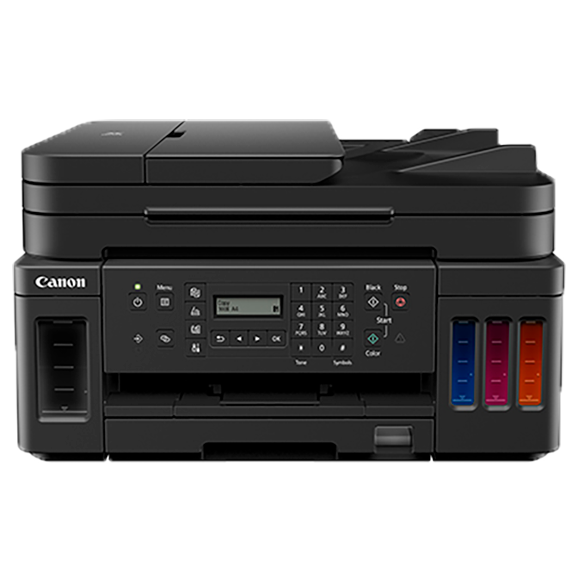
Canon PIXMA G7020: Specs, Features, Pros & Cons
Filling this printer is a small ritual. You lift a cover, unseal a bottle and pour ink into a reservoir until it reaches a marked line, one color at a time. Canon's MegaTank bottles are keyed so they cannot go into the wrong tank, and each tank has a window so the level is readable without software involvement. It takes a couple of minutes and it happens rarely.
That single design decision explains the rest of the machine. Because ink is cheap and abundant, Canon could aim this printer at people who print a great deal and equip it accordingly: a document feeder over the scanner, two-sided printing without intervention, a wired network port as well as wireless, and a full fax modem, which in 2026 is a deliberate decision rather than a leftover.
There is a consequence of tank printing that nobody advertises. Ink sitting unused in a print head can dry, and a machine built on this principle assumes it will be used. Left idle for months at a stretch it will want cleaning cycles, and cleaning cycles consume exactly the ink you bought it to save. Someone who prints a handful of pages a season would be better off with a laser, whose toner cannot dry out.
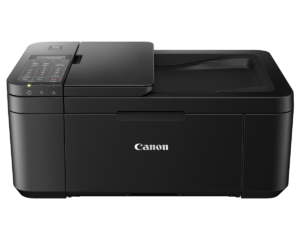
The other thing to weigh before ordering is that this is a large object. Two paper sources, a feeder and a scanner stacked on top of one another make for a substantial box, and it is meant to occupy a dedicated surface and stay there between uses. Measure the space first.
Category strengths
Where the Canon PIXMA G7020 beats the median
- A much higher input tray capacity ?350 sheets vs 150 sheets (median)
- Has supertank / refillable ink ?
- Has fax ?
Where the Canon PIXMA G7020 trails the median
- A lower print speed (black) ?13 ppm vs 16 ppm (median)
- A lower print speed (color) ?6.8 ppm vs 9 ppm (median)
- A much lower monthly duty cycle ?5,000 pages vs 10,000 pages (median)
- A lower output tray capacity ?50 sheets vs 67.5 sheets (median)
- A slightly heavier build ?8.07 kg vs 7.98 kg (median)
How this VS Score was computed
Score 62: each known spec is measured against the median of all printers (65 products), then weighted; 50 means level with that median. In classes of six or more, a value beyond the class’s 10th–90th percentile range counts as that limit, so one extreme product cannot set the scale. 66% of the scoreable weight could be used; unknown values, features not applicable to this class and proxies (battery capacity where a rated life exists) add or remove nothing.
| Specification | This product | Cohort median | Score weight | Points moved |
|---|---|---|---|---|
| Automatic duplex printing | Yes | 73% of the class have it | 1 | +50.0 |
| Automatic document feeder | Yes | 55% of the class have it | 1 | +50.0 |
| Input tray capacity | 350 | 150 | 1 | +50.0 |
| Supertank / refillable ink | Yes | 30% of the class have it | 0.5 | +25.0 |
| Ethernet | Yes | 54% of the class have it | 0.5 | +25.0 |
| Duplex scanning | No | 23% of the class have it | 0.5 | −24.0 |
| Touchscreen display | No | 45% of the class have it | 0.5 | −24.0 |
| Print speed (black) | 13 | 16 | 2 | −18.0 |
| Print speed (color) | 6.8 | 9 | 1 | −12.0 |
| Fax | Yes | 35% of the class have it | 0.2 | +10.0 |
| Monthly duty cycle | 5,000 | 10,000 | 0.3 | −7.5 |
| Output tray capacity | 50 | 67.5 | 0.3 | −3.9 |
| Weight | 8.07 | 7.98 | 0.3 | −0.3 |
| Print resolution | 4,800 | 4,800 | 0.5 | +0.0 |
| ADF capacity | 35 | 35 | 0.5 | +0.0 |
Not scored: Color printing (standard for the class (88% have it)); All-in-one (standard for the class (85% have it)); Wi-Fi (standard for the class (97% have it)); Wi-Fi Direct (standard for the class (90% have it)); USB (standard for the class (100% have it)); Apple AirPrint (standard for the class (97% have it)); Mobile app printing (standard for the class (100% have it)).
Editor’s note
The Canon PIXMA G7020 is the MegaTank answer to a specific complaint: cartridge printers that cost little to buy and a fortune to run. Its refillable ink tanks ship with enough ink for roughly 6,000 black or 7,700 color pages (years of typical home-office printing), and replacement bottles cost a fraction of equivalent cartridge yield. That economics argument is the whole reason to buy it, and Canon backs it with a complete feature set: print, copy, scan and fax, a 35-sheet ADF, auto duplex printing, and both Ethernet and 2.4 GHz Wi-Fi alongside USB, AirPrint, Mopria and Wi-Fi Direct.
Paper handling is better than most tank machines at this price: a 250-sheet front cassette plus a 100-sheet rear tray gives 350 sheets across two sources, with legal-size support and a 50-sheet output tray. Print quality reaches 4800 x 1200 dpi, and speeds are approximately 13 ipm black and 6.8 ipm color, which is adequate for the class, and the duplex speeds of around 3 ipm are slow enough that big two-sided jobs need patience. The duty cycle is rated at 5,000 pages a month.
The interface is where the budget shows: a two-line mono display with buttons, no touchscreen, and the ADF scans one side per pass. Fax is full-featured, including PC faxing in black and white. At 17.8 pounds it is a substantial box, and the ink windows on the front make remaining levels visible at a glance.
The G7020 makes sense for exactly the buyer Canon aimed at: a home office printing several hundred pages a month that wants text, color documents and the occasional photo without ever thinking about cartridge prices. Print-speed chasers and anyone expecting a touchscreen should shop elsewhere, while cost-per-page shoppers can stop looking.
Specifications
Quality bars show where each figure sits between the lowest and highest of the 65 printers this VS Score is measured against.
Printing
Scanning & copying
Paper handling
Connectivity
Design
Sources and verification
Where the specifications come from
- Official product pagecanon.ca
- Independent testingrtings.com
Verification
- First published
- Specifications last checked
- Sheet completeness
- 24 of 24 specifications verified; the rest show as Unknown and are never estimated or scored
- Page type
- Product specification page — Compiled from the manufacturer’s published specifications and the cited sources; this is not a hands-on test.
- Basis
- Research-based: specifications and editorial text were compiled from the documents listed here and the manufacturer’s published data. We have not tested this unit ourselves; where independent measurements are mentioned they belong to the linked publication.
Printers with similar specs to the Canon PIXMA G7020
Ratings & reviews
No reviews yet. Be the first to share your experience.
The bottom line
The Canon PIXMA G7020 earns a VS Score of 62, above the median of the 65 printers it is measured against (a score of 50 is level with that median).
- Who it’s for
- Home offices printing hundreds of pages monthly that want years of ink in the box and full fax, ADF and Ethernet capability.
- Who should look elsewhere
- Anyone who needs quick output or expects a touchscreen. Long two-sided jobs test your patience and the control panel is a small text display with buttons.
- The trade-off that matters
- Rock-bottom cost per page in exchange for slow duplex output and a dated control panel.
- The main alternative
- Epson EcoTank ET-2900
The VS Score is calculated from the weighted specifications above, each measured against the median of comparable printers — a shortlisting guide, not a substitute for your own priorities. See how we score.





