
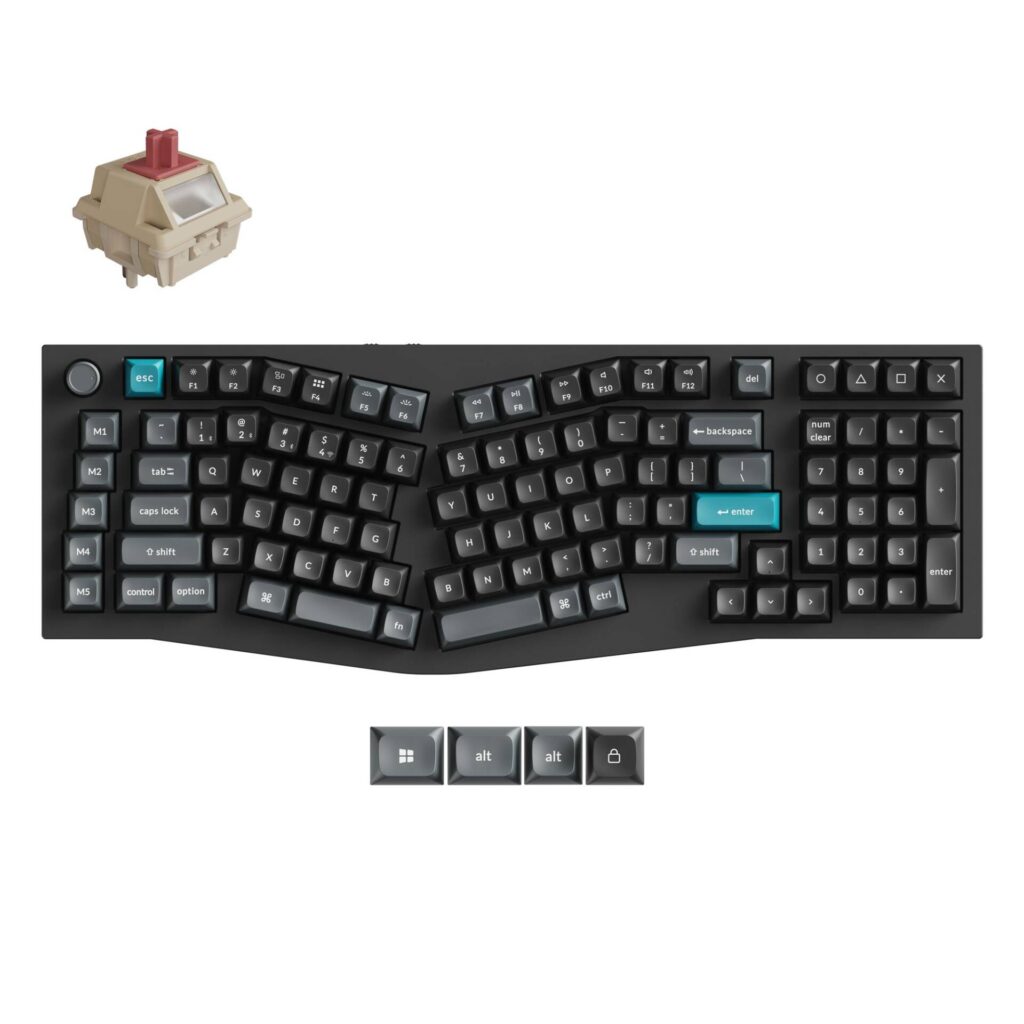
Keychron Q13 Ultra 8K: Specs, Price, Pros & Cons
An Alice layout with a number pad is a strange thing to build. Alice boards split and angle the alphabetic keys to keep your wrists straight, and they normally shrink the board to do it. This one instead runs the split cluster out to a full numeric keypad and a column of five macro keys, ending up wider and far heavier than most full-size boards.
The weight is aluminum. The case is milled from a single block, the plate is polycarbonate, and there are foam, IXPE, PET and latex layers stacked between the circuit board and the bottom case. Keychron calls the mounting a double-gasket design. All of it is aimed at sound and typing feel rather than at any measurable figure, and it is most of what separates this board from a cheaper one running the same switches.
The wireless side is the new part. Running ZMK firmware where the Max runs QMK, the board polls at 8000 Hz over its own 2.4 GHz dongle as well as over USB, where most wireless boards fall back to 1000 Hz. Bluetooth is capped at 125 Hz and three paired devices, so the fast mode and the convenient mode are not the same mode. Keychron rates the 4000 mAh battery at up to 660 hours with the backlight switched off.
This variant ships with linear Keychron Silk POM Red switches rated at 45 gf, and they are hot-swappable if you disagree with that choice. What it is not is portable, cheap or discreet. The layout also takes a two weeks or so of retraining before it stops slowing you down, which is worth budgeting for if typing speed is part of the job.
Category strengths
Where the Keychron Q13 Ultra 8K beats the median
- A much higher polling rate ?8,000 Hz vs 1,000 Hz (median)
- Much longer battery life ?660 h vs 325 h (median)
How this VS Score was computed
Score 61: each known spec is measured against the median of all keyboards (101 products), then weighted; 50 means level with that median. In classes of six or more, a value beyond the class’s 10th–90th percentile range counts as that limit, so one extreme product cannot set the scale. 63% of the scoreable weight could be used; unknown values, features not applicable to this class and proxies (battery capacity where a rated life exists) add or remove nothing.
| Specification | This product | Cohort median | Score weight | Points moved |
|---|---|---|---|---|
| Polling rate | 8,000 | 1,000 | 0.7 | +35.0 |
| Hot-swappable | Yes | 61% of the class have it | 0.6 | +30.0 |
| Battery life | 660 | 325 | 0.6 | +30.0 |
| Rapid trigger | No | 25% of the class have it | 0.5 | −24.0 |
| Adjustable actuation | No | 24% of the class have it | 0.4 | −19.2 |
| Sound dampening | Yes | 76% of the class have it | 0.3 | +15.0 |
| Rotary knob | Yes | 53% of the class have it | 0.2 | +10.0 |
| Switch technology | Mechanical | Mechanical | 1 | +0.0 |
| Actuation force | 45 | 45 | 0.4 | +0.0 |
| Front height | 20.3 | 20.2 | 0.2 | +0.0 |
| Connection | 3 | 3 | 0.8 | +0.0 |
| Bluetooth devices | 3 | 3 | 0.3 | +0.0 |
| Keycap material | PBT | PBT | 0.4 | +0.0 |
| Backlight | RGB | RGB | 0.3 | +0.0 |
Not scored: N-key rollover (standard for the class (85% have it)); Analog input (not applicable: only 14% of this class have it); Wired latency (unknown: not scored); Wireless latency (unknown: not scored); Battery capacity (capacity is a proxy; the rated battery life is scored instead); USB passthrough (not applicable: only 4% of this class have it); Programmable keys (standard for the class (99% have it)); Media controls (standard for the class (97% have it)); Onboard profiles (standard for the class (89% have it)); Configuration software (standard for the class (95% have it)).
Editor’s note
The Q13 Ultra 8K is the unusual one. It carries the Alice layout all the way out to 96% with a full numpad. Very few keyboards attempt this, and it is the reason to consider it over anything else in Keychron's range.
The appeal is specific. If you want ergonomic wrist angles but your job involves entering numbers all day, most ergonomic boards force you to choose. This one does not. The trade is desk space: at 447 mm wide and 157 mm deep it occupies more surface than a standard full-size board, and the angled center section means it does not sit flush against a monitor stand.
Then there is the weight. 2,440 grams is extraordinary: more than a 13-inch laptop, and 700 grams heavier than the Q1. In practice that means total stability and a very low, dense typing sound, helped by the double-gasket mount and layered foam. It also means this board is permanently wherever you first put it.
Everything else matches the rest of Keychron's Ultra 8K line, fast wireless mode and hot-swap sockets included. Five macro keys plus a knob is a lot of programmable surface, and the Launcher web app handles remapping without installing anything.
Choose it if the Alice layout appeals and you need a numpad, a combination that barely exists elsewhere. Do not choose it if your desk is shallow, if you have never used a split alphanumeric block before and are not prepared to relearn typing, or if you would rather spend less on the Q6 Ultra 8K for a conventional full-size layout.
Specifications
Quality bars show where each figure sits between the lowest and highest of the 101 keyboards this VS Score is measured against.
Switches & typing
Performance
Layout & size
Connectivity
Build & sound
Features
Sources and verification
Where the specifications come from
- Official product pagekeychron.com
Verification
- First published
- Specifications last checked
- Sheet completeness
- 32 of 34 specifications verified; the rest show as Unknown and are never estimated or scored
- Page type
- Product specification page — Compiled from the manufacturer’s published specifications and the cited sources; this is not a hands-on test.
- Basis
- Research-based: specifications and editorial text were compiled from the documents listed here and the manufacturer’s published data. We have not tested this unit ourselves; where independent measurements are mentioned they belong to the linked publication.
Where to buy
Prices and availability may change. Check the retailer before buying. We may earn a commission on purchases.
Price history
Keyboards with similar specs to the Keychron Q13 Ultra 8K

Ratings & reviews
No reviews yet. Be the first to share your experience.
The bottom line
The Keychron Q13 Ultra 8K earns a VS Score of 61, above the median of the 101 keyboards it is measured against (a score of 50 is level with that median).
- Who it’s for
- Typists who want the wrist angle of an Alice layout but refuse to give up a numeric keypad, and who like a heavyweight board that never shifts on the desk.
- Who should look elsewhere
- Anyone who moves their keyboard between desks or works on a shallow one (this is furniture rather than a peripheral), and anyone who needs full typing speed from the first day.
- The trade-off that matters
- The layout is the entire product. Everything around it is executed well, but you are buying an ergonomic experiment with a number pad attached, and no specification can tell you whether your hands will agree with it.
- The main alternative
- Keychron Q13 Max (Alice Layout): the same shape and build on QMK firmware with a slower wireless link, for noticeably less if the fastest wireless mode is not something you will use.
The VS Score is calculated from the weighted specifications above, each measured against the median of comparable keyboards — a shortlisting guide, not a substitute for your own priorities. See how we score.




