
Keychron V10 Max: Specs, Price, Pros & Cons
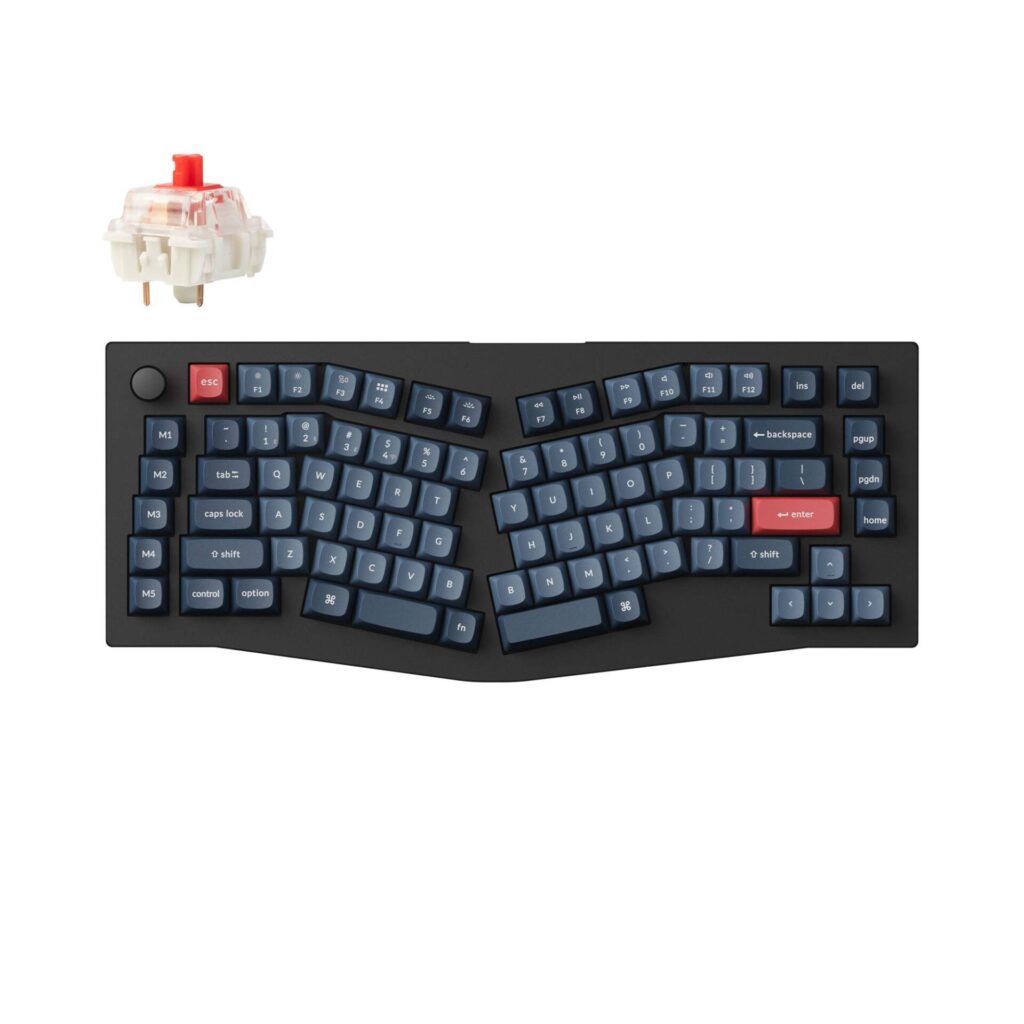
Keychron calls this a 75 percent keyboard, and by key count that is roughly fair. By footprint it is not. At 386.7 mm across it is wider than the brand's own tenkeyless boards, because an Alice layout splits the alphas into two angled halves and this one then adds a column of macro keys and a knob down the left side. Measure the desk before you study the layout diagram.
What the width buys is the least demanding ergonomic keyboard on the market. A true split asks you to learn new muscle memory and find somewhere to put two separate halves. The Alice arrangement angles the halves apart inside one case, so the wrists straighten while the hands stay roughly where they already know to go. The adjustment costs a day or two, most of it spent relearning which half owns the B key.
This is the V series, Keychron's plastic-cased line rather than the machined aluminum Q series. The case is ABS over a polycarbonate plate with a gasket mount, and the board lands just under a kilogram, which is substantial for plastic, light beside the metal alternatives. Where the money was saved is visible in the material and audible in the sound, which is softer and less resonant than an aluminum board.
Connectivity is the Max part of the name: 2.4 GHz over a dongle, Bluetooth to three devices, or USB-C. Keychron ships both a Type-C and a Type-A receiver and cuts a magnetic slot into the board to keep the spare in, which is a small thing right up until the third time you move desks.
The five macro keys down the left flank are the feature most likely to go unused, and the easiest to forget you have.
Category strengths
Where the Keychron V10 Max beats the median
- A slightly lower front height ?18.7 mm vs 20.2 mm (median)
Where the Keychron V10 Max trails the median
- Shorter battery life ?190 h vs 325 h (median)
How this VS Score was computed
Score 50: each known spec is measured against the median of all keyboards (101 products), then weighted; 50 means level with that median. In classes of six or more, a value beyond the class’s 10th–90th percentile range counts as that limit, so one extreme product cannot set the scale. 59% of the scoreable weight could be used; unknown values, features not applicable to this class and proxies (battery capacity where a rated life exists) add or remove nothing.
| Specification | This product | Cohort median | Score weight | Points moved |
|---|---|---|---|---|
| Hot-swappable | Yes | 61% of the class have it | 0.6 | +30.0 |
| Rapid trigger | No | 25% of the class have it | 0.5 | −24.0 |
| Adjustable actuation | No | 24% of the class have it | 0.4 | −19.2 |
| Sound dampening | Yes | 76% of the class have it | 0.3 | +15.0 |
| Battery life | 190 | 325 | 0.6 | −12.6 |
| Rotary knob | Yes | 53% of the class have it | 0.2 | +10.0 |
| Front height | 18.7 | 20.2 | 0.2 | +0.8 |
| Switch technology | Mechanical | Mechanical | 1 | +0.0 |
| Polling rate | 1,000 | 1,000 | 0.7 | +0.0 |
| Connection | 3 | 3 | 0.8 | +0.0 |
| Bluetooth devices | 3 | 3 | 0.3 | +0.0 |
| Keycap material | PBT | PBT | 0.4 | +0.0 |
| Backlight | RGB | RGB | 0.3 | +0.0 |
Not scored: Actuation force (unknown: not scored); N-key rollover (standard for the class (85% have it)); Analog input (not applicable: only 14% of this class have it); Wired latency (unknown: not scored); Wireless latency (unknown: not scored); Battery capacity (capacity is a proxy; the rated battery life is scored instead); USB passthrough (not applicable: only 4% of this class have it); Programmable keys (standard for the class (99% have it)); Media controls (unknown: not scored); Onboard profiles (standard for the class (89% have it)); Configuration software (standard for the class (95% have it)).
Editor’s note
The question with any Alice board is not whether it is comfortable but whether you will keep it. The angled halves do work, and a few days in the straighter wrist position stops registering as a novelty. That layout also makes this a poor traveler and a poor second keyboard, because everything you type on anything else briefly stops working while your hands recalibrate. I would treat it as a board you commit to.
The specification I would weigh hardest is the Bluetooth polling rate, which is 90 Hz. That is entirely fine for a tablet and useless for a game. Both the dongle and the cable run at 1000 Hz, so the practical reading is that this is a wired-or-dongle keyboard that also happens to pair with a phone. Keychron publishes the number rather than hiding it, which is more than most of its competitors manage.
Battery life is strong (a 4000 mAh cell rated up to 190 hours with the backlight off), and the reason is unglamorous: the plastic case has room inside that the aluminum boards do not.
What tempers my enthusiasm is availability. Keychron currently lists only the barebone build in stock, which means a fair number of buyers will end up sourcing switches and keycaps separately. That changes both the total cost and the amount of assembly you signed up for, so check what is shippable before you plan around it.
If you want this layout in aluminum, with a denser and deader typing sound, the Keychron Q10 Max is the direct step up and costs roughly twice as much. Anyone still unsure about Alice should type on one first. It is not a layout anybody can evaluate from a photograph.
Specifications
Quality bars show where each figure sits between the lowest and highest of the 101 keyboards this VS Score is measured against.
Switches & typing
Performance
Layout & size
Connectivity
Build & sound
Features
Sources and verification
Where the specifications come from
- Official product pagekeychron.com
- Retailer listing (cross-check)amazon.com
Verification
- First published
- Specifications last checked
- Sheet completeness
- 28 of 34 specifications verified; the rest show as Unknown and are never estimated or scored
- Page type
- Product specification page — Compiled from the manufacturer’s published specifications and the cited sources; this is not a hands-on test.
- Basis
- Research-based: specifications and editorial text were compiled from the documents listed here and the manufacturer’s published data. We have not tested this unit ourselves; where independent measurements are mentioned they belong to the linked publication.
Where to buy
Prices and availability may change. Check the retailer before buying. We may earn a commission on purchases.
Price history
Keyboards with similar specs to the Keychron V10 Max

Ratings & reviews
No reviews yet. Be the first to share your experience.
The bottom line
The Keychron V10 Max earns a VS Score of 50, level with the median of the 101 keyboards it is measured against.
- Who it’s for
- Someone whose wrists ache on a conventional board and who wants split-style ergonomics without owning two separate halves, and who will use one keyboard consistently enough to build the muscle memory.
- Who should look elsewhere
- Anyone who moves between keyboards during the day or needs a compact footprint. Despite the 75 percent label this is wider than most tenkeyless boards, and the Alice layout punishes switching.
- The trade-off that matters
- Bluetooth polls at a small fraction of the dongle and cable rate. Pair it with a tablet by all means, but expect to keep the receiver plugged in for anything with a timer on it.
- The main alternative
- Keychron Q10 Max is the identical Alice layout in a machined aluminum case, for people who want the denser typing sound and will pay roughly double to get it.
The VS Score is calculated from the weighted specifications above, each measured against the median of comparable keyboards — a shortlisting guide, not a substitute for your own priorities. See how we score.




