
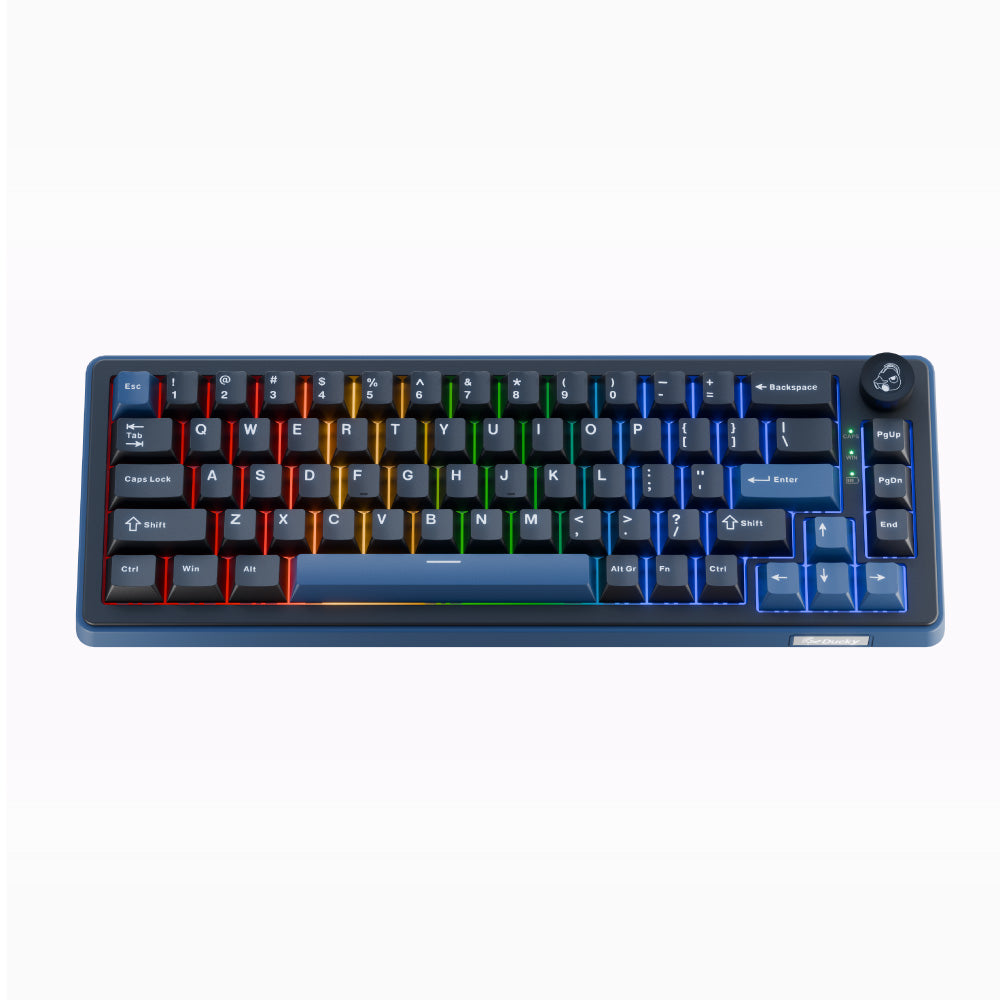
Ducky OK-M 65 Wireless: Specs, Price, Pros & Cons
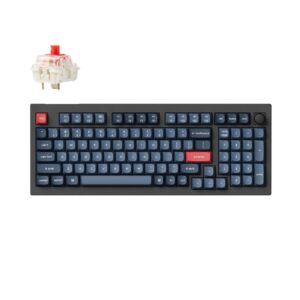
Ducky makes its OK-M Wireless board in three sizes, and the 65 is the smallest: the arrow keys stay, while the function row, the number pad and most of the navigation block move onto a second layer.
The OK-M line is Ducky's budget range, and all three sizes share one construction, so the choice between them comes down to how many keys you want in reach. That shared build is a good one for the money. A gasket mount and several layers of acoustic dampening sit under PBT keycaps, the switches drop into hot-swap sockets, and a rotary knob handles volume. Dedicated media controls survive the shrink. Remapping runs through VIA, the open configurator, instead of a Ducky driver, and it works from a browser on any operating system. Programmable keys, full N-key rollover and RGB lighting complete the list.
It connects over a cable, a receiver or Bluetooth. Its main weakness is physical: the case stands unusually tall. Typing on it for a long stretch without a wrist rest bends the wrists back, so budget for one if you write much. What the small layout gives up only shows in certain work. Games rarely touch Home, End or the page keys. Documents and spreadsheets touch them constantly, and each of those presses on this board needs a second key held down.
A narrow desk, or a low mouse sensitivity that needs room to sweep, gets the most from it, provided the owner will learn a layer for the keys that are no longer printed on the board.
Category strengths
How this VS Score was computed
Score 52: each known spec is measured against the median of all keyboards (101 products), then weighted; 50 means level with that median. In classes of six or more, a value beyond the class’s 10th–90th percentile range counts as that limit, so one extreme product cannot set the scale. 49% of the scoreable weight could be used; unknown values, features not applicable to this class and proxies (battery capacity where a rated life exists) add or remove nothing.
| Specification | This product | Cohort median | Score weight | Points moved |
|---|---|---|---|---|
| Hot-swappable | Yes | 61% of the class have it | 0.6 | +30.0 |
| Rapid trigger | No | 25% of the class have it | 0.5 | −24.0 |
| Adjustable actuation | No | 24% of the class have it | 0.4 | −19.2 |
| Sound dampening | Yes | 76% of the class have it | 0.3 | +15.0 |
| Rotary knob | Yes | 53% of the class have it | 0.2 | +10.0 |
| Switch technology | Mechanical | Mechanical | 1 | +0.0 |
| Polling rate | 1,000 | 1,000 | 0.7 | +0.0 |
| Connection | 3 | 3 | 0.8 | +0.0 |
| Keycap material | PBT | PBT | 0.4 | +0.0 |
| Backlight | RGB | RGB | 0.3 | +0.0 |
Not scored: Actuation force (unknown: not scored); N-key rollover (standard for the class (85% have it)); Analog input (not applicable: only 14% of this class have it); Wired latency (unknown: not scored); Wireless latency (unknown: not scored); Front height (unknown: not scored); Bluetooth devices (unknown: not scored); Battery life (unknown: not scored); Battery capacity (unknown: not scored); USB passthrough (not applicable: only 4% of this class have it); Programmable keys (standard for the class (99% have it)); Media controls (standard for the class (97% have it)); Onboard profiles (unknown: not scored); Configuration software (standard for the class (95% have it)).
Editor’s note
The OK-M 65 is the compact member of Ducky's budget family, and it makes the classic 65 percent trade: the arrow keys stay, the function row and number pad go. On a small desk, or for a low-sensitivity mouse grip that needs room to swing, that is the whole argument.
What makes it interesting at this price is the construction rather than the layout. Gasket mounting, five layers of acoustic dampening, a polycarbonate plate and Cherry-profile PBT keycaps are specifications you would normally start seeing only on pricier boards. The result sounds and feels considerably better than an entry-level board has any business doing.
The switches are conventional mechanical, hot-swappable on 3-pin and 5-pin sockets, and Ducky ships either KTT Red Wine at 43 grams linear or KTT Baby Blue at 38 grams tactile. Because the sockets are hot-swap you are not married to either. Changing feel later costs the price of a switch set and about ten minutes.
Connectivity is the other strength. USB-C, 2.4 GHz and Bluetooth are all present, polling tops out at 1000 Hz, and there is a rotary knob for volume. Configuration runs through VIA rather than a proprietary driver, which is the better long-term bet: VIA is open, works on any operating system with a browser, and will still be around when Ducky stops updating its own software.
The cost is key access. Home, End, Page Up, Page Down and every function key live on a layer, and that slows spreadsheet and editing work in a way gaming does not expose. Buy this one if the desk space matters more than the shortcuts, and take the 75 or the 98 if you spend your day in documents.
Specifications
Quality bars show where each figure sits between the lowest and highest of the 101 keyboards this VS Score is measured against.
Switches & typing
Performance
Layout & size
Connectivity
Build & sound
Features
Sources and verification
Where the specifications come from
- Official product pageducky.global
Verification
- First published
- Specifications last checked
- Sheet completeness
- 25 of 34 specifications verified; the rest show as Unknown and are never estimated or scored
- Page type
- Product specification page — Compiled from the manufacturer’s published specifications and the cited sources; this is not a hands-on test.
- Basis
- Research-based: specifications and editorial text were compiled from the documents listed here and the manufacturer’s published data. We have not tested this unit ourselves; where independent measurements are mentioned they belong to the linked publication.
Where to buy
Prices and availability may change. Check the retailer before buying. We may earn a commission on purchases.
Price history
Keyboards with similar specs to the Ducky OK-M 65 Wireless
Ratings & reviews
No reviews yet. Be the first to share your experience.
The bottom line
The Ducky OK-M 65 Wireless earns a VS Score of 52, above the median of the 101 keyboards it is measured against (a score of 50 is level with that median).
- Who it’s for
- A budget buyer with a small desk or a wide low-sensitivity mouse swing who wants a well-damped wireless board and still needs arrow keys.
- Who should look elsewhere
- Look elsewhere if you type long days without a wrist rest, because the board sits tall, or if you want rapid trigger for competitive play.
- The trade-off that matters
- Losing the function row and navigation keys. Games never notice, but every shortcut and page jump in office work needs a second key.
- The main alternative
- Ducky OK-M 75 Wireless: the same build with a function row back, for mixed work and play.
The VS Score is calculated from the weighted specifications above, each measured against the median of comparable keyboards — a shortlisting guide, not a substitute for your own priorities. See how we score.





