
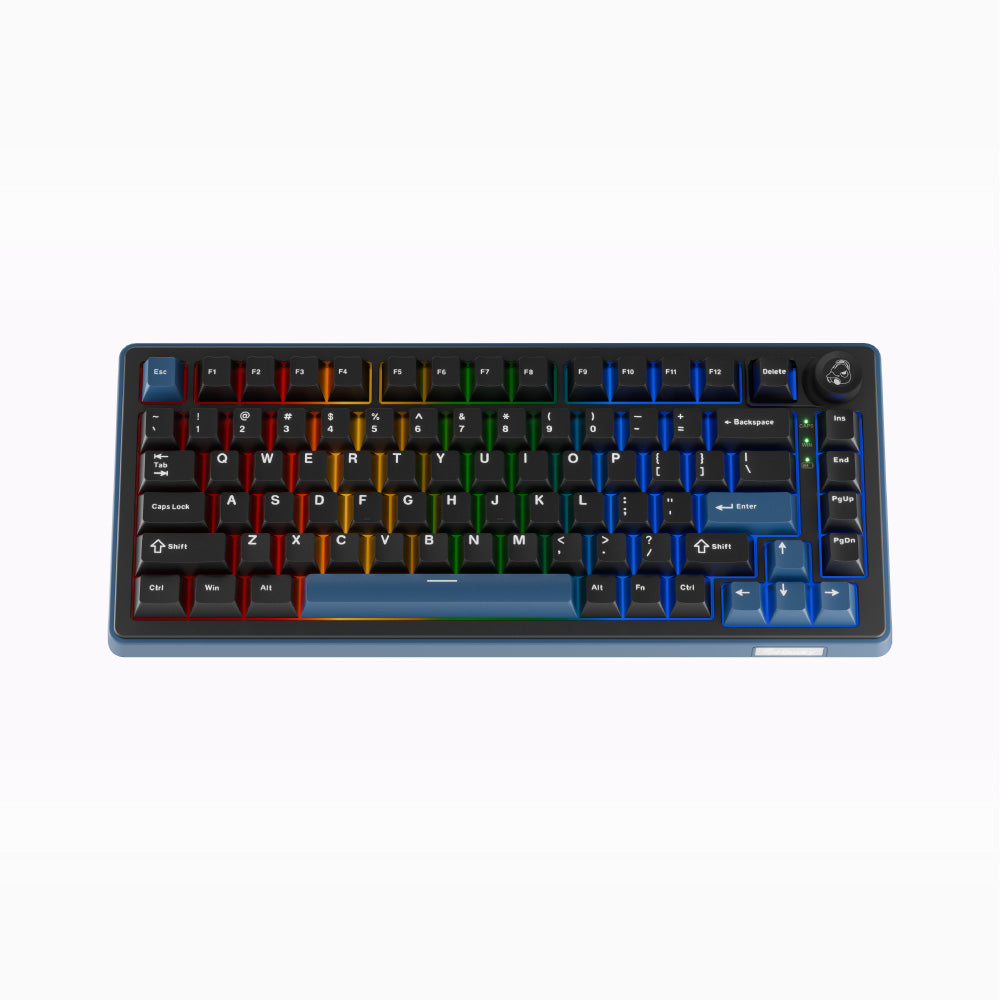
Ducky OK-M 75 Wireless: Specs, Price, Pros & Cons
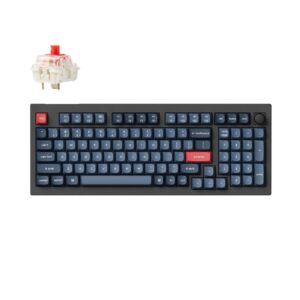
The OK-M 75 keeps the function row and the arrow keys, drops the number pad, and adds a volume knob, which makes it the middle size of Ducky's three-model OK-M Wireless family.
Its siblings are the smaller 65, which gives up the function row, and the 98, which adds a keypad. All three share the same gasket-mounted build, PBT keycaps, hot-swap sockets and pair of switch options, so the choice between them can be made on layout alone. In this size the F keys stay one press away for shortcuts, and the mouse stays close to the body. Connections cover a cable, a receiver and Bluetooth. VIA handles remapping in the open, without a proprietary driver, and the knob turns the volume without a key combination.
Programmable keys and full N-key rollover are standard across the family. Height is its weak point. The case rises high enough to tilt the wrists back on a long writing day, and a wrist rest fixes most of it. Ducky made the case from plastic, the part of the build where it saved money. The dampening inside keeps it from sounding cheap, but it will not have the cold weight of an aluminum shell.
This is the size for a budget buyer who writes by day and plays in the evening and wants to drop the cable. Its limits are the ones any board of this layout shares: no keypad for figures, and no magnetic switch tricks such as rapid trigger for competitive games. Anyone who needs either of those should look at the 98 or at a Hall-effect board instead.
Category strengths
How this VS Score was computed
Score 52: each known spec is measured against the median of all keyboards (101 products), then weighted; 50 means level with that median. In classes of six or more, a value beyond the class’s 10th–90th percentile range counts as that limit, so one extreme product cannot set the scale. 49% of the scoreable weight could be used; unknown values, features not applicable to this class and proxies (battery capacity where a rated life exists) add or remove nothing.
| Specification | This product | Cohort median | Score weight | Points moved |
|---|---|---|---|---|
| Hot-swappable | Yes | 61% of the class have it | 0.6 | +30.0 |
| Rapid trigger | No | 25% of the class have it | 0.5 | −24.0 |
| Adjustable actuation | No | 24% of the class have it | 0.4 | −19.2 |
| Sound dampening | Yes | 76% of the class have it | 0.3 | +15.0 |
| Rotary knob | Yes | 53% of the class have it | 0.2 | +10.0 |
| Switch technology | Mechanical | Mechanical | 1 | +0.0 |
| Polling rate | 1,000 | 1,000 | 0.7 | +0.0 |
| Connection | 3 | 3 | 0.8 | +0.0 |
| Keycap material | PBT | PBT | 0.4 | +0.0 |
| Backlight | RGB | RGB | 0.3 | +0.0 |
Not scored: Actuation force (unknown: not scored); N-key rollover (standard for the class (85% have it)); Analog input (not applicable: only 14% of this class have it); Wired latency (unknown: not scored); Wireless latency (unknown: not scored); Front height (unknown: not scored); Bluetooth devices (unknown: not scored); Battery life (unknown: not scored); Battery capacity (unknown: not scored); USB passthrough (not applicable: only 4% of this class have it); Programmable keys (standard for the class (99% have it)); Media controls (standard for the class (97% have it)); Onboard profiles (unknown: not scored); Configuration software (standard for the class (95% have it)).
Editor’s note
The OK-M 75 is the version of this board most people should buy. Eighty-two keys give you a function row and arrow keys without the width of a number pad, which is the layout that suits mixed work and play better than either of its siblings.
The build is the same as the rest of the family and remains the reason to look. Gasket mounting and five layers of dampening produce a muted, low-pitched sound where most budget boards rattle, and the Cherry-profile PBT keycaps will not go shiny the way ABS does. The plate is polycarbonate, which adds a little flex and softens the bottom-out.
Switches are standard mechanical and hot-swappable, offered as KTT Red Wine at 43 grams linear or KTT Baby Blue at 38 grams tactile. Neither is a specialist gaming switch and neither needs to be. If you want something else later, the 3-pin and 5-pin sockets take almost anything.
Wireless is properly implemented: USB-C, 2.4 GHz and Bluetooth, with a rotary knob and VIA support for remapping. The 1000 Hz polling rate is standard, and worth mentioning only because some competing boards at this price advertise 8000 Hz. In practice the difference is invisible outside a benchmark.
At 337 by 142 millimeters and just over a kilogram this is a desk keyboard, and a good one for the money. The case is ABS rather than aluminum, which is where the budget shows most. It is also why the board is not considerably heavier.
Choose the 65 if you want more mouse space, or the 98 if you enter numbers all day. For everyone else, this is the sensible middle.
Specifications
Quality bars show where each figure sits between the lowest and highest of the 101 keyboards this VS Score is measured against.
Switches & typing
Performance
Layout & size
Connectivity
Build & sound
Features
Sources and verification
Where the specifications come from
- Official product pageducky.global
Verification
- First published
- Specifications last checked
- Sheet completeness
- 26 of 34 specifications verified; the rest show as Unknown and are never estimated or scored
- Page type
- Product specification page — Compiled from the manufacturer’s published specifications and the cited sources; this is not a hands-on test.
- Basis
- Research-based: specifications and editorial text were compiled from the documents listed here and the manufacturer’s published data. We have not tested this unit ourselves; where independent measurements are mentioned they belong to the linked publication.
Where to buy
Prices and availability may change. Check the retailer before buying. We may earn a commission on purchases.
Price history
Keyboards with similar specs to the Ducky OK-M 75 Wireless
Ratings & reviews
No reviews yet. Be the first to share your experience.
The bottom line
The Ducky OK-M 75 Wireless earns a VS Score of 52, above the median of the 101 keyboards it is measured against (a score of 50 is level with that median).
- Who it’s for
- Budget buyers who split the day between documents and games and want a well-built wireless board with a function row.
- Who should look elsewhere
- Numpad users and anyone after magnetic-switch features should pass, and so should anyone set on metal, since the case is plastic.
- The trade-off that matters
- The case sits tall. Typing for hours without a wrist rest is uncomfortable, so budget for one if you write a lot.
- The main alternative
- Ducky OK-M 98 Wireless: the same family with a numpad, for anyone entering numbers all day.
The VS Score is calculated from the weighted specifications above, each measured against the median of comparable keyboards — a shortlisting guide, not a substitute for your own priorities. See how we score.





