
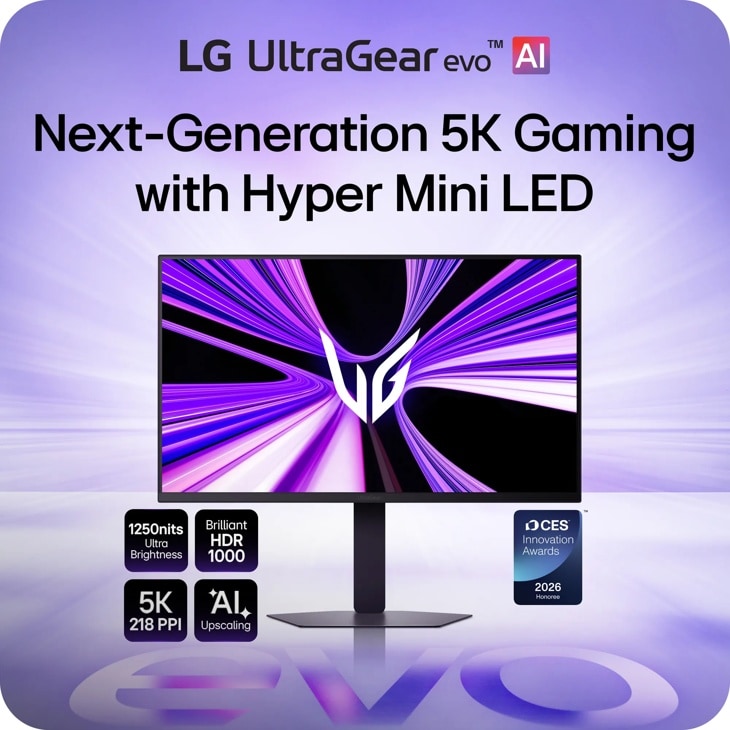
LG 27GM950B-B: Specs, Features, Pros & Cons
Two refresh rates share this panel. The lower one is what it runs at its native 5K resolution. LG's dual mode doubles it by dropping the picture to QHD. Both modes are real and both have a use, but they are two ways of running one panel, and the desktop, along with any game played at full sharpness, lives at the lower figure.
Once that is understood the product is easy to place. This is LG's UltraGear gaming line reaching for the pixel density usually associated with Apple's displays, on a screen of the ordinary desktop size, and it joins a very short list of monitors that pair that sharpness with gaming speeds. ASUS's high-refresh ROG Strix model is its closest neighbor. Apple's Studio Display XDR arrives at the same resolution from the creative-work side instead.
That resolution has a side effect Mac owners in particular should know about. Because the panel is exactly twice a common desktop resolution in each direction, macOS can run it at the pixel-doubled scaling it is designed around, which is where its text rendering looks best. Either way, this is a screen bought for what it does to type and fine detail before anything else.
The limits concern fit, and none of them is a fault. It is a flat, conventional shape, so anyone hoping for the wrap-around feel of an ultrawide is in the wrong aisle. And a zoned backlight, however well controlled, still lights areas rather than individual pixels, which can show as a faint glow around small bright objects on a black background.
It is priced among the expensive models, so the case for it rests on how many hours of the day are spent looking at text.
Category strengths
Where the LG 27GM950B-B beats the median
- Much higher peak brightness ?1,250 nits vs 400 nits (median)
- A much higher pixel density ?218 ppi vs 109 ppi (median)
- Has USB-C ?
- Has local dimming ?
- Has built-in speakers ?
- Slightly wider DCI-P3 colour coverage ?99 % vs 95 % (median)
- Has USB hub ?
- Faster USB-C charging ?90 W vs 65 W (median)
Where the LG 27GM950B-B trails the median
- A slightly lower refresh rate ?165 Hz vs 180 Hz (median)
How this VS Score was computed
Score 65: each known spec is measured against the median of IPS gaming monitors, 27 to 31 inches (29 products), then weighted; 50 means level with that median. In classes of six or more, a value beyond the class’s 10th–90th percentile range counts as that limit, so one extreme product cannot set the scale. 77% of the scoreable weight could be used; unknown values, features not applicable to this class and proxies (battery capacity where a rated life exists) add or remove nothing.
| Specification | This product | Cohort median | Score weight | Points moved |
|---|---|---|---|---|
| Resolution | 5K | 1440p | 1.2 | +30.0 |
| USB-C | Yes | 24% of the class have it | 0.5 | +25.0 |
| Peak brightness | 1,250 — capped at the class’s upper range (600) | 400 | 0.8 | +20.0 |
| Local dimming | Yes | 17% of the class have it | 0.4 | +20.0 |
| Height adjustment | Yes | 79% of the class have it | 0.4 | +20.0 |
| Motion blur reduction | Yes | 67% of the class have it | 0.3 | +15.0 |
| HDR | DisplayHDR 1000 | DisplayHDR 400 | 0.5 | +12.5 |
| Pixel density | 218 — capped at the class’s upper range (163) | 109 | 0.5 | +12.5 |
| Swivel | Yes | 64% of the class have it | 0.2 | +10.0 |
| Built-in speakers | Yes | 31% of the class have it | 0.2 | +10.0 |
| Refresh rate | 165 | 180 | 1.2 | −4.8 |
| USB hub | Yes | 50% of the class have it | 0.05 | +2.3 |
| Pivot | Yes | 75% of the class have it | 0.02 | +1.0 |
| USB-C power delivery | 90 | 65 | 0.05 | +0.9 |
| DCI-P3 coverage | 99 — capped at the class’s upper range (97) | 95 | 0.6 | +0.6 |
| Screen size | 27 | 27 | 1.2 | +0.0 |
| Panel type | IPS | IPS | 0.8 | +0.0 |
| Color depth | 10 | 10 | 0.3 | +0.0 |
| Response time | 1 | 1 | 0.8 | +0.0 |
| Contrast ratio | 1,000 | 1,000 | 0.6 | +0.0 |
| Adaptive sync | G-Sync Compatible | G-Sync Compatible | 0.6 | +0.0 |
| HDMI ports | 2 | 2 | 0.4 | +0.0 |
| DisplayPort inputs | 1 | 1 | 0.4 | +0.0 |
Not scored: Local dimming zones (unknown: not scored); Variable refresh rate (standard for the class (100% have it)); Input lag (unknown: not scored); Tilt (standard for the class (100% have it)); Headphone output (standard for the class (86% have it)); KVM switch (unknown: not scored); Webcam (unknown: not scored); Microphone (unknown: not scored); Ethernet (unknown: not scored); Picture-by-picture (unknown: not scored).
Editor’s note
The 27GM950B puts 5K on a 27-inch panel and runs it at 165 Hz.
That works out to 218 pixels per inch, the density Apple's Retina displays use, and roughly double the 109 ppi of a 27-inch 1440p monitor. Text renders without any visible pixel structure at desk distance, which is the single biggest quality-of-life difference for anyone who reads or writes for a living. Nearly every other 5K monitor stops at 60 Hz, so pairing that density with this refresh rate and G-Sync Compatible variable refresh is unusual.
It is not an OLED, and here that is a deliberate advantage. The mini-LED backlight has local dimming and peaks at 1,250 nits with DisplayHDR 1000 certification, so HDR has real impact, while a static taskbar can sit on screen for years without any retention risk. Color coverage is nearly full DCI-P3 at 10-bit.
Connectivity covers USB-C, a USB hub, two HDMI 2.1 ports and DisplayPort 2.1, and the stand adjusts in every axis including pivot.
Two practical points. Driving that resolution at that speed needs a serious graphics card and modern cable. At lower frame rates the density still pays off for work. And the 1 ms response is fast for IPS but not the 0.03 ms an OLED delivers, so competitive players will see a difference in motion clarity.
For a day of text and an evening of games on one screen, it is the one I would choose.
Specifications
Quality bars show where each figure sits between the lowest and highest of the 29 IPS gaming monitors, 27 to 31 inches this VS Score is measured against.
Picture
Gaming
Ergonomics & design
Connectivity
Features
Sources and verification
Where the specifications come from
- Official product pagelg.com
- Independent testingrtings.com
Verification
- First published
- Specifications last checked
- Sheet completeness
- 32 of 42 specifications verified; the rest show as Unknown and are never estimated or scored
- Page type
- Product specification page — Compiled from the manufacturer’s published specifications and the cited sources; this is not a hands-on test.
- Basis
- Research-based: specifications and editorial text were compiled from the documents listed here and the manufacturer’s published data. We have not tested this unit ourselves; where independent measurements are mentioned they belong to the linked publication.
Monitors with similar specs to the LG 27GM950B-B
Ratings & reviews
No reviews yet. Be the first to share your experience.
The bottom line
The LG 27GM950B-B earns a VS Score of 65, above the median of the 29 IPS gaming monitors, 27 to 31 inches it is measured against (a score of 50 is level with that median).
- Who it’s for
- Someone who reads, codes or edits photos for most of the day and wants the same screen to handle games properly afterwards, with a graphics card strong enough to make use of it.
- Who should look elsewhere
- Competitive players who rank motion clarity above everything, and anyone with a mid-range graphics card, because the native mode will be out of reach in games and the extra cost buys little.
- The trade-off that matters
- The sharpness that makes it special is also what makes it demanding: getting the resolution and the speed at the same time takes one of the fastest graphics cards, and without one you are choosing between them.
- The main alternative
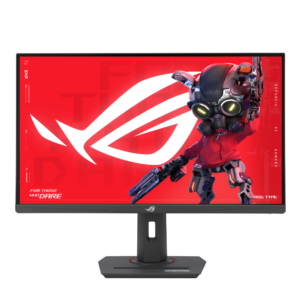
- ASUS ROG Strix 5K XG27JCG: ASUS's high-refresh 5K rival, with a higher native refresh rate and a lower HDR tier, for buyers who put speed ahead of HDR impact.
The VS Score is calculated from the weighted specifications above, each measured against the median of comparable IPS gaming monitors, 27 to 31 inches — a shortlisting guide, not a substitute for your own priorities. See how we score.





