
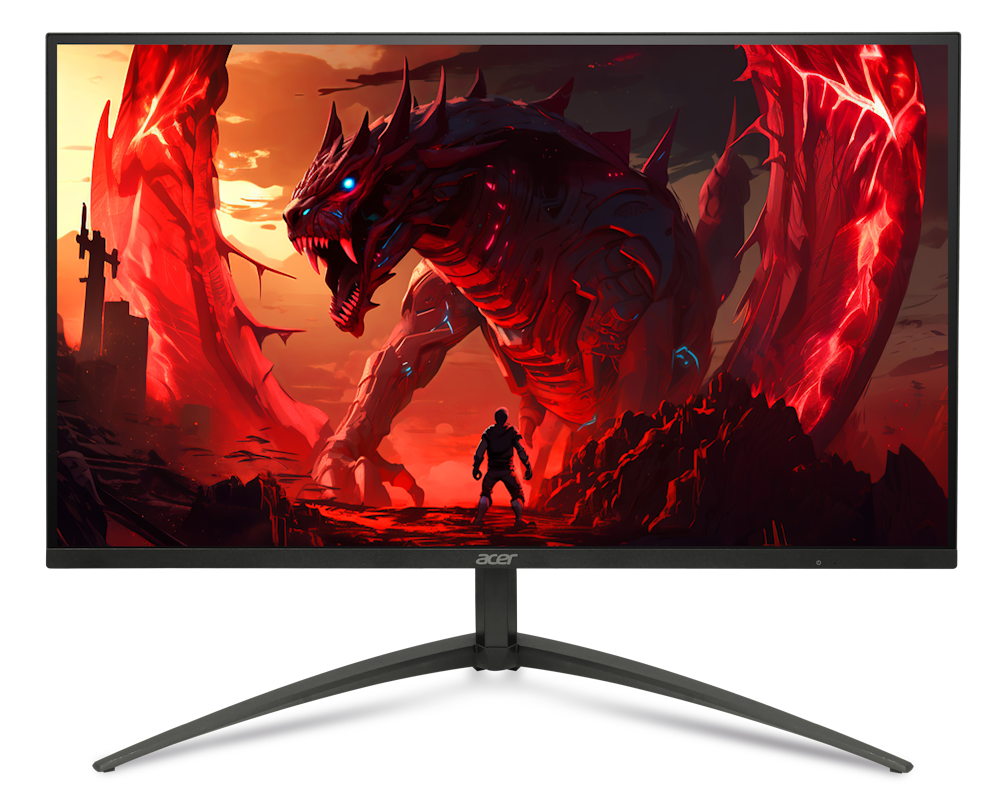
Acer Nitro XV275K P5biipruzx: Specs, Features, Pros & Cons
Mini LED exists because of an argument that LCD was losing. An OLED panel switches off individual pixels and produces perfect black. An ordinary LCD shines one backlight through the entire screen and cannot. Splitting that backlight into a dense grid of independently controlled zones is the LCD industry's answer, and this Acer is a mid-priced example of it, aimed at people who want convincing HDR without OLED's price or its care routine.
Inside Acer's Nitro line it reads as a high-resolution gaming monitor first and an HDR display second, even though the backlight is what justifies the money. The practical effect is that highlights (a sun, a muzzle flash, a lit window in a dark room) keep their intensity instead of being flattened towards gray, and the screen holds that brightness across a whole scene rather than for a second or two.
The flexible part is what it will accept and how it can be driven. Current consoles run at full resolution and frame rate, one cable can carry video and charge a laptop at the same time, and a switchable display mode trades resolution away for a much higher refresh rate when a competitive game is what is on screen. For a desk shared between a console and a PC, that combination removes a lot of cable swapping.
Two things temper the appeal. Zone-dimmed backlights halo around small bright objects on dark backgrounds, and subtitles, cursors and star fields are where anyone will notice it first. The top refresh rate at full resolution also needs DisplayPort or USB-C, and the HDMI inputs stop a step below it, which a console never notices but a PC on the wrong cable does. Neither undoes the argument for the panel, but both are everyday consequences of choosing this monitor over the alternatives, and they belong in the decision rather than after it.
Category strengths
Where the Acer Nitro XV275K P5biipruzx beats the median
- Much higher peak brightness ?1,000 nits vs 400 nits (median)
- Has USB-C ?
- Has local dimming ?
- A much higher pixel density ?163 ppi vs 109 ppi (median)
- Has USB hub ?
- Faster USB-C charging ?90 W vs 65 W (median)
Where the Acer Nitro XV275K P5biipruzx trails the median
- A lower refresh rate ?160 Hz vs 180 Hz (median)
How this VS Score was computed
Score 59: each known spec is measured against the median of IPS gaming monitors, 27 to 31 inches (29 products), then weighted; 50 means level with that median. In classes of six or more, a value beyond the class’s 10th–90th percentile range counts as that limit, so one extreme product cannot set the scale. 73% of the scoreable weight could be used; unknown values, features not applicable to this class and proxies (battery capacity where a rated life exists) add or remove nothing.
| Specification | This product | Cohort median | Score weight | Points moved |
|---|---|---|---|---|
| USB-C | Yes | 24% of the class have it | 0.5 | +25.0 |
| Peak brightness | 1,000 — capped at the class’s upper range (600) | 400 | 0.8 | +20.0 |
| Local dimming | Yes | 17% of the class have it | 0.4 | +20.0 |
| Height adjustment | Yes | 79% of the class have it | 0.4 | +20.0 |
| Resolution | 4K | 1440p | 1.2 | +15.6 |
| Adaptive sync | FreeSync | G-Sync Compatible | 0.6 | −15.0 |
| HDR | DisplayHDR 1000 | DisplayHDR 400 | 0.5 | +12.5 |
| Pixel density | 163 | 109 | 0.5 | +12.5 |
| Swivel | Yes | 64% of the class have it | 0.2 | +10.0 |
| Built-in speakers | No | 31% of the class have it | 0.2 | −9.6 |
| Refresh rate | 160 | 180 | 1.2 | −7.2 |
| USB hub | Yes | 50% of the class have it | 0.05 | +2.3 |
| Pivot | Yes | 75% of the class have it | 0.02 | +1.0 |
| USB-C power delivery | 90 | 65 | 0.05 | +0.9 |
| Screen size | 27 | 27 | 1.2 | +0.0 |
| Panel type | IPS | IPS | 0.8 | +0.0 |
| Response time | 1 | 1 | 0.8 | +0.0 |
| Contrast ratio | 1,000 | 1,000 | 0.6 | +0.0 |
| DCI-P3 coverage | 95 | 95 | 0.6 | +0.0 |
| HDMI ports | 2 | 2 | 0.4 | +0.0 |
| DisplayPort inputs | 1 | 1 | 0.4 | +0.0 |
Not scored: Color depth (unknown: not scored); Local dimming zones (too few comparable peers (2, need 3)); Variable refresh rate (standard for the class (100% have it)); Motion blur reduction (unknown: not scored); Input lag (unknown: not scored); Tilt (standard for the class (100% have it)); Headphone output (standard for the class (86% have it)); KVM switch (unknown: not scored); Webcam (not applicable: only 0% of this class have it); Microphone (not applicable: only 0% of this class have it); Ethernet (not applicable: only 0% of this class have it); Picture-by-picture (not applicable: only 14% of this class have it).
Editor’s note
The Acer Nitro XV275K P5biipruzx is the HDR specialist of the group. It is a 27-inch 4K IPS panel backed by a 1152-zone Mini LED backlight, and that hardware lets it hit VESA DisplayHDR 1000 with a 1000-nit peak, a different league of brightness and highlight detail than the edge-lit IPS monitors it competes with.
It is also unusually flexible for gaming. Natively it runs 4K at 160 Hz, but a dual-mode option switches to 1080p at 320 Hz for competitive titles where frame rate matters more than pixel count. Pair that with FreeSync, a 1 ms response and a full HDMI 2.1 / DisplayPort 1.4 input set, plus a 90 W USB-C port, and it works as both a console-friendly 4K screen and a fast esports panel.
The caveat with any Mini LED IPS panel is blooming. With 1152 zones you will still see halos around bright objects on dark backgrounds (subtitles, mouse cursors, star fields), and this particular panel has been noted for aggressive local-dimming behavior. It is a real improvement over no dimming at all, but it is not OLED, and if you are sensitive to bloom it will bother you. Native contrast without dimming is a standard IPS 1000:1.
The stand handles height, tilt, swivel and pivot into portrait, and there is a 3.5 mm audio output, though no built-in speakers.
Buy this if you want the brightest HDR and highest refresh in this price band and you would rather avoid OLED burn-in worries entirely. Think twice if you mostly watch dark, high-contrast content where blooming is most visible, or if you want the perfect per-pixel blacks that only an OLED can deliver.
Specifications
Quality bars show where each figure sits between the lowest and highest of the 29 IPS gaming monitors, 27 to 31 inches this VS Score is measured against.
Picture
Gaming
Ergonomics & design
Connectivity
Features
Sources and verification
Where the specifications come from
- Official product pageacer.com
- Datasheet or manualglobal-download.acer.com
- Independent testingrtings.com
Verification
- First published
- Specifications last checked
- Sheet completeness
- 36 of 42 specifications verified; the rest show as Unknown and are never estimated or scored
- Page type
- Product specification page — Compiled from the manufacturer’s published specifications and the cited sources; this is not a hands-on test.
- Basis
- Research-based: specifications and editorial text were compiled from the documents listed here and the manufacturer’s published data. We have not tested this unit ourselves; where independent measurements are mentioned they belong to the linked publication.
Monitors with similar specs to the Acer Nitro XV275K P5biipruzx

Ratings & reviews
No reviews yet. Be the first to share your experience.
The bottom line
The Acer Nitro XV275K P5biipruzx earns a VS Score of 59, above the median of the 29 IPS gaming monitors, 27 to 31 inches it is measured against (a score of 50 is level with that median).
- Who it’s for
- Someone who wants convincing HDR for games and films without moving to OLED, and who shares one desk between a console and a computer.
- Who should look elsewhere
- Anyone working all day on dark interfaces (code editors, video timelines, spreadsheets on a dark theme), where the halos around small bright elements are most visible.
- The trade-off that matters
- A zone-dimmed backlight buys sustained brightness that OLED cannot match, and pays for it with halos that OLED would never produce.
- The main alternative
- Samsung Odyssey Neo G7 S32BG75: a larger curved Mini LED screen with stronger native contrast, if a wrap-around entertainment display suits the room better than a flat desk monitor.
The VS Score is calculated from the weighted specifications above, each measured against the median of comparable IPS gaming monitors, 27 to 31 inches — a shortlisting guide, not a substitute for your own priorities. See how we score.





