
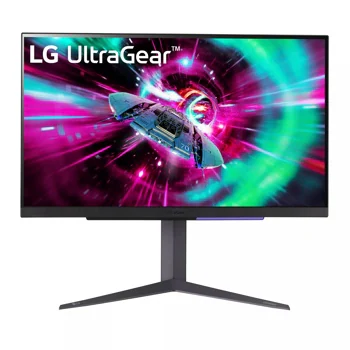
LG UltraGear 27GR93U-B: Specs, Features, Pros & Cons
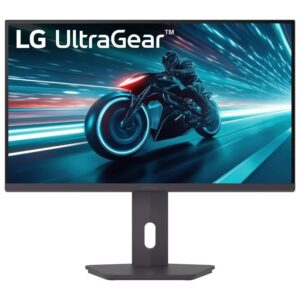
LG's UltraGear range at this size splits roughly three ways. The fast QHD models chase frame rates, the OLED models chase contrast and motion, and this one chases detail. It is the member of the family built around a high-resolution image, which also makes it the one that doubles most comfortably as a work screen.
That dual role is the whole point of it. A desk that runs spreadsheets and documents by day and games in the evening gets sharp text and fine interface detail without a second monitor, and the current consoles connect at their best output modes over the fast inputs on the back. The flat, conventional panel also avoids the burn-in care that an OLED asks of anyone who leaves a taskbar on screen for ten hours at a stretch.
The price of that detail is paid mostly by the graphics card. Recent PC games at native resolution and a high refresh rate need a strong GPU, and upscaling helps keep frame rates up. Older and lighter titles are a different story, and a mid-range card handles those comfortably. Anyone planning the purchase should think about the whole system, since the monitor is the easy part.
Several things are left to other models in the range. HDR here is an entry-level badge on a panel without local dimming, so films in a dark room look flat beside an OLED or a mini-LED screen. There is no single-cable laptop connection, no speakers and no switching between computers. On a gaming desk that has to earn its place as a work desk too, those omissions matter far less than they would on an office monitor.
Category strengths
Where the LG UltraGear 27GR93U-B beats the median
- A much higher pixel density ?163 ppi vs 109 ppi (median)
- Has USB hub ?
Where the LG UltraGear 27GR93U-B trails the median
- A lower refresh rate ?144 Hz vs 180 Hz (median)
- No swivel adjustment ?
How this VS Score was computed
Score 50: each known spec is measured against the median of IPS gaming monitors, 27 to 31 inches (29 products), then weighted; 50 means level with that median. In classes of six or more, a value beyond the class’s 10th–90th percentile range counts as that limit, so one extreme product cannot set the scale. 72% of the scoreable weight could be used; unknown values, features not applicable to this class and proxies (battery capacity where a rated life exists) add or remove nothing.
| Specification | This product | Cohort median | Score weight | Points moved |
|---|---|---|---|---|
| USB-C | No | 24% of the class have it | 0.5 | −24.0 |
| Height adjustment | Yes | 79% of the class have it | 0.4 | +20.0 |
| Resolution | 4K | 1440p | 1.2 | +15.6 |
| Pixel density | 163 | 109 | 0.5 | +12.5 |
| Refresh rate | 144 | 180 | 1.2 | −12.0 |
| Swivel | No | 64% of the class have it | 0.2 | −9.6 |
| Built-in speakers | No | 31% of the class have it | 0.2 | −9.6 |
| USB hub | Yes | 50% of the class have it | 0.05 | +2.3 |
| Pivot | Yes | 75% of the class have it | 0.02 | +1.0 |
| Screen size | 27 | 27 | 1.2 | +0.0 |
| Panel type | IPS | IPS | 0.8 | +0.0 |
| Color depth | 10 | 10 | 0.3 | +0.0 |
| Response time | 1 | 1 | 0.8 | +0.0 |
| Peak brightness | 400 | 400 | 0.8 | +0.0 |
| Contrast ratio | 1,000 | 1,000 | 0.6 | +0.0 |
| DCI-P3 coverage | 95 | 95 | 0.6 | +0.0 |
| HDR | DisplayHDR 400 | DisplayHDR 400 | 0.5 | +0.0 |
| Adaptive sync | G-Sync Compatible | G-Sync Compatible | 0.6 | +0.0 |
| HDMI ports | 2 | 2 | 0.4 | +0.0 |
| DisplayPort inputs | 1 | 1 | 0.4 | +0.0 |
Not scored: Local dimming (not applicable: only 17% of this class have it); Local dimming zones (unknown: not scored); Variable refresh rate (standard for the class (100% have it)); Motion blur reduction (unknown: not scored); Input lag (unknown: not scored); Tilt (standard for the class (100% have it)); USB-C power delivery (unknown: not scored); Headphone output (standard for the class (86% have it)); KVM switch (not applicable: only 0% of this class have it); Webcam (not applicable: only 0% of this class have it); Microphone (not applicable: only 0% of this class have it); Ethernet (not applicable: only 0% of this class have it); Picture-by-picture (unknown: not scored).
Editor’s note
The 27GR93U-B combines 4K sharpness with a 144 Hz refresh rate in a conventional 27-inch IPS package. Text, fine interface elements, and high-resolution games look sharp at this density, while HDMI 2.1 makes the monitor a strong companion for current consoles that support 4K at 120 Hz. DisplayPort 1.4 and a USB hub also make it comfortable in a desktop gaming setup.
Driving new PC games at native 4K and high frame rates requires a powerful graphics card. Resolution scaling or upscaling technologies may be necessary, so buyers should budget for the whole system rather than the panel alone. The 1 ms response claim depends on overdrive, so use a setting that avoids overshoot. DisplayHDR 400, roughly 400-nit brightness, and IPS contrast provide basic HDR presentation, not the deep blacks and intense highlights of OLED or Mini-LED.
FreeSync Premium and G-Sync compatibility help when frame rate varies. The stand supports height, tilt, and pivot, but not swivel, and a 100 x 100 mm VESA mount is available. Two HDMI 2.1 inputs, one DisplayPort input, USB hub, and headphone output cover common needs, but there is no USB-C video or charging, built-in speaker system, KVM, webcam, microphone, or Ethernet.
Choose the 27GR93U-B for a mixed console/PC desk, sharp productivity, and high-refresh 4K gaming without OLED burn-in concerns. Skip it for meaningful dark-room HDR, one-cable laptop docking, or a modest GPU expected to sustain 144 fps at 4K. Confirm the full model code before buying, because 27GR93U-B is easily confused with QHD UltraGear models whose resolution and HDMI behavior differ.
Specifications
Quality bars show where each figure sits between the lowest and highest of the 29 IPS gaming monitors, 27 to 31 inches this VS Score is measured against.
Picture
Gaming
Ergonomics & design
Connectivity
Features
Sources and verification
Where the specifications come from
- Official product pagelg.com
- Independent testingrtings.com
Verification
- First published
- Specifications last checked
- Sheet completeness
- 35 of 42 specifications verified; the rest show as Unknown and are never estimated or scored
- Page type
- Product specification page — Compiled from the manufacturer’s published specifications and the cited sources; this is not a hands-on test.
- Basis
- Research-based: specifications and editorial text were compiled from the documents listed here and the manufacturer’s published data. We have not tested this unit ourselves; where independent measurements are mentioned they belong to the linked publication.
Monitors with similar specs to the LG UltraGear 27GR93U-B
Ratings & reviews
No reviews yet. Be the first to share your experience.
The bottom line
The LG UltraGear 27GR93U-B earns a VS Score of 50, level with the median of the 29 IPS gaming monitors, 27 to 31 inches it is measured against.
- Who it’s for
- Someone who games and works at the same desk and wants sharp text for the day job, with a console or a strong graphics card for the evenings.
- Who should look elsewhere
- Owners of a mid-range graphics card expecting high frame rates in new games at full resolution, anyone who wants a single-cable laptop desk, and film watchers who care about dark-room HDR. Look elsewhere for any of those.
- The trade-off that matters
- Sharpness costs frames. The detail is the reason to buy it, and it is also what makes every new game harder to run smoothly.
- The main alternative
- Acer Nitro XV275K P5biipruzx, a gaming panel at the same resolution with a mini-LED backlight for HDR that looks the part, plus a single-cable laptop input.
The VS Score is calculated from the weighted specifications above, each measured against the median of comparable IPS gaming monitors, 27 to 31 inches — a shortlisting guide, not a substitute for your own priorities. See how we score.





