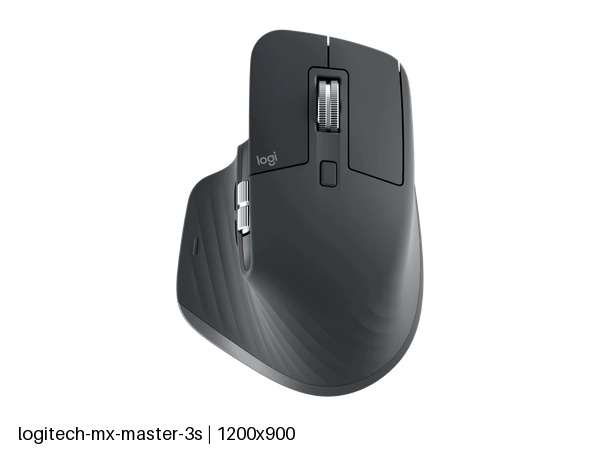
Logitech MX Master 3S: Specs, Price, Pros & Cons
Quiet switches, an electromagnetic MagSpeed scroll wheel and a Darkfield sensor that tracks on glass define the MX Master 3S, the full-size office mouse in Logitech's MX line. Each of the three answers a complaint that gaming mice never set out to solve.
The body is large and sculpted, with a second wheel under the thumb for horizontal scrolling and seven buttons in total. It connects through a Logitech receiver or over Bluetooth, pairs with several computers, and Logitech's software remaps the buttons for each program. The thumb wheel moves wide spreadsheets and editing timelines sideways without a keyboard shortcut. Power comes from a 500 mAh cell charged over USB-C, with quick charging for the day it runs flat, and charging turns into an occasional job.
The trade-offs are plain, and none of them touch office work. Sensor resolution trails any gaming mouse, and there is no published polling rate. The switches are quiet and carry a much shorter rated life than gaming switches, though the click count of office work is modest. Quiet clicks also suit an open office, or a call with the microphone on. It is a heavy mouse, so it feels settled on a desk and slow for anything quick. None of that touches the wheel. A light turn clicks line by line, a flick sends it spinning through a long spreadsheet, and it shifts between the two without a button press.
The mouse suits someone who spends the day in documents, spreadsheets or editing timelines, especially on a glass desk where an ordinary sensor fails. It is heavy and quiet on purpose, and both choices point away from games.
Category strengths
Where the Logitech MX Master 3S beats the median
- Has horizontal scrolling ?
- Has free-spin scroll wheel ?
- More buttons ?7 vs 6 (median)
Where the Logitech MX Master 3S trails the median
- A much lower max sensitivity ?8,000 DPI vs 25,600 DPI (median)
- A much heavier build ?141 g vs 89 g (median)
- A much lower switch lifespan ?10 million clicks vs 80 million clicks (median)
How this VS Score was computed
Score 49: each known spec is measured against the median of all mice (83 products), then weighted; 50 means level with that median. In classes of six or more, a value beyond the class’s 10th–90th percentile range counts as that limit, so one extreme product cannot set the scale. 44% of the scoreable weight could be used; unknown values, features not applicable to this class and proxies (battery capacity where a rated life exists) add or remove nothing.
| Specification | This product | Cohort median | Score weight | Points moved |
|---|---|---|---|---|
| Max sensitivity | 8,000 | 25,600 | 1 | −34.0 |
| Weight | 141 | 89 | 1 | −18.0 |
| USB-C charging | Yes | 68% of the class have it | 0.3 | +15.0 |
| Quick charge | Yes | 55% of the class have it | 0.3 | +15.0 |
| Horizontal scrolling | Yes | 46% of the class have it | 0.2 | +10.0 |
| Free-spin scroll wheel | Yes | 36% of the class have it | 0.2 | +10.0 |
| Switch lifespan | 10 — capped at the class’s lower range (15) | 80 | 0.2 | −8.2 |
| Buttons | 7 | 6 | 0.6 | +4.8 |
| Connection | 2 | 2 | 0.8 | +0.0 |
| Battery capacity | 500 | 500 | 0.2 | +0.0 |
Not scored: Max tracking speed (unknown: not scored); Max acceleration (unknown: not scored); Polling rate (unknown: not scored); Adjustable lift-off distance (unknown: not scored); Grip styles (unknown: not scored); Click latency (unknown: not scored); Debounce adjustment (unknown: not scored); Wireless polling rate (unknown: not scored); Battery life (unknown: not scored); Wireless charging (unknown: not scored); Onboard memory (unknown: not scored); Software customization (standard for the class (98% have it)); Adjustable weights (unknown: not scored); RGB lighting (unknown: not scored).
Editor’s note
The MX Master 3S is the productivity mouse other productivity mice are measured against, and two of its features have no equivalent in gaming hardware.
The first is the Darkfield sensor. It tracks on glass, including a glass desk or table, where an ordinary optical sensor sees nothing and a laser struggles. Logitech specifies glass at least 4 mm thick, so a glass desk or table can do without a mat.
The second is the MagSpeed scroll wheel, which is electromagnetic and shifts automatically between ratcheted and free-spinning depending on how hard you flick it. A thousand-row spreadsheet passes in one motion, and a gentle turn still clicks line by line. There is a second thumb wheel for horizontal scrolling.
Logitech rates the battery at up to 70 days on a full charge, and a one-minute quick charge over USB-C gives three hours of use. It pairs with multiple machines. The switches are the quiet type, rated to 10 million clicks, which is low by gaming standards and ample for the click volume office work produces.
At 141 g it is far heavier than a gaming mouse, and the 8,000 DPI sensor with no published polling rate makes clear this is not for aiming.
Buy it if you work all day, especially across long documents, spreadsheets or a glass desk. Buy a gaming mouse for games: the weight and the quiet switches are wrong for that, deliberately.
Specifications
Quality bars show where each figure sits between the lowest and highest of the 83 mice this VS Score is measured against.
Sensor & tracking
Design & handling
Switches & latency
Connectivity
Battery
Features
Sources and verification
Where the specifications come from
- Official product pagelogitech.com
Verification
- First published
- Specifications last checked
- Sheet completeness
- 20 of 34 specifications verified; the rest show as Unknown and are never estimated or scored
- Page type
- Product specification page — Compiled from the manufacturer’s published specifications and the cited sources; this is not a hands-on test.
- Basis
- Research-based: specifications and editorial text were compiled from the documents listed here and the manufacturer’s published data. We have not tested this unit ourselves; where independent measurements are mentioned they belong to the linked publication.
Where to buy
Prices and availability may change. Check the retailer before buying. We may earn a commission on purchases.
Price history
Mice with similar specs to the Logitech MX Master 3S
Ratings & reviews
No reviews yet. Be the first to share your experience.
The bottom line
The Logitech MX Master 3S earns a VS Score of 49, below the median of the 83 mice it is measured against (a score of 50 is level with that median).
- Who it’s for
- Heavy spreadsheet and document users, especially anyone working on a glass desk, who want the wheel and the battery to vanish from their thinking.
- Who should look elsewhere
- Not a gaming mouse. The weight and the quiet, modestly rated switches are chosen for an office and work against fast aiming.
- The trade-off that matters
- Its weight gives a settled feel on the desk and makes it tiring for anything quick, which is why it stays an office tool.
- The main alternative
- Razer Pro Click V2: an all-day ergonomic shape with tilt scrolling that also tracks on glass and handles games
The VS Score is calculated from the weighted specifications above, each measured against the median of comparable mice — a shortlisting guide, not a substitute for your own priorities. See how we score.