
Logitech Mobi Fold: Specs, Price, Pros & Cons
Folding mice are a strange little category. They exist because laptop trackpads are unpleasant for long sessions and because a normal mouse is an awkward shape to carry, and almost every attempt to solve that has produced something that is bad at being carried, bad at being a mouse, or both. Logitech's answer is to treat the fold as the defining constraint and let everything else bend around it.
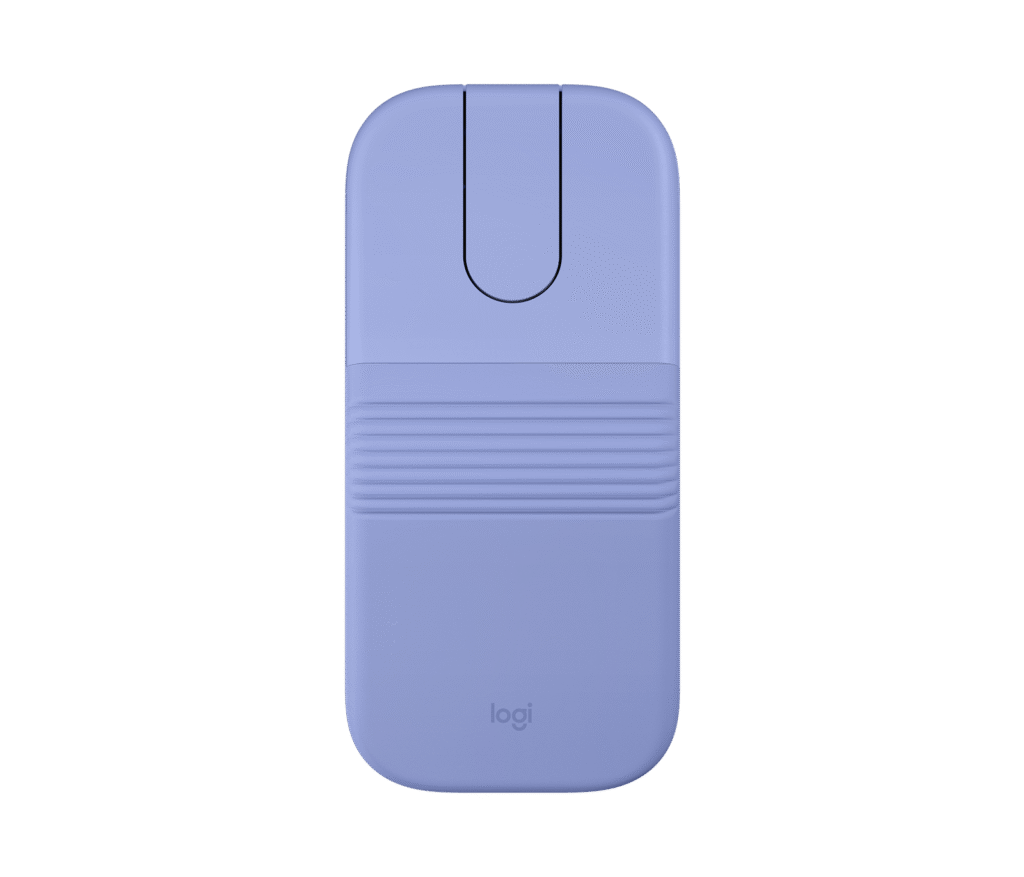
That means this is a flat mouse. Not low-profile in the marketing sense: flat, with a profile closer to a bar of soap than to the contoured shapes Logitech sells for desks. Your hand rests on it rather than wrapping around it. For an hour in a hotel room or on a train table that is comfortable enough, and vastly better than a trackpad. For a full working day at a fixed desk it is not what you want, and Logitech does not pretend otherwise.
The fold itself does double duty as the power control, which is the sort of detail that sounds like a gimmick and turns out to be the most useful thing about the design: there is no switch to forget, and the mouse cannot wake up in a bag. Charging is over USB-C, and the battery is small enough that the sleep behavior matters.
The compromise that will decide it for most people is the scrolling. There is no wheel. A touch surface handles vertical movement and the two programmable inputs. It works, and it is clearly a concession to thickness.
This is a second mouse, bought deliberately for the bag. Judged that way it is well made. Judged as a general-purpose mouse it will disappoint, and it was never built to survive that comparison.
Category strengths
Where the Logitech Mobi Fold beats the median
- Much longer battery life ?768 h vs 150 h (median)
- A lighter build ?79 g vs 89 g (median)
Where the Logitech Mobi Fold trails the median
- A much lower max sensitivity ?4,000 DPI vs 25,600 DPI (median)
- Fewer connection options ?
- No onboard memory ?
- Fewer buttons ?4 vs 6 (median)
How this VS Score was computed
Score 46: each known spec is measured against the median of all mice (81 products), then weighted; 50 means level with that median. In classes of six or more, a value beyond the class’s 10th–90th percentile range counts as that limit, so one extreme product cannot set the scale. 50% of the scoreable weight could be used; unknown values, features not applicable to this class and proxies (battery capacity where a rated life exists) add or remove nothing.
| Specification | This product | Cohort median | Score weight | Points moved |
|---|---|---|---|---|
| Max sensitivity | 4,000 | 25,600 | 1 | −42.0 |
| Battery life | 768 | 150 | 0.8 | +40.0 |
| Connection | 1 | 2 | 0.8 | −20.0 |
| USB-C charging | Yes | 67% of the class have it | 0.3 | +15.0 |
| Quick charge | Yes | 55% of the class have it | 0.3 | +15.0 |
| Onboard memory | No | 86% of the class have it | 0.3 | −14.4 |
| Free-spin scroll wheel | No | 34% of the class have it | 0.2 | −9.6 |
| RGB lighting | No | 46% of the class have it | 0.2 | −9.6 |
| Weight | 79 | 89 | 1 | +6.0 |
| Buttons | 4 — capped at the class’s lower range (5) | 6 | 0.6 | −4.8 |
Not scored: Max tracking speed (unknown: not scored); Max acceleration (unknown: not scored); Polling rate (unknown: not scored); Adjustable lift-off distance (unknown: not scored); Grip styles (unknown: not scored); Horizontal scrolling (unknown: not scored); Click latency (unknown: not scored); Switch lifespan (unknown: not scored); Debounce adjustment (unknown: not scored); Wireless polling rate (unknown: not scored); Battery capacity (capacity is a proxy; the rated battery life is scored instead); Wireless charging (not applicable: only 14% of this class have it); Software customization (standard for the class (97% have it)); Adjustable weights (not applicable: only 2% of this class have it).
Editor’s note
The Logitech Mobi Fold is a travel mouse first and a mouse second, and that ordering explains every choice in it. Unfolded, it is a low 33-millimeter-tall, 79-gram mouse that Logitech's ergonomics lab says cuts forearm muscle strain by about 22 percent compared with using a laptop trackpad. Folded, it collapses to 21 millimeters thick and 66 millimeters long, small enough for a pocket, and the fold doubles as the power switch: open to wake, close to sleep, which is why the small 100 mAh battery still lasts around 32 days between charges.
There is no scroll wheel. In its place sits a touch panel with what Logitech calls Adaptive Scrolling: line-by-line when you move slowly, hyperfast when you flick. The forward and back functions live under the same panel and are the two programmable inputs, configured through Logi Options+ on Windows or macOS. Tracking comes from a PAW3222 optical sensor with a 400-4,000 DPI range in 100-DPI steps, which is unremarkable on paper and entirely adequate for documents, browsers and spreadsheets.
Connectivity is Bluetooth Low Energy only, with Easy-Switch pairing for up to three devices (laptop, tablet, phone) and compatibility across Windows, macOS, iPadOS, ChromeOS, Android and Linux. There is no dongle in the box, though Logi Bolt receivers are supported if your machine's Bluetooth is unreliable. The quiet clicks are a deliberate choice for cafes and shared spaces.
What this is not is a primary desk mouse. The flat profile that makes it portable also makes it a compromise for long sessions, there is no wheel for gaming, and that DPI ceiling with Bluetooth-class latency rules out anything competitive. As a dedicated bag companion for hybrid workers who currently suffer the trackpad, it is one of the most considered designs in its niche.
Specifications
Quality bars show where each figure sits between the lowest and highest of the 81 mice this VS Score is measured against.
Sensor & tracking
Design & handling
Switches & latency
Connectivity
Battery
Features
Sources and verification
Where the specifications come from
- Official product pagelogitech.com
- Datasheet or manuallogitech.com
- Independent testingrtings.com
Verification
- First published
- Specifications last checked
- Sheet completeness
- 21 of 34 specifications verified; the rest show as Unknown and are never estimated or scored
- Page type
- Product specification page — Compiled from the manufacturer’s published specifications and the cited sources; this is not a hands-on test.
- Basis
- Research-based: specifications and editorial text were compiled from the documents listed here and the manufacturer’s published data. We have not tested this unit ourselves; where independent measurements are mentioned they belong to the linked publication.
Where to buy
Prices and availability may change. Check the retailer before buying. We may earn a commission on purchases.
Price history
Mice with similar specs to the Logitech Mobi Fold
Ratings & reviews
No reviews yet. Be the first to share your experience.
The bottom line
The Logitech Mobi Fold earns a VS Score of 46, below the median of the 81 mice it is measured against (a score of 50 is level with that median).
- Who it’s for
- Hybrid workers and travelers who want a pocketable mouse that beats a trackpad on comfort.
- Who should look elsewhere
- Gamers or anyone wanting a primary desk mouse, because the flat shape and touch scrolling are travel compromises.
- The trade-off that matters
- Folds to 21 mm and lasts a month per charge, but you give up a real scroll wheel and any dongle in the box.
- The main alternative
- Logitech Pebble Mouse 2 M350s
The VS Score is calculated from the weighted specifications above, each measured against the median of comparable mice — a shortlisting guide, not a substitute for your own priorities. See how we score.





