
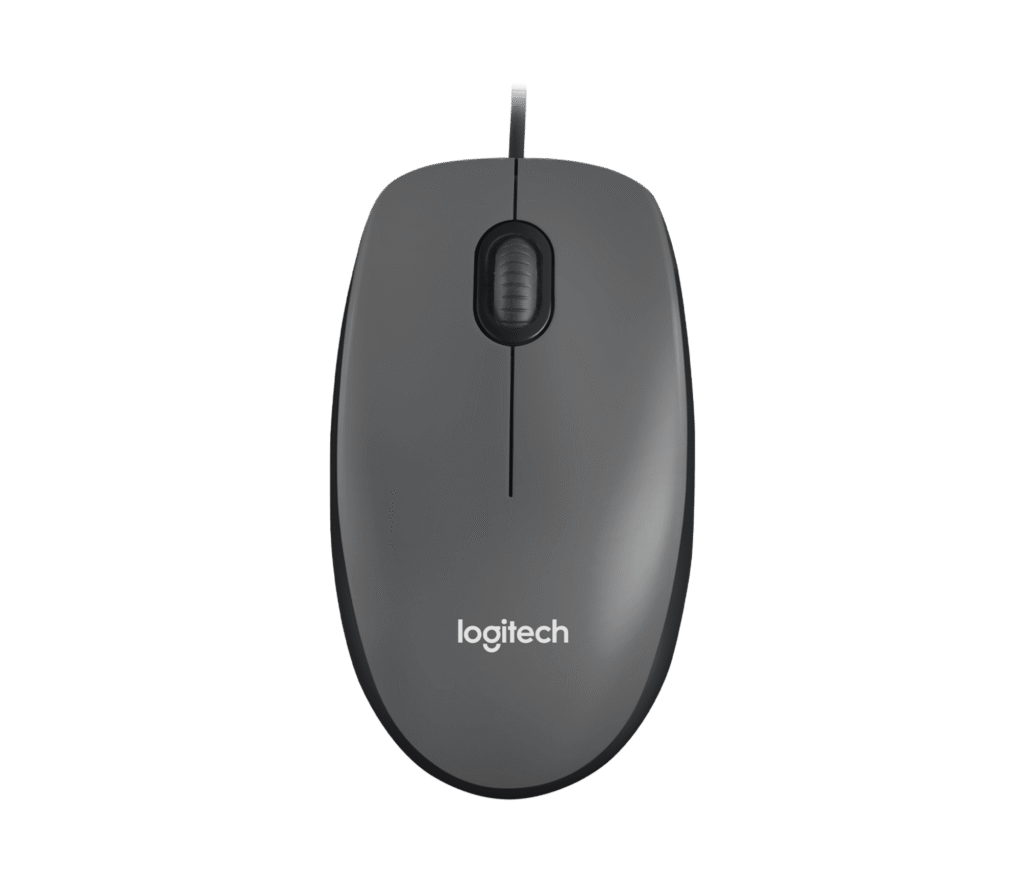
Logitech M100: Specs, Features, Pros & Cons
Almost everything written about mice is written about the interesting end of the market, where sensors and switches and polling rates are argued over. The M100 sits at the other end, and the useful thing about it is that it functions as a kind of control group: it shows what a mouse is when nothing has been added to it.
It is wired. It has a left button, a right button and a wheel that clicks. There is no software, no pairing, no charging, no firmware, no profiles and no lighting. The shape is symmetrical, so it works in either hand, and it is a size that suits most adults without being notable in any direction.
The point is not that this is a bargain, although it is. The point is that every feature a more expensive mouse has is also a thing that can fail, need updating, run out of charge, or refuse to work on a locked-down machine. On a work computer where you cannot install peripheral software, on a machine in a shared office, on a spare kept in a drawer for the day something dies, the complete absence of anything to configure is the feature.
Where it falls short is predictable and worth stating. The sensor resolution is low by modern standards, which is fine on a standard-resolution display and tiring on a high-resolution one, where you will find yourself lifting and repositioning far more than you should. There is no way to change it.
Buy it knowing exactly what it is. As a primary mouse for a demanding desk it is the wrong choice. As the thing that always works, it is hard to beat.
Category strengths
Where the Logitech M100 trails the median
- A much lower max sensitivity ?1,000 DPI vs 25,600 DPI (median)
- Fewer connection options ?
- No adjustable lift-off distance ?
- Fewer buttons ?3 vs 6 (median)
- No USB-C charging ?
- No onboard memory ?
- No software customization ?
- A slightly heavier build ?90 g vs 89 g (median)
How this VS Score was computed
Score 20: each known spec is measured against the median of all mice (81 products), then weighted; 50 means level with that median. In classes of six or more, a value beyond the class’s 10th–90th percentile range counts as that limit, so one extreme product cannot set the scale. 47% of the scoreable weight could be used; unknown values, features not applicable to this class and proxies (battery capacity where a rated life exists) add or remove nothing.
| Specification | This product | Cohort median | Score weight | Points moved |
|---|---|---|---|---|
| Max sensitivity | 1,000 — capped at the class’s lower range (4,000) | 25,600 | 1 | −42.0 |
| Connection | 1 | 2 | 0.8 | −20.0 |
| Adjustable lift-off distance | No | 61% of the class have it | 0.3 | −14.4 |
| USB-C charging | No | 67% of the class have it | 0.3 | −14.4 |
| Onboard memory | No | 86% of the class have it | 0.3 | −14.4 |
| Software customization | No | 97% of the class have it | 0.3 | −14.4 |
| Horizontal scrolling | No | 45% of the class have it | 0.2 | −9.6 |
| Free-spin scroll wheel | No | 34% of the class have it | 0.2 | −9.6 |
| RGB lighting | No | 46% of the class have it | 0.2 | −9.6 |
| Buttons | 3 — capped at the class’s lower range (5) | 6 | 0.6 | −4.8 |
| Weight | 90 | 89 | 1 | −1.0 |
Not scored: Max tracking speed (unknown: not scored); Max acceleration (unknown: not scored); Polling rate (unknown: not scored); Grip styles (unknown: not scored); Click latency (unknown: not scored); Switch lifespan (unknown: not scored); Debounce adjustment (unknown: not scored); Wireless polling rate (unknown: not scored); Battery life (unknown: not scored); Battery capacity (unknown: not scored); Quick charge (unknown: not scored); Wireless charging (not applicable: only 14% of this class have it); Adjustable weights (not applicable: only 2% of this class have it).
Editor’s note
The M100 is a plain wired mouse and it is on this list because sometimes that is the correct answer.
There is no software, no onboard memory, no RGB, no adjustable DPI and no extra buttons: three buttons, 1,000 DPI, a 1.8 m USB-A cable, and an ambidextrous shape at 90 g. Nothing to configure, nothing to charge, nothing to pair, nothing to update.
That specification would be a criticism of a gaming mouse and is a description here. For a second machine, a work PC where installing peripheral software is not allowed, a spare in a drawer, or a family computer, the total absence of anything to go wrong is the feature. It works the moment it is plugged in, on any operating system, forever.
Its resolution is low by modern standards and usable on a 1080p screen. On a 4K display you will be moving your arm a lot, which is the one situation where it falls short.
The shape is symmetrical, so left-handed people are equally served, which is more than most mice manage.
Buy it as a spare, a backup, or a mouse for a machine where simplicity and reliability matter more than anything else. Buy almost anything else on this list as your main mouse, particularly if you use a high-resolution display, where the fixed low sensitivity becomes tiring.
Specifications
Quality bars show where each figure sits between the lowest and highest of the 81 mice this VS Score is measured against.
Sensor & tracking
Design & handling
Switches & latency
Connectivity
Battery
Features
Sources and verification
Where the specifications come from
- Official product pagelogitech.com
- Independent testingrtings.com
Verification
- First published
- Specifications last checked
- Sheet completeness
- 20 of 34 specifications verified; the rest show as Unknown and are never estimated or scored
- Page type
- Product specification page — Compiled from the manufacturer’s published specifications and the cited sources; this is not a hands-on test.
- Basis
- Research-based: specifications and editorial text were compiled from the documents listed here and the manufacturer’s published data. We have not tested this unit ourselves; where independent measurements are mentioned they belong to the linked publication.
Mice with similar specs to the Logitech M100


Ratings & reviews
No reviews yet. Be the first to share your experience.
The bottom line
The Logitech M100 earns a VS Score of 20, below the median of the 81 mice it is measured against (a score of 50 is level with that median).
- Who it’s for
- A locked-down work PC, a family computer or a drawer spare: anywhere a mouse has to work the moment it is plugged in, with nothing to install.
- Who should look elsewhere
- Anyone whose main screen is high resolution, or who wants side buttons or adjustable sensitivity.
- The trade-off that matters
- Fixed low sensitivity. On a large high-resolution screen every trip across it takes more arm movement, and there is no setting to change that.
- The main alternative
- Logitech G203 LIGHTSYNC: also wired and cheap, with a higher-resolution sensor and onboard memory for a main desk
The VS Score is calculated from the weighted specifications above, each measured against the median of comparable mice — a shortlisting guide, not a substitute for your own priorities. See how we score.



