
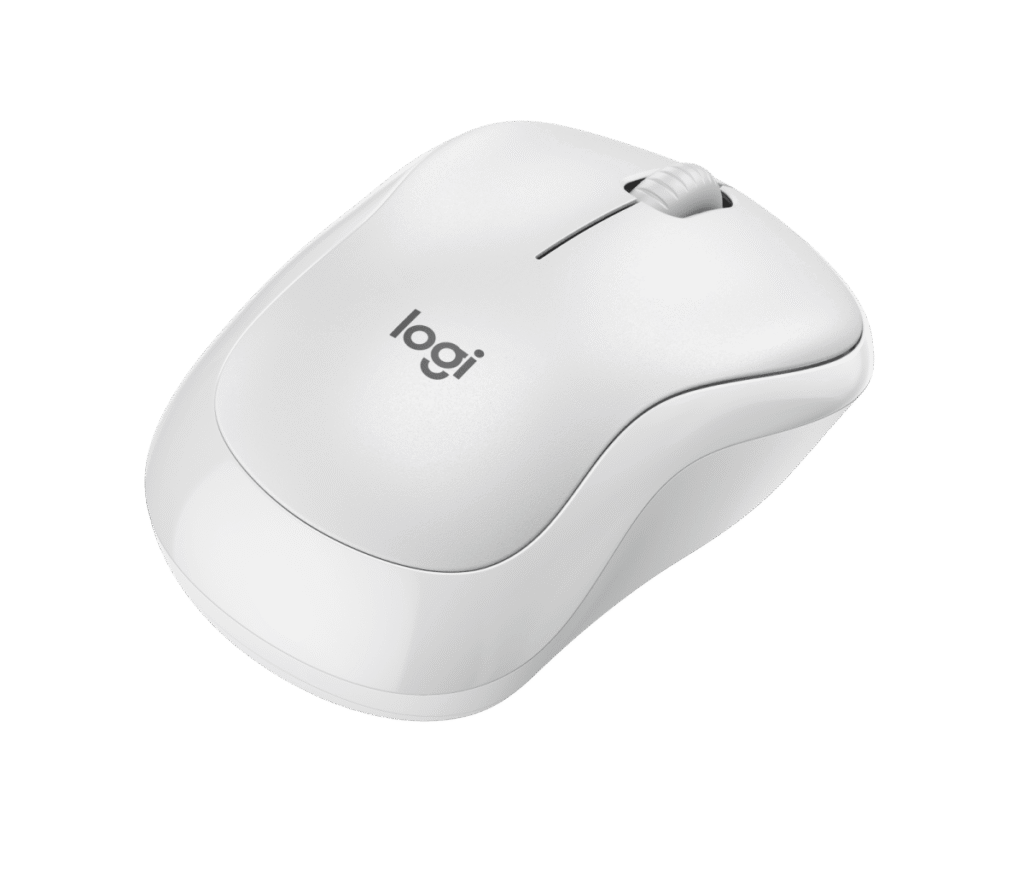
Logitech M240: Specs, Features, Pros & Cons
Cheap wireless mice are usually cheap in every direction at once. The M240 Silent is worth a look because Logitech clearly chose one thing to spend on and let everything else stay ordinary.
That one thing is the click. This is a mouse designed for rooms where noise is a problem: shared offices, lecture halls, a bedroom with someone asleep in it, a video call where the microphone sits close to your hand. The switches are built to strip the sharp crack out of the sound while keeping enough feedback that you can feel the press land. It is the entire reason the model exists.
Everything else is deliberately conventional. It is a small, rounded, symmetrical shell with a left button, a right button, a ratcheted wheel and nothing more. No side buttons, no tilt, no sensitivity switch on top. It runs on a replaceable cell rather than an internal rechargeable pack, which sounds dated and in practice means you will rarely think about power at all.
The specification most likely to change a buying decision is the connection. There is no USB receiver in the box. It pairs over Bluetooth and nothing else. On a modern laptop that is fine and saves a port. On a desktop with no Bluetooth radio, or when you need a working pointer before the operating system has loaded, it will not work, and no accessory fixes that.
Size deserves a check too. This is a small mouse, closer to a travel model than a full desk one, and larger hands tend to find it cramped across a long day.
Taken for what it is, a quiet and forgettable pointer that lives in a laptop bag, it is hard to fault. Asked to be a main desk mouse, the compromises surface quickly.
Category strengths
Where the Logitech M240 beats the median
- Much longer battery life ?13,140 h vs 150 h (median)
- A lighter build ?73.8 g vs 89 g (median)
Where the Logitech M240 trails the median
- A much lower max sensitivity ?4,000 DPI vs 25,600 DPI (median)
- Fewer connection options ?
- No adjustable lift-off distance ?
- Fewer buttons ?3 vs 6 (median)
- No USB-C charging ?
- No quick charge ?
- No onboard memory ?
How this VS Score was computed
Score 34: each known spec is measured against the median of all mice (81 products), then weighted; 50 means level with that median. In classes of six or more, a value beyond the class’s 10th–90th percentile range counts as that limit, so one extreme product cannot set the scale. 53% of the scoreable weight could be used; unknown values, features not applicable to this class and proxies (battery capacity where a rated life exists) add or remove nothing.
| Specification | This product | Cohort median | Score weight | Points moved |
|---|---|---|---|---|
| Max sensitivity | 4,000 | 25,600 | 1 | −42.0 |
| Battery life | 13,140 — capped at the class’s upper range (2,920) | 150 | 0.8 | +40.0 |
| Connection | 1 | 2 | 0.8 | −20.0 |
| Adjustable lift-off distance | No | 61% of the class have it | 0.3 | −14.4 |
| USB-C charging | No | 67% of the class have it | 0.3 | −14.4 |
| Quick charge | No | 55% of the class have it | 0.3 | −14.4 |
| Onboard memory | No | 86% of the class have it | 0.3 | −14.4 |
| Weight | 73.8 | 89 | 1 | +10.0 |
| Free-spin scroll wheel | No | 34% of the class have it | 0.2 | −9.6 |
| RGB lighting | No | 46% of the class have it | 0.2 | −9.6 |
| Buttons | 3 — capped at the class’s lower range (5) | 6 | 0.6 | −4.8 |
Not scored: Max tracking speed (unknown: not scored); Max acceleration (unknown: not scored); Polling rate (unknown: not scored); Grip styles (unknown: not scored); Horizontal scrolling (unknown: not scored); Click latency (unknown: not scored); Switch lifespan (unknown: not scored); Debounce adjustment (not applicable: only 20% of this class have it); Wireless polling rate (unknown: not scored); Battery capacity (unknown: not scored); Wireless charging (not applicable: only 14% of this class have it); Software customization (standard for the class (97% have it)); Adjustable weights (not applicable: only 2% of this class have it).
Editor’s note
The M240 Silent is a cheap Bluetooth mouse that does three things well and makes no pretense about the rest.
The first is the click. Logitech's SilentTouch mechanism cuts click noise by about 90 percent while keeping the tactile feel, and it works: this is a mouse you can use in a shared office, a library or next to a sleeping person without anyone noticing. The second is battery life: 18 months from a single pre-installed AA, helped by auto-sleep. You will likely lose this mouse before you change its battery. The third is that it is ambidextrous, so left-handers get a real option at this price.
The limitations are the point of the design rather than oversights. It is Bluetooth-only, with no USB dongle, so it will not work with a machine that has no Bluetooth or with a BIOS screen before the OS loads. There are three buttons and a ratcheted line-by-line wheel, with no side buttons, no free-spin and no horizontal scroll. Tracking is a basic optical sensor with a 1,000 DPI default and a 4,000 DPI ceiling, which is fine for documents and browsing and not intended for anything faster.
At 99 x 60 x 39 mm and 73.8 grams it is a small mouse. If you have large hands you will be fingertip-gripping it whether you meant to or not.
Buy it as a travel or second mouse, for a quiet office, or for anyone who wants a reliable pointer with no dongle to lose.
Do not buy it for gaming, for detailed design work, or if you rely on extra thumb buttons. Logi Options+ can remap the three it has, but it cannot add more.
Specifications
Quality bars show where each figure sits between the lowest and highest of the 81 mice this VS Score is measured against.
Sensor & tracking
Design & handling
Switches & latency
Connectivity
Battery
Features
Sources and verification
Where the specifications come from
- Official product pagelogitech.com
- Independent testingrtings.com
Verification
- First published
- Specifications last checked
- Sheet completeness
- 22 of 34 specifications verified; the rest show as Unknown and are never estimated or scored
- Page type
- Product specification page — Compiled from the manufacturer’s published specifications and the cited sources; this is not a hands-on test.
- Basis
- Research-based: specifications and editorial text were compiled from the documents listed here and the manufacturer’s published data. We have not tested this unit ourselves; where independent measurements are mentioned they belong to the linked publication.
Mice with similar specs to the Logitech M240


Ratings & reviews
No reviews yet. Be the first to share your experience.
The bottom line
The Logitech M240 earns a VS Score of 34, below the median of the 81 mice it is measured against (a score of 50 is level with that median).
- Who it’s for
- Laptop owners who want a quiet, small pointer for a bag, a library or a shared office and would rather never think about the battery.
- Who should look elsewhere
- Desktops without Bluetooth, anyone who needs a pointer in the BIOS, gamers and large hands all need a different mouse.
- The trade-off that matters
- Bluetooth is the only way in. That saves a USB port on a laptop, and it rules out any machine without a Bluetooth radio, with nothing in the box to fix it.
- The main alternative
- Logitech M720 Triathlon: a USB receiver as well as Bluetooth, plus thumb buttons, for a desktop without a Bluetooth radio
The VS Score is calculated from the weighted specifications above, each measured against the median of comparable mice — a shortlisting guide, not a substitute for your own priorities. See how we score.



