
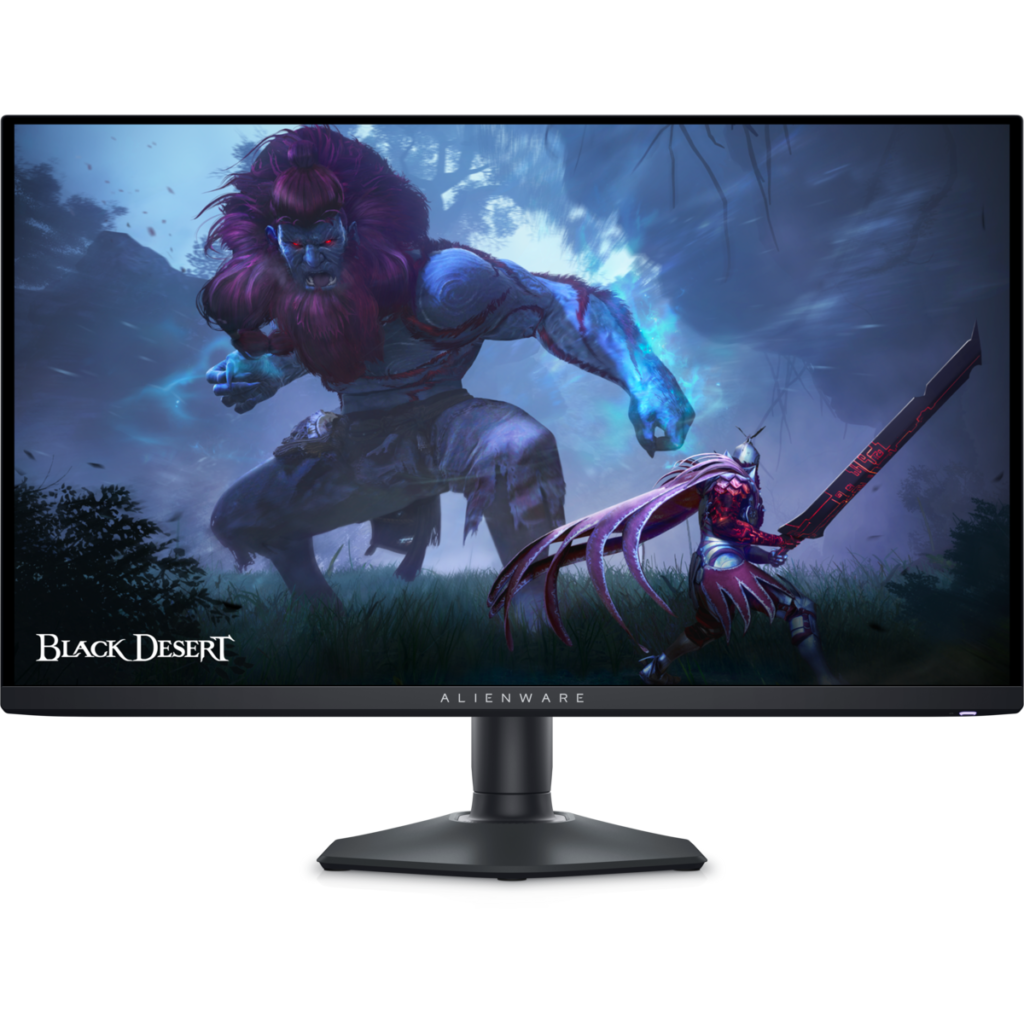
Dell Alienware AW2725DF: Specs, Features, Pros & Cons
Alienware's larger QD-OLED monitors curve toward the player. This one is flat, smaller and aimed at competitive games, where a flat surface keeps the crosshair and the edges of the map where the eye expects them and the whole image stays inside one glance.
The panel type carries the rest of the pitch. Each pixel makes its own light, so there is no backlight to bleed around dark areas and fast motion stays clean at speeds where most LCD gaming screens begin to blur. Here that sits on top of one of the highest refresh ceilings sold at this size, a pairing that fast shooters reward and slower games barely notice.
A few details shape how it lives on a desk. There is no headphone output, so a headset has to plug into the PC. Like other OLEDs, it runs short panel-care cycles while it sleeps, so it is better left on standby than switched off at the wall socket every night. Dell's warranty on its Alienware OLEDs covers burn-in, which takes some of the worry out of the one long-term weakness of the technology, though it does not change how the panel should be treated.
Its closest relatives are Alienware's own curved OLEDs, which trade some of this speed for a larger or wider picture. The flat body and the smaller size are the reasons to choose this one over them. Both matter most to players who sit close, move the mouse fast and spend their evenings in ranked matches, and they matter very little to someone who mostly plays slower games with a controller from further back.
Category strengths
Where the Dell Alienware AW2725DF beats the median
- A much higher refresh rate ?360 Hz vs 240 Hz (median)
Where the Dell Alienware AW2725DF trails the median
- Fewer HDMI ports ?1 vs 2 (median)
- No headphone output ?
How this VS Score was computed
Score 45: each known spec is measured against the median of OLED gaming monitors, 27 to 31 inches (16 products), then weighted; 50 means level with that median. In classes of six or more, a value beyond the class’s 10th–90th percentile range counts as that limit, so one extreme product cannot set the scale. 70% of the scoreable weight could be used; unknown values, features not applicable to this class and proxies (battery capacity where a rated life exists) add or remove nothing.
| Specification | This product | Cohort median | Score weight | Points moved |
|---|---|---|---|---|
| Refresh rate | 360 | 240 | 1.2 | +30.0 |
| Adaptive sync | FreeSync | G-Sync Compatible | 0.6 | −28.8 |
| USB-C | No | 33% of the class have it | 0.5 | −24.0 |
| Motion blur reduction | No | 22% of the class have it | 0.3 | −14.4 |
| HDMI ports | 1 | 2 | 0.4 | −10.0 |
| Headphone output | No | 75% of the class have it | 0.2 | −9.6 |
| USB hub | Yes | 73% of the class have it | 0.05 | +2.3 |
| Screen size | 27 | 27 | 1.2 | +0.0 |
| Resolution | 1440p | 1440p | 1.2 | +0.0 |
| Panel type | OLED | OLED | 0.8 | +0.0 |
| Color depth | 10 | 10 | 0.3 | +0.0 |
| Response time | 0.03 | 0.03 | 0.8 | +0.0 |
| Peak brightness | 1,000 | 1,000 | 0.8 | +0.0 |
| Contrast ratio | 1,500,000 | 1,500,000 | 0.6 | +0.0 |
| DCI-P3 coverage | 99.3 | 99 | 0.6 | +0.0 |
| HDR | True Black 400 | True Black 400 | 0.5 | +0.0 |
| Pixel density | 111 | 111 | 0.5 | +0.0 |
| DisplayPort inputs | 2 — capped at the class’s upper range (1) | 1 | 0.4 | +0.0 |
Not scored: Local dimming (not applicable: only 0% of this class have it); Local dimming zones (unknown: not scored); Variable refresh rate (standard for the class (100% have it)); Input lag (unknown: not scored); Height adjustment (standard for the class (94% have it)); Tilt (standard for the class (100% have it)); Swivel (standard for the class (88% have it)); Pivot (standard for the class (81% have it)); USB-C power delivery (unknown: not scored); Built-in speakers (not applicable: only 0% of this class have it); KVM switch (unknown: not scored); Webcam (unknown: not scored); Microphone (unknown: not scored); Ethernet (unknown: not scored); Picture-by-picture (unknown: not scored).
Editor’s note
The AW2725DF is a focused product: a 27-inch 1440p QD-OLED at 360 Hz, and almost every decision in it serves frame rate.
1440p is the deliberate choice. At 109 pixels per inch it is not a sharpness champion, but a mid-range graphics card can feed that rate at this resolution, which it cannot at 4K. Paired with QD-OLED's 0.03 ms response and quoted 1,500,000:1 contrast, motion clarity is about as good as a desk display gets. Color coverage is 99% DCI-P3 with True Black 400 HDR at 1,000 nits.
The port layout tells you who Dell had in mind: two DisplayPort inputs and one HDMI 2.1, which is the reverse of most monitors and suits two PCs rather than a console-heavy setup. There is a USB hub but no USB-C, so a laptop needs a separate video cable and its own charger. The stand adjusts fully, including pivot.
The glossy coating is what gives QD-OLED its depth and it will mirror a window behind you. As with any OLED on a desk, a fixed taskbar carries a slow retention risk that television use does not.
Buy it for competitive shooters, where that refresh rate at a resolution you can drive beats 4K at half the rate. Buy the 4K OLEDs alongside it if you also work on the same screen: text at 109 ppi is the compromise you are making.
Specifications
Quality bars show where each figure sits between the lowest and highest of the 16 OLED gaming monitors, 27 to 31 inches this VS Score is measured against.
Picture
Gaming
Ergonomics & design
Connectivity
Features
Sources and verification
Where the specifications come from
- Datasheet or manualdell.com
- Independent testingrtings.com
Verification
- First published
- Specifications last checked
- Sheet completeness
- 31 of 42 specifications verified; the rest show as Unknown and are never estimated or scored
- Page type
- Product specification page — Compiled from the manufacturer’s published specifications and the cited sources; this is not a hands-on test.
- Basis
- Research-based: specifications and editorial text were compiled from the documents listed here and the manufacturer’s published data. We have not tested this unit ourselves; where independent measurements are mentioned they belong to the linked publication.
Monitors with similar specs to the Dell Alienware AW2725DF

Ratings & reviews
No reviews yet. Be the first to share your experience.
The bottom line
The Dell Alienware AW2725DF earns a VS Score of 45, below the median of the 16 OLED gaming monitors, 27 to 31 inches it is measured against (a score of 50 is level with that median).
- Who it’s for
- Competitive shooter players with a mid-range graphics card who want the cleanest motion their card can feed, often with two PCs to plug in.
- Who should look elsewhere
- Console-heavy setups, since only one of its inputs suits a console, and anyone who spends the working day on text at this pixel density.
- The trade-off that matters
- Frame rate comes first, so the resolution stays modest to keep the refresh ceiling reachable, and text looks coarser than on a denser screen.
- The main alternative
- ASUS ROG Swift OLED PG27UCDM: the same size with far sharper text and single-cable laptop charging, for a screen that also does a day's work at a lower refresh ceiling.
The VS Score is calculated from the weighted specifications above, each measured against the median of comparable OLED gaming monitors, 27 to 31 inches — a shortlisting guide, not a substitute for your own priorities. See how we score.





