
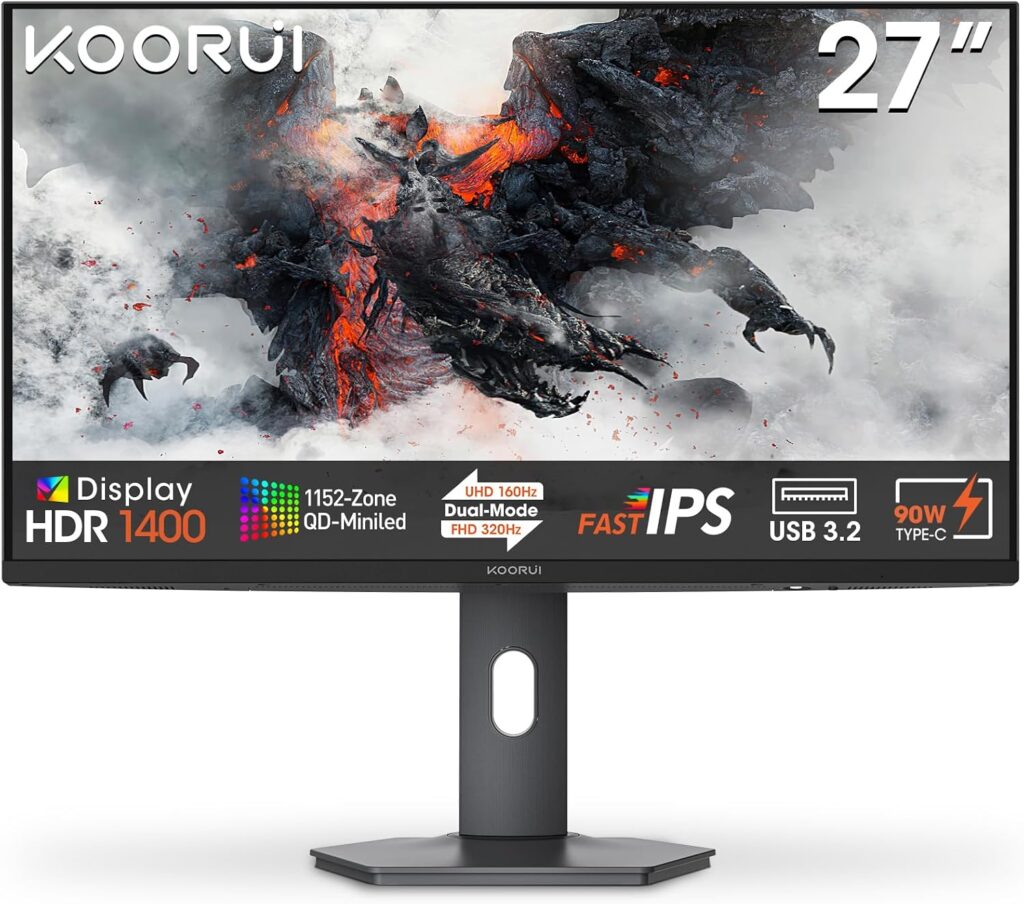
KOORUI S2741LM: Specs, Features, Pros & Cons
Most monitors ask you to choose between a sharp screen for work and a bright one for HDR. This one tries to be both at once, pairing a high-resolution panel with a mini-LED backlight, and it comes from KOORUI, a brand best known for inexpensive monitors sold mainly online rather than through big-name retail channels.
That background explains the pitch. KOORUI competes on specification for the money, and here it has packed in a feature list the major brands usually keep for their premium lines: a finely zoned backlight, full HDR certification, laptop charging over a single cable, a hub for peripherals and a stand that turns to portrait. On paper it lines up against monitors from far better-known names that cost considerably more.
The day-to-day value lies in two places. Text is crisp at this pixel density, which makes it a comfortable work display, and the laptop connection lets one cable handle picture, charging and accessories. After hours the HDR capability turns the same screen into a credible display for films and single-player games. The refresh rate is respectable for play but not the headline, so competitive players chasing the fastest possible panel are not its natural audience.
What it gives up is certainty. A zoned backlight is always a compromise, and how well it behaves depends on the maker's tuning, which varies more between brands than any spec sheet admits. Warranty handling and firmware support from a smaller company are also harder to judge in advance. Seen against a basic high-resolution office screen, it costs more and does far more. Seen against an OLED, it swaps perfect black for brightness and a lower price.
Category strengths
Where the KOORUI S2741LM beats the median
- Much higher peak brightness ?1,400 nits vs 400 nits (median)
- Has USB-C ?
- Has local dimming ?
- A much higher pixel density ?163 ppi vs 109 ppi (median)
- Has USB hub ?
- Slightly wider DCI-P3 colour coverage ?98 % vs 95 % (median)
- Faster USB-C charging ?90 W vs 65 W (median)
Where the KOORUI S2741LM trails the median
- A lower refresh rate ?160 Hz vs 180 Hz (median)
How this VS Score was computed
Score 60: each known spec is measured against the median of IPS gaming monitors, 27 to 31 inches (29 products), then weighted; 50 means level with that median. In classes of six or more, a value beyond the class’s 10th–90th percentile range counts as that limit, so one extreme product cannot set the scale. 71% of the scoreable weight could be used; unknown values, features not applicable to this class and proxies (battery capacity where a rated life exists) add or remove nothing.
| Specification | This product | Cohort median | Score weight | Points moved |
|---|---|---|---|---|
| USB-C | Yes | 24% of the class have it | 0.5 | +25.0 |
| Peak brightness | 1,400 — capped at the class’s upper range (600) | 400 | 0.8 | +20.0 |
| Local dimming | Yes | 17% of the class have it | 0.4 | +20.0 |
| Height adjustment | Yes | 79% of the class have it | 0.4 | +20.0 |
| Resolution | 4K | 1440p | 1.2 | +15.6 |
| Adaptive sync | FreeSync | G-Sync Compatible | 0.6 | −15.0 |
| HDR | DisplayHDR 1000 | DisplayHDR 400 | 0.5 | +12.5 |
| Pixel density | 163 | 109 | 0.5 | +12.5 |
| Swivel | Yes | 64% of the class have it | 0.2 | +10.0 |
| Built-in speakers | No | 31% of the class have it | 0.2 | −9.6 |
| Refresh rate | 160 | 180 | 1.2 | −7.2 |
| USB hub | Yes | 50% of the class have it | 0.05 | +2.3 |
| Pivot | Yes | 75% of the class have it | 0.02 | +1.0 |
| USB-C power delivery | 90 | 65 | 0.05 | +0.9 |
| DCI-P3 coverage | 98 — capped at the class’s upper range (97) | 95 | 0.6 | +0.6 |
| Screen size | 27 | 27 | 1.2 | +0.0 |
| Panel type | IPS | IPS | 0.8 | +0.0 |
| Color depth | 10 | 10 | 0.3 | +0.0 |
| Response time | 1 | 1 | 0.8 | +0.0 |
| HDMI ports | 2 | 2 | 0.4 | +0.0 |
| DisplayPort inputs | 1 | 1 | 0.4 | +0.0 |
Not scored: Contrast ratio (unknown: not scored); Local dimming zones (too few comparable peers (2, need 3)); Variable refresh rate (standard for the class (100% have it)); Motion blur reduction (unknown: not scored); Input lag (unknown: not scored); Tilt (standard for the class (100% have it)); Headphone output (standard for the class (86% have it)); KVM switch (unknown: not scored); Webcam (unknown: not scored); Microphone (unknown: not scored); Ethernet (unknown: not scored); Picture-by-picture (unknown: not scored).
Editor’s note
The S2741LM is a value story, and the number that carries it is 1,152 local-dimming zones.
Zone count is what separates HDR that works from HDR that is a sticker. Most monitors at this price have none at all. This one divides a QD-Mini LED backlight into over a thousand independently controlled regions, reaches 1,400 nits peak, and is certified DisplayHDR 1000. In practice that means a bright highlight can sit next to genuinely dark surroundings without the whole panel lifting, which OLED does perfectly and cheap LCDs cannot do at all.
The rest is a well-specified 27-inch 4K. At 163 pixels per inch text is sharp, refresh runs to 160 Hz with FreeSync, response is 1 ms, and color covers 98% DCI-P3 at 10-bit. USB-C carries 90 W of laptop charging alongside a USB hub, two HDMI 2.1 ports and DisplayPort 1.4, and the stand adjusts fully including pivot.
Two caveats. It is an IPS panel, so native contrast before the dimming kicks in is modest, and zone-lit backlights always show some halo around small bright objects on black. A thousand zones reduce that without removing it. And KOORUI is a less familiar name than the brands around it, which matters for warranty and support rather than for the hardware.
Buy it if you want real HDR and 4K sharpness for the least money and are comfortable with a lesser-known brand. Buy an OLED if perfect black is the priority, or a Dell if support matters more than specification.
Specifications
Quality bars show where each figure sits between the lowest and highest of the 29 IPS gaming monitors, 27 to 31 inches this VS Score is measured against.
Picture
Gaming
Ergonomics & design
Connectivity
Features
Sources and verification
Where the specifications come from
- Official product pagekoorui.com
- Independent testingrtings.com
Verification
- First published
- Specifications last checked
- Sheet completeness
- 31 of 42 specifications verified; the rest show as Unknown and are never estimated or scored
- Page type
- Product specification page — Compiled from the manufacturer’s published specifications and the cited sources; this is not a hands-on test.
- Basis
- Research-based: specifications and editorial text were compiled from the documents listed here and the manufacturer’s published data. We have not tested this unit ourselves; where independent measurements are mentioned they belong to the linked publication.
Monitors with similar specs to the KOORUI S2741LM
Ratings & reviews
No reviews yet. Be the first to share your experience.
The bottom line
The KOORUI S2741LM earns a VS Score of 60, above the median of the 29 IPS gaming monitors, 27 to 31 inches it is measured against (a score of 50 is level with that median).
- Who it’s for
- A buyer who wants a sharp work screen by day and convincing HDR for films and games at night, on a mid-range budget, with a laptop connected by one cable.
- Who should look elsewhere
- Anyone who expects OLED-perfect black, or who would rather pay extra for a big brand's service network than get more hardware for the money.
- The trade-off that matters
- Subtitles and small bright details on dark scenes are where the backlight shows its limits: the zones are fine for an LCD, yet a slight glow remains that an OLED never has.
- The main alternative
- Dell U2725QE: same size and resolution with a fuller office dock and Dell's support behind it, for buyers who care less about HDR than long-term backing.
The VS Score is calculated from the weighted specifications above, each measured against the median of comparable IPS gaming monitors, 27 to 31 inches — a shortlisting guide, not a substitute for your own priorities. See how we score.





