
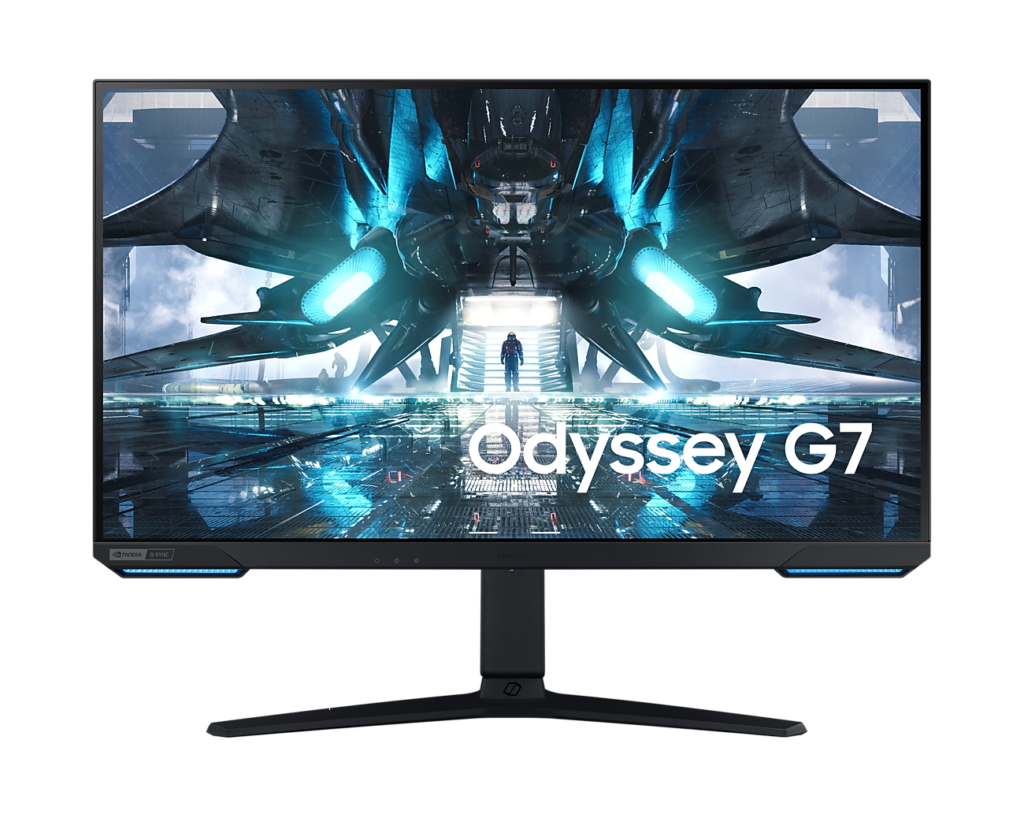
Samsung Odyssey G7 S28AG70: Specs, Features, Pros & Cons
Twenty-eight inches is an unusual size for an Ultra HD monitor, and it is the key to understanding the Odyssey G7 S28AG70. It sits between the common QHD gaming screens and the larger Ultra HD ones, and the result is a panel sharp enough for most people to use at native scaling, without the extra desk depth a bigger screen demands.
Samsung built it at the point when the current consoles made high-refresh Ultra HD over HDMI worth caring about, and that console focus still defines it. It can take a PlayStation or Xbox signal at full resolution and a high frame rate on one cable, so a single screen can serve a console and a PC on the same desk without compromise on either input.
For PC use it is a fast IPS panel with good color, a fully adjustable stand and a USB hub. What it lacks is equally clear. The HDR certification is the entry tier, with no local dimming, so highlights are brighter but blacks stay IPS gray. There is no USB-C, so it cannot charge and drive a laptop through a single connection, and there are no speakers.
Buyers should also know that Samsung has moved on. A near-identical successor adds the company's smart platform, and listings do not always make clear which model they are selling, so it is worth checking the model code before paying.
It makes most sense for a desk shared between a current console and a PC, where sharp text and full-bandwidth HDMI matter more than contrast or docking. Anyone working from a laptop, or hoping for convincing HDR, should look at newer models with USB-C or a Mini-LED backlight.
Category strengths
Where the Samsung Odyssey G7 S28AG70 beats the median
- A higher pixel density ?157 ppi vs 109 ppi (median)
- Has picture-by-picture ?
- Has USB hub ?
Where the Samsung Odyssey G7 S28AG70 trails the median
- No motion blur reduction ?
- A lower refresh rate ?144 Hz vs 180 Hz (median)
- A lower color depth ?8 bit vs 10 bit (median)
- Slightly narrower DCI-P3 colour coverage ?90 % vs 95 % (median)
How this VS Score was computed
Score 50: each known spec is measured against the median of IPS gaming monitors, 27 to 31 inches (29 products), then weighted; 50 means level with that median. In classes of six or more, a value beyond the class’s 10th–90th percentile range counts as that limit, so one extreme product cannot set the scale. 75% of the scoreable weight could be used; unknown values, features not applicable to this class and proxies (battery capacity where a rated life exists) add or remove nothing.
| Specification | This product | Cohort median | Score weight | Points moved |
|---|---|---|---|---|
| USB-C | No | 24% of the class have it | 0.5 | −24.0 |
| Height adjustment | Yes | 79% of the class have it | 0.4 | +20.0 |
| Resolution | 4K | 1440p | 1.2 | +15.6 |
| Motion blur reduction | No | 67% of the class have it | 0.3 | −14.4 |
| Refresh rate | 144 | 180 | 1.2 | −12.0 |
| Pixel density | 157 | 109 | 0.5 | +11.0 |
| Swivel | Yes | 64% of the class have it | 0.2 | +10.0 |
| Picture-by-picture | Yes | 14% of the class have it | 0.2 | +10.0 |
| Built-in speakers | No | 31% of the class have it | 0.2 | −9.6 |
| Color depth | 8 | 10 | 0.3 | −3.0 |
| USB hub | Yes | 50% of the class have it | 0.05 | +2.3 |
| DCI-P3 coverage | 90 | 95 | 0.6 | −1.8 |
| Pivot | Yes | 75% of the class have it | 0.02 | +1.0 |
| Screen size | 28 — capped at the class’s upper range (27) | 27 | 1.2 | +0.0 |
| Panel type | IPS | IPS | 0.8 | +0.0 |
| Response time | 1 | 1 | 0.8 | +0.0 |
| Peak brightness | 400 | 400 | 0.8 | +0.0 |
| Contrast ratio | 1,000 | 1,000 | 0.6 | +0.0 |
| HDR | DisplayHDR 400 | DisplayHDR 400 | 0.5 | +0.0 |
| Adaptive sync | G-Sync Compatible | G-Sync Compatible | 0.6 | +0.0 |
| HDMI ports | 2 | 2 | 0.4 | +0.0 |
| DisplayPort inputs | 1 | 1 | 0.4 | +0.0 |
Not scored: Local dimming (unknown: not scored); Local dimming zones (unknown: not scored); Variable refresh rate (standard for the class (100% have it)); Input lag (unknown: not scored); Tilt (standard for the class (100% have it)); USB-C power delivery (unknown: not scored); Headphone output (standard for the class (86% have it)); KVM switch (not applicable: only 0% of this class have it); Webcam (not applicable: only 0% of this class have it); Microphone (not applicable: only 0% of this class have it); Ethernet (not applicable: only 0% of this class have it).
Editor’s note
The G70A was Samsung's answer to a specific question: what does a 4K monitor need to be worth pairing with a current console? Its answer was two HDMI 2.1 ports, and that is still the most useful thing about it. A PS5 or Xbox Series X can drive 4K at 120 Hz over a single cable, which plenty of 4K monitors from the same era could not.
On a PC it is a 28-inch, 3,840 by 2,160 IPS panel at 144 Hz with a 1 ms response. At that size 4K works out to about 157 pixels per inch, which is sharp enough that text looks clean without display scaling. A 32-inch 4K panel misses that balance in the other direction.
Be realistic about the HDR. It carries DisplayHDR 400, which is the entry rung of the standard: there is no local dimming, and static contrast is the 1,000:1 typical of IPS. You get slightly brighter highlights and wider color than SDR, not the deep blacks the term implies. The 90% DCI-P3 coverage is useful for creative work, though.
Connectivity is good apart from one gap. Alongside the two HDMI 2.1 ports there is DisplayPort 1.4 and a USB hub, but no USB-C at all, so this cannot be a single-cable laptop dock. There are no speakers either. The stand is fully adjustable and it takes a standard 100 mm VESA mount.
One practical note: this model has been superseded by the G70B, which looks nearly identical but adds Samsung's smart platform. Check which one a listing is selling before you buy.
Buy it as a console-first 4K display that doubles as a sharp desktop. Look elsewhere if you want real HDR or laptop docking.
Specifications
Quality bars show where each figure sits between the lowest and highest of the 29 IPS gaming monitors, 27 to 31 inches this VS Score is measured against.
Picture
Gaming
Ergonomics & design
Connectivity
Features
Sources and verification
Where the specifications come from
- Official product pagesamsung.com
- Independent testingrtings.com
Verification
- First published
- Specifications last checked
- Sheet completeness
- 34 of 42 specifications verified; the rest show as Unknown and are never estimated or scored
- Page type
- Product specification page — Compiled from the manufacturer’s published specifications and the cited sources; this is not a hands-on test.
- Basis
- Research-based: specifications and editorial text were compiled from the documents listed here and the manufacturer’s published data. We have not tested this unit ourselves; where independent measurements are mentioned they belong to the linked publication.
Monitors with similar specs to the Samsung Odyssey G7 S28AG70
Ratings & reviews
No reviews yet. Be the first to share your experience.
The bottom line
The Samsung Odyssey G7 S28AG70 earns a VS Score of 50, level with the median of the 29 IPS gaming monitors, 27 to 31 inches it is measured against.
- Who it’s for
- A desk shared between a current console and a PC, where full-bandwidth HDMI and sharp text at native scaling matter more than contrast.
- Who should look elsewhere
- Laptop owners who want single-cable USB-C docking, and anyone expecting convincing HDR from an entry-level certification without local dimming.
- The trade-off that matters
- Console-ready HDMI and a crisp, well-built panel, bought with ordinary IPS contrast and an older design Samsung has since superseded.
- The main alternative
- Samsung Odyssey Neo G7 S32BG75: a larger Mini-LED screen with genuine local dimming, if HDR matters more to you than sharpness at desk distance.
The VS Score is calculated from the weighted specifications above, each measured against the median of comparable IPS gaming monitors, 27 to 31 inches — a shortlisting guide, not a substitute for your own priorities. See how we score.





