
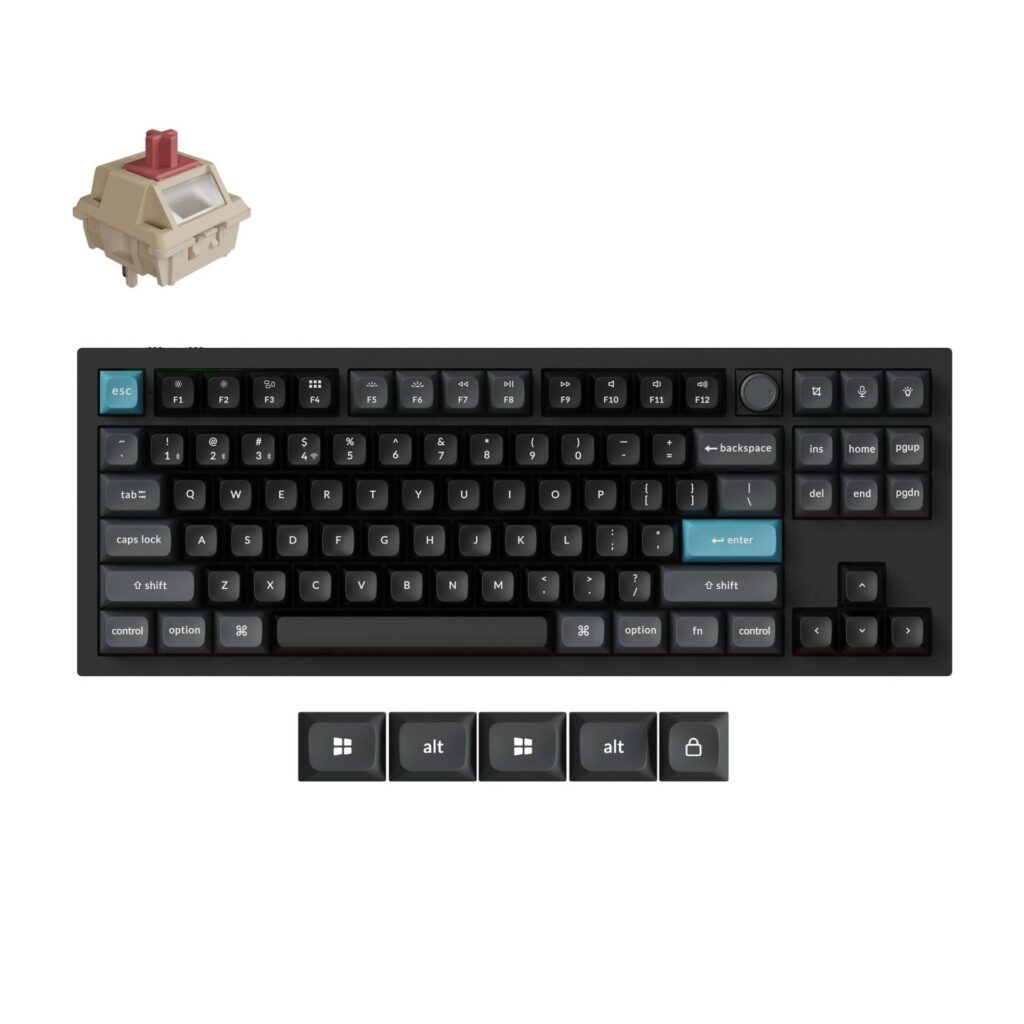
Keychron Q3 Ultra 8K: Specs, Price, Pros & Cons
Between the compact Q1 and the full-size Q6 sits the Q3, the Ultra board with a separate navigation block and no number pad. That makes it the tenkeyless of the range, the size to pick when the numbers can go but the editing keys have to stay.
Inside, it matches its siblings part for part. Keychron's Silk POM switches sit in hot-swap sockets, a double-gasket mount and layered foam shape the sound, PBT caps sit on top, and the dongle, the cable and Bluetooth for three hosts are all available. The battery is the long-running Ultra cell, rated roughly twice as long as a typical wireless keyboard, and wireless polling runs at the rate in the name.
Where the Q1 stacks its insert, home and page keys in a single column, the Q3 gives them a block of their own with a gap around it. Hands find those keys by position, without looking, which is the reason writers and developers ask for the layout. The cost is width on the desk and a little less room for the mouse.
It is heavier than the Q1 and rests at a fixed angle that barely rises from front to back, with no feet to change it. Its front edge is a hair lower than most keyboards', so the height is ordinary and the flat angle is the part to plan around.
Anyone whose work runs through a text editor, and who has a wide enough desk, is the buyer, whether the editor holds prose or code. Gamers who want every centimeter for the mouse will be happier with the smaller Q1, and anyone who types numbers all day belongs on the Q6.
Category strengths
Where the Keychron Q3 Ultra 8K beats the median
- A much higher polling rate ?8,000 Hz vs 1,000 Hz (median)
- Much longer battery life ?660 h vs 325 h (median)
Where the Keychron Q3 Ultra 8K trails the median
- A slightly higher front height ?20.6 mm vs 20.2 mm (median)
How this VS Score was computed
Score 62: each known spec is measured against the median of all keyboards (101 products), then weighted; 50 means level with that median. In classes of six or more, a value beyond the class’s 10th–90th percentile range counts as that limit, so one extreme product cannot set the scale. 59% of the scoreable weight could be used; unknown values, features not applicable to this class and proxies (battery capacity where a rated life exists) add or remove nothing.
| Specification | This product | Cohort median | Score weight | Points moved |
|---|---|---|---|---|
| Polling rate | 8,000 | 1,000 | 0.7 | +35.0 |
| Hot-swappable | Yes | 61% of the class have it | 0.6 | +30.0 |
| Battery life | 660 | 325 | 0.6 | +30.0 |
| Rapid trigger | No | 25% of the class have it | 0.5 | −24.0 |
| Adjustable actuation | No | 24% of the class have it | 0.4 | −19.2 |
| Sound dampening | Yes | 76% of the class have it | 0.3 | +15.0 |
| Rotary knob | Yes | 53% of the class have it | 0.2 | +10.0 |
| Front height | 20.6 | 20.2 | 0.2 | −0.2 |
| Switch technology | Mechanical | Mechanical | 1 | +0.0 |
| Connection | 3 | 3 | 0.8 | +0.0 |
| Bluetooth devices | 3 | 3 | 0.3 | +0.0 |
| Keycap material | PBT | PBT | 0.4 | +0.0 |
| Backlight | RGB | RGB | 0.3 | +0.0 |
Not scored: Actuation force (unknown: not scored); N-key rollover (standard for the class (85% have it)); Analog input (not applicable: only 14% of this class have it); Wired latency (unknown: not scored); Wireless latency (unknown: not scored); Battery capacity (capacity is a proxy; the rated battery life is scored instead); USB passthrough (not applicable: only 4% of this class have it); Programmable keys (standard for the class (99% have it)); Media controls (standard for the class (97% have it)); Onboard profiles (standard for the class (89% have it)); Configuration software (standard for the class (95% have it)).
Editor’s note
Choosing the Q3 Ultra 8K over the Q1 comes down to one question: do you want a dedicated insert, home, page-up and page-down cluster? That is essentially the whole difference. The TKL layout adds roughly 37 mm of width over the 75% Q1 and separates the navigation keys into their own block instead of stacking them in a column.
For anyone who edits text seriously (writers, developers, people who live in a code editor), that separated cluster is worth the desk space. You stop mis-hitting page-up when you meant delete. For gaming, the extra width mostly costs you mouse room, which is why plenty of competitive players go the other direction entirely.
Everything under the hood matches the rest of the Ultra range: Keychron Silk POM switches in hot-swap sockets, a 4,000 mAh cell rated to 660 hours with the lighting off, 8,000 Hz polling over 2.4 GHz, and the double-gasket mount with layered foam that gives these boards their characteristic dense sound. Keychron also confirms up to three paired Bluetooth devices, so a laptop, desktop and tablet can all live on the same board.
The weight is the drawback. At 1,787 grams this is heavier than the Q1 and roughly three times a typical plastic TKL. Combined with the 5.3 degree fixed angle and a 20.6 mm front height, you will want a wrist rest for long sessions, because the case does not slope enough to make that optional for everyone.
Buy it if you want the Ultra platform but refuse to give up a proper navigation cluster, and your desk has the room. Look at the Q1 Ultra 8K instead if mouse space is tight, or at the Q6 if you need a numpad. Avoid it entirely if you want something you can pick up and move.
Specifications
Quality bars show where each figure sits between the lowest and highest of the 101 keyboards this VS Score is measured against.
Switches & typing
Performance
Layout & size
Connectivity
Build & sound
Features
Sources and verification
Where the specifications come from
- Official product pagekeychron.com
Verification
- First published
- Specifications last checked
- Sheet completeness
- 31 of 34 specifications verified; the rest show as Unknown and are never estimated or scored
- Page type
- Product specification page — Compiled from the manufacturer’s published specifications and the cited sources; this is not a hands-on test.
- Basis
- Research-based: specifications and editorial text were compiled from the documents listed here and the manufacturer’s published data. We have not tested this unit ourselves; where independent measurements are mentioned they belong to the linked publication.
Where to buy
Prices and availability may change. Check the retailer before buying. We may earn a commission on purchases.
Price history
Keyboards with similar specs to the Keychron Q3 Ultra 8K

Ratings & reviews
No reviews yet. Be the first to share your experience.
The bottom line
The Keychron Q3 Ultra 8K earns a VS Score of 62, above the median of the 101 keyboards it is measured against (a score of 50 is level with that median).
- Who it’s for
- A writer or developer who wants the Ultra's fast wireless and long battery but refuses to lose a separate insert, home and page cluster.
- Who should look elsewhere
- Skip it if mouse room is tight, you need a numpad, or the board has to move at all.
- The trade-off that matters
- The extra navigation block costs width, and the case barely slopes, so long sessions usually call for a wrist rest.
- The main alternative
- Keychron Q1 Ultra 8K: the same platform without the separate navigation block, for a desk short on mouse room.
The VS Score is calculated from the weighted specifications above, each measured against the median of comparable keyboards — a shortlisting guide, not a substitute for your own priorities. See how we score.




