
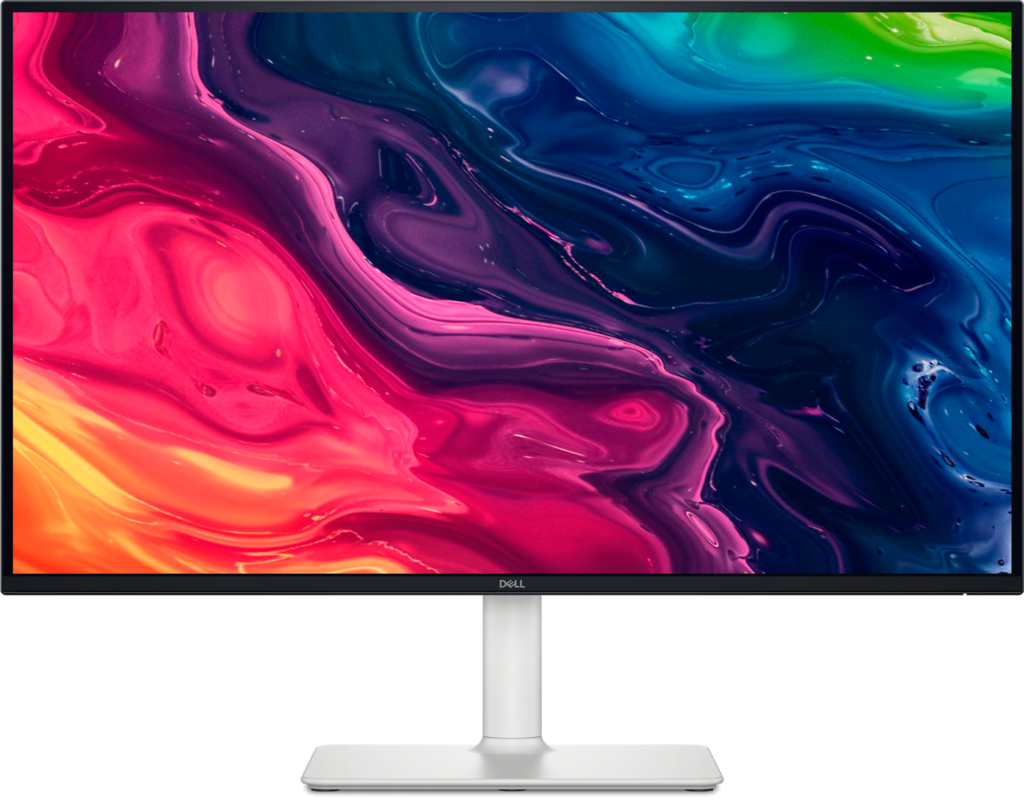
Dell S2725QS: Specs, Price, Pros & Cons
Two HDMI ports and one DisplayPort on a 27-inch 4K screen tell you what the S2725QS expects to be plugged into: a desktop PC and a console or two, with no laptop cable in the plan. It is Dell's plain 4K monitor for a home or student desk.
The panel is IPS, at the pixel density that makes text and photos look clean at arm's length. Its refresh rate is one a console can use in full for casual games, and it makes scrolling and window dragging look smoother than on an office monitor of the old kind. FreeSync handles variable refresh, which smooths out a game whose frame rate wanders.
Contrast is typical of a good IPS panel, though nowhere near OLED black in a dark room. Built-in speakers turn the monitor into a self-contained screen for a family machine or a second desk, and they spare a small desk a pair of separate boxes. The stand adjusts for height and rotates.
The weaknesses are on the gaming side. Response time is 4 ms, slow next to dedicated gaming panels, so fast motion leaves a little more trail. The refresh rate also stops short of what those panels reach. There is no headphone socket, which means headphones go to the PC or the console.
It suits a household that wants sharp text for homework and office work, a console on the second HDMI port and sound without extra speakers. Laptops are the gap, since nothing on the back can charge one or carry its picture over a single cable.
Category strengths
Where the Dell S2725QS beats the median
- A much higher contrast ratio ?1500:1 vs 1000:1 (median)
- A much higher pixel density ?163 ppi vs 109 ppi (median)
- Has built-in speakers ?
Where the Dell S2725QS trails the median
- A lower refresh rate ?120 Hz vs 180 Hz (median)
- No headphone output ?
- Lower peak brightness ?350 nits vs 400 nits (median)
- No USB hub ?
How this VS Score was computed
Score 52: each known spec is measured against the median of IPS gaming monitors, 27 to 31 inches (29 products), then weighted; 50 means level with that median. In classes of six or more, a value beyond the class’s 10th–90th percentile range counts as that limit, so one extreme product cannot set the scale. 66% of the scoreable weight could be used; unknown values, features not applicable to this class and proxies (battery capacity where a rated life exists) add or remove nothing.
| Specification | This product | Cohort median | Score weight | Points moved |
|---|---|---|---|---|
| USB-C | No | 24% of the class have it | 0.5 | −24.0 |
| Height adjustment | Yes | 79% of the class have it | 0.4 | +20.0 |
| Resolution | 4K | 1440p | 1.2 | +15.6 |
| Contrast ratio | 1,500 | 1,000 | 0.6 | +15.0 |
| Adaptive sync | FreeSync | G-Sync Compatible | 0.6 | −15.0 |
| Pixel density | 163 | 109 | 0.5 | +12.5 |
| Refresh rate | 120 — capped at the class’s lower range (144) | 180 | 1.2 | −12.0 |
| Swivel | Yes | 64% of the class have it | 0.2 | +10.0 |
| Built-in speakers | Yes | 31% of the class have it | 0.2 | +10.0 |
| Headphone output | No | 86% of the class have it | 0.2 | −9.6 |
| Peak brightness | 350 | 400 | 0.8 | −4.8 |
| USB hub | No | 50% of the class have it | 0.05 | −2.2 |
| Pivot | Yes | 75% of the class have it | 0.02 | +1.0 |
| Screen size | 27 | 27 | 1.2 | +0.0 |
| Panel type | IPS | IPS | 0.8 | +0.0 |
| Color depth | 10 | 10 | 0.3 | +0.0 |
| Response time | 4 — capped at the class’s upper range (1) | 1 | 0.8 | +0.0 |
| HDMI ports | 2 | 2 | 0.4 | +0.0 |
| DisplayPort inputs | 1 | 1 | 0.4 | +0.0 |
Not scored: DCI-P3 coverage (unknown: not scored); HDR (unknown: not scored); Local dimming (unknown: not scored); Local dimming zones (unknown: not scored); Variable refresh rate (standard for the class (100% have it)); Motion blur reduction (unknown: not scored); Input lag (unknown: not scored); Tilt (standard for the class (100% have it)); USB-C power delivery (unknown: not scored); KVM switch (not applicable: only 0% of this class have it); Webcam (not applicable: only 0% of this class have it); Microphone (not applicable: only 0% of this class have it); Ethernet (not applicable: only 0% of this class have it); Picture-by-picture (unknown: not scored).
Editor’s note
Dell built this as a sensible everyday monitor, and the specification is refreshingly free of things you would not use.
Twenty-seven inches at 4K gives 163 pixels per inch, the same density as the far more expensive OLED panels and the reason text looks clean. The refresh rate is 120 Hz with FreeSync Premium, which is a real benefit over the 60 Hz panels that still dominate this price: everything from dragging a window to casual gaming looks smoother, and a console will run happily at that rate.
The IPS panel gives accurate color and wide viewing angles, brightness is 350 cd/m2, and contrast is a typical 1500:1. It includes speakers, which is unusual and useful for a second monitor or a family machine, and the stand tilts, swivels, pivots and adjusts for height.
There is no USB-C and no USB hub, so this cannot act as a dock and a laptop needs its own charger and a separate video cable. There is no Ethernet. Dell publishes an sRGB figure rather than a wide-gamut one, so this is not a monitor for color-critical print work.
Buy it as a general-purpose screen for office work, study, streaming and casual gaming, where the fast panel and the pixel density do the heavy lifting.
Step up to the U3225QE if you want one-cable laptop docking, Ethernet or a KVM, and to a QD-OLED if contrast and motion clarity in games are what you are paying for.
Specifications
Quality bars show where each figure sits between the lowest and highest of the 29 IPS gaming monitors, 27 to 31 inches this VS Score is measured against.
Picture
Gaming
Ergonomics & design
Connectivity
Features
Sources and verification
Where the specifications come from
- Official product pagedell.com
- Datasheet or manualdell.com
- Independent testingrtings.com
Verification
- First published
- Specifications last checked
- Sheet completeness
- 33 of 42 specifications verified; the rest show as Unknown and are never estimated or scored
- Page type
- Product specification page — Compiled from the manufacturer’s published specifications and the cited sources; this is not a hands-on test.
- Basis
- Research-based: specifications and editorial text were compiled from the documents listed here and the manufacturer’s published data. We have not tested this unit ourselves; where independent measurements are mentioned they belong to the linked publication.
Where to buy
Prices and availability may change. Check the retailer before buying. We may earn a commission on purchases.
Price history
Monitors with similar specs to the Dell S2725QS
Ratings & reviews
No reviews yet. Be the first to share your experience.
The bottom line
The Dell S2725QS earns a VS Score of 52, above the median of the 29 IPS gaming monitors, 27 to 31 inches it is measured against (a score of 50 is level with that median).
- Who it’s for
- A family or student desk that wants sharp text, smooth scrolling, built-in speakers and a refresh rate a console can use for casual games.
- Who should look elsewhere
- Anyone hoping to dock a laptop on a single cable, and color-critical print work that needs a wider gamut.
- The trade-off that matters
- It skips every docking feature to keep the price sensible, which only costs you if a laptop is part of the desk.
- The main alternative
- Dell U3225QE: Dell's larger work monitor with one-cable laptop docking, Ethernet and a KVM switch.
The VS Score is calculated from the weighted specifications above, each measured against the median of comparable IPS gaming monitors, 27 to 31 inches — a shortlisting guide, not a substitute for your own priorities. See how we score.





