
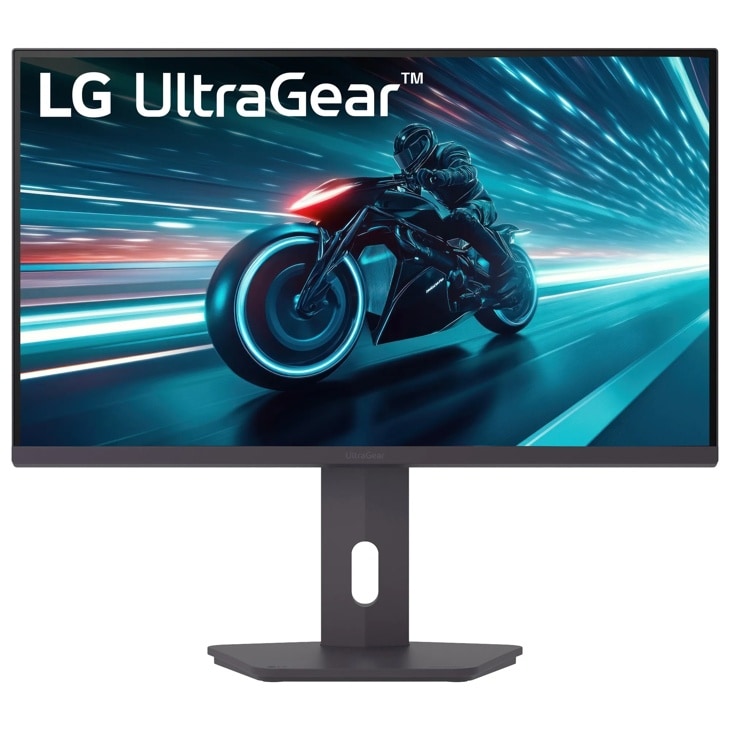
LG UltraGear 27G61ZB-B: Specs, Price, Pros & Cons
This is the point on LG's UltraGear ladder where resolution stops being the thing you give up. It pairs a QHD IPS panel with a refresh rate a notch above the mainstream gaming tier, sells mainly through Amazon, and is the same hardware LG also sells under a second part number with an extra HDR badge.
QHD is the reason to pick this rung over the one below. At this screen size it gives enough pixel density that text looks clean at a normal desk distance, while staying light enough for a mid-range graphics card to run most games at high frame rates. That balance is why this size and resolution pairing has become the default recommendation for a first serious gaming monitor, and this model sits squarely in the middle of it.
The other thing that defines it is the stand. Budget monitors usually tilt and nothing else, which leaves people stacking books under the base or buying an arm. This one raises, lowers, swivels and turns into portrait, so it can be set up properly on day one without extra spending.
What it leaves out is everything around the panel. There is no USB hub, no speakers and no type-C input, HDR is a label rather than an experience, and contrast is ordinary for the panel type, so a dark room shows gray where black should be. The newest console-friendly input standard is missing too, which matters to anyone who wants a current console's highest refresh modes. For a desktop PC gamer who wants a sharp, fast, properly adjustable screen and already owns headphones, those omissions are easy to live with. For someone building a setup around a console, they deserve a second look.
Category strengths
Where the LG UltraGear 27G61ZB-B beats the median
- A higher refresh rate ?200 Hz vs 180 Hz (median)
Where the LG UltraGear 27G61ZB-B trails the median
- A lower color depth ?8 bit vs 10 bit (median)
- No USB hub ?
How this VS Score was computed
Score 44: each known spec is measured against the median of IPS gaming monitors, 27 to 31 inches (30 products), then weighted; 50 means level with that median. In classes of six or more, a value beyond the class’s 10th–90th percentile range counts as that limit, so one extreme product cannot set the scale. 68% of the scoreable weight could be used; unknown values, features not applicable to this class and proxies (battery capacity where a rated life exists) add or remove nothing.
| Specification | This product | Cohort median | Score weight | Points moved |
|---|---|---|---|---|
| USB-C | No | 24% of the class have it | 0.5 | −24.0 |
| Local dimming | No | 21% of the class have it | 0.4 | −19.2 |
| Adaptive sync | FreeSync | G-Sync Compatible | 0.6 | −15.0 |
| Swivel | Yes | 66% of the class have it | 0.2 | +10.0 |
| Built-in speakers | No | 30% of the class have it | 0.2 | −9.6 |
| Refresh rate | 200 | 180 | 1.2 | +7.2 |
| HDR | HDR10 | DisplayHDR 400 | 0.5 | −6.0 |
| Color depth | 8 | 10 | 0.3 | −3.0 |
| USB hub | No | 50% of the class have it | 0.05 | −2.2 |
| Pivot | Yes | 76% of the class have it | 0.02 | +1.0 |
| Screen size | 27 | 27 | 1.2 | +0.0 |
| Resolution | 1440p | 1440p | 1.2 | +0.0 |
| Panel type | IPS | IPS | 0.8 | +0.0 |
| Response time | 1 | 1 | 0.8 | +0.0 |
| Peak brightness | 400 | 400 | 0.8 | +0.0 |
| Contrast ratio | 1,000 | 1,000 | 0.6 | +0.0 |
| Pixel density | 109 | 109 | 0.5 | +0.0 |
| HDMI ports | 2 | 2 | 0.4 | +0.0 |
| DisplayPort inputs | 1 | 1 | 0.4 | +0.0 |
Not scored: DCI-P3 coverage (unknown: not scored); Local dimming zones (unknown: not scored); Variable refresh rate (standard for the class (100% have it)); Motion blur reduction (unknown: not scored); Input lag (unknown: not scored); Height adjustment (standard for the class (80% have it)); Tilt (standard for the class (100% have it)); USB-C power delivery (unknown: not scored); Headphone output (standard for the class (87% have it)); KVM switch (not applicable: only 0% of this class have it); Webcam (not applicable: only 0% of this class have it); Microphone (not applicable: only 0% of this class have it); Ethernet (not applicable: only 0% of this class have it); Picture-by-picture (not applicable: only 20% of this class have it).
Editor’s note
The 27G61ZB-B needs a disclosure more than a review, because LG sells this exact hardware twice. Comparing it against the 27G610A-B we already cover, every specification row is identical down to byte-identical dimensions and weights: same 200 Hz QHD IPS panel, same 400-nit brightness, same four-way stand, same ports. The differences: this ZB version carries no VESA DisplayHDR 400 certification (its marketing says 'HDR10' where the 610A says 'DisplayHDR 400'), it has a different UPC, a lower list price, and it is the SKU you will find at Amazon while the 610A lives at lg.com. Two shelf tags, one monitor.
Judged on its own, it is the strongest 27-inch gaming panel under two hundred dollars that we have cataloged. Its refresh is native, with a 1 ms GtG, 400 nits typical (unusually bright for budget IPS), 99% sRGB with factory calibration, and a stand that adjusts height, pivot, swivel and tilt at a price where tilt-only is the norm. Street pricing well below that line makes it something of a category benchmark.
The economies are visible if you look. HDMI is 2.0, so the full refresh rate needs the DisplayPort. Contrast is a plain 1000:1, the panel is 8-bit, and the missing DisplayHDR certification means HDR content displays without impressing. There are no speakers and no USB. And unlike its own 32-inch sibling, it carries FreeSync Premium only, with no NVIDIA G-Sync certification, though adaptive sync works fine on GeForce cards in practice.
Buy whichever of the twins is cheaper on the day. That is the whole decision. At equal prices, the 610A's DisplayHDR badge is the only tiebreaker, and it is a small one.
Specifications
Quality bars show where each figure sits between the lowest and highest of the 30 IPS gaming monitors, 27 to 31 inches this VS Score is measured against.
Picture
Gaming
Ergonomics & design
Connectivity
Features
Sources and verification
Where the specifications come from
- Official product pagelg.com
- Retailer listing (cross-check)amazon.com
Verification
- First published
- Specifications last checked
- Sheet completeness
- 36 of 42 specifications verified; the rest show as Unknown and are never estimated or scored
- Page type
- Product specification page — Compiled from the manufacturer’s published specifications and the cited sources; this is not a hands-on test.
- Basis
- Research-based: specifications and editorial text were compiled from the documents listed here and the manufacturer’s published data. We have not tested this unit ourselves; where independent measurements are mentioned they belong to the linked publication.
Where to buy
Prices and availability may change. Check the retailer before buying. We may earn a commission on purchases.
Price history
Monitors with similar specs to the LG UltraGear 27G61ZB-B
Ratings & reviews
No reviews yet. Be the first to share your experience.
The bottom line
The LG UltraGear 27G61ZB-B earns a VS Score of 44, below the median of the 30 IPS gaming monitors, 27 to 31 inches it is measured against (a score of 50 is level with that median).
- Who it’s for
- Whoever finds this SKU cheaper than its twin on the day. It is a high-refresh QHD IPS panel on a fully adjustable stand, which is an unusually complete package at the bottom of the gaming-monitor market.
- Who should look elsewhere
- Anyone who already owns the 27G610A-B. This is the same monitor sold through a different channel, and the only thing separating them is a certification badge this one does not carry.
- The trade-off that matters
- Serious panel fundamentals wrapped in budget-grade extras. The image and the ergonomics are where the money went. The ports, the contrast and the missing audio are where it came from.
- The main alternative
- LG UltraGear 27G610A-B: identical hardware with the HDR badge attached, so buy whichever of the two is cheaper on the day.
The VS Score is calculated from the weighted specifications above, each measured against the median of comparable IPS gaming monitors, 27 to 31 inches — a shortlisting guide, not a substitute for your own priorities. See how we score.





