
Razer Pro Type Ergo: Specs, Features, Pros & Cons
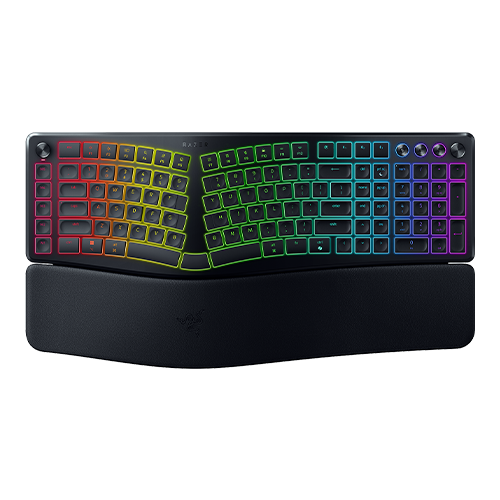
Razer's office keyboards carry the Pro Type name, and this one takes the line in its most unusual direction: a fixed split with a slope built into the frame. The two halves of the alphabet sit apart and angled, so your forearms stay straighter and the wrists stop bending outward to reach the keys. It takes the middle ground among split boards. A fully separate board lets you place each half anywhere, and a one-piece curve changes very little. The Pro Type Ergo holds a single geometry that Razer chose, with the tilt and a leatherette wrist rest already in the molding, so there is nothing to adjust and nothing to position wrong.
The switches are scissor keys over a membrane under very low keycaps, a laptop-style action with none of the travel a Razer gaming board gives. Extras are aimed at office work. A Command Dial changes its job per application, a clickable media roller sits nearby, macro keys run down the left edge, and a microphone mute has its own key. The B key appears on both halves, since people hit it with either hand.
Connection is broad, with Razer's receiver, three Bluetooth profiles and a cable, and Razer's battery rating, given in months, assumes the lighting is off. Several things are absent. No settings are stored on the keyboard, so macros live in Razer's software and follow you only where it runs. The keycaps are ABS and the case has no sound dampening.
It is built for someone who types for a living, has started to feel it in the wrists, and wants a split board that works on the first morning without a build or a layout project. Expect a few days of stray presses before the gap in the middle feels normal.
Category strengths
Where the Razer Pro Type Ergo beats the median
- Much longer battery life ?2,160 h vs 325 h (median)
Where the Razer Pro Type Ergo trails the median
- No hot-swappable switches ?
- No sound dampening ?
- No onboard profiles ?
How this VS Score was computed
Score 36: each known spec is measured against the median of all keyboards (101 products), then weighted; 50 means level with that median. In classes of six or more, a value beyond the class’s 10th–90th percentile range counts as that limit, so one extreme product cannot set the scale. 60% of the scoreable weight could be used; unknown values, features not applicable to this class and proxies (battery capacity where a rated life exists) add or remove nothing.
| Specification | This product | Cohort median | Score weight | Points moved |
|---|---|---|---|---|
| Battery life | 2,160 — capped at the class’s upper range (1,600) | 325 | 0.6 | +30.0 |
| Hot-swappable | No | 61% of the class have it | 0.6 | −28.8 |
| Rapid trigger | No | 25% of the class have it | 0.5 | −24.0 |
| Adjustable actuation | No | 24% of the class have it | 0.4 | −19.2 |
| Switch technology | Membrane | Mechanical | 1 | −17.0 |
| Sound dampening | No | 76% of the class have it | 0.3 | −14.4 |
| Onboard profiles | No | 89% of the class have it | 0.3 | −14.4 |
| Keycap material | ABS | PBT | 0.4 | −10.0 |
| Rotary knob | Yes | 53% of the class have it | 0.2 | +10.0 |
| Polling rate | 1,000 | 1,000 | 0.7 | +0.0 |
| Connection | 3 | 3 | 0.8 | +0.0 |
| Bluetooth devices | 3 | 3 | 0.3 | +0.0 |
| Backlight | RGB | RGB | 0.3 | +0.0 |
Not scored: Actuation force (unknown: not scored); N-key rollover (standard for the class (85% have it)); Analog input (not applicable: only 14% of this class have it); Wired latency (unknown: not scored); Wireless latency (unknown: not scored); Front height (unknown: not scored); Battery capacity (unknown: not scored); USB passthrough (not applicable: only 4% of this class have it); Programmable keys (standard for the class (99% have it)); Media controls (standard for the class (97% have it)); Configuration software (standard for the class (95% have it)).
Editor’s note
Razer built its name on mechanical keyboards for gamers, so the Pro Type Ergo needs one thing said at the start: it is not mechanical. The switches are scissor-switch membrane, the same broad mechanism as a laptop keyboard, and the keycaps are ultra low-profile. Anyone expecting the travel and the click of a Razer gaming board will be disappointed. If you came here because your wrists hurt, keep reading.
The shape is the product. It is a split ergonomic layout with a fixed 10-degree tilt and a plush leatherette wrist rest built into the front edge, which together stop you pronating your forearms and splaying your wrists outward. There are also dual B keys, one on each half, which sounds like a gimmick, but a split board otherwise punishes anyone who hits B with whichever hand is closer.
The productivity extras earn their place. The Command Dial is programmable per application, there is a clickable media roller, five dedicated macro keys down the left side, and a mic-mute button. Connection is five-way: HyperSpeed 2.4 GHz, three separate Bluetooth profiles and USB-C, so it moves between a desktop, a laptop and a tablet without repairing.
Two limitations to weigh. There is no onboard memory, so your macros and lighting live in Razer Synapse and travel only to machines running it, which undercuts the multi-device pitch. And Razer quotes battery life in months with the lighting off, and the 19-zone Chroma RGB is lovely and will cost you most of that.
Buy it if you type all day, want an ergonomic split without going full custom, and already run Synapse. Skip it if you want a mechanical feel, or want profiles stored on the board itself.
Specifications
Quality bars show where each figure sits between the lowest and highest of the 101 keyboards this VS Score is measured against.
Switches & typing
Performance
Layout & size
Connectivity
Build & sound
Features
Sources and verification
Where the specifications come from
- Official product pagerazer.com
- Independent testingrtings.com
Verification
- First published
- Specifications last checked
- Sheet completeness
- 23 of 34 specifications verified; the rest show as Unknown and are never estimated or scored
- Page type
- Product specification page — Compiled from the manufacturer’s published specifications and the cited sources; this is not a hands-on test.
- Basis
- Research-based: specifications and editorial text were compiled from the documents listed here and the manufacturer’s published data. We have not tested this unit ourselves; where independent measurements are mentioned they belong to the linked publication.
Keyboards with similar specs to the Razer Pro Type Ergo



Ratings & reviews
No reviews yet. Be the first to share your experience.
The bottom line
The Razer Pro Type Ergo earns a VS Score of 36, below the median of the 101 keyboards it is measured against (a score of 50 is level with that median).
- Who it’s for
- Buy it if you type all day, your wrists have started to complain, and you want a split layout without building or positioning a custom board.
- Who should look elsewhere
- Look elsewhere if you want mechanical travel, or if you work on computers that cannot run Synapse, since nothing is saved on the board itself.
- The trade-off that matters
- The geometry is fixed. You get the tilt and wrist rest Razer chose, with no way to spread the halves wider or raise the angle if your shoulders ask for it.
- The main alternative
- Logitech Wave Keys: a gentler one-piece curve with a cushioned palm rest, for wrist relief that takes hours to get used to.
The VS Score is calculated from the weighted specifications above, each measured against the median of comparable keyboards — a shortlisting guide, not a substitute for your own priorities. See how we score.




