
Razer Joro: Specs, Features, Pros & Cons
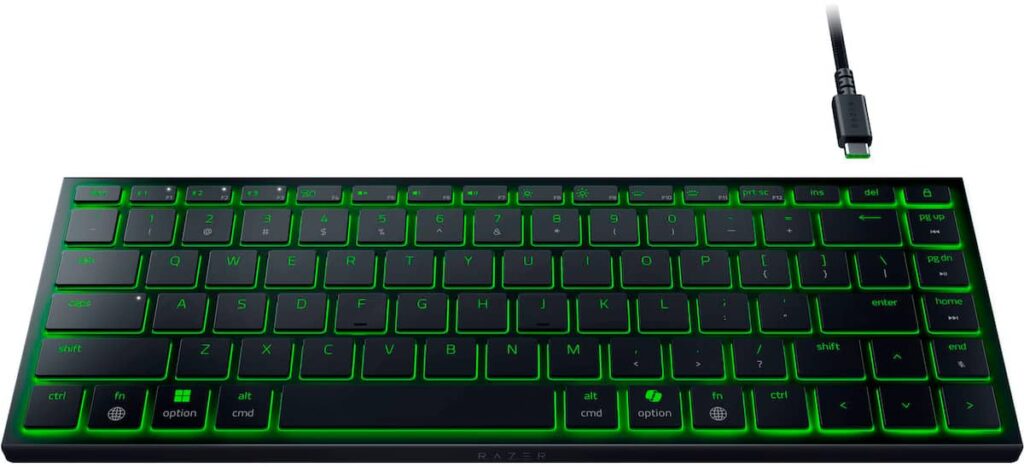
A compact layout that keeps the function row and the arrow keys, built at the thickness of a laptop deck, is the shape of the Razer Joro. It drops the number pad and the navigation cluster and nothing else, so shortcuts that need F-keys or arrows work the way they do on a notebook.
Razer files it under gaming, and the lighting and the software fit that label. The typing hardware points somewhere else. Scissor keys sit over a membrane, short and stable, under an aluminum top case that keeps the thin board from bending. The legends cover both Windows and Mac, and Bluetooth holds three devices, so one keyboard can follow a laptop, a tablet and a desk machine through the week.
A few gaming details survive the slim build. Polling runs at the standard rate over the cable, every key registers when several are held, and keys can be remapped. The wireless link is Bluetooth only, which is fine for writing and weak for fast games. Razer's battery rating is very long, and it assumes the lighting is off. With the colors on, the board needs the cable far more often, so the lighting is best treated as a choice for the evening. The keycaps are ABS, the switches are soldered, and there is no rotary knob.
The ideal owner types in more than one place, cares more about thinness and weight than key travel, and wants a keyboard that looks at home on a gaming desk as well as on a train. Serious wireless gaming needs a receiver and deeper keys, and this board has neither.
Category strengths
Where the Razer Joro beats the median
- Much longer battery life ?1,800 h vs 325 h (median)
Where the Razer Joro trails the median
- No hot-swappable switches ?
- Fewer connection options ?
- No rotary knob ?
How this VS Score was computed
Score 34: each known spec is measured against the median of all keyboards (101 products), then weighted; 50 means level with that median. In classes of six or more, a value beyond the class’s 10th–90th percentile range counts as that limit, so one extreme product cannot set the scale. 55% of the scoreable weight could be used; unknown values, features not applicable to this class and proxies (battery capacity where a rated life exists) add or remove nothing.
| Specification | This product | Cohort median | Score weight | Points moved |
|---|---|---|---|---|
| Battery life | 1,800 — capped at the class’s upper range (1,600) | 325 | 0.6 | +30.0 |
| Hot-swappable | No | 61% of the class have it | 0.6 | −28.8 |
| Rapid trigger | No | 25% of the class have it | 0.5 | −24.0 |
| Adjustable actuation | No | 24% of the class have it | 0.4 | −19.2 |
| Switch technology | Membrane | Mechanical | 1 | −17.0 |
| Connection | 2 | 3 | 0.8 | −13.6 |
| Keycap material | ABS | PBT | 0.4 | −10.0 |
| Rotary knob | No | 53% of the class have it | 0.2 | −9.6 |
| Polling rate | 1,000 | 1,000 | 0.7 | +0.0 |
| Bluetooth devices | 3 | 3 | 0.3 | +0.0 |
| Backlight | RGB | RGB | 0.3 | +0.0 |
Not scored: Actuation force (unknown: not scored); N-key rollover (standard for the class (85% have it)); Analog input (not applicable: only 14% of this class have it); Wired latency (unknown: not scored); Wireless latency (unknown: not scored); Front height (unknown: not scored); Battery capacity (unknown: not scored); USB passthrough (not applicable: only 4% of this class have it); Sound dampening (unknown: not scored); Programmable keys (standard for the class (99% have it)); Media controls (standard for the class (97% have it)); Onboard profiles (standard for the class (89% have it)); Configuration software (standard for the class (95% have it)).
Editor’s note
Razer sells the Joro as a gaming keyboard, and that framing does it a disservice. What it is, a 374 g slab 16.5 mm thick with an aluminum top case and low-profile scissor switches, is a very good travel and commuting keyboard that happens to carry Chroma lighting.
The typing feel sits closest to a good laptop keyboard: short, quiet and stable, with none of the depth a mechanical board gives you. That is the point. It slides into the sleeve of a laptop bag, pairs with three devices over Bluetooth 5.0, and carries both Windows and Mac legends on the keycaps, so moving between a work laptop, a tablet and a handheld is a single keypress.
Two limitations matter before you buy. There is no 2.4 GHz dongle in the box and the keyboard does not currently work with one, so playing wirelessly means accepting Bluetooth latency. Serious gaming needs the USB-C cable, which rather defeats the portability. And the headline 1,800-hour battery figure assumes the lighting is switched off. Turn the RGB on and Razer's own figure falls to roughly ten hours, so the backlight is an occasional luxury rather than a default state.
The single-zone lighting is a further compromise. The whole board changes color together, so per-key effects and reactive typing patterns are not available.
None of this spoils it. As a keyboard you throw in a bag for a week away, or leave on a shelf for a tablet, it is pleasant to use, and the aluminum frame does not flex under a firm hand.
Buy it if you type in more than one place and value thinness and weight above key travel. Avoid it if this is meant to be your only keyboard for desktop gaming, where a wired or HyperSpeed board will serve you far better for the money.
Specifications
Quality bars show where each figure sits between the lowest and highest of the 101 keyboards this VS Score is measured against.
Switches & typing
Performance
Layout & size
Connectivity
Build & sound
Features
Sources and verification
Where the specifications come from
- Official product pagerazer.com
- Independent testingrtings.com
Verification
- First published
- Specifications last checked
- Sheet completeness
- 24 of 34 specifications verified; the rest show as Unknown and are never estimated or scored
- Page type
- Product specification page — Compiled from the manufacturer’s published specifications and the cited sources; this is not a hands-on test.
- Basis
- Research-based: specifications and editorial text were compiled from the documents listed here and the manufacturer’s published data. We have not tested this unit ourselves; where independent measurements are mentioned they belong to the linked publication.
Keyboards with similar specs to the Razer Joro


Ratings & reviews
No reviews yet. Be the first to share your experience.
The bottom line
The Razer Joro earns a VS Score of 34, below the median of the 101 keyboards it is measured against (a score of 50 is level with that median).
- Who it’s for
- Someone who works from a laptop bag, a tablet stand and a desk in the same week and wants one thin board paired with all three.
- Who should look elsewhere
- Do not make it your only gaming keyboard. Wireless play means Bluetooth, and switching the lighting on drains the battery within a day.
- The trade-off that matters
- Portability costs key travel. The scissor keys are short and quiet like a laptop's, so anyone who enjoys the depth of a mechanical switch will find them flat.
- The main alternative
- Logitech MX Keys Mini: a small scissor board with a receiver option and smarter backlighting, for office work over gaming looks.
The VS Score is calculated from the weighted specifications above, each measured against the median of comparable keyboards — a shortlisting guide, not a substitute for your own priorities. See how we score.





