
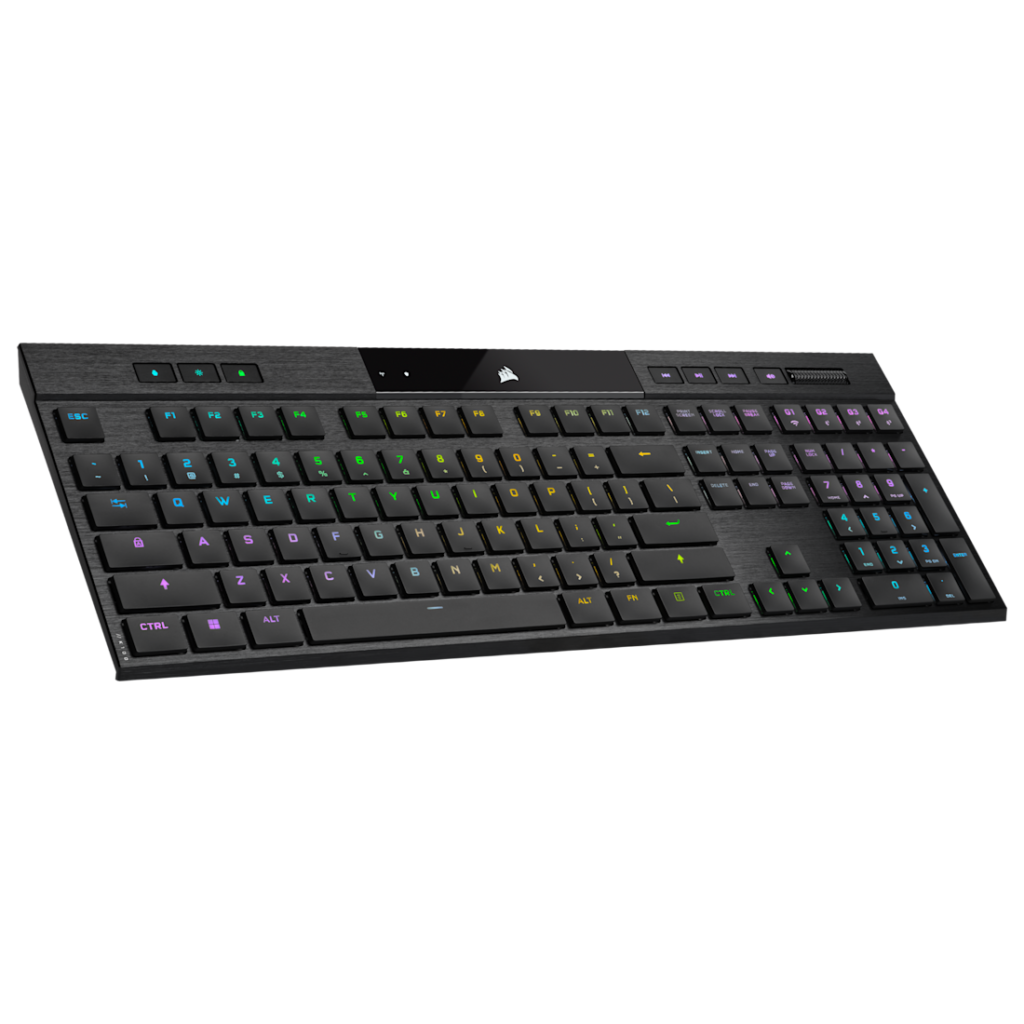
Corsair K100 AIR: Specs, Features, Pros & Cons
Laptops get their thin keyboards from scissor keys. Corsair built the K100 AIR the other way, with very short Cherry mechanical switches under a full-size wireless layout that Corsair measures at 11 mm at its slimmest point.
That makes it an odd one in Corsair's range: a full-size board, number pad included, that is closer in height to a notebook than to a gaming keyboard. It keeps the extras the K100 name carries, with dedicated macro keys and a volume roller, and it connects three ways. A Slipstream receiver serves the gaming PC, Bluetooth covers more computers, and the cable raises the polling rate well above what most boards in the category manage. Every cap has its own RGB light. The layout itself is a standard full-size one, so the keys fall where a desktop typist expects them.
The thin build fixes more than it frees. Switches are soldered, so the short-travel feel cannot later be traded for something deeper. The keycaps are ABS, the softer plastic that takes on a shine, and the rated battery life is short for a wireless board even before the lighting is counted.
The typist it suits already likes the shallow keys of a good laptop and wants that feel on a desk that holds a desktop, a laptop and a tablet at once, with one keyboard hopping between them. A buyer who has never tried an ultra-low-profile switch should find one in a shop first. The travel is short enough that some mechanical fans find it hard to warm to, and the switches cannot be changed once the keyboard is home.
Category strengths
Where the Corsair K100 AIR beats the median
- A much higher polling rate ?8,000 Hz vs 1,000 Hz (median)
Where the Corsair K100 AIR trails the median
- No hot-swappable switches ?
- Shorter battery life ?200 h vs 313.5 h (median)
How this VS Score was computed
Score 42: each known spec is measured against the median of all keyboards (101 products), then weighted; 50 means level with that median. In classes of six or more, a value beyond the class’s 10th–90th percentile range counts as that limit, so one extreme product cannot set the scale. 55% of the scoreable weight could be used; unknown values, features not applicable to this class and proxies (battery capacity where a rated life exists) add or remove nothing.
| Specification | This product | Cohort median | Score weight | Points moved |
|---|---|---|---|---|
| Polling rate | 8,000 | 1,000 | 0.7 | +35.0 |
| Hot-swappable | No | 61% of the class have it | 0.6 | −28.8 |
| Rapid trigger | No | 25% of the class have it | 0.5 | −24.0 |
| Adjustable actuation | No | 24% of the class have it | 0.4 | −19.2 |
| Battery life | 200 | 313.5 | 0.6 | −10.8 |
| Keycap material | ABS | PBT | 0.4 | −10.0 |
| Rotary knob | Yes | 54% of the class have it | 0.2 | +10.0 |
| Switch technology | Mechanical | Mechanical | 1 | +0.0 |
| Connection | 3 | 3 | 0.8 | +0.0 |
| Bluetooth devices | 3 | 3 | 0.3 | +0.0 |
| Backlight | RGB | RGB | 0.3 | +0.0 |
Not scored: Actuation force (unknown: not scored); N-key rollover (standard for the class (84% have it)); Analog input (not applicable: only 14% of this class have it); Wired latency (unknown: not scored); Wireless latency (unknown: not scored); Front height (unknown: not scored); Battery capacity (unknown: not scored); USB passthrough (not applicable: only 4% of this class have it); Sound dampening (unknown: not scored); Programmable keys (standard for the class (99% have it)); Media controls (standard for the class (98% have it)); Onboard profiles (standard for the class (89% have it)); Configuration software (standard for the class (95% have it)).
Editor’s note
The K100 AIR is Corsair's answer to a specific question: what if a wireless multi-device board had the low-slung feel of a laptop keyboard but real mechanical switches underneath? The Cherry MX Ultra Low Profile Tactile switches are the whole story here: 0.8 mm actuation with an honest tactile bump in that slim wireless chassis. Nothing else types like it, which cuts both ways: people who love it are devoted to it, and mechanical purists find the short travel unsatisfying. Try to sample ULP switches somewhere before committing, because you cannot swap them out later.
The connectivity package is the best part. Slipstream 2.4 GHz for the gaming PC, Bluetooth for up to three more devices, and a wired mode that polls at a full 8,000 Hz, plus four dedicated macro keys and a volume roller. As a do-everything board for someone juggling a desktop, laptop and tablet, the K100 AIR covers more ground than almost anything in Corsair's lineup.
The keycaps are ABS on a board priced with the flagships, and battery life collapses from a claimed 200 hours to about 50 with the RGB running, and you did buy a per-key RGB keyboard, presumably, to see it lit. It has also been on the market since late 2022, so stores often sell it well below where it launched. Discounted, the argument gets much easier. Without a discount, newer flagship boards make the stronger case.
I would choose this for a clean, quiet, multi-device desk where the laptop-style feel is the point. If you want a conventional wireless gaming flagship with normal switch feel and better battery discipline, the Logitech G915 X LIGHTSPEED is the more sensible spend, and its low-profile GL switches are less polarizing than Cherry's ULP experiment.
Specifications
Quality bars show where each figure sits between the lowest and highest of the 101 keyboards this VS Score is measured against.
Switches & typing
Performance
Layout & size
Connectivity
Build & sound
Features
Sources and verification
Where the specifications come from
- Official product pagecorsair.com
Verification
- First published
- Specifications last checked
- Sheet completeness
- 25 of 34 specifications verified; the rest show as Unknown and are never estimated or scored
- Page type
- Product specification page — Compiled from the manufacturer’s published specifications and the cited sources; this is not a hands-on test.
- Basis
- Research-based: specifications and editorial text were compiled from the documents listed here and the manufacturer’s published data. We have not tested this unit ourselves; where independent measurements are mentioned they belong to the linked publication.
Keyboards with similar specs to the Corsair K100 AIR

Ratings & reviews
No reviews yet. Be the first to share your experience.
The bottom line
The Corsair K100 AIR earns a VS Score of 42, below the median of the 101 keyboards it is measured against (a score of 50 is level with that median).
- Who it’s for
- Multi-device desks that prize a slim, quiet, laptop-like feel: Slipstream for the gaming PC, Bluetooth for three more machines, and Cherry MX Ultra Low Profile tactility in a slim aluminum chassis.
- Who should look elsewhere
- Mechanical purists and anyone paying full list price, because the short-travel ULP feel is divisive, the keycaps are ABS, and running the RGB cuts the rated battery life to about 50 hours.
- The trade-off that matters
- Thinness costs travel: the ULP switches that make it this slim are exactly what make it feel un-mechanical. If the low profile is not the point for you, the price buys better boards.
- The main alternative
- Logitech G915 X LIGHTSPEED: the conventional wireless low-profile flagship, with less polarizing switch feel and better battery discipline for similar money.
The VS Score is calculated from the weighted specifications above, each measured against the median of comparable keyboards — a shortlisting guide, not a substitute for your own priorities. See how we score.





