Bluetooth is built into almost every modern phone, laptop, pair of headphones, smartwatch, car, and smart-home accessory. Still, two products with Bluetooth on the box can behave very differently.
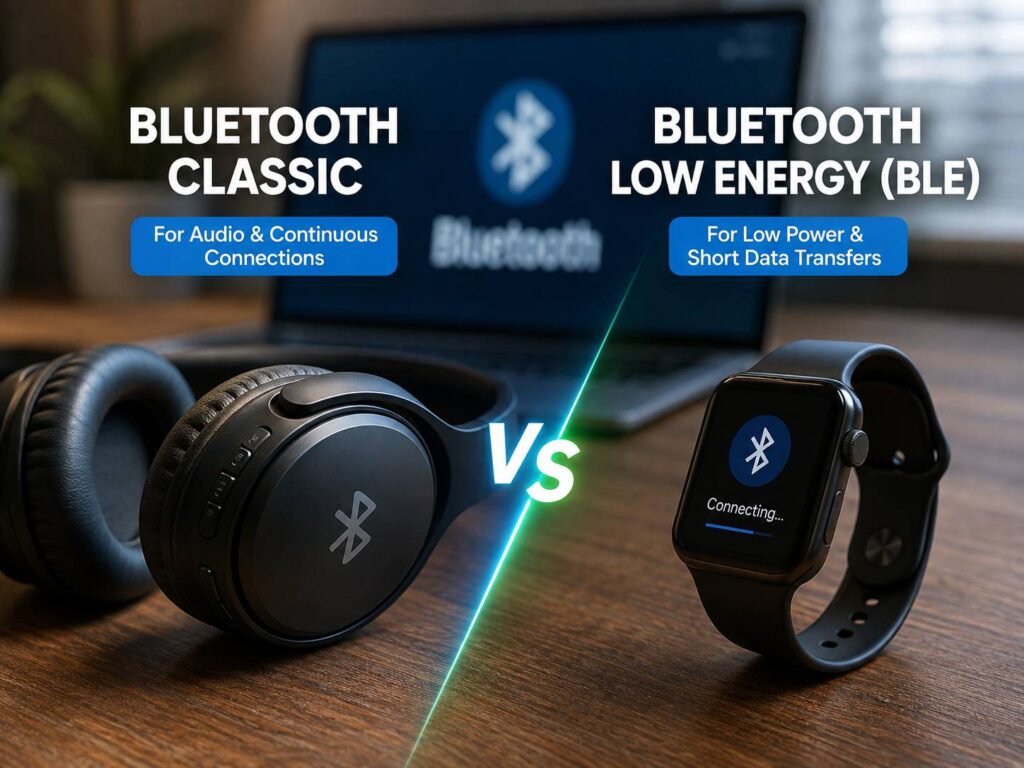
One reason is that Bluetooth does not work in just one way. Two main technologies sit behind many everyday connections: Bluetooth Classic and Bluetooth Low Energy, often called Bluetooth LE or BLE.
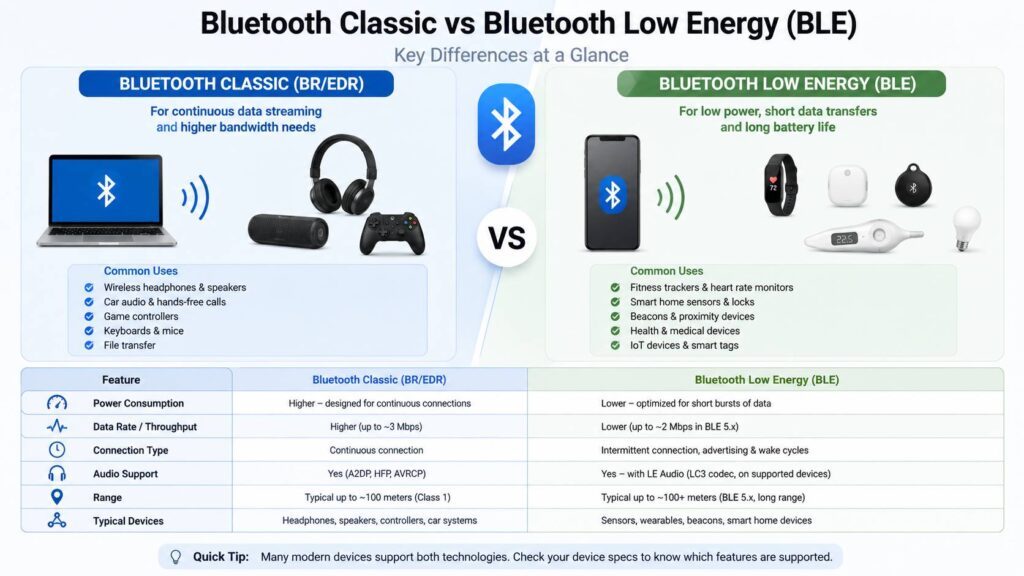
Bluetooth Classic has handled familiar jobs such as wireless audio, keyboards, game controllers, and car connections for years. BLE focuses more on low-power communication and short bursts of data. More recently, Bluetooth LE Audio has started bringing audio into the BLE side of Bluetooth too.
So, choosing between Bluetooth Classic and BLE is not really about finding a winner. The useful question is simpler. Which technology does your device use, and does it support the feature you actually need?
This guide explains the differences, battery use, pairing behavior, audio support, compatibility, and how to check what your own device uses.
What Is Bluetooth Classic?
Bluetooth Classic is the everyday name for Bluetooth BR/EDR. BR stands for Basic Rate, and EDR stands for Enhanced Data Rate.
For years, this was the Bluetooth most people interacted with. Wireless speakers used it. Headphones used it. Cars used it for calls and music. Keyboards, mice, and game controllers often relied on it too.
Bluetooth Classic works well for connections that stay active for longer periods or move a steady stream of data.
Common Bluetooth Classic profiles include:
- A2DP for stereo audio
- HFP for calls and headset microphones
- AVRCP for media controls
- HID for keyboards, mice, and controllers
- SPP for serial-style communication on supported devices
For example, Bluetooth headphones can use several profiles during the same connection. A2DP handles music playback, AVRCP deals with controls, and HFP can take over during a voice call.
That profile switching explains one issue many people have probably noticed. Music can sound worse after an app starts using the headset microphone. Traditional Bluetooth handles high-quality playback and two-way voice through different profiles, so the connection can switch modes.
This behavior is normal for many older Bluetooth audio products.
What Is Bluetooth Low Energy?
Bluetooth Low Energy is usually called BLE or Bluetooth LE.
As the name suggests, it was designed around low power use. That makes it a good fit for devices that send small amounts of data and then spend much of their time doing very little.
Think about a heart-rate strap. It only needs to send a small measurement at regular intervals. A door sensor behaves in a similar way. The same goes for a smart thermometer or fitness tracker.
Common BLE devices include:
- Fitness trackers
- Heart-rate monitors
- Smart scales
- Smart locks
- Temperature sensors
- Tracking tags
- Smart-home sensors
- Medical accessories
- Small remote controls
- IoT devices
For example, a coin-cell sensor can wake up, send a short packet, then return to a low-power state. That pattern can save a lot of energy compared with maintaining a more active connection.
Still, BLE does not guarantee amazing battery life on its own. Battery size, firmware, radio strength, display use, sensor activity, and connection settings all matter.
A poorly designed BLE accessory can still burn through its battery faster than expected.
Bluetooth Classic vs Bluetooth Low Energy: Main Differences
The easiest way to compare Bluetooth Classic and BLE is to look at what each one was designed to do.
| Feature | Bluetooth Classic | Bluetooth Low Energy |
|---|---|---|
| Technical name | BR/EDR | LE |
| Power use | Higher during continuous use | Designed for lower power |
| Data pattern | Continuous or frequent | Short or periodic transfers |
| Traditional Bluetooth audio | Yes | No |
| LE Audio | No | Yes |
| Sensors | Possible | Very common |
| Fitness trackers | Less common | Very common |
| Wireless headphones | Very common | Growing through LE Audio |
| Smart-home accessories | Less common | Very common |
| Advertising packets | Limited role | Core feature |
At first glance, the split seems simple. Classic handles heavier communication, and BLE handles low-power accessories.
Real products are messier.
A modern smartphone can support Bluetooth Classic and BLE at the same time. The same is true for many laptops, tablets, headphones, and other accessories.
So, a phone does not have to be either a “Classic device” or a “BLE device.” It can work with both.
Bluetooth Classic vs BLE Battery Use
Battery use is one of the main reasons BLE exists.
Bluetooth Low Energy gives devices a way to communicate without keeping the radio highly active all the time. A sensor can announce its presence, connect briefly, send information, then return to a quieter state.
For that reason, BLE works very well for small devices.
Examples include:
- Smart tags
- Heart-rate straps
- Door sensors
- Smart scales
- Thermometers
- Wearables
- Environmental monitors
- Small medical devices
By comparison, Bluetooth Classic has traditionally suited products that keep a more active connection.
Wireless audio is the obvious example. Music needs a continuous stream, so the radio spends much more time working.
Still, power use depends heavily on the product.
For example, a pair of earbuds using Bluetooth Classic can still last many hours thanks to a larger battery and well-tuned hardware. At the same time, a badly programmed BLE tracker can drain quickly.
The Bluetooth type matters, but the rest of the product design matters just as much.
Is Bluetooth Low Energy Slower Than Bluetooth Classic?
People often describe BLE as slower Bluetooth. That description is too simple.
The two technologies were built for different types of traffic.
Bluetooth Classic works well when data needs to keep flowing. BLE was built around short transfers and lower radio activity.
For example, a heart-rate sensor does not need the same data flow as a speaker playing music. A smart lock does not need the same connection pattern as a game controller.
So, raw speed is not the most useful comparison.
Modern versions of Bluetooth LE have grown much more capable than early BLE hardware. Newer BLE features support higher data rates, longer range options, larger packets, and audio through LE Audio.
In practice, the workload matters more than the headline speed.
What Are BLE Advertising and GATT?
Two terms appear often when reading about Bluetooth Low Energy: advertising and GATT.
BLE devices can send advertising packets that nearby devices can detect.
For example, a temperature sensor can periodically announce that it is nearby. A phone can detect that signal without creating the kind of traditional pairing session people know from headphones.
Then, once a connection starts, many BLE products exchange data through GATT.
GATT stands for Generic Attribute Profile.
It organizes information into services and characteristics.
A heart-rate monitor, for instance, can expose a heart-rate service. Inside that service, a characteristic can contain the current heart-rate measurement.
This structure explains why BLE scanner apps often show terms such as:
- Services
- Characteristics
- UUIDs
- Read
- Write
- Notify
Most users never need to touch these settings. They become useful when troubleshooting a device, testing compatibility, or developing software.
Does BLE Need Pairing?
Not always.
This is one of the most confusing differences for everyday users.
A BLE device can communicate without appearing in Bluetooth Settings like a normal pair of headphones.
For example, many fitness sensors and smart-home accessories are added through their own apps. You open the manufacturer app, choose “Add device,” and the app scans for nearby BLE hardware.
The accessory can work perfectly even though you never paired it through the phone’s normal Bluetooth menu.
So, if a BLE device does not appear in your phone’s main Bluetooth list, that does not automatically mean something is wrong.
Check the setup instructions first.
A lot of wasted troubleshooting starts with users trying to pair a device manually when the product was meant to be added from inside an app.
Do Bluetooth Headphones Use Classic Bluetooth or BLE?
Many wireless headphones still use Bluetooth Classic for normal music playback.
That is where profiles such as A2DP and HFP have traditionally handled music and calls.
Still, modern headphones can use both Bluetooth Classic and BLE.
For example, a pair of earbuds can use Bluetooth Classic for audio and BLE for:
- Battery information
- Companion-app controls
- Firmware updates
- EQ settings
- Device discovery
- Touch control settings
- Find-my-device features
This can make product specifications confusing.
Seeing “Bluetooth Low Energy” on a headphone page does not automatically mean the headphones play music over BLE.
Look for terms such as:
- Bluetooth LE Audio
- LE Audio
- LC3
- Auracast
- A2DP
- HFP
- Bluetooth Classic Audio
These terms tell you much more than the Bluetooth version number alone.
What Is Bluetooth LE Audio?
Bluetooth LE Audio brings audio streaming to Bluetooth Low Energy.
That is a major change.
Traditional Bluetooth audio mostly relied on Bluetooth Classic. LE Audio moves audio to the BLE side and introduces a newer system built around the LC3 codec.
LC3 stands for Low Complexity Communication Codec.
LE Audio can support features such as:
- LC3 audio
- Multi-Stream Audio
- Hearing-device support
- Auracast broadcast audio
- Better coordination between left and right earbuds
- Lower-power audio designs
Auracast is one of the more interesting features.
It lets a compatible source broadcast audio to nearby compatible receivers. In theory, a television, airport display, gym screen, or public venue can broadcast sound that users join with their own headphones.
At the same time, LE Audio support is not automatic just from seeing “Bluetooth 5” or “Bluetooth 6” on a specification sheet.
The phone, operating system, Bluetooth hardware, and headphones all need support for the relevant LE Audio features.

Bluetooth Version vs Bluetooth Type
Bluetooth version numbers cause a lot of confusion.
A device can say Bluetooth 5.3, Bluetooth 5.4, Bluetooth 6.0, or another version. That number does not tell you every feature the product supports.
For example, two products with the same Bluetooth version can have different profiles, audio features, codec support, and LE capabilities.
So, do not treat the Bluetooth version as a full compatibility list.
Instead, check the actual features.
Useful terms to look for include:
- Bluetooth Classic
- BR/EDR
- Bluetooth LE
- BLE
- LE Audio
- LC3
- Auracast
- A2DP
- HFP
- HID
- GATT
This small check can save a lot of frustration.
How to Check Whether Your Device Uses Bluetooth Classic or BLE
Start with the manufacturer’s specifications or manual.
Search for terms such as “Bluetooth LE,” “BLE,” “BR/EDR,” “LE Audio,” “A2DP,” or “GATT.”
The product type can give you a useful clue too.
Devices that commonly use BLE include:
- Fitness trackers
- Heart-rate straps
- Smart thermometers
- Smart locks
- Tracking tags
- Smart scales
- Environmental sensors
Devices that have traditionally relied more heavily on Bluetooth Classic include:
- Wireless speakers
- Older Bluetooth headphones
- Car audio systems
- Some game controllers
- Older keyboards and mice
Still, modern products often support both.
Windows accessories are a good example. A mouse can connect through Bluetooth without a USB receiver, but the exact connection process can vary between models. If you are setting one up, this guide on how to connect a Bluetooth mouse to Windows 10 without the usual headaches covers the practical pairing steps and common problems.
For a deeper technical check, a BLE scanner app can detect advertising packets and show GATT services.
Still, finding BLE services only confirms that BLE is present. It does not prove that every Bluetooth function on that device uses BLE.
Why Does a Bluetooth Device Sometimes Appear Twice?
Dual-mode devices can behave in odd ways.
For example, headphones can expose one connection for audio and another interface for BLE control functions. A companion app can then see one part of the device, while the operating system handles another.
This can make the same accessory appear differently in:
- Bluetooth Settings
- Manufacturer apps
- BLE scanner apps
- Device managers
- Diagnostic tools
So, do not delete entries at random.
For headphones, use the normal pairing process from the manufacturer first. Then open the companion app for EQ settings, firmware, button controls, and other options.
Trying to pair every entry manually can sometimes create more problems than it fixes.
Common Bluetooth Classic and BLE Problems
Bluetooth problems are often easier to solve once you know which technology the product uses.
The device appears in an app but not in Bluetooth Settings
This can be completely normal for BLE hardware.
Use the manufacturer’s app and follow its setup process.
The device supports BLE but LE Audio does not work
BLE support alone does not mean LE Audio support.
Check for explicit support for LE Audio, LC3, or Auracast.
A newer phone still lacks a Bluetooth feature
A newer Bluetooth version does not guarantee every optional feature.
Check the phone manufacturer’s feature list.
A sensor connects but its data does not appear
The app needs to understand the BLE services exposed by the sensor.
A successful Bluetooth connection does not automatically make every sensor work with every application.
Headphone sound quality drops during calls
Traditional Bluetooth audio often switches profiles when the microphone becomes active.
That can reduce music quality during calls, voice chat, or recording.
The accessory keeps disconnecting
Power-saving settings, weak signal, firmware bugs, interference, and aggressive battery management can all cause this.
For BLE sensors, connection intervals and app background restrictions can matter too.
Is BLE Better Than Bluetooth Classic?
Neither one is better for every job.
Bluetooth Classic remains useful for many established audio and continuous-data connections.
BLE is a better fit for small sensors, wearables, tags, and devices that need to save battery.
Then there is LE Audio, which brings audio into Bluetooth Low Energy and makes the division less clear than it used to be.
For example, a heart-rate monitor is an obvious BLE device.
An older wireless speaker is an obvious Bluetooth Classic device.
Modern earbuds can use both.
So, instead of asking which Bluetooth type is better, ask what feature you need and whether both devices support it.
That gives you a much more useful answer.
Bluetooth Classic vs BLE FAQ
Is Bluetooth LE the same as BLE?
Yes. Bluetooth LE and BLE are two names for Bluetooth Low Energy.
Can a device use Bluetooth Classic and BLE at the same time?
Yes. Many phones, computers, headphones, and accessories support both.
Does BLE save battery?
BLE was designed for lower-power communication. Actual battery life still depends on the hardware, firmware, radio settings, display, sensors, and battery capacity.
Can BLE stream music?
Yes, but only through Bluetooth LE Audio on compatible hardware.
Basic BLE support alone does not mean a device can stream music.
Is Bluetooth Classic being replaced?
Not immediately. Bluetooth Classic remains widely used, especially for traditional audio and older accessories.
LE Audio is expanding the role of BLE in newer products.
Is Bluetooth 5 the same as Bluetooth Low Energy?
No.
Bluetooth 5 refers to a Bluetooth specification generation. Bluetooth Low Energy is a radio and communication technology within Bluetooth.
Why does my BLE accessory not show up as paired?
Some BLE products connect through an app instead of the phone’s normal Bluetooth pairing screen.
That behavior can be completely normal.
Does BLE mean better range?
Not automatically.
Range depends on radio power, antenna design, environment, Bluetooth features, interference, and the hardware at both ends.
Bluetooth Classic vs Bluetooth Low Energy: Which One Does Your Device Need?
Bluetooth Classic and Bluetooth Low Energy were created for different jobs.
Classic became the standard choice for familiar uses such as headphones, speakers, car audio, keyboards, mice, and controllers.
BLE became popular in trackers, sensors, smart-home devices, medical accessories, and wearables where power use matters more.
Now LE Audio is changing the picture again.
A single modern device can use Bluetooth Classic for one function and BLE for another. Newer audio products can even move sound over Bluetooth Low Energy.
For that reason, the Bluetooth version printed on the box tells only part of the story.
Check the actual features instead.
For sensors and trackers, look for BLE and GATT. For traditional audio, look for A2DP and HFP. For newer headphones, check for LE Audio, LC3, and Auracast.
That small check can prevent one of the most annoying Bluetooth situations. Two devices both support Bluetooth, yet the feature you expected still does not work.