
Logitech MX Keys S: Specs, Price, Pros & Cons
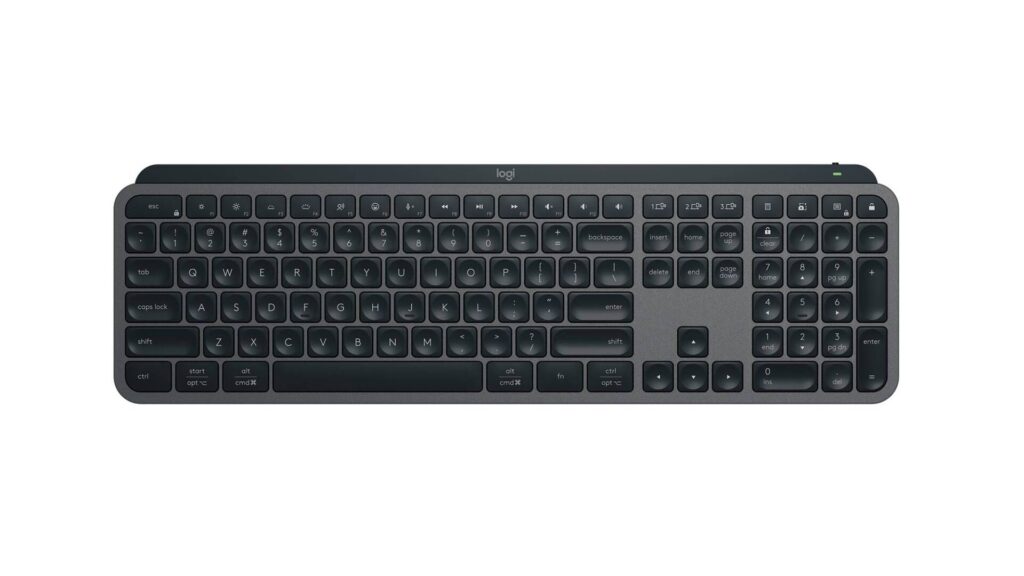
Logitech's MX Keys S is the full-size office board of the MX Keys family, the one with a number pad, while the compact MX Keys Mini covers smaller desks. It is built for a working day spent across several computers, and every part of the specification points at comfort and quiet.
The keys are scissor switches over a membrane, shallow and firm like a good laptop's, in a body 20.5 mm thick. An aluminum plate is fixed inside the plastic case, and the press is quiet enough that a call at the desk goes on without the clatter of a mechanical board. The layout is the traditional full-size one, with the navigation block and numbers in their usual places, so nothing has to be relearned by someone coming from an older office keyboard.
Its central feature is switching. Three hosts can be paired, and a keypress moves the keyboard from a desktop to a laptop to a tablet with nothing to re-pair and no cable to move. Bluetooth or Logitech's receiver handles the link, and programmable keys can be set to run the shortcuts a job repeats all day.
A 1,500 mAh cell powers it, and the backlight is what decides how long a charge lasts. The white backlight wakes when hands come near and stays dark otherwise.
What it does not do is anything the keyboard hobby cares about. The switches cannot be changed, there is no rotary knob, and nothing is adjustable about how a key registers. A typist who wants the feel of a mechanical keystroke, or a player shopping for rapid trigger, will find the whole design pointed elsewhere.
Category strengths
Where the Logitech MX Keys S trails the median
- No hot-swappable switches ?
- Fewer connection options ?
- No rotary knob ?
- A heavier actuation force ?60 g vs 45 g (median)
- A much smaller battery ?1,500 mAh vs 4,000 mAh (median)
How this VS Score was computed
Score 25: each known spec is measured against the median of all keyboards (101 products), then weighted; 50 means level with that median. In classes of six or more, a value beyond the class’s 10th–90th percentile range counts as that limit, so one extreme product cannot set the scale. 40% of the scoreable weight could be used; unknown values, features not applicable to this class and proxies (battery capacity where a rated life exists) add or remove nothing.
| Specification | This product | Cohort median | Score weight | Points moved |
|---|---|---|---|---|
| Hot-swappable | No | 61% of the class have it | 0.6 | −28.8 |
| Adjustable actuation | No | 24% of the class have it | 0.4 | −19.2 |
| Switch technology | Membrane | Mechanical | 1 | −17.0 |
| Connection | 2 | 3 | 0.8 | −13.6 |
| Rotary knob | No | 54% of the class have it | 0.2 | −9.6 |
| Backlight | White | RGB | 0.3 | −7.5 |
| Battery capacity | 1,500 | 4,000 | 0.2 | −6.2 |
| Actuation force | 60 | 45 | 0.4 | −4.8 |
| Bluetooth devices | 3 | 3 | 0.3 | +0.0 |
Not scored: N-key rollover (unknown: not scored); Analog input (not applicable: only 14% of this class have it); Polling rate (unknown: not scored); Wired latency (unknown: not scored); Wireless latency (unknown: not scored); Rapid trigger (unknown: not scored); Front height (unknown: not scored); Battery life (unknown: not scored); USB passthrough (not applicable: only 4% of this class have it); Keycap material (unknown: not scored); Sound dampening (unknown: not scored); Programmable keys (standard for the class (99% have it)); Media controls (standard for the class (98% have it)); Onboard profiles (unknown: not scored); Configuration software (standard for the class (95% have it)).
Editor’s note
The MX Keys S is the only keyboard here that is not mechanical, and it is on this list for a reason that has nothing to do with gaming.
The switches are scissor-type over a membrane (the mechanism a good laptop keyboard uses), with 60 g actuation and shallow, quiet travel. Typed quickly it is one of the most comfortable keyboards made, and it is nearly silent, which matters in a shared room or on a call. Nobody buys it for the feel of a mechanical keystroke, and that is the point.
Two numbers explain its appeal. Logitech rates a charge at up to 10 days with the default lighting settings and up to five months with the backlight off. And it pairs with three devices at once over Bluetooth or its 2.4 GHz receiver, switching between a desktop, a laptop and a tablet at a keypress, which is the feature people use it for.
The keys are backlit in white, with no RGB, and proximity sensing brings the lighting on as your hands approach. The case is plastic over an aluminum plate and the layout is a full 108 keys.
There is no hot-swap, no adjustable actuation, no rapid trigger and no analog input.
Buy it if you type across several machines all day and want quiet, comfortable, low-maintenance hardware. Buy anything else on this list if you game seriously or want the feel of a mechanical switch.
Specifications
Quality bars show where each figure sits between the lowest and highest of the 101 keyboards this VS Score is measured against.
Switches & typing
Performance
Layout & size
Connectivity
Build & sound
Features
Sources and verification
Where the specifications come from
- Official product pagelogitech.com
- Support and firmware documentationsupport.logi.com
Verification
- First published
- Specifications last checked
- Sheet completeness
- 22 of 34 specifications verified; the rest show as Unknown and are never estimated or scored
- Page type
- Product specification page — Compiled from the manufacturer’s published specifications and the cited sources; this is not a hands-on test.
- Basis
- Research-based: specifications and editorial text were compiled from the documents listed here and the manufacturer’s published data. We have not tested this unit ourselves; where independent measurements are mentioned they belong to the linked publication.
Where to buy
Prices and availability may change. Check the retailer before buying. We may earn a commission on purchases.
Price history
Keyboards with similar specs to the Logitech MX Keys S
Ratings & reviews
No reviews yet. Be the first to share your experience.
The bottom line
The Logitech MX Keys S earns a VS Score of 25 on the 40% of specifications we could compare like for like — an indication, not a ranking.
- Who it’s for
- People who type for a living on two or three machines and want a near-silent board that hops between them at one keypress.
- Who should look elsewhere
- Gamers and anyone who wants a mechanical keystroke should pass. The scissor keys are fixed, with no swapping, no tuning and no magnetic sensing.
- The trade-off that matters
- It is a finished tool with nothing to change. Comfort and quiet are there from day one, but if the shallow press ever stops suiting you, the only fix is another keyboard.
- The main alternative
- Logitech MX Keys Mini: the compact sibling without a numpad, still pairing with three devices, for a smaller desk.
The VS Score is calculated from the weighted specifications above, each measured against the median of comparable keyboards — a shortlisting guide, not a substitute for your own priorities. See how we score.





