
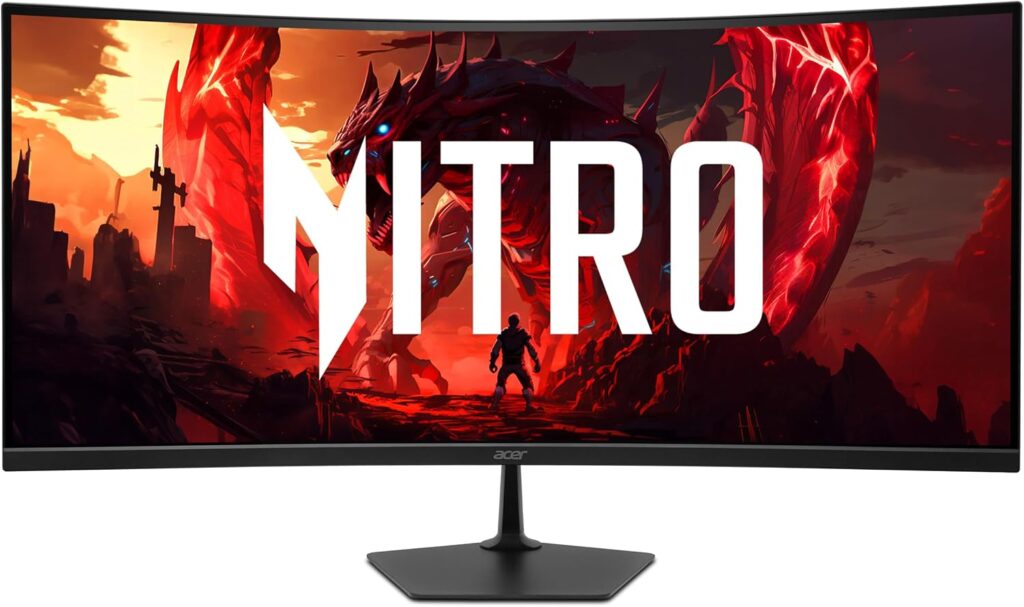
Acer Nitro EDA340CUR J0: Specs, Features, Pros & Cons
An ultrawide screen does the work of two ordinary monitors without a bezel down the middle. Two documents sit side by side at full height, a video timeline stretches across the desk, and games that support the wider shape show more of the world at the edges.
The Nitro EDA340CUR J0 is Acer's entry ticket to that format. It is a curved panel at the resolution most ultrawides use, which keeps text readable at arm's length and asks far less of a graphics card than a 4K screen would. The curve pulls the far corners toward you, so reading across the full width does not mean turning your head.
It suits someone who mostly works and plays now and then. Spreadsheets with many columns, code beside documentation and several browser windows all benefit from the width, and the panel's deep blacks make evening films and dark games look richer than they would on a typical budget office screen.
One limit catches console owners. A PlayStation or Xbox sends a standard widescreen picture, so it fills the middle of this screen with black bars on both sides. PC games mostly support the wider view, though a few titles lock to the standard shape and show the same bars.
Acer builds this curved body in several versions, and the J0 is the slowest of them. It also carries the fewest extras, so the stand only tilts and there is little on the back beyond video inputs. Its faster siblings share the size and the curve, and a higher refresh rate is the main thing the extra money buys.
Category strengths
Where the Acer Nitro EDA340CUR J0 trails the median
- A lower refresh rate ?120 Hz vs 172.5 Hz (median)
- Lower peak brightness ?250 nits vs 400 nits (median)
- No height adjustment ?
- No headphone output ?
- No swivel adjustment ?
- A lower contrast ratio ?3000:1 vs 3500:1 (median)
- A lower color depth ?8 bit vs 10 bit (median)
- No USB hub ?
How this VS Score was computed
Score 41: each known spec is measured against the median of VA gaming monitors, 32 inches and up (6 products), then weighted; 50 means level with that median. In classes of six or more, a value beyond the class’s 10th–90th percentile range counts as that limit, so one extreme product cannot set the scale. 69% of the scoreable weight could be used; unknown values, features not applicable to this class and proxies (battery capacity where a rated life exists) add or remove nothing.
| Specification | This product | Cohort median | Score weight | Points moved |
|---|---|---|---|---|
| Height adjustment | No | 50% of the class have it | 0.4 | −19.2 |
| Refresh rate | 120 | 172.5 | 1.2 | −18.0 |
| Peak brightness | 250 | 400 | 0.8 | −15.2 |
| Local dimming | No — held to half its range (class of fewer than six) | 40% of the class have it | 0.4 | −10.0 |
| Swivel | No | 50% of the class have it | 0.2 | −9.6 |
| Headphone output | No — held to half its range (class of fewer than six) | 80% of the class have it | 0.2 | −5.0 |
| Picture-by-picture | No — held to half its range (class of fewer than six) | 33% of the class have it | 0.2 | −5.0 |
| Contrast ratio | 3,000 | 3,500 | 0.6 | −4.2 |
| Color depth | 8 | 10 | 0.3 | −3.0 |
| USB hub | No | 50% of the class have it | 0.05 | −2.2 |
| Pivot | No | 33% of the class have it | 0.02 | −1.0 |
| Screen size | 34 | 34 | 1.2 | +0.0 |
| Resolution | 1440p | 1440p | 1.2 | +0.0 |
| Panel type | VA | VA | 0.8 | +0.0 |
| Response time | 1 | 1 | 0.8 | +0.0 |
| HDR | HDR10 | HDR10 | 0.5 | +0.0 |
| Pixel density | 110 | 110 | 0.5 | +0.0 |
| Adaptive sync | FreeSync | FreeSync | 0.6 | +0.0 |
| HDMI ports | 2 | 2 | 0.4 | +0.0 |
| DisplayPort inputs | 1 | 1 | 0.4 | +0.0 |
Not scored: DCI-P3 coverage (unknown: not scored); Local dimming zones (unknown: not scored); Variable refresh rate (standard for the class (100% have it)); Motion blur reduction (unknown: not scored); Input lag (unknown: not scored); Tilt (standard for the class (100% have it)); USB-C (not applicable: only 0% of this class have it); USB-C power delivery (unknown: not scored); Built-in speakers (not applicable: only 0% of this class have it); KVM switch (not applicable: only 0% of this class have it); Webcam (not applicable: only 0% of this class have it); Microphone (not applicable: only 0% of this class have it); Ethernet (not applicable: only 0% of this class have it).
Editor’s note
The EDA340CUR J0 is the cheapest way into a 34-inch curved ultrawide from a name brand, and one correction belongs up front: despite what the Amazon listing title says, this is a VA panel. The spec databases for this exact part, the retailer listings, and the fact that Acer's entire ED0 series is VA all agree, and the listing title is wrong. VA here is not a downgrade so much as a different trade: you get 3000:1 contrast and far deeper blacks than any IPS ultrawide near the price, and in exchange the viewing angles and dark-scene motion are weaker.
What you are buying is screen real estate: 3440×1440 across a 1500R curve at around 110 ppi, with FreeSync Premium and a three-year warranty. For productivity-plus-gaming on a budget, that is the pitch, and it is a good one.
The honest limitations: 120 Hz is the slowest tier of this chassis (Acer sells the same 34-inch curve as the X0 at 200 Hz and W0 at 240 Hz), so if refresh matters, know the ladder before buying the bottom rung. Brightness is 250 nits with decode-only HDR10. The stand only tilts. And this SKU is unusually bare: no speakers, no headphone jack, no USB of any kind. The two HDMI 2.1 ports are a small joke on a 1440p panel this slow, which will never use their bandwidth.
The 1 ms claim is Acer's VRB figure, a different measure from GtG. Typical VA response is the real-world experience, and VA smear in dark games is the thing to test in the return window.
At its frequent street price, I think the size-per-dollar carries it, as a first ultrawide for someone who mostly works and sometimes plays.
Specifications
Quality bars show where each figure sits between the lowest and highest of the 6 VA gaming monitors, 32 inches and up this VS Score is measured against.
Picture
Gaming
Ergonomics & design
Connectivity
Features
Sources and verification
Where the specifications come from
- Official product pageacer.com
- Retailer listing (cross-check)amazon.com
Verification
- First published
- Specifications last checked
- Sheet completeness
- 37 of 42 specifications verified; the rest show as Unknown and are never estimated or scored
- Page type
- Product specification page — Compiled from the manufacturer’s published specifications and the cited sources; this is not a hands-on test.
- Basis
- Research-based: specifications and editorial text were compiled from the documents listed here and the manufacturer’s published data. We have not tested this unit ourselves; where independent measurements are mentioned they belong to the linked publication.
Monitors with similar specs to the Acer Nitro EDA340CUR J0
Ratings & reviews
No reviews yet. Be the first to share your experience.
The bottom line
The Acer Nitro EDA340CUR J0 earns a VS Score of 41, below the median of the 6 VA gaming monitors, 32 inches and up it is measured against (a score of 50 is level with that median).
- Who it’s for
- A first ultrawide on a tight budget, where curved width and VA contrast matter more than speed, and where a long warranty is worth having in its own right.
- Who should look elsewhere
- Refresh-rate buyers. This is the slowest rung of a chassis Acer also sells much faster, and this particular SKU has no speakers, no headphone jack and no USB of any kind.
- The trade-off that matters
- A lot of screen per dollar, on a panel type the retail listing gets wrong. You get deep blacks and pay for them in viewing angles and dark-scene smear, both worth checking inside the return window.
- The main alternative
- Acer's own ED340CUR X0: the same size and curve at a far higher refresh rate, for the step-up money.
The VS Score is calculated from the weighted specifications above, each measured against the median of comparable VA gaming monitors, 32 inches and up — a shortlisting guide, not a substitute for your own priorities. See how we score.





