
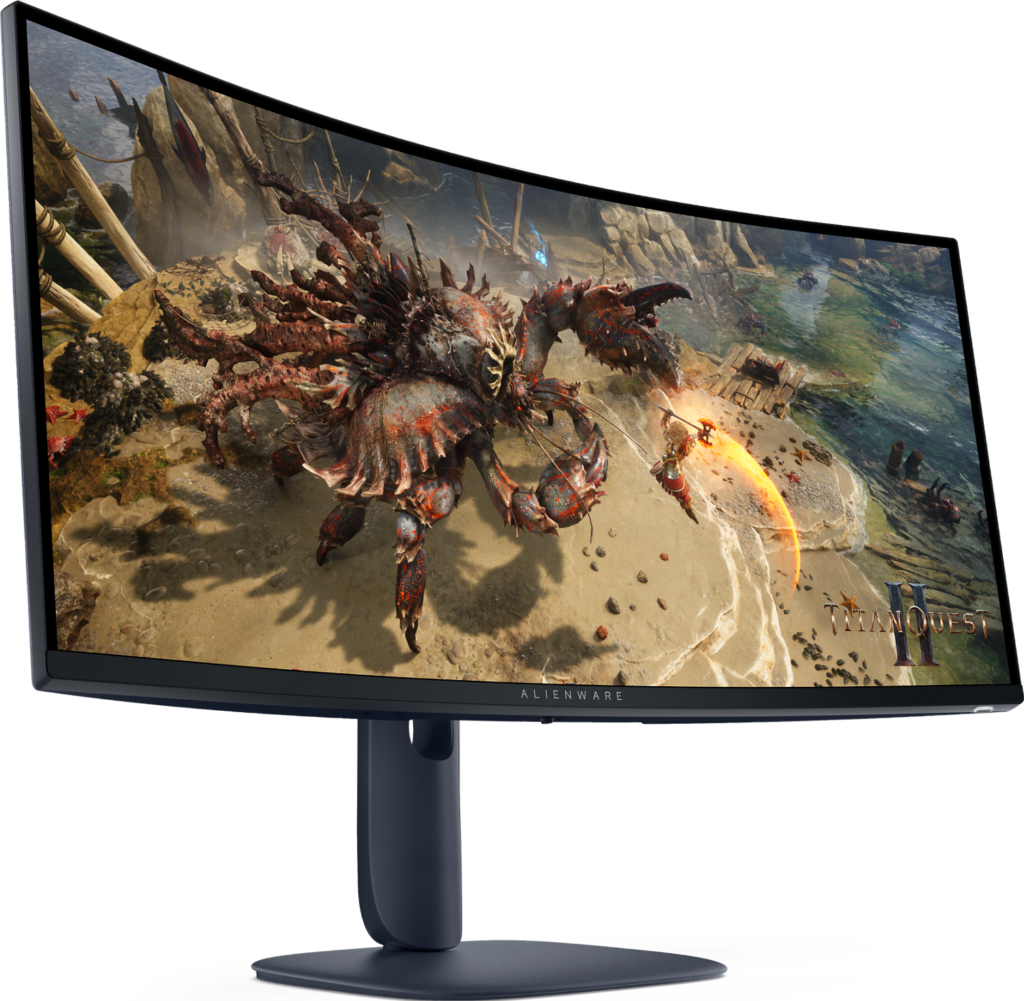
Dell Alienware AW3425DWM: Specs, Features, Pros & Cons
An ultrawide changes how a desk is laid out before it changes any game. This Alienware is a curved screen about as wide as two small monitors placed side by side, and it wants a desk with the width to hold it and enough depth to sit back from it. It is the lower-cost ultrawide in Alienware's range, built on a VA panel, and the stand adjusts for height and swivel, which helps on a screen this long, since a slight angle toward the chair keeps both ends in comfortable view.
Games decide whether the width earns its space. Driving games, flight simulators and most big single-player releases render the wider view natively, so the extra width becomes extra scenery at the edges. Competitive games are a mixed case, and a few show black bars down the sides to keep matches fair. Video behaves the same way. Ordinary streams sit in the middle with dark strips left and right, and only films shot in a wide cinema ratio fill nearly all of it.
The width also has a cost in frame rate. There are roughly a third more pixels to draw than on a conventional screen of the same height, so a graphics card that is comfortable on a standard gaming monitor will run slower here. The high refresh ceiling is easier to reach in older or lighter games than in the newest ones, and a buyer with a modest card should expect to lower some settings to get near it.
The format pays off for evenings spent in long story games or behind a racing wheel, and much less for ranked matches, where a lot of that width goes unused.
Category strengths
Where the Dell Alienware AW3425DWM beats the median
- Higher peak brightness ?500 nits vs 400 nits (median)
- Has height adjustment ?
- Has swivel adjustment ?
- A slightly higher refresh rate ?180 Hz vs 172.5 Hz (median)
- Has USB hub ?
Where the Dell Alienware AW3425DWM trails the median
- A lower contrast ratio ?3000:1 vs 3500:1 (median)
How this VS Score was computed
Score 52: each known spec is measured against the median of VA gaming monitors, 32 inches and up (6 products), then weighted; 50 means level with that median. In classes of six or more, a value beyond the class’s 10th–90th percentile range counts as that limit, so one extreme product cannot set the scale. 72% of the scoreable weight could be used; unknown values, features not applicable to this class and proxies (battery capacity where a rated life exists) add or remove nothing.
| Specification | This product | Cohort median | Score weight | Points moved |
|---|---|---|---|---|
| Height adjustment | Yes | 50% of the class have it | 0.4 | +20.0 |
| Local dimming | No | 40% of the class have it | 0.4 | −19.2 |
| HDR | DisplayHDR 400 | HDR10 | 0.5 | +12.5 |
| Peak brightness | 500 | 400 | 0.8 | +10.4 |
| Swivel | Yes | 50% of the class have it | 0.2 | +10.0 |
| Picture-by-picture | No | 33% of the class have it | 0.2 | −9.6 |
| Contrast ratio | 3,000 | 3,500 | 0.6 | −4.2 |
| Refresh rate | 180 | 172.5 | 1.2 | +2.4 |
| USB hub | Yes | 50% of the class have it | 0.05 | +2.3 |
| Pivot | No | 33% of the class have it | 0.02 | −1.0 |
| Screen size | 34 | 34 | 1.2 | +0.0 |
| Resolution | 1440p | 1440p | 1.2 | +0.0 |
| Panel type | VA | VA | 0.8 | +0.0 |
| Color depth | 10 | 10 | 0.3 | +0.0 |
| Response time | 1 | 1 | 0.8 | +0.0 |
| DCI-P3 coverage | 95 | 95 | 0.6 | +0.0 |
| Pixel density | 109 — capped at the class’s lower range (110) | 110 | 0.5 | +0.0 |
| Adaptive sync | FreeSync | FreeSync | 0.6 | +0.0 |
| HDMI ports | 2 | 2 | 0.4 | +0.0 |
| DisplayPort inputs | 1 | 1 | 0.4 | +0.0 |
Not scored: Local dimming zones (unknown: not scored); Variable refresh rate (standard for the class (100% have it)); Motion blur reduction (unknown: not scored); Input lag (unknown: not scored); Tilt (standard for the class (100% have it)); USB-C (not applicable: only 0% of this class have it); USB-C power delivery (unknown: not scored); Built-in speakers (not applicable: only 0% of this class have it); Headphone output (standard for the class (80% have it)); KVM switch (not applicable: only 0% of this class have it); Webcam (not applicable: only 0% of this class have it); Microphone (not applicable: only 0% of this class have it); Ethernet (not applicable: only 0% of this class have it).
Editor’s note
The Alienware AW3425DWM is proof that ultrawide gaming no longer has to be expensive. It is a 34-inch, 3440×1440, 1500R curved panel running at 180 Hz, and the extra horizontal space changes how racing sims, RPGs and open-world games feel compared with a flat 16:9 screen.
The key thing to understand before buying is the panel type. This is a VA monitor, and it should not be confused with the near-identically named AW3425DW, which is Alienware's QD-OLED. VA is a sensible choice here: it reaches roughly 3000:1 static contrast, so blacks are far deeper than any IPS competitor at this price, which suits dark, atmospheric games well. It covers 95% of DCI-P3 and carries DisplayHDR 400 with a 500-nit peak, entry-level HDR that adds a little punch without transforming the picture.
The trade-off with VA is pixel response. Dell rates it at 1 ms, but in practice you will see some dark-scene smearing that OLED and the best IPS panels avoid, and that is the main reason competitive esports players should look elsewhere. For everyone else, that refresh rate with FreeSync Premium is plenty smooth.
Connectivity is straightforward gaming fare: two HDMI ports and a DisplayPort 1.4, all capable of the full refresh rate, plus a headphone jack. There is no USB-C and no speakers, so plan on separate audio.
Buy this if you want a big, high-contrast ultrawide for single-player and story-driven games without spending OLED money. Avoid it if you play fast competitive shooters where VA smearing matters, or if you expected the OLED model. Check the exact suffix before you order, because the two are easy to mix up.
Specifications
Quality bars show where each figure sits between the lowest and highest of the 6 VA gaming monitors, 32 inches and up this VS Score is measured against.
Picture
Gaming
Ergonomics & design
Connectivity
Features
Sources and verification
Where the specifications come from
- Datasheet or manualdell.com
- Independent testingrtings.com
Verification
- First published
- Specifications last checked
- Sheet completeness
- 37 of 42 specifications verified; the rest show as Unknown and are never estimated or scored
- Page type
- Product specification page — Compiled from the manufacturer’s published specifications and the cited sources; this is not a hands-on test.
- Basis
- Research-based: specifications and editorial text were compiled from the documents listed here and the manufacturer’s published data. We have not tested this unit ourselves; where independent measurements are mentioned they belong to the linked publication.
Monitors with similar specs to the Dell Alienware AW3425DWM
Ratings & reviews
No reviews yet. Be the first to share your experience.
The bottom line
The Dell Alienware AW3425DWM earns a VS Score of 52, above the median of the 6 VA gaming monitors, 32 inches and up it is measured against (a score of 50 is level with that median).
- Who it’s for
- Story and RPG players who want a big curved ultrawide with deep blacks and would rather not pay for the flagship model.
- Who should look elsewhere
- Esports players, since dark-scene smearing costs clarity in fast motion, and anyone expecting speakers or single-cable laptop charging.
- The trade-off that matters
- Deep contrast makes dark games look rich, but slower dark transitions smear in fast motion. That matters little in an RPG and a lot in a shooter.
- The main alternative
- Dell Alienware AW3425DW: the QD-OLED ultrawide with a similar name, for faster motion and deeper contrast at a higher cost.
The VS Score is calculated from the weighted specifications above, each measured against the median of comparable VA gaming monitors, 32 inches and up — a shortlisting guide, not a substitute for your own priorities. See how we score.





