
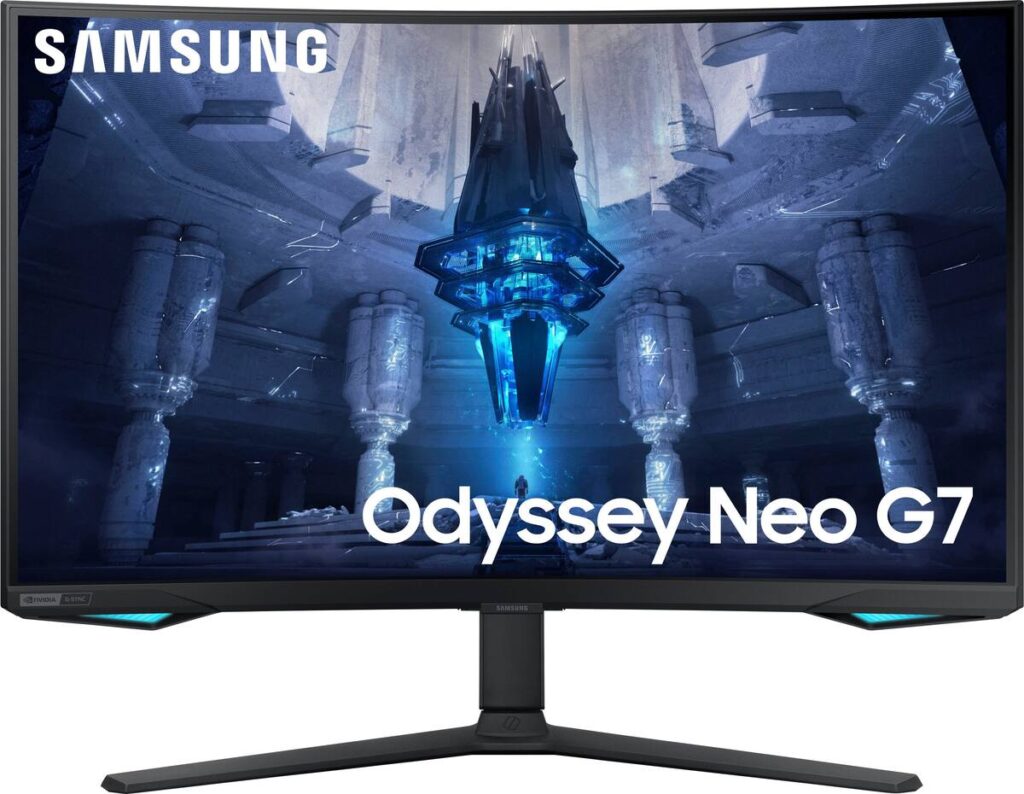
Samsung Odyssey Neo G7 S32BG75: Specs, Features, Pros & Cons
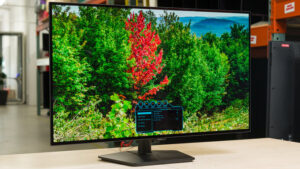
The first thing you notice about the Neo G7 is not a number but a shape. Samsung bends this large Ultra HD panel into a pronounced curve, far tighter than the gentle arcs on most flat-looking monitors, and that decision frames who it suits: wonderful for wrapping a game world around your field of view, awkward for anything built from straight lines.
Behind the curve sits a Mini-LED backlight divided into many independently dimmed zones, which is how an LCD produces convincing HDR. Bright highlights can sit next to deep shadows, and the screen reaches a level of sustained brightness that OLED monitors still cannot match. For games, films and HDR video in a room with daylight, that is the core of its appeal.
The panel underneath is VA, which brings strong native contrast but slower transitions in dark, fast scenes than IPS or OLED. Local dimming also has a visible limit: each zone still covers thousands of pixels, so white text on a black background carries a faint halo. None of this is a defect, but it explains why the Neo G7 is a better entertainment screen than a desktop one.
Practicalities are well covered. The stand adjusts fully, there are HDMI inputs suited to current consoles at full resolution, a DisplayPort for the PC, a small USB hub and a headphone jack, though no speakers and no USB-C.
The right owner has a console or a strong PC, plays and watches more than they type, and wants bright HDR without OLED's care routine. Designers, programmers and anyone who works with rulers and grids should look at a flat screen instead, however attractive the brightness looks in a shop.
Category strengths
Where the Samsung Odyssey Neo G7 S32BG75 beats the median
- A much higher contrast ratio ?1000000:1 vs 3500:1 (median)
- Much higher peak brightness ?1,000 nits vs 400 nits (median)
- Has local dimming ?
- Has height adjustment ?
- A higher pixel density ?140 ppi vs 110 ppi (median)
- Has swivel adjustment ?
- Has USB hub ?
- Has pivot adjustment ?
Where the Samsung Odyssey Neo G7 S32BG75 trails the median
- A slightly smaller screen ?32" (81.28 cm) vs 34" (86.36 cm) (median)
- A slightly lower refresh rate ?165 Hz vs 172.5 Hz (median)
How this VS Score was computed
Score 70: each known spec is measured against the median of VA gaming monitors, 32 inches and up (6 products), then weighted; 50 means level with that median. In classes of six or more, a value beyond the class’s 10th–90th percentile range counts as that limit, so one extreme product cannot set the scale. 70% of the scoreable weight could be used; unknown values, features not applicable to this class and proxies (battery capacity where a rated life exists) add or remove nothing.
| Specification | This product | Cohort median | Score weight | Points moved |
|---|---|---|---|---|
| Resolution | 4K | 1440p | 1.2 | +60.0 |
| Peak brightness | 1,000 | 400 | 0.8 | +40.0 |
| Contrast ratio | 1,000,000 | 3,500 | 0.6 | +30.0 |
| Adaptive sync | G-Sync Compatible | FreeSync | 0.6 | +30.0 |
| Local dimming | Yes | 40% of the class have it | 0.4 | +20.0 |
| Height adjustment | Yes | 50% of the class have it | 0.4 | +20.0 |
| Swivel | Yes | 50% of the class have it | 0.2 | +10.0 |
| Pixel density | 140 | 110 | 0.5 | +7.0 |
| Screen size | 32 | 34 | 1.2 | −3.6 |
| Refresh rate | 165 | 172.5 | 1.2 | −2.4 |
| USB hub | Yes | 50% of the class have it | 0.05 | +2.3 |
| Pivot | Yes | 33% of the class have it | 0.02 | +1.0 |
| Panel type | VA | VA | 0.8 | +0.0 |
| Color depth | 10 | 10 | 0.3 | +0.0 |
| Response time | 1 | 1 | 0.8 | +0.0 |
| DCI-P3 coverage | 95 | 95 | 0.6 | +0.0 |
| HDR | HDR10 | HDR10 | 0.5 | +0.0 |
| HDMI ports | 2 | 2 | 0.4 | +0.0 |
| DisplayPort inputs | 1 | 1 | 0.4 | +0.0 |
Not scored: Local dimming zones (too few comparable peers (2, need 3)); Variable refresh rate (standard for the class (100% have it)); Motion blur reduction (unknown: not scored); Input lag (unknown: not scored); Tilt (standard for the class (100% have it)); USB-C (not applicable: only 0% of this class have it); USB-C power delivery (unknown: not scored); Built-in speakers (not applicable: only 0% of this class have it); Headphone output (standard for the class (80% have it)); KVM switch (unknown: not scored); Webcam (unknown: not scored); Microphone (unknown: not scored); Ethernet (unknown: not scored); Picture-by-picture (unknown: not scored).
Editor’s note
The Neo G7 is the Neo G8 with the refresh rate turned down and a good deal of money taken off, and for most buyers that is the better trade. It uses the same 32-inch 4K Mini-LED backlight, the same 1,196 dimming zones and the same 1,000-nit output. The difference is 165 Hz instead of 240 Hz.
That matters less than the number suggests. Driving 4K above 165 frames per second needs a graphics card that costs more than the monitor, so the extra headroom on the G8 goes unused on most systems. Meanwhile the brightness, the zone count and the HDR10+ certification carry over intact, and those are what you see.
The panel is VA with a 1000R curve and shares its sibling's traits: strong native contrast and slower dark-scene transitions than IPS or OLED. Ten-bit color and 95 percent DCI-P3 coverage make it credible for media, less so for color-critical editing given the curve.
Local dimming is worth enabling and then leaving alone. With 1,196 zones behind a 4K panel each zone still covers a lot of pixels, so bright text on a black background haloes visibly. That is physics rather than a fault, and it is the main reason to prefer OLED for desktop work.
This is the Mini-LED to buy if you want bright HDR at 4K and are not chasing frame rates your hardware cannot reach. Step up to the Neo G8 only if you run competitive titles above 165 frames per second.
Specifications
Quality bars show where each figure sits between the lowest and highest of the 6 VA gaming monitors, 32 inches and up this VS Score is measured against.
Picture
Gaming
Ergonomics & design
Connectivity
Features
Sources and verification
Where the specifications come from
- Official product pagesamsung.com
- Independent testingrtings.com
Verification
- First published
- Specifications last checked
- Sheet completeness
- 31 of 42 specifications verified; the rest show as Unknown and are never estimated or scored
- Page type
- Product specification page — Compiled from the manufacturer’s published specifications and the cited sources; this is not a hands-on test.
- Basis
- Research-based: specifications and editorial text were compiled from the documents listed here and the manufacturer’s published data. We have not tested this unit ourselves; where independent measurements are mentioned they belong to the linked publication.
Monitors with similar specs to the Samsung Odyssey Neo G7 S32BG75
Ratings & reviews
No reviews yet. Be the first to share your experience.
The bottom line
The Samsung Odyssey Neo G7 S32BG75 earns a VS Score of 70, above the median of the 6 VA gaming monitors, 32 inches and up it is measured against (a score of 50 is level with that median).
- Who it’s for
- Console and PC players who want bright, convincing HDR on a large, wraparound screen and who play or watch far more than they type.
- Who should look elsewhere
- Designers, programmers and spreadsheet workers, for whom the tight curve and blooming around bright text work against them, and competitive players chasing the highest frame rates.
- The trade-off that matters
- Mini-LED brightness and HDR punch without OLED's burn-in worries, paid for with VA smearing in dark scenes and haloes around small bright objects.
- The main alternative
- Samsung Odyssey OLED G80SD S32DG80: a flat 4K OLED of the same size for deeper blacks and cleaner motion, if the room is dim and the desk also serves as a workstation.
The VS Score is calculated from the weighted specifications above, each measured against the median of comparable VA gaming monitors, 32 inches and up — a shortlisting guide, not a substitute for your own priorities. See how we score.





