
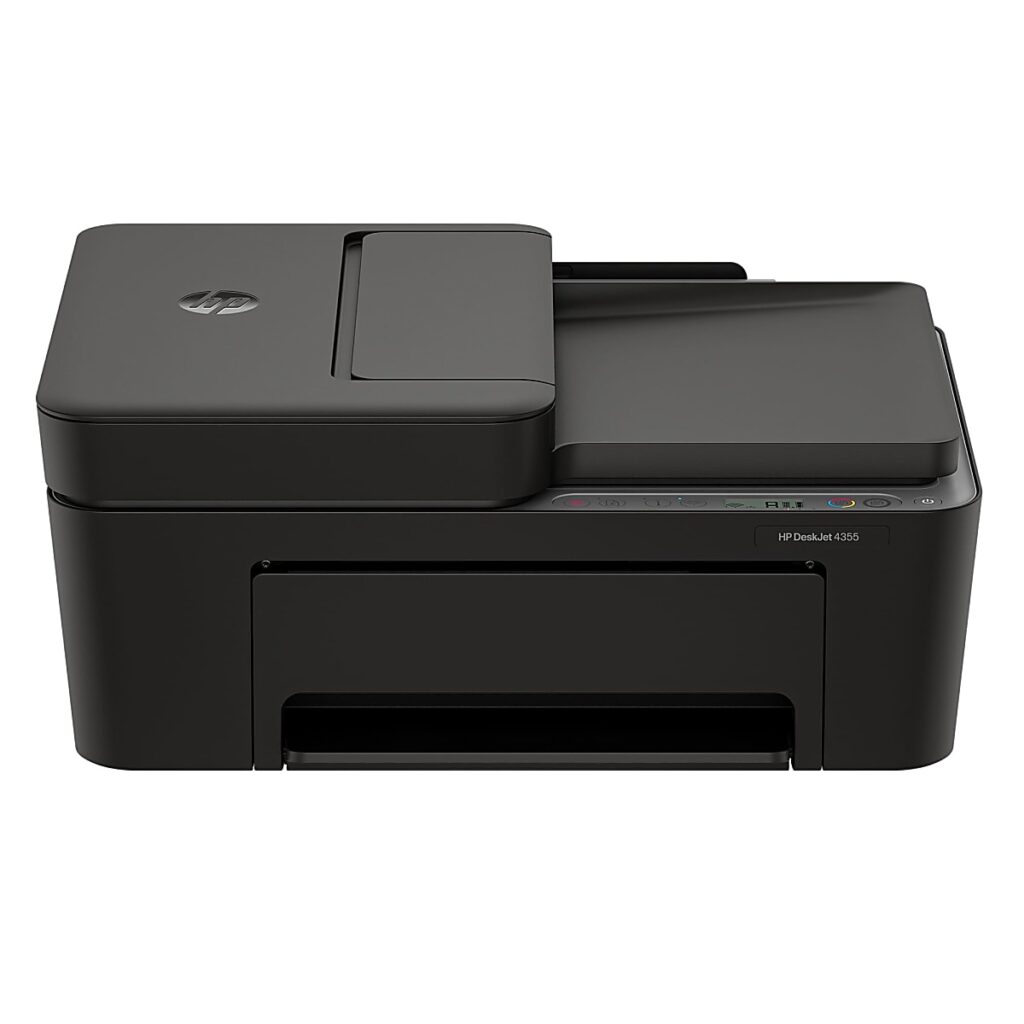
HP DeskJet 4355: Specs, Price, Pros & Cons
The DeskJet name covers HP's least expensive inkjets, the ones that end up in student rooms and spare corners because they cost little to buy. HP makes its money on those machines through ink, and it currently sells the 4355 with a trial of Instant Ink, its subscription that ships cartridges automatically and charges by the page. Understanding that arrangement matters more here than any single spec.
What sets this model apart from the smaller DeskJets is a document feeder on top. That turns a basic printer into something that can scan or copy a short stack of pages without standing over the flatbed, which is genuinely useful for school forms, receipts or household admin. Wireless printing and HP's app handle the everyday sending of jobs, and a simple icon panel replaces a screen.
The limitations follow from its price. There is no automatic two-sided printing, so the feeder cannot deliver the hands-off double-sided copies it seems to promise. The cartridges are small, so pages cost more than on tank printers, and HP firmware has a documented history of rejecting non-HP cartridges, which removes the cheapest way around that cost. The machine is also bulkier than retail listings suggest.
It suits a household that prints modestly but handles multi-page paperwork often enough for the feeder to matter. For that buyer the extra outlay over the plainest DeskJet is easy to justify. Anyone printing more each month, or who wants duplex output, is better served by stepping up to a tank printer or a more capable cartridge model, because moving up this line adds convenience without making pages any cheaper.
Category strengths
Where the HP DeskJet 4355 beats the median
- A lighter build ?4.8 kg vs 7.98 kg (median)
Where the HP DeskJet 4355 trails the median
- No automatic duplex printing ?
- A much lower print speed (black) ?8.5 ppm vs 16 ppm (median)
- A much lower input tray capacity ?60 sheets vs 150 sheets (median)
- No ethernet ?
- A lower print speed (color) ?5.5 ppm vs 9 ppm (median)
- No Wi-Fi Direct ?
- A much lower monthly duty cycle ?1,000 pages vs 10,000 pages (median)
- A much lower output tray capacity ?25 sheets vs 67.5 sheets (median)
How this VS Score was computed
Score 28: each known spec is measured against the median of all printers (65 products), then weighted; 50 means level with that median. In classes of six or more, a value beyond the class’s 10th–90th percentile range counts as that limit, so one extreme product cannot set the scale. 68% of the scoreable weight could be used; unknown values, features not applicable to this class and proxies (battery capacity where a rated life exists) add or remove nothing.
| Specification | This product | Cohort median | Score weight | Points moved |
|---|---|---|---|---|
| Automatic document feeder | Yes | 55% of the class have it | 1 | +50.0 |
| Automatic duplex printing | No | 73% of the class have it | 1 | −48.0 |
| Print speed (black) | 8.5 — capped at the class’s lower range (8.8) | 16 | 2 | −44.0 |
| Input tray capacity | 60 | 150 | 1 | −30.0 |
| Supertank / refillable ink | No | 30% of the class have it | 0.5 | −24.0 |
| Duplex scanning | No | 23% of the class have it | 0.5 | −24.0 |
| Ethernet | No | 54% of the class have it | 0.5 | −24.0 |
| Touchscreen display | No | 45% of the class have it | 0.5 | −24.0 |
| Print speed (color) | 5.5 | 9 | 1 | −19.0 |
| Wi-Fi Direct | No | 90% of the class have it | 0.3 | −14.4 |
| Monthly duty cycle | 1,000 | 10,000 | 0.3 | −13.5 |
| Weight | 4.8 | 7.98 | 0.3 | +9.9 |
| Fax | No | 35% of the class have it | 0.2 | −9.6 |
| Output tray capacity | 25 | 67.5 | 0.3 | −9.3 |
| Print resolution | 4,800 | 4,800 | 0.5 | +0.0 |
| ADF capacity | 35 | 35 | 0.5 | +0.0 |
Not scored: Color printing (standard for the class (88% have it)); All-in-one (standard for the class (85% have it)); Wi-Fi (standard for the class (97% have it)); USB (standard for the class (100% have it)); Apple AirPrint (standard for the class (97% have it)); Mobile app printing (standard for the class (100% have it)).
Editor’s note
The DeskJet 4355 is the DeskJet 2955 with a 35-sheet document feeder bolted on top, a slightly faster 8.5 ppm black engine, and HP's blessing for a heavier 100-to-300-page monthly workload. At its low street price, the ADF is the entire purchase decision, and it comes with two catches that the product photos do not show.
First: there is still no automatic duplex printing. The feeder will pull a stack through the scanner, but the printer cannot turn a page over by itself, so unattended two-sided copying (the thing an ADF visually promises) is not possible. Second, the feeder itself is single-sided and slow, rated at 2.5 images per minute. A twenty-page contract takes a while.
Everything else carries over from the cheaper DeskJets, for better and worse. Same dual-band Wi-Fi and solid app. Same icon panel instead of a screen, no fax, no Ethernet. And the same HP 68 cartridges at roughly 160 pages black, meaning the same 13-to-17-cents-per-page economics and the same documented firmware blocking of non-HP cartridges. Moving up the DeskJet range buys features, not cheaper printing.
One detail worth passing on: retailers list this machine at six pounds, but HP's own datasheet says roughly ten and a half, which is believable for a chassis with a feeder. Clear a proper space for it.
Who is it for? Someone who regularly scans or copies multi-page documents (school paperwork, receipts for accounting) and prints modestly. I would take it over the 2955 for that use alone. If two-sided printing matters, or if your monthly page count keeps growing, Brother's MFC-J1360DW and Epson's tank machines solve problems this DeskJet cannot.
Specifications
Quality bars show where each figure sits between the lowest and highest of the 65 printers this VS Score is measured against.
Printing
Scanning & copying
Paper handling
Connectivity
Design
Sources and verification
Where the specifications come from
- Official product pagehp.com
- Retailer listing (cross-check)amazon.com
Verification
- First published
- Specifications last checked
- Sheet completeness
- 24 of 24 specifications verified; the rest show as Unknown and are never estimated or scored
- Page type
- Product specification page — Compiled from the manufacturer’s published specifications and the cited sources; this is not a hands-on test.
- Basis
- Research-based: specifications and editorial text were compiled from the documents listed here and the manufacturer’s published data. We have not tested this unit ourselves; where independent measurements are mentioned they belong to the linked publication.
Where to buy
Prices and availability may change. Check the retailer before buying. We may earn a commission on purchases.
Price history
Printers with similar specs to the HP DeskJet 4355
Ratings & reviews
No reviews yet. Be the first to share your experience.
The bottom line
The HP DeskJet 4355 earns a VS Score of 28, below the median of the 65 printers it is measured against (a score of 50 is level with that median).
- Who it’s for
- Households that scan or copy multi-page documents often enough for a feeder to earn its place, but still print modestly.
- Who should look elsewhere
- Anyone expecting two-sided copying from that feeder, because there is no auto-duplex at all, and the ADF is single-sided and slow.
- The trade-off that matters
- The ADF buys real convenience for scanning stacks, while the printing underneath stays strictly entry-level: same slow speeds, same small cartridges as the cheapest DeskJets.
- The main alternative
- Brother MFC-J1360DW adds fax and stronger paper handling in the same bracket, with cartridge economics that are less punishing.
The VS Score is calculated from the weighted specifications above, each measured against the median of comparable printers — a shortlisting guide, not a substitute for your own priorities. See how we score.





