
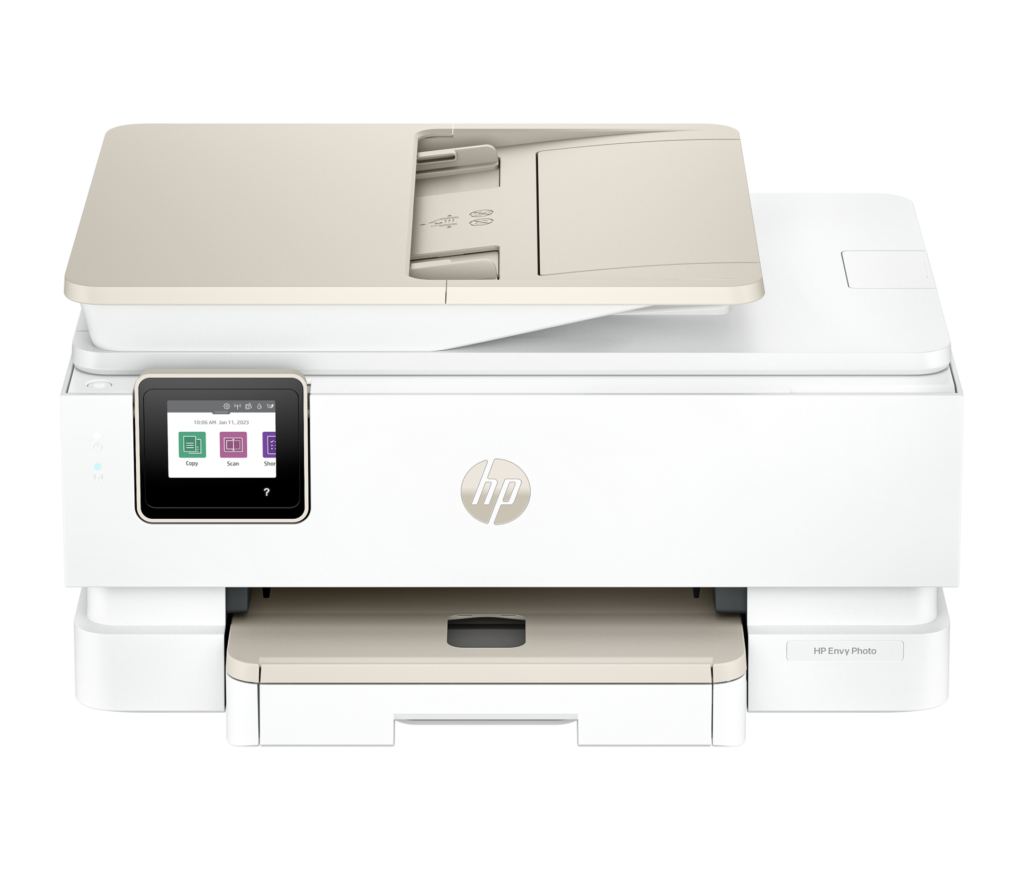
HP Envy Photo 7975: Specs, Features, Pros & Cons
HP rates this machine for about a thousand pages a month, and that figure is the most honest thing on its specification. Look only at the feature list (automatic two-sided printing, a document feeder on the scanner, a color touchscreen, dual-band wireless) and you would place it in a home office. The duty cycle says household, and the duty cycle is the number HP would have to defend under warranty.
That mismatch is worth holding onto, because it explains the whole design. Nearly everything here is aimed at convenience: features that save you a trip to the printer, with little that lets it run unattended. The feeder is sized for the ten-page school form, not for a stack of invoices. The tray depth assumes you refill it whenever you happen to think of it.
The cost question on a cartridge-based photo printer is then decided by a mismatch nobody advertises. Cartridge page ratings are document measurements, taken on standard text pages to a printing-industry test. A full-bleed photograph lays ink across the entire sheet and consumes on a completely different scale, so a rated page count tells you very little about how many photographs a cartridge will produce. On a machine bought for photographs, that is the number you would want, and it is precisely the one nobody publishes.
Where that leaves the printer depends less on the hardware than on the pattern of your printing. It is well judged for a family that prints in small, varied bursts: a few pages, then some photos, then a scan of something that arrived in the post. It is a poor fit for anyone whose output is mostly text, mostly monochrome and measured in reams, because that pattern turns a reasonable one-off purchase into an open-ended subscription to consumables.
Category strengths
Where the HP Envy Photo 7975 beats the median
- Has touchscreen display ?
- A higher print speed (color) ?10 ppm vs 9 ppm (median)
Where the HP Envy Photo 7975 trails the median
- No ethernet ?
- A much lower monthly duty cycle ?1,000 pages vs 10,000 pages (median)
- A lower input tray capacity ?125 sheets vs 150 sheets (median)
- A slightly lower print speed (black) ?15 ppm vs 16 ppm (median)
- A lower output tray capacity ?60 sheets vs 67.5 sheets (median)
- A slightly heavier build ?8.12 kg vs 7.98 kg (median)
How this VS Score was computed
Score 52: each known spec is measured against the median of all printers (65 products), then weighted; 50 means level with that median. In classes of six or more, a value beyond the class’s 10th–90th percentile range counts as that limit, so one extreme product cannot set the scale. 66% of the scoreable weight could be used; unknown values, features not applicable to this class and proxies (battery capacity where a rated life exists) add or remove nothing.
| Specification | This product | Cohort median | Score weight | Points moved |
|---|---|---|---|---|
| Automatic duplex printing | Yes | 73% of the class have it | 1 | +50.0 |
| Automatic document feeder | Yes | 55% of the class have it | 1 | +50.0 |
| Touchscreen display | Yes | 45% of the class have it | 0.5 | +25.0 |
| Supertank / refillable ink | No | 30% of the class have it | 0.5 | −24.0 |
| Duplex scanning | No | 23% of the class have it | 0.5 | −24.0 |
| Ethernet | No | 54% of the class have it | 0.5 | −24.0 |
| Monthly duty cycle | 1,000 | 10,000 | 0.3 | −13.5 |
| Fax | No | 35% of the class have it | 0.2 | −9.6 |
| Input tray capacity | 125 | 150 | 1 | −8.0 |
| Print speed (black) | 15 | 16 | 2 | −6.0 |
| Print speed (color) | 10 | 9 | 1 | +6.0 |
| Output tray capacity | 60 | 67.5 | 0.3 | −1.8 |
| Weight | 8.12 | 7.98 | 0.3 | −0.3 |
| Print resolution | 4,800 | 4,800 | 0.5 | +0.0 |
| ADF capacity | 35 | 35 | 0.5 | +0.0 |
Not scored: Color printing (standard for the class (88% have it)); All-in-one (standard for the class (85% have it)); Wi-Fi (standard for the class (97% have it)); Wi-Fi Direct (standard for the class (90% have it)); USB (standard for the class (100% have it)); Apple AirPrint (standard for the class (97% have it)); Mobile app printing (standard for the class (100% have it)).
Editor’s note
Plenty of printers are marketed as photo printers. This one is built as one, and the giveaway is the paper path.
There is a dedicated 15-sheet photo tray alongside the 125-sheet main tray, so 4×6 paper stays permanently loaded and you never swap stacks to print a document. That sounds mundane until you have owned a printer where every photo means unloading plain paper first. Add automatic two-sided photo printing (unusual at this size), a color touchscreen, an automatic document feeder for the scanner, auto duplex for documents and dual-band Wi-Fi, and it covers family printing properly.
Worth being clear about two marketing numbers. The "4800 x 1200 optimized dpi" is HP's interpolated figure. The machine renders at 1200 x 1200. And the AI badge does very little outside a narrow setup: HP's own footnotes limit those features to Windows 11, English only, and a US setup location.
The real cost is not the sticker. The standard HP 64 black and tri-color cartridges are rated at roughly 200 and 165 pages respectively. XL versions of the 64 raise those yields and the price with them. That is tolerable for photos and expensive for text. If you print school essays and letters in any volume, this is the wrong machine and a refillable tank or a mono laser is the right one. There is also no true fax line, no Ethernet and no two-sided scanning.
At its list price the hardware is fairly priced for what is in the box. Whether it is good value depends entirely on what you print: a household doing photos, cards and craft projects with light document duty will be happy. A household printing hundreds of pages of text will be feeding it cartridges forever.
Specifications
Quality bars show where each figure sits between the lowest and highest of the 65 printers this VS Score is measured against.
Printing
Scanning & copying
Paper handling
Connectivity
Design
Sources and verification
Where the specifications come from
- Official product pagehp.com
- Independent testingrtings.com
Verification
- First published
- Specifications last checked
- Sheet completeness
- 23 of 24 specifications verified; the rest show as Unknown and are never estimated or scored
- Page type
- Product specification page — Compiled from the manufacturer’s published specifications and the cited sources; this is not a hands-on test.
- Basis
- Research-based: specifications and editorial text were compiled from the documents listed here and the manufacturer’s published data. We have not tested this unit ourselves; where independent measurements are mentioned they belong to the linked publication.
Printers with similar specs to the HP Envy Photo 7975
Ratings & reviews
No reviews yet. Be the first to share your experience.
The bottom line
The HP Envy Photo 7975 earns a VS Score of 52, above the median of the 65 printers it is measured against (a score of 50 is level with that median).
- Who it’s for
- Families who print photos, greeting cards and craft projects often enough to resent swapping paper, and who also need light document duty. The dedicated photo tray and auto two-sided photo printing are the reasons to pick it.
- Who should look elsewhere
- Anyone printing real text volume: standard-cartridge yields make this the wrong machine for a home office or a student. Also no true fax line, no Ethernet and no two-sided scanning.
- The trade-off that matters
- A properly photo-oriented paper path paid for in cartridge costs. The hardware is well judged, but the HP 64 consumables dominate the total cost of ownership.
- The main alternative
- Epson EcoTank Photo ET-8550: far more expensive up front, but refillable tanks make it the serious answer if you print photos in any quantity.
The VS Score is calculated from the weighted specifications above, each measured against the median of comparable printers — a shortlisting guide, not a substitute for your own priorities. See how we score.





