
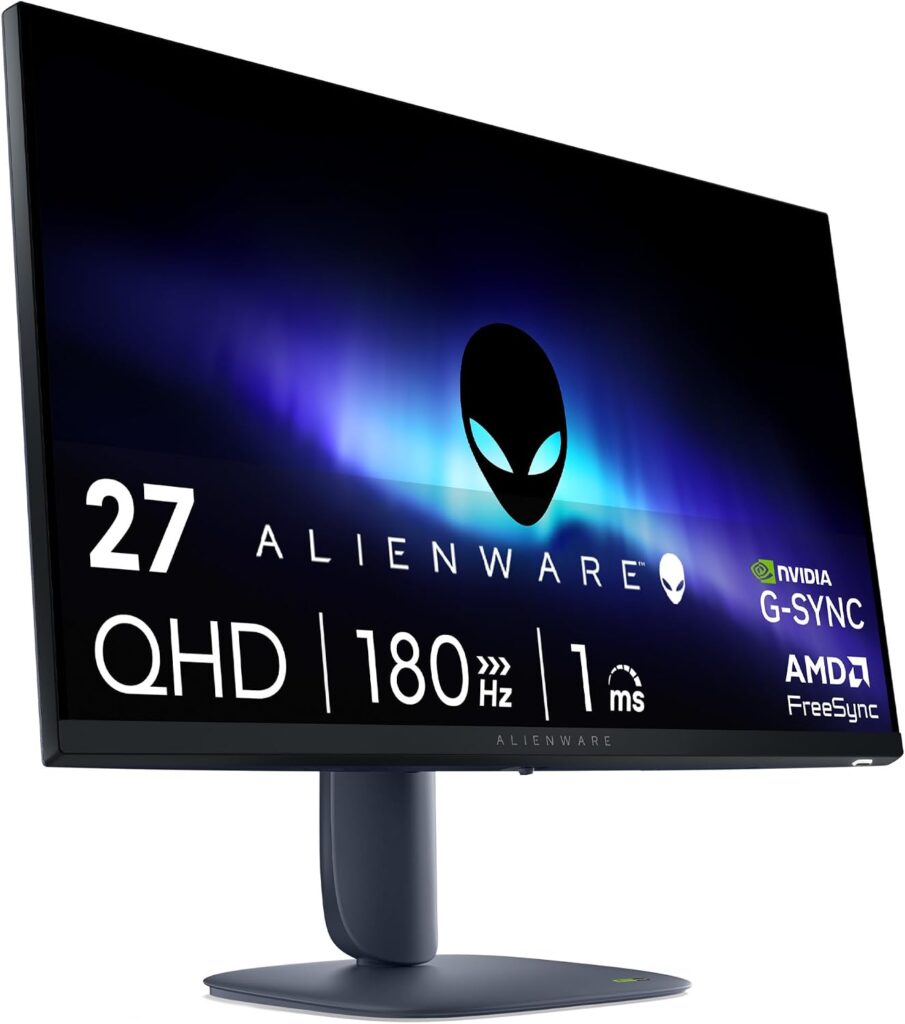
Dell Alienware AW2725DM: Specs, Features, Pros & Cons
What this monitor mostly sells is the Alienware part: the styling, the stand and the service network of a major manufacturer, wrapped around a conventional fast IPS gaming panel of the kind several brands offer. That is not a criticism. For many buyers the badge and the warranty behind it are a reasonable thing to pay for, provided expectations match the hardware.
It is a QHD high-refresh gaming screen at the entry point of Dell's gaming range, built for the mainstream of PC gaming. The features that matter day to day are variable refresh, certified for use with G-Sync graphics cards, a pair of inputs that let a console share the screen with a PC, and a hub for a keyboard, mouse or headset receiver. None of that is exotic, and all of it gets used.
This type of panel also has an advantage that rarely appears on spec sheets: there is nothing to burn in. Someone who leaves a strategy game's interface, a trading dashboard or a work desktop on screen for hours can do so without a second thought, which is less true of the OLED models Alienware sells alongside it.
The limits are the familiar ones for this class. The HDR badge is there for compatibility and adds little impact, dark scenes look grayish next to an OLED or mini-LED screen, and there is no single-cable laptop connection. Its real competition is not the OLEDs above it but the unbranded fast IPS screens below it, and the case for paying a little more comes down to the stand, the service and the name.
Category strengths
Where the Dell Alienware AW2725DM beats the median
- Has USB hub ?
Where the Dell Alienware AW2725DM trails the median
- A lower color depth ?8 bit vs 10 bit (median)
How this VS Score was computed
Score 50: each known spec is measured against the median of IPS gaming monitors, 27 to 31 inches (29 products), then weighted; 50 means level with that median. In classes of six or more, a value beyond the class’s 10th–90th percentile range counts as that limit, so one extreme product cannot set the scale. 72% of the scoreable weight could be used; unknown values, features not applicable to this class and proxies (battery capacity where a rated life exists) add or remove nothing.
| Specification | This product | Cohort median | Score weight | Points moved |
|---|---|---|---|---|
| USB-C | No | 24% of the class have it | 0.5 | −24.0 |
| Height adjustment | Yes | 79% of the class have it | 0.4 | +20.0 |
| Swivel | Yes | 64% of the class have it | 0.2 | +10.0 |
| Built-in speakers | No | 31% of the class have it | 0.2 | −9.6 |
| Color depth | 8 | 10 | 0.3 | −3.0 |
| USB hub | Yes | 50% of the class have it | 0.05 | +2.3 |
| Screen size | 27 | 27 | 1.2 | +0.0 |
| Resolution | 1440p | 1440p | 1.2 | +0.0 |
| Panel type | IPS | IPS | 0.8 | +0.0 |
| Refresh rate | 180 | 180 | 1.2 | +0.0 |
| Response time | 1 | 1 | 0.8 | +0.0 |
| Peak brightness | 400 | 400 | 0.8 | +0.0 |
| Contrast ratio | 1,000 | 1,000 | 0.6 | +0.0 |
| DCI-P3 coverage | 95 | 95 | 0.6 | +0.0 |
| HDR | DisplayHDR 400 | DisplayHDR 400 | 0.5 | +0.0 |
| Pixel density | 109 | 109 | 0.5 | +0.0 |
| Adaptive sync | G-Sync Compatible | G-Sync Compatible | 0.6 | +0.0 |
| HDMI ports | 2 | 2 | 0.4 | +0.0 |
| DisplayPort inputs | 1 | 1 | 0.4 | +0.0 |
Not scored: Local dimming (not applicable: only 17% of this class have it); Local dimming zones (unknown: not scored); Variable refresh rate (standard for the class (100% have it)); Motion blur reduction (unknown: not scored); Input lag (unknown: not scored); Tilt (standard for the class (100% have it)); Pivot (unknown: not scored); USB-C power delivery (unknown: not scored); Headphone output (standard for the class (86% have it)); KVM switch (unknown: not scored); Webcam (unknown: not scored); Microphone (unknown: not scored); Ethernet (unknown: not scored); Picture-by-picture (unknown: not scored).
Editor’s note
The AW2725DM is the cheapest way into an Alienware monitor.
It is an IPS panel rather than the QD-OLED of its near-namesake AW2725DF. The two are a single letter apart in the model number and completely different displays. Refresh is 180 Hz with a 1 ms response and G-Sync Compatible variable refresh, which is quick, and the matte coating handles a lit room better than any glossy OLED will.
Three numbers set expectations. Peak brightness is 400 nits, contrast is the standard IPS 1,000:1, and color depth is 8-bit, where pricier panels use 10-bit. The DisplayHDR 400 badge follows from that: HDR content will play and will look flat, because the panel has no way to make a highlight bright while keeping the surroundings dark. Read it as a good SDR monitor and it is one: 95% DCI-P3 coverage is respectable for everyday work and games.
Two HDMI 2.1 ports, one DisplayPort 1.4 and a USB hub cover connection. There is no USB-C. The stand adjusts for height, tilt and swivel but does not pivot.
Buy it if you want 1440p at high refresh with a proper brand warranty and a matte finish, and you are not paying for HDR you will not get. Spend up to the DF if contrast and motion clarity are what you care about.
Specifications
Quality bars show where each figure sits between the lowest and highest of the 29 IPS gaming monitors, 27 to 31 inches this VS Score is measured against.
Picture
Gaming
Ergonomics & design
Connectivity
Features
Sources and verification
Where the specifications come from
- Datasheet or manualdell.com
- Independent testingrtings.com
Verification
- First published
- Specifications last checked
- Sheet completeness
- 30 of 42 specifications verified; the rest show as Unknown and are never estimated or scored
- Page type
- Product specification page — Compiled from the manufacturer’s published specifications and the cited sources; this is not a hands-on test.
- Basis
- Research-based: specifications and editorial text were compiled from the documents listed here and the manufacturer’s published data. We have not tested this unit ourselves; where independent measurements are mentioned they belong to the linked publication.
Monitors with similar specs to the Dell Alienware AW2725DM
Ratings & reviews
No reviews yet. Be the first to share your experience.
The bottom line
The Dell Alienware AW2725DM earns a VS Score of 50, level with the median of the 29 IPS gaming monitors, 27 to 31 inches it is measured against.
- Who it’s for
- A PC gamer in a bright room who wants a quick QHD screen from a major brand, leaves static game interfaces up for hours, and would rather not think about burn-in at all.
- Who should look elsewhere
- Anyone buying for HDR, or anyone who wants to connect and charge a laptop through the monitor. Neither is on offer here.
- The trade-off that matters
- It is a good SDR monitor carrying an HDR badge it cannot live up to. Dark scenes look flat beside OLED and mini-LED rivals, and that is what the lower price leaves out.
- The main alternative
- AOC Q27G3XMN: same resolution and refresh class with a mini-LED backlight that makes HDR visible, for buyers willing to accept slower dark transitions from its VA panel.
The VS Score is calculated from the weighted specifications above, each measured against the median of comparable IPS gaming monitors, 27 to 31 inches — a shortlisting guide, not a substitute for your own priorities. See how we score.





