
Ducky One 2 Mini V1: Specs, Features, Pros & Cons
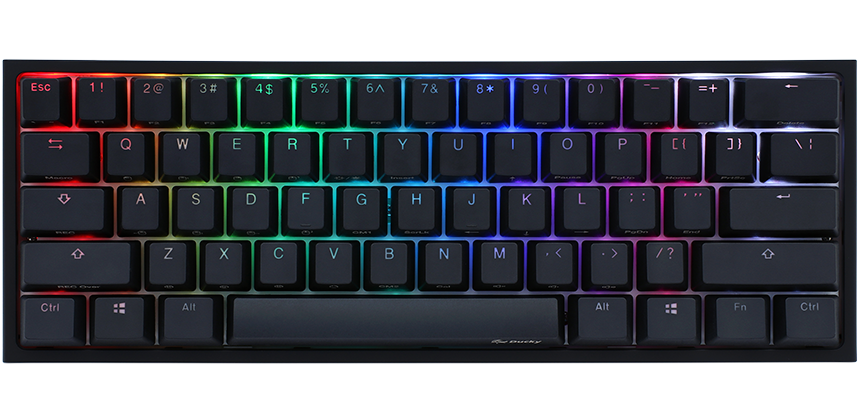
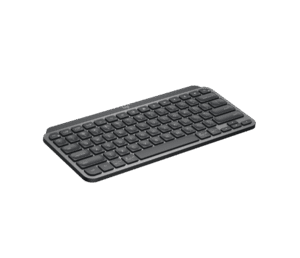
This first revision of the One 2 Mini is the smallest layout in that Ducky range: no function row, no arrow cluster, no navigation block and no number pad, with all of those keys moved onto a layer reached through the Fn key.
Learning that layer is the price of the size. Arrow keys, Delete, the F keys and the page keys all become two-key presses, and it takes days before they come without thought. In exchange the board is short enough that the mouse can sit where a keypad would otherwise be, which suits players who sweep the mouse a long way at low sensitivity. Competitive players adopted the size for that reason, and it spread from there.
Underneath, it is a plain wired mechanical keyboard of its time. Cherry MX switches are soldered to the board, the keycaps are doubleshot PBT, the lighting is RGB, and macros are stored in onboard profiles without any software. The detachable USB-C cable was less common on keyboards when this one appeared than it is now. Its age shows in three places: switches soldered in, a cable as the only connection, and no dampening in the case, which gives it a hollow sound.
The V1 label counts when you shop, because a later revision followed it. The V2 fixed the stabilizer and firmware problems of this one, and Ducky has since withdrawn the whole One 2 range, so either version is now a used purchase with no warranty. A seller with both at similar money has made the choice easy: take the later board.
Category strengths
Where the Ducky One 2 Mini V1 trails the median
- No hot-swappable switches ?
- Fewer connection options ?
- No sound dampening ?
- No rotary knob ?
- No configuration software ?
How this VS Score was computed
Score 22: each known spec is measured against the median of all keyboards (101 products), then weighted; 50 means level with that median. In classes of six or more, a value beyond the class’s 10th–90th percentile range counts as that limit, so one extreme product cannot set the scale. 44% of the scoreable weight could be used; unknown values, features not applicable to this class and proxies (battery capacity where a rated life exists) add or remove nothing.
| Specification | This product | Cohort median | Score weight | Points moved |
|---|---|---|---|---|
| Hot-swappable | No | 61% of the class have it | 0.6 | −28.8 |
| Connection | 1 | 3 | 0.8 | −26.4 |
| Rapid trigger | No | 25% of the class have it | 0.5 | −24.0 |
| Adjustable actuation | No | 24% of the class have it | 0.4 | −19.2 |
| Sound dampening | No | 76% of the class have it | 0.3 | −14.4 |
| Rotary knob | No | 53% of the class have it | 0.2 | −9.6 |
| Configuration software | No | 95% of the class have it | 0.2 | −9.6 |
| Switch technology | Mechanical | Mechanical | 1 | +0.0 |
| Keycap material | PBT | PBT | 0.4 | +0.0 |
| Backlight | RGB | RGB | 0.3 | +0.0 |
Not scored: Actuation force (unknown: not scored); N-key rollover (standard for the class (85% have it)); Analog input (not applicable: only 14% of this class have it); Polling rate (unknown: not scored); Wired latency (unknown: not scored); Wireless latency (unknown: not scored); Front height (unknown: not scored); Bluetooth devices (unknown: not scored); Battery life (unknown: not scored); Battery capacity (unknown: not scored); USB passthrough (not applicable: only 4% of this class have it); Programmable keys (standard for the class (99% have it)); Media controls (standard for the class (97% have it)); Onboard profiles (standard for the class (89% have it)).
Editor’s note
The One 2 Mini V1 is the original, the 2018 board that turned the 60% layout from an enthusiast curiosity into something ordinary gamers bought.
Understanding what it got right explains why it sold so well. Cherry MX switches rather than clones, doubleshot PBT keycaps that still look new years later, a detachable USB-C cable when most keyboards had a fixed one, per-key RGB, and hardware macros with six onboard profiles and no software to install. At its price nothing else offered that combination, and the 302 mm by 108 mm footprint freed a useful amount of desk space for low-sensitivity mouse players.
It also has flaws that are worth knowing before buying one second-hand, and they are the reason a V2 exists. The stabilizers under the spacebar and the longer modifiers were inconsistent from unit to unit. Some rattle noticeably, some do not, and which one you get is luck. No setting fixes it. Early firmware also had rough edges in the RGB modes. If you have a choice between V1 and V2 at similar money, take V2.
The rest of the compromises are shared across the line. Switches are soldered, so nothing can be swapped without a soldering iron. There is no dampening foam, so the case sounds hollow next to a modern gasket-mounted board. And there is no wireless version.
Ducky has removed the whole One 2 range from its catalog, so anything available is used or old stock with no warranty.
Buy one only if it is cheap and the rattle does not bother you. Otherwise pay a little more for a V2, or move to a One 3 Mini.
Specifications
Quality bars show where each figure sits between the lowest and highest of the 101 keyboards this VS Score is measured against.
Switches & typing
Performance
Layout & size
Connectivity
Build & sound
Features
Sources and verification
Where the specifications come from
- Independent testingrtings.com
Verification
- First published
- Specifications last checked
- Sheet completeness
- 21 of 34 specifications verified; the rest show as Unknown and are never estimated or scored
- Page type
- Product specification page — Compiled from the manufacturer’s published specifications and the cited sources; this is not a hands-on test.
- Basis
- Research-based: specifications and editorial text were compiled from the documents listed here and the manufacturer’s published data. We have not tested this unit ourselves; where independent measurements are mentioned they belong to the linked publication.
Keyboards with similar specs to the Ducky One 2 Mini V1
Ratings & reviews
No reviews yet. Be the first to share your experience.
The bottom line
The Ducky One 2 Mini V1 earns a VS Score of 22, below the median of the 101 keyboards it is measured against (a score of 50 is level with that median).
- Who it’s for
- Only someone who finds one cheap, wants the original compact Ducky and does not mind the risk of a rattling spacebar.
- Who should look elsewhere
- Buyers who want a consistent unit, hot-swap sockets or any warranty should pass on the first revision.
- The trade-off that matters
- Stabilizer quality varies from board to board and nothing fixes it, so a used first revision is a gamble on the one thing you hear most.
- The main alternative
- Ducky One 2 Mini V2: the revision with the stabilizers and firmware fixed, for little more money.
The VS Score is calculated from the weighted specifications above, each measured against the median of comparable keyboards — a shortlisting guide, not a substitute for your own priorities. See how we score.





