
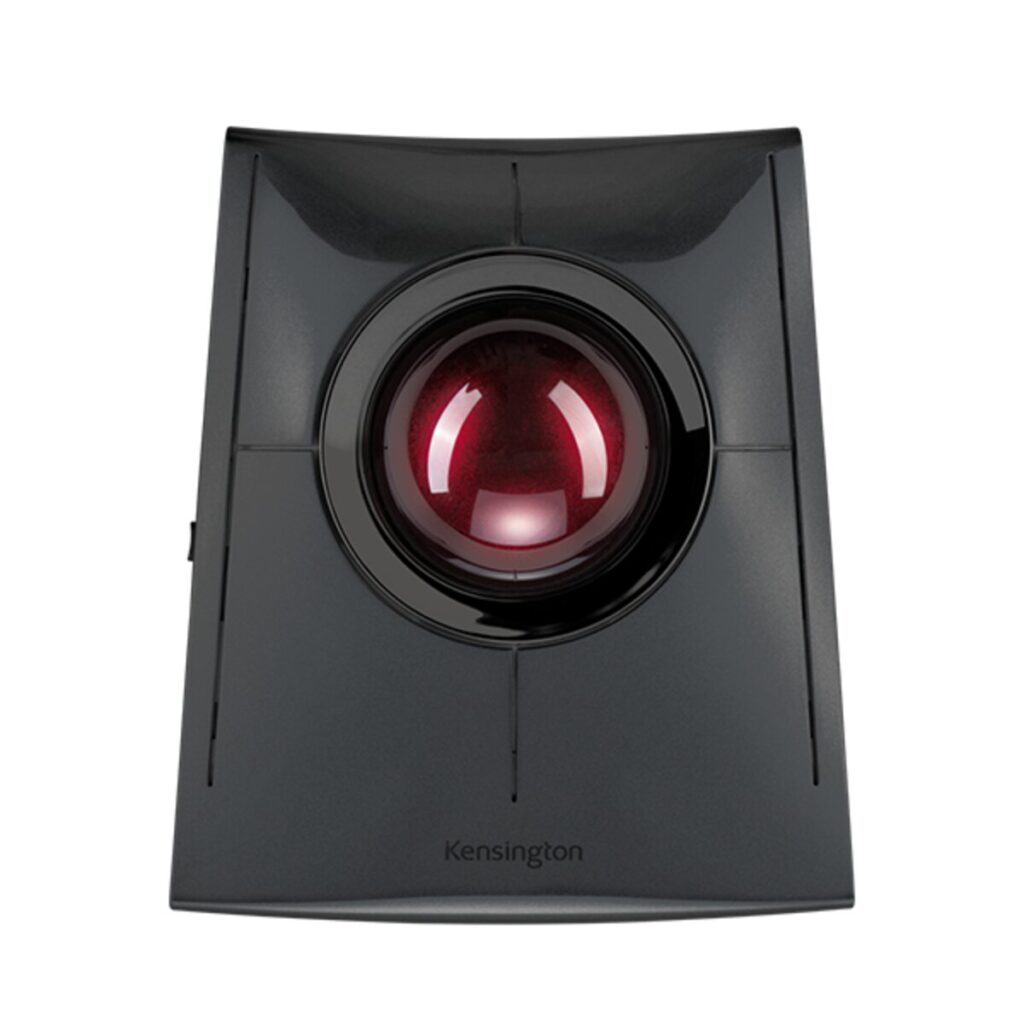
Kensington SlimBlade Pro Trackball: Specs, Pros & Cons
A trackball asks you to give up something you probably never think about: the habit of moving your arm. The SlimBlade Pro sits still on the desk and you move a ball with your fingertips, which means the space it needs is the space it already occupies and nothing more. On a crowded desk, a standing desk, or a train tray table, that alone is the argument.
Kensington has been making these longer than almost anyone, and this is the connected, current version of a shape that has been in offices for years. It is a finger-operated ball rather than a thumb-operated one, which is the fork in the trackball world that matters most: thumb units are easier to adopt and load a single joint, finger units take longer to learn and spread the work across the whole hand.
The unusual part of the design is that there is no scroll wheel anywhere on it. Scrolling is done by twisting the ball itself. That sounds like a gimmick and is not, but it does mean the first days feel wrong in a way a new mouse never does. Budget a week before judging it.
What it is not is a gaming device or a precision drawing tool. Trackballs are slower for large, fast movements, and no amount of tuning changes that. It is also a wide, heavy object that is not portable in the way a small travel mouse is.
The people who keep one tend to be those who came to it for a reason: wrist pain, shoulder strain, a desk with no room to sweep a mouse across. If none of those apply to you, a well-shaped ergonomic mouse is a far easier answer and a much shorter adjustment.
Category strengths
Where the Kensington SlimBlade Pro Trackball beats the median
- Much longer battery life ?2,920 h vs 150 h (median)
- More connection options ?
Where the Kensington SlimBlade Pro Trackball trails the median
- A much heavier build ?285 g vs 89 g (median)
- No adjustable lift-off distance ?
- No quick charge ?
- No onboard memory ?
- Fewer buttons ?4 vs 6 (median)
How this VS Score was computed
Score 48: each known spec is measured against the median of all mice (81 products), then weighted; 50 means level with that median. In classes of six or more, a value beyond the class’s 10th–90th percentile range counts as that limit, so one extreme product cannot set the scale. 44% of the scoreable weight could be used; unknown values, features not applicable to this class and proxies (battery capacity where a rated life exists) add or remove nothing.
| Specification | This product | Cohort median | Score weight | Points moved |
|---|---|---|---|---|
| Battery life | 2,920 | 150 | 0.8 | +40.0 |
| Connection | 3 | 2 | 0.8 | +20.0 |
| Weight | 285 — capped at the class’s upper range (145) | 89 | 1 | −19.0 |
| USB-C charging | Yes | 67% of the class have it | 0.3 | +15.0 |
| Adjustable lift-off distance | No | 61% of the class have it | 0.3 | −14.4 |
| Quick charge | No | 55% of the class have it | 0.3 | −14.4 |
| Onboard memory | No | 86% of the class have it | 0.3 | −14.4 |
| Free-spin scroll wheel | No | 34% of the class have it | 0.2 | −9.6 |
| RGB lighting | No | 46% of the class have it | 0.2 | −9.6 |
| Buttons | 4 — capped at the class’s lower range (5) | 6 | 0.6 | −4.8 |
Not scored: Max sensitivity (unknown: not scored); Max tracking speed (unknown: not scored); Max acceleration (unknown: not scored); Polling rate (unknown: not scored); Grip styles (unknown: not scored); Horizontal scrolling (unknown: not scored); Click latency (unknown: not scored); Switch lifespan (unknown: not scored); Debounce adjustment (not applicable: only 20% of this class have it); Wireless polling rate (unknown: not scored); Battery capacity (unknown: not scored); Wireless charging (not applicable: only 14% of this class have it); Software customization (standard for the class (97% have it)); Adjustable weights (not applicable: only 2% of this class have it).
Editor’s note
The SlimBlade Pro is a finger-operated trackball, and that phrase does most of the work in deciding whether it is for you.
Unlike thumb trackballs, you move a 55 mm ball with your fingers, which is more precise and spreads the effort across the whole hand. The party trick is twist-scrolling: rotating the ball scrolls the page, so there is no wheel at all. It takes a day or two to stop reaching for one, and then it feels obvious.
It is the flexible one in Kensington's range. You get Bluetooth, a 2.4 GHz nano receiver and wired USB-C, with 128-bit AES on the wireless link, and the rechargeable battery lasts around four months per charge over USB-C. KensingtonWorks lets you map four physical buttons plus four chorded combinations, which covers most of what people miss from a multi-button mouse. It is ambidextrous, so left-handers are properly served.
The drawbacks are size and price. At 153 x 133 mm and 285 grams this occupies real desk space and is not something you throw in a bag. It sits fairly high, and Kensington does not include a wrist rest, so plan on buying one. There is no DPI switch, no adjustable lift-off distance, and Kensington publishes no sensor or polling figures, so this is not a trackball for anyone chasing latency numbers.
Buy it if you have wrist or shoulder discomfort from a conventional mouse, you work at a fixed desk, and you want the most accurate trackball form factor.
Skip it if you travel with your peripherals, need a compact setup, or are not prepared for a genuine adjustment period.
Specifications
Quality bars show where each figure sits between the lowest and highest of the 81 mice this VS Score is measured against.
Sensor & tracking
Design & handling
Switches & latency
Connectivity
Battery
Features
Sources and verification
Where the specifications come from
- Official product pagekensington.com
- Support and firmware documentationkensington.com
- Independent testingrtings.com
Verification
- First published
- Specifications last checked
- Sheet completeness
- 21 of 34 specifications verified; the rest show as Unknown and are never estimated or scored
- Page type
- Product specification page — Compiled from the manufacturer’s published specifications and the cited sources; this is not a hands-on test.
- Basis
- Research-based: specifications and editorial text were compiled from the documents listed here and the manufacturer’s published data. We have not tested this unit ourselves; where independent measurements are mentioned they belong to the linked publication.
Mice with similar specs to the Kensington SlimBlade Pro Trackball


Ratings & reviews
No reviews yet. Be the first to share your experience.
The bottom line
The Kensington SlimBlade Pro Trackball earns a VS Score of 48, below the median of the 81 mice it is measured against (a score of 50 is level with that median).
- Who it’s for
- Someone with wrist or shoulder pain from a conventional mouse, working at one fixed desk, who is willing to relearn pointing for the sake of it.
- Who should look elsewhere
- Not for travel bags, gaming, compact setups or anyone unwilling to spend a week or two getting used to twist-scrolling.
- The trade-off that matters
- Finger control is precise but slow to learn. Expect the first stretch to feel clumsy, since both the pointing and the wheel-less scrolling are new habits.
- The main alternative
- Logitech Ergo M575S: a thumb-operated ball that is easier to adopt and smaller on the desk, at the cost of loading one joint
The VS Score is calculated from the weighted specifications above, each measured against the median of comparable mice — a shortlisting guide, not a substitute for your own priorities. See how we score.



