
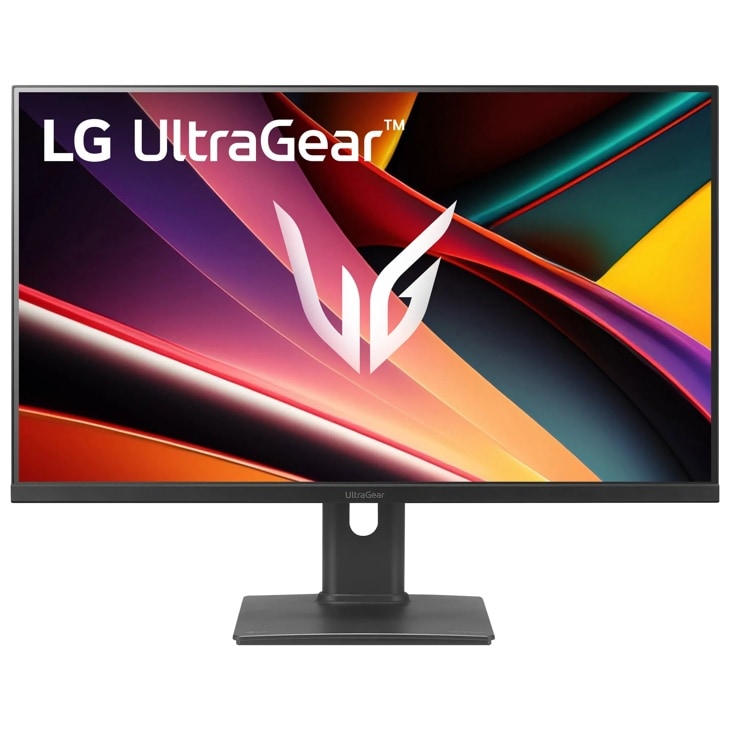
LG UltraGear G6 27G64NA-B: Specs, Features, Pros & Cons
Two DisplayPorts is an unusual thing to find on a monitor this cheap. The 27G64NA-B carries DisplayPort 1.4 twice and HDMI 2.1 twice, which is four full-speed video inputs on a panel sitting at the budget end of the UltraGear line. The single USB-A socket beside them is not a hub (LG's own port legend labels it SERVICE), so there is nothing here for peripherals.
The rest is a speed-first 27-inch 1440p IPS panel: 300 Hz, one millisecond gray-to-gray at the fastest overdrive setting, G-Sync Compatible and FreeSync Premium together. At 109 pixels per inch the density is the standard one for 27-inch QHD, and the panel's job here is refresh rate rather than image quality.
That distinction matters, because LG is careless about it. The marketing copy on LG's own product page claims up to 93% sRGB coverage, while the specification table directly beneath it says DCI-P3 93%. Those are very different claims about a display, and only the second is plausible for a panel of this class. The VESA DisplayHDR 400 badge deserves similar caution: on a 1000:1 IPS with no local dimming it certifies a brightness floor and very little else.
The stand adjusts for height, tilt and pivot but will not swivel, which is an awkward gap next to the other three. There are no speakers, only a headphone jack. None of that is unreasonable at the money being asked. The point is that almost the entire budget went into the panel's refresh rate, and a buyer should want that particular thing more than a good all-round display.
Category strengths
Where the LG UltraGear G6 27G64NA-B beats the median
- A much higher refresh rate ?300 Hz vs 180 Hz (median)
Where the LG UltraGear G6 27G64NA-B trails the median
- No swivel adjustment ?
- No USB hub ?
- Slightly narrower DCI-P3 colour coverage ?93 % vs 95 % (median)
How this VS Score was computed
Score 48: each known spec is measured against the median of IPS gaming monitors, 27 to 31 inches (30 products), then weighted; 50 means level with that median. In classes of six or more, a value beyond the class’s 10th–90th percentile range counts as that limit, so one extreme product cannot set the scale. 70% of the scoreable weight could be used; unknown values, features not applicable to this class and proxies (battery capacity where a rated life exists) add or remove nothing.
| Specification | This product | Cohort median | Score weight | Points moved |
|---|---|---|---|---|
| USB-C | No | 24% of the class have it | 0.5 | −24.0 |
| Refresh rate | 300 — capped at the class’s upper range (240) | 180 | 1.2 | +20.4 |
| Swivel | No | 66% of the class have it | 0.2 | −9.6 |
| Built-in speakers | No | 30% of the class have it | 0.2 | −9.6 |
| USB hub | No | 50% of the class have it | 0.05 | −2.2 |
| Pivot | Yes | 76% of the class have it | 0.02 | +1.0 |
| DCI-P3 coverage | 93 | 95 | 0.6 | −0.6 |
| Screen size | 27 | 27 | 1.2 | +0.0 |
| Resolution | 1440p | 1440p | 1.2 | +0.0 |
| Panel type | IPS | IPS | 0.8 | +0.0 |
| Color depth | 10 | 10 | 0.3 | +0.0 |
| Response time | 1 | 1 | 0.8 | +0.0 |
| Peak brightness | 400 | 400 | 0.8 | +0.0 |
| Contrast ratio | 1,000 | 1,000 | 0.6 | +0.0 |
| HDR | DisplayHDR 400 | DisplayHDR 400 | 0.5 | +0.0 |
| Pixel density | 109 | 109 | 0.5 | +0.0 |
| Adaptive sync | G-Sync Compatible | G-Sync Compatible | 0.6 | +0.0 |
| HDMI ports | 2 | 2 | 0.4 | +0.0 |
| DisplayPort inputs | 2 — capped at the class’s upper range (1) | 1 | 0.4 | +0.0 |
Not scored: Local dimming (unknown: not scored); Local dimming zones (unknown: not scored); Variable refresh rate (standard for the class (100% have it)); Motion blur reduction (unknown: not scored); Input lag (unknown: not scored); Height adjustment (standard for the class (80% have it)); Tilt (standard for the class (100% have it)); USB-C power delivery (unknown: not scored); Headphone output (standard for the class (87% have it)); KVM switch (not applicable: only 0% of this class have it); Webcam (not applicable: only 0% of this class have it); Microphone (not applicable: only 0% of this class have it); Ethernet (not applicable: only 0% of this class have it); Picture-by-picture (unknown: not scored).
Editor’s note
The honest way to describe this monitor is a very fast panel with a display attached, and whether that reads as a compliment depends entirely on what you play. If you spend your evenings in competitive shooters at frame rates that can feed the panel, this is a great deal of refresh rate for very little money, and the input count means a PC and two consoles can stay plugged in permanently.
If you play anything slower, I would spend the money differently. IPS at this contrast gives you the gray blacks it has always given, and the HDR badge does not change that. Dark scenes will look washed out beside any OLED or a decent Mini-LED. LG's own 27GR83Q-B sits close by at 240 Hz with a better-behaved picture, and the drop to its rate is far less noticeable in practice than the difference in contrast.
What I like is the connectivity, which is unusual at this price. Two DisplayPorts is rare, and the second one is useful in a way a third HDMI would not be. What I like less is the stand. Height and pivot without swivel is an odd combination to land on, and pivot on a panel with IPS viewing angles is the adjustment you are least likely to use.
The gamut labeling is the part that would irritate me as a buyer. Being told 93% of one color space when the specification sheet means another is not a small slip, and it makes the rest of the marketing harder to take at face value. Buy this for the refresh rate and the inputs, and treat everything else as adequate rather than good.
Specifications
Quality bars show where each figure sits between the lowest and highest of the 30 IPS gaming monitors, 27 to 31 inches this VS Score is measured against.
Picture
Gaming
Ergonomics & design
Connectivity
Features
Sources and verification
Where the specifications come from
- Official product pagelg.com
- Retailer listing (cross-check)amazon.com
Verification
- First published
- Specifications last checked
- Sheet completeness
- 31 of 42 specifications verified; the rest show as Unknown and are never estimated or scored
- Page type
- Product specification page — Compiled from the manufacturer’s published specifications and the cited sources; this is not a hands-on test.
- Basis
- Research-based: specifications and editorial text were compiled from the documents listed here and the manufacturer’s published data. We have not tested this unit ourselves; where independent measurements are mentioned they belong to the linked publication.
Monitors with similar specs to the LG UltraGear G6 27G64NA-B
Ratings & reviews
No reviews yet. Be the first to share your experience.
The bottom line
The LG UltraGear G6 27G64NA-B earns a VS Score of 48, below the median of the 30 IPS gaming monitors, 27 to 31 inches it is measured against (a score of 50 is level with that median).
- Who it’s for
- Competitive players who already push frame rates high enough to use the whole panel, and who want a PC and a couple of consoles permanently connected without reaching behind the screen.
- Who should look elsewhere
- Anyone who cares about contrast or color accuracy. This is an ordinary-contrast IPS wearing an HDR badge, and single-player games, films and dark rooms will all show it up.
- The trade-off that matters
- Nearly the whole budget went into refresh rate. You get the speed and the inputs, and in exchange you get gray blacks, no speakers, no USB hub and a stand that refuses to swivel.
- The main alternative
- LG UltraGear 27GR83Q-B: a lower refresh rate, but a better-rounded picture for similar money if you play more than shooters.
The VS Score is calculated from the weighted specifications above, each measured against the median of comparable IPS gaming monitors, 27 to 31 inches — a shortlisting guide, not a substitute for your own priorities. See how we score.





