
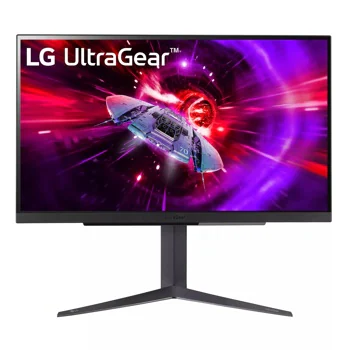
LG UltraGear 27GR83Q-B: Specs, Features, Pros & Cons
LG's 27GR83Q-B puts a fast IPS panel at QHD resolution with a 240 Hz refresh rate, so it competes with OLED monitors on speed while avoiding their care routine. There is no burn-in question and no screen-saving routine to learn, and the price reflects the simpler panel.
The monitor sits in LG's UltraGear gaming range, and its connections are laid out for a mixed desk. Two HDMI inputs and a DisplayPort input cover a PC and a console together, a USB hub is on the back, and there is a headphone output for plugging in at the screen. Pixel density is 109 ppi, which keeps text readable for work between games.
Color coverage is wide for an IPS panel, and variable refresh works with both major graphics card makers. The response figure LG advertises comes from the most aggressive overdrive mode, which can add inverse ghosting around moving objects, so the cleanest setting is often a notch below the maximum.
What it gives up starts with contrast. IPS blacks look gray once the room is dark, and the entry-level HDR badge does not change that. The stand is the other gap: it adjusts for height and tilt and rotates into portrait, but it does not swivel, so turning the screen toward a second chair means moving the whole base. There is no USB-C and no built-in speaker.
The owner it fits plays fast games, spends working hours on the same screen and wants to stop thinking about panel care.
Category strengths
Where the LG UltraGear 27GR83Q-B beats the median
- A higher refresh rate ?240 Hz vs 180 Hz (median)
- Has USB hub ?
Where the LG UltraGear 27GR83Q-B trails the median
- No swivel adjustment ?
How this VS Score was computed
Score 50: each known spec is measured against the median of IPS gaming monitors, 27 to 31 inches (29 products), then weighted; 50 means level with that median. In classes of six or more, a value beyond the class’s 10th–90th percentile range counts as that limit, so one extreme product cannot set the scale. 72% of the scoreable weight could be used; unknown values, features not applicable to this class and proxies (battery capacity where a rated life exists) add or remove nothing.
| Specification | This product | Cohort median | Score weight | Points moved |
|---|---|---|---|---|
| USB-C | No | 24% of the class have it | 0.5 | −24.0 |
| Refresh rate | 240 | 180 | 1.2 | +20.4 |
| Height adjustment | Yes | 79% of the class have it | 0.4 | +20.0 |
| Swivel | No | 64% of the class have it | 0.2 | −9.6 |
| Built-in speakers | No | 31% of the class have it | 0.2 | −9.6 |
| USB hub | Yes | 50% of the class have it | 0.05 | +2.3 |
| Pivot | Yes | 75% of the class have it | 0.02 | +1.0 |
| Screen size | 27 | 27 | 1.2 | +0.0 |
| Resolution | 1440p | 1440p | 1.2 | +0.0 |
| Panel type | IPS | IPS | 0.8 | +0.0 |
| Color depth | 10 | 10 | 0.3 | +0.0 |
| Response time | 1 | 1 | 0.8 | +0.0 |
| Peak brightness | 400 | 400 | 0.8 | +0.0 |
| Contrast ratio | 1,000 | 1,000 | 0.6 | +0.0 |
| DCI-P3 coverage | 95 | 95 | 0.6 | +0.0 |
| HDR | DisplayHDR 400 | DisplayHDR 400 | 0.5 | +0.0 |
| Pixel density | 109 | 109 | 0.5 | +0.0 |
| Adaptive sync | G-Sync Compatible | G-Sync Compatible | 0.6 | +0.0 |
| HDMI ports | 2 | 2 | 0.4 | +0.0 |
| DisplayPort inputs | 1 | 1 | 0.4 | +0.0 |
Not scored: Local dimming (not applicable: only 17% of this class have it); Local dimming zones (unknown: not scored); Variable refresh rate (standard for the class (100% have it)); Motion blur reduction (unknown: not scored); Input lag (unknown: not scored); Tilt (standard for the class (100% have it)); USB-C power delivery (unknown: not scored); Headphone output (standard for the class (86% have it)); KVM switch (not applicable: only 0% of this class have it); Webcam (not applicable: only 0% of this class have it); Microphone (not applicable: only 0% of this class have it); Ethernet (not applicable: only 0% of this class have it); Picture-by-picture (unknown: not scored).
Editor’s note
The case for this monitor rests on the graphics card you already own. QHD at 240 Hz is a target an upper-midrange card can reach in competitive shooters and many older games, where the same card would fall well short of that rate at 4K. If your card lives in that tier, this monitor uses all of it. If it does not, the top of the refresh range goes unused and a cheaper high-refresh panel would do the same job.
I would hesitate over the gap to OLED. QD-OLED and WOLED screens with the same size, resolution and refresh cost more but no longer sit in a different world, and they answer the two complaints this panel cannot fix: gray blacks, and motion that looks clean only in the right overdrive setting. For someone who plays in a dark room most evenings, saving for the OLED makes more sense than settling for this one.
The opposite buyer is the one it serves best. A bright room, a static taskbar, spreadsheets on screen for eight hours and a game in the evening is exactly the pattern that makes OLED care routines tedious, and here there is nothing to manage. The HDR badge on the box is best ignored, since the panel has no local dimming and the highlights barely rise above ordinary brightness.
It is also a monitor for a desktop, not for a laptop. There is no KVM, webcam, microphone or Ethernet, so a laptop-centered desk would need a dock and extra peripherals that a USB-C monitor would have made unnecessary.
Check the full model code on the listing. LG sells several UltraGear screens of this size with near-identical styling, some with slower panels or older HDMI bandwidth, and only the suffix tells them apart.
Specifications
Quality bars show where each figure sits between the lowest and highest of the 29 IPS gaming monitors, 27 to 31 inches this VS Score is measured against.
Picture
Gaming
Ergonomics & design
Connectivity
Features
Sources and verification
Where the specifications come from
- Official product pagelg.com
- Independent testingrtings.com
Verification
- First published
- Specifications last checked
- Sheet completeness
- 35 of 42 specifications verified; the rest show as Unknown and are never estimated or scored
- Page type
- Product specification page — Compiled from the manufacturer’s published specifications and the cited sources; this is not a hands-on test.
- Basis
- Research-based: specifications and editorial text were compiled from the documents listed here and the manufacturer’s published data. We have not tested this unit ourselves; where independent measurements are mentioned they belong to the linked publication.
Monitors with similar specs to the LG UltraGear 27GR83Q-B
Ratings & reviews
No reviews yet. Be the first to share your experience.
The bottom line
The LG UltraGear 27GR83Q-B earns a VS Score of 50, level with the median of the 29 IPS gaming monitors, 27 to 31 inches it is measured against.
- Who it’s for
- Someone who plays fast games on an upper-midrange card, works on the same screen, and would rather not think about burn-in.
- Who should look elsewhere
- Dark-room film watchers, HDR fans and anyone who docks a laptop over one cable. Blacks are gray and HDR is basic.
- The trade-off that matters
- You keep the speed and lose contrast, so night scenes in games and films look washed out.
- The main alternative
- HyperX OMEN OLED 27q: an OLED at the same size, resolution and refresh, with far deeper blacks and the burn-in care that comes with them.
The VS Score is calculated from the weighted specifications above, each measured against the median of comparable IPS gaming monitors, 27 to 31 inches — a shortlisting guide, not a substitute for your own priorities. See how we score.





