
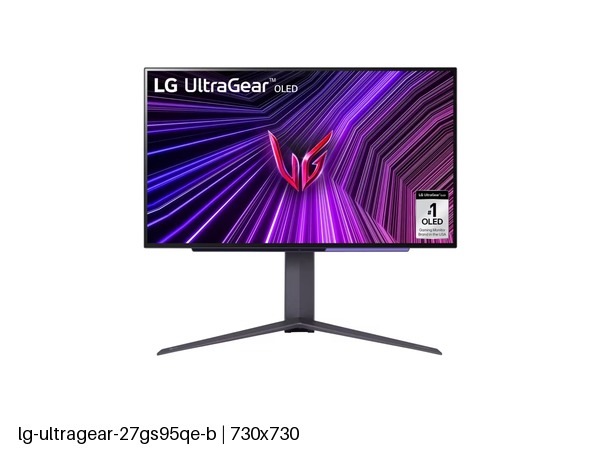
LG UltraGear 27GS95QE-B: Specs, Features, Pros & Cons
Most OLED monitors ask for a dim room, and this LG is built for a bright one. Its panel carries a matte finish, and the screen measures a little under the size its model number suggests. In LG's UltraGear range it sits beside a glossy OLED of the same class, and the choice between them comes down to the room.
Matte coatings scatter the reflection of a window or a ceiling light across the screen, at a small cost in how deep black looks. That trade defines this model. A desk that faces daylight, or an office under strip lights, keeps the picture readable all day where a glossy screen would mirror the room.
The rest is standard for a fast OLED at QHD. Response is near instant, contrast is effectively infinite in a dark scene, and variable refresh works with both graphics card makers. Brightness in HDR is high for the class, which pairs well with a coating meant for lit rooms.
It gives up two things. The refresh rate trails the fastest OLED gaming monitors, and there is no motion blur reduction mode, a setting some competitive players use to sharpen moving targets. Color coverage is a whisker short of the widest panels too, which no one will see without an instrument.
The buyer here wants OLED motion and contrast and cannot darken the room to get them. What they accept in return is a slightly softer black, a refresh rate below the fastest panels and text that looks best at a gaming distance.
Category strengths
Where the LG UltraGear 27GS95QE-B trails the median
- A lower refresh rate ?240 Hz vs 360 Hz (median)
- No motion blur reduction ?
How this VS Score was computed
Score 44: each known spec is measured against the median of OLED gaming monitors, under 27 inches (5 products), then weighted; 50 means level with that median. In classes of six or more, a value beyond the class’s 10th–90th percentile range counts as that limit, so one extreme product cannot set the scale. 70% of the scoreable weight could be used; unknown values, features not applicable to this class and proxies (battery capacity where a rated life exists) add or remove nothing.
| Specification | This product | Cohort median | Score weight | Points moved |
|---|---|---|---|---|
| USB-C | No | 40% of the class have it | 0.5 | −24.0 |
| Refresh rate | 240 | 360 | 1.2 | −20.4 |
| Motion blur reduction | No | 75% of the class have it | 0.3 | −14.4 |
| Picture-by-picture | No | 25% of the class have it | 0.2 | −9.6 |
| KVM switch | No | 25% of the class have it | 0.02 | −1.0 |
| Screen size | 26.5 | 26.5 | 1.2 | +0.0 |
| Resolution | 1440p | 1440p | 1.2 | +0.0 |
| Panel type | OLED | OLED | 0.8 | +0.0 |
| Color depth | 10 | 10 | 0.3 | +0.0 |
| Response time | 0.03 | 0.03 | 0.8 | +0.0 |
| Peak brightness | 1,300 | 1,300 | 0.8 | +0.0 |
| Contrast ratio | 1,500,000 | 1,500,000 | 0.6 | +0.0 |
| DCI-P3 coverage | 98.5 | 99 | 0.6 | +0.0 |
| HDR | True Black 400 | True Black 400 | 0.5 | +0.0 |
| Pixel density | 111 | 111 | 0.5 | +0.0 |
| Adaptive sync | G-Sync Compatible | G-Sync Compatible | 0.6 | +0.0 |
| HDMI ports | 2 | 2 | 0.4 | +0.0 |
| DisplayPort inputs | 1 | 1 | 0.4 | +0.0 |
Not scored: Local dimming (too few comparable peers (1, need 3)); Local dimming zones (unknown: not scored); Variable refresh rate (standard for the class (100% have it)); Input lag (unknown: not scored); Height adjustment (standard for the class (100% have it)); Tilt (standard for the class (100% have it)); Swivel (standard for the class (100% have it)); Pivot (standard for the class (100% have it)); USB-C power delivery (unknown: not scored); USB hub (standard for the class (80% have it)); Built-in speakers (not applicable: only 0% of this class have it); Headphone output (standard for the class (100% have it)); Webcam (not applicable: only 0% of this class have it); Microphone (not applicable: only 0% of this class have it); Ethernet (not applicable: only 0% of this class have it).
Editor’s note
This UltraGear is a WOLED with a matte finish, and that combination makes it more tolerant of a bright room than a glossy OLED.
Glossy OLEDs produce the deepest-looking blacks and mirror whatever is behind you. Matte diffuses that reflection at a small cost in apparent contrast. If the monitor faces a window or sits under office lighting, this is the version of an OLED that stays usable all day. Peak brightness is 1,300 nits (higher than the QD-OLED panels it competes with, which stop around 1,000), with quoted contrast of 1,500,000:1 and nearly full DCI-P3 coverage.
Refresh is 240 Hz, with variable refresh from 48 Hz up, a 0.03 ms response and G-Sync Compatible certification. That is fast enough that only competitive players would notice a 360 Hz panel, and far easier to feed. The screen is 26.5 inches at 111 pixels per inch, so text is adequate rather than crisp: this is a gaming display that can be worked on, not the reverse.
Two HDMI 2.1 ports, DisplayPort 1.4 and a USB hub cover connections. There is no USB-C, so a laptop needs its own charger and video cable. The stand adjusts in every axis including pivot.
The room decides this one. Its refresh rate is enough for most people, so the only reason to pass is a desk you can darken, where a glossy panel shows deeper blacks.
Specifications
Quality bars show where each figure sits between the lowest and highest of the 5 OLED gaming monitors, under 27 inches this VS Score is measured against.
Picture
Gaming
Ergonomics & design
Connectivity
Features
Sources and verification
Where the specifications come from
- Official product pagelg.com
Verification
- First published
- Specifications last checked
- Sheet completeness
- 37 of 42 specifications verified; the rest show as Unknown and are never estimated or scored
- Page type
- Product specification page — Compiled from the manufacturer’s published specifications and the cited sources; this is not a hands-on test.
- Basis
- Research-based: specifications and editorial text were compiled from the documents listed here and the manufacturer’s published data. We have not tested this unit ourselves; where independent measurements are mentioned they belong to the linked publication.
Monitors with similar specs to the LG UltraGear 27GS95QE-B

Ratings & reviews
No reviews yet. Be the first to share your experience.
The bottom line
The LG UltraGear 27GS95QE-B earns a VS Score of 44, below the median of the 5 OLED gaming monitors, under 27 inches it is measured against (a score of 50 is level with that median).
- Who it’s for
- A gamer whose desk faces a window or sits under office lights, and who wants OLED motion without the reflections of a glossy panel.
- Who should look elsewhere
- Laptop docking and long reading sessions. A laptop cannot charge and send video over one cable here, and small text looks soft at this pixel density.
- The trade-off that matters
- The matte finish keeps the screen usable in daylight at the cost of a little apparent contrast, so blacks in a dark room look slightly less deep than on glossy rivals.
- The main alternative
- LG 27GX704A-B: LG's glossy panel of the same class, with the edge in a dim room where absolute contrast matters more than reflections.
The VS Score is calculated from the weighted specifications above, each measured against the median of comparable OLED gaming monitors, under 27 inches — a shortlisting guide, not a substitute for your own priorities. See how we score.





